
On-hand vs reserved vs available vs incoming
Before you start, sign in and open Stock / Stock / Stock Items.
Can’t find it? It may be turned off for your business, or your account may not be allowed to open it. Ask the person who set up your FeePrime. They can fix both.
It is 2 PM on a Thursday at Sunrise Bakery. Amina the manager calls the Bonabéri warehouse and asks a simple question: “How many 50kg bags of flour do we have?”
The storekeeper looks at the pallet, counts 24 bags, and says “24.” Ten minutes later, Amina promises 20 bags to a walk-in caterer — not knowing that 10 of those bags are already promised to Hôtel Akwa for Friday morning. Meanwhile, Paul at the counter sees a supplier order for 15 more bags and assumes they are ready to sell.
Ask how much of an item you have and there are four honest answers — plus a fifth when stock is moving between your own sites. Confusing them is the fastest way to double-promise goods, run short mid-bake, or argue over stock counts. FeePrime separates all of them on every item so the whole team reads the same truth.
1. The four core numbers on every stock item
Open any item under Stock / Stock / Stock Items and FeePrime shows four live quantities side by side:
- On-hand — physically sitting in your warehouse or shop right now. This is what a physical stock count would find on the pallets.
- Reserved — physically on-hand, but already promised to a customer on a confirmed sales order.
- Available — what is genuinely free to promise to a new customer today. Available = On-hand − Reserved.
- Incoming — not in your building yet, but ordered from a supplier on a confirmed purchase order.
Look at Premium Baking Flour 50kg at Sunrise Bakery’s Bonabéri warehouse:
Notice how every document in FeePrime feeds a specific number — you never type these totals by hand:
Purchase Order (15 bags) ──▶  Incoming: 15   (ordered, not here yet)
                                   │
                             Goods Receipt
                                   ▼
Bonabéri Warehouse            On-hand:  24   (physically on the pallet)
Sales Order (10 bags)    ──▶  Reserved: 10   (promised to Hôtel Akwa)
                              ────────────
                              Available: 14  (safe to promise today)

Between your own locations (Stock Transfer Order):
Bonabéri Warehouse ──▶ In transit: 6 bags ──▶ Akwa Bakery
(left source)          (on the van)          (not received yet)
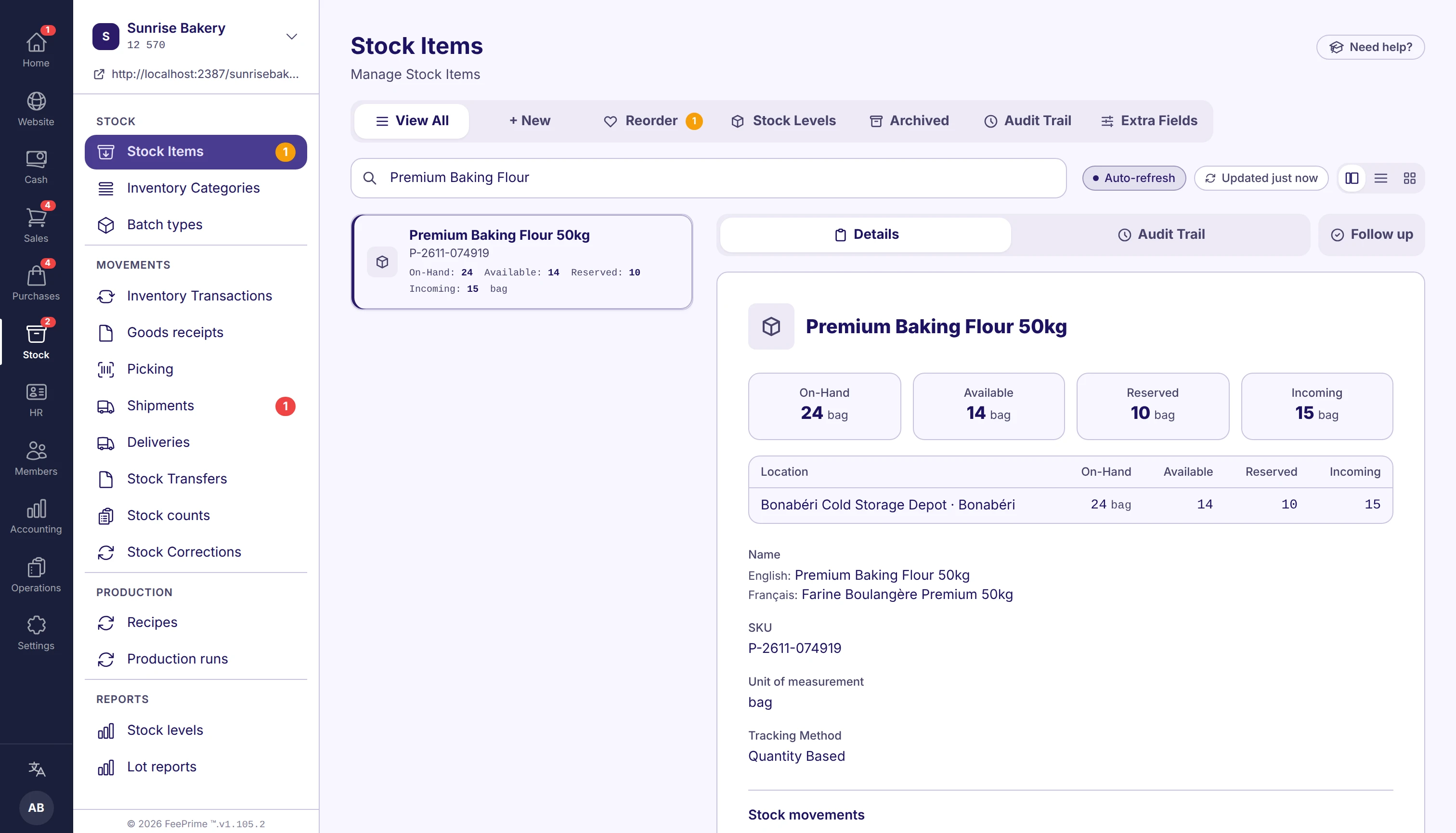 Stock Items (Sunrise Bakery) — Premium Baking Flour 50kg showing On-Hand 24, Available 14, Reserved 10, Incoming 15, plus the Bonabéri warehouse breakdown.
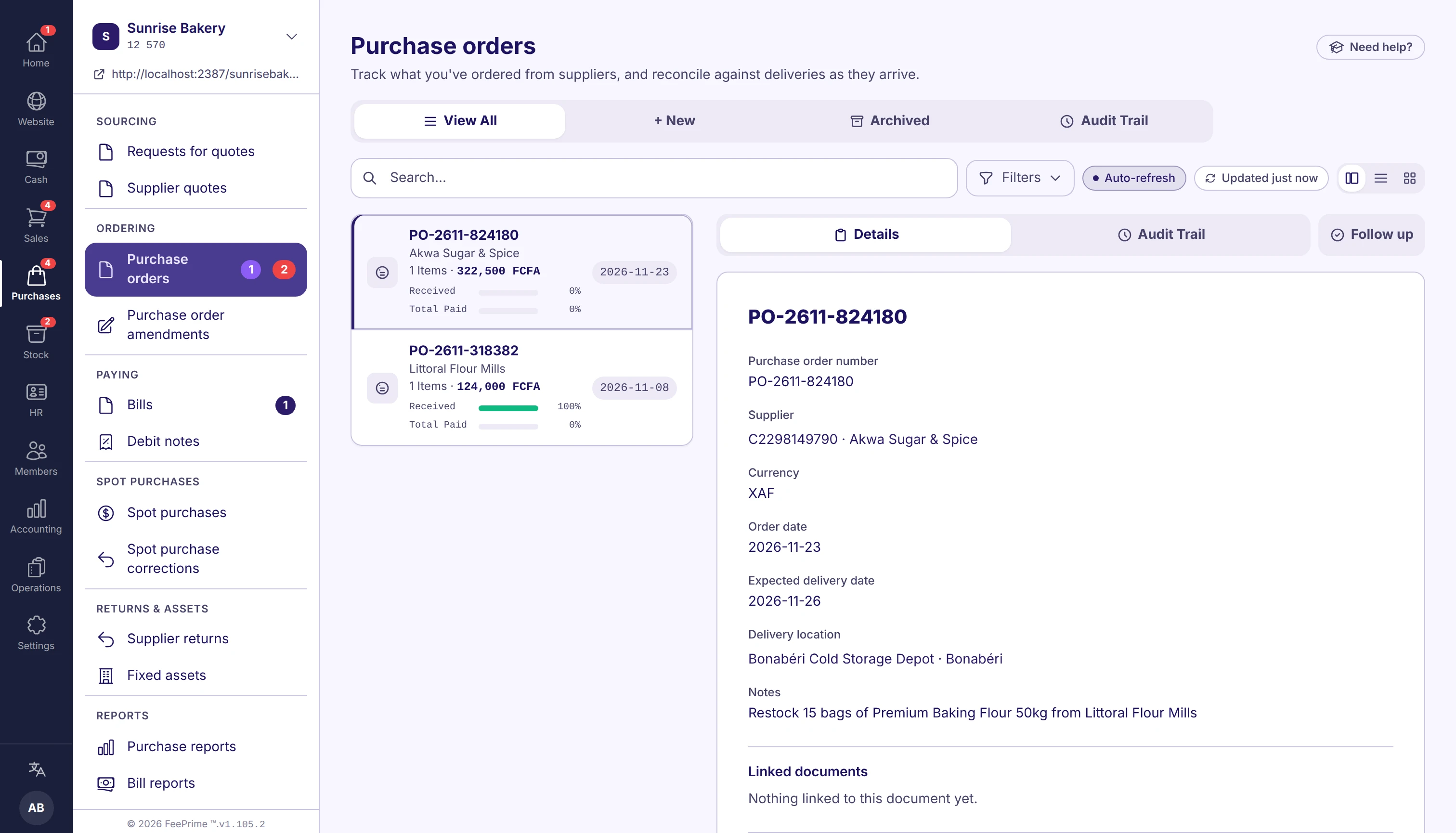 Purchase Orders — PO-2611-824180 (Received 0%) holding the 15 Incoming bags until the Goods Receipt is posted.
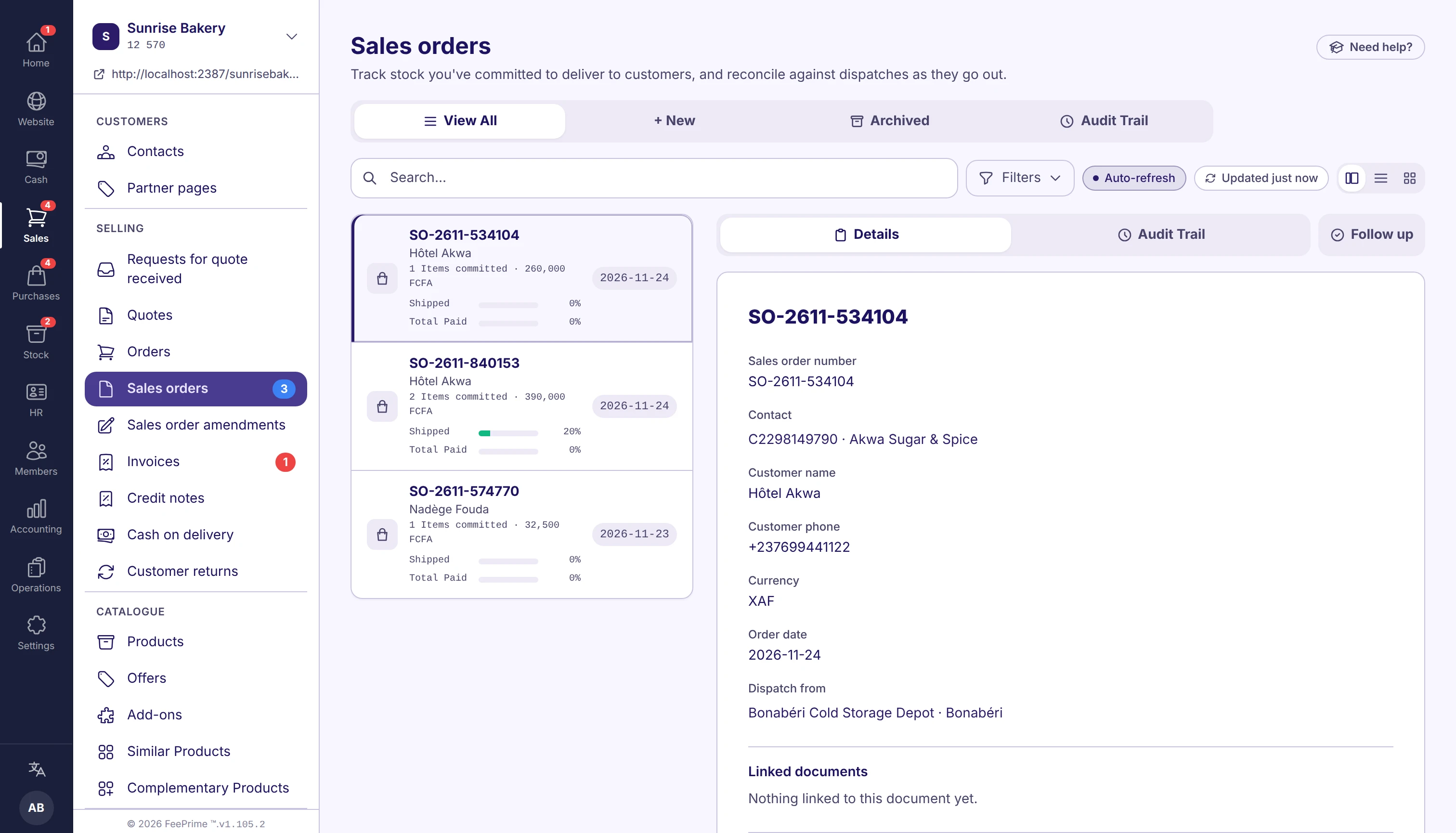 Sales Orders — Hôtel Akwa’s confirmed order (SO-2611-534104, Shipped 0%) reserving 10 bags and lowering Available from 24 to 14.
2. Available is the number to sell from
Never promise stock by looking at On-hand alone. Having 24 bags on the pallet with 10 already promised to Hôtel Akwa means Sunrise Bakery can sell 14 bags to a new buyer, not 24.
Here is what happens when Hôtel Akwa’s order (SO-2611-534104) is confirmed under Sales / Selling / Sales Orders:
- On-hand stays at 24 because the bags are still sitting in Bonabéri.
- Reserved rises from 0 to 10 because those 10 bags now have Hôtel Akwa’s name on them.
- Available drops from 24 to 14 so Paul immediately sees what is left for walk-in buyers.
Later, when the warehouse packs and dispatches those 10 bags via Stock / Movements / Shipments, both On-hand and Reserved drop by 10 (to 14 and 0). Available stays at 14. Nothing is subtracted twice because those 10 bags were already set aside when the sales order was confirmed.
3. Incoming is a planning number, not a promise
When Amina orders 15 fresh bags of flour from the mill under Procurements / Ordering / Purchase Orders, FeePrime adds 15 to Incoming — and leaves On-hand and Available untouched:
Never sell Incoming stock as ready for same-day pickup. A purchase order only means a supplier is expected to deliver. Trucks break down, bridges jam up, and mills sometimes ship 12 bags instead of 15.
Those 15 bags only become sellable when the truck reaches Bonabéri and the storekeeper records a Goods Receipt under Stock / Movements / Goods Receipts. At that exact moment, Incoming drops by 15 and On-hand (along with Available) rises by 15. Until then, Incoming helps Amina decide whether to place another supplier order — not what Paul can hand across the counter today.
4. In transit: keeping stock visible between your own locations
Once you operate more than one location — say Bonabéri Warehouse supplying Akwa Bakery and the Bonapriso shop — a fifth number matters: In transit.
Internal moves in Stock / Movements / Stock Transfer Orders work in two steps:
- Dispatch at the source: Bonabéri sends 6 bags out on the delivery van. Bonabéri’s On-hand drops by 6 and In transit rises by 6.
- Receive at the destination: Akwa Bakery unloads and confirms the 6 bags. In transit drops by 6 and Akwa Bakery’s On-hand rises by 6.
Without In transit, goods sitting on Junior’s motorbike or the delivery van would either vanish from your reports or show up at Akwa Bakery before arriving. With it, Source On-hand + In transit + Destination On-hand always adds up. Better yet, if 6 bags leave Bonabéri on Monday and still sit in In transit on Wednesday, everyone spots the missing consignment immediately.
Running one shop with no internal transfers? Leave Stock Transfer Orders untouched and ignore In transit — it stays cleanly at zero and nothing breaks.
5. Negative Available is an early alarm, not a glitch
Sometimes you will see Available turn negative — for example, On-hand 6, Reserved 10, Available −4.
That is not a system bug. It is FeePrime warning you about an over-commitment that already exists in real life. It usually happens in one of two ways: a cashier sells bags over the counter after a wholesale sales order was already confirmed, or a physical count under Stock / Movements / Stock Counts finds 4 burst bags and adjusts On-hand downward.
When you see a negative Available number, act on it the same day:
- Check Incoming to see whether a supplier delivery will land before your customer’s pickup date.
- Check the per-warehouse breakdown on the stock item to see if another site can send stock via a transfer.
- If neither covers the gap in time, call the customer early instead of surprising them at the loading dock.
Never fix a negative Available number by typing a fake positive stock count. Hiding the shortage only guarantees someone shows up for bags that do not exist.
Try it
Open staging.feeprime.com — a practice copy of FeePrime kept apart from your real business — and watch all five numbers move in 5 minutes:
- Open Stock / Stock / Stock Items, pick any item with stock on hand, and note its starting On-hand, Reserved, Available, and Incoming values.
- Open Sales / Selling / Sales Orders, confirm a sales order for part of that stock, then return to the stock item — watch On-hand stay steady while Reserved rises and Available falls.
- Open Procurements / Ordering / Purchase Orders, confirm a purchase order for the same item, and verify Incoming rises while Available stays unchanged.
- Post a Goods Receipt under Stock / Movements / Goods Receipts for that purchase order and watch the quantity move from Incoming into On-hand and Available.
- If your practice workspace has two locations, dispatch a Stock Transfer Order under Stock / Movements / Stock Transfer Orders and check In transit before receiving it at the destination.
Once you see how one document updates the right number without double-counting, you will never guess your stock position again.