
The Wallet Portal: Public landing, personal wallets, and Group Wallets
Before you start, open your issuer’s Wallet Portal (/app/en/portal/<issuer>/wallet) on your phone or browser — or, if you run the portal for an issuer, sign in and open Digital Wallets / Issuing / Wallet Portal Settings.
Can’t find it? It may be turned off for your business, or your account may not be allowed to open it. Ask the person who set up your FeePrime. They can fix both.

Photo: Angelo Moleele on Unsplash
Every afternoon in Douala, Paul Kamga finishes his baking shift at Sunrise Bakery with the same three errands: send 15,000 FCFA to his sister in Makepe, drop 20,000 FCFA into the bakery staff tontine (njangi), and put aside cash before taking a moto home. When that money lives in envelopes or a single treasurer’s personal phone, mistakes happen fast. Nobody is sure who paid, someone walks two kilometres to a kiosk that closed an hour ago, and one treasurer holds the power to empty the whole group’s savings.
FeePrime’s Wallet Portal fixes this on an ordinary smartphone. Each licensed issuer — like Manna Finance, led by Clarisse Mbarga — gets its own dedicated customer portal where everyday people hold personal wallets, locate open cash agents, verify their identity, and run joint Group Wallets where no single person can move a franc alone.
1. The public landing page and your first sign-in
Customers do not hunt inside a complex accounting back office to use their wallet. Manna Finance shares one clean web address — /app/en/portal/manna-finance/wallet — built on FeePrime’s wallet landing page.
From that landing page, a new visitor can see who backs the money, check how the wallet works, locate nearby agents, and create a personal wallet in two minutes. Every newly opened personal wallet starts at Tier 1 with starter daily and balance limits so you can receive and send small amounts right away.
Notice how your balance is displayed: you always see real currency (FCFA) alongside the issuer name (Manna Finance). FeePrime never confuses customers with made-up internal token names or weird conversion formulas. If you hold 45,000 FCFA with Manna Finance, your screen simply reads 45,000 FCFA.
Your Home screen also stays calm. FeePrime only surfaces a wallet limit warning when you are getting close to hitting a cap — so you are not staring at cluttered progress bars on an ordinary Tuesday.
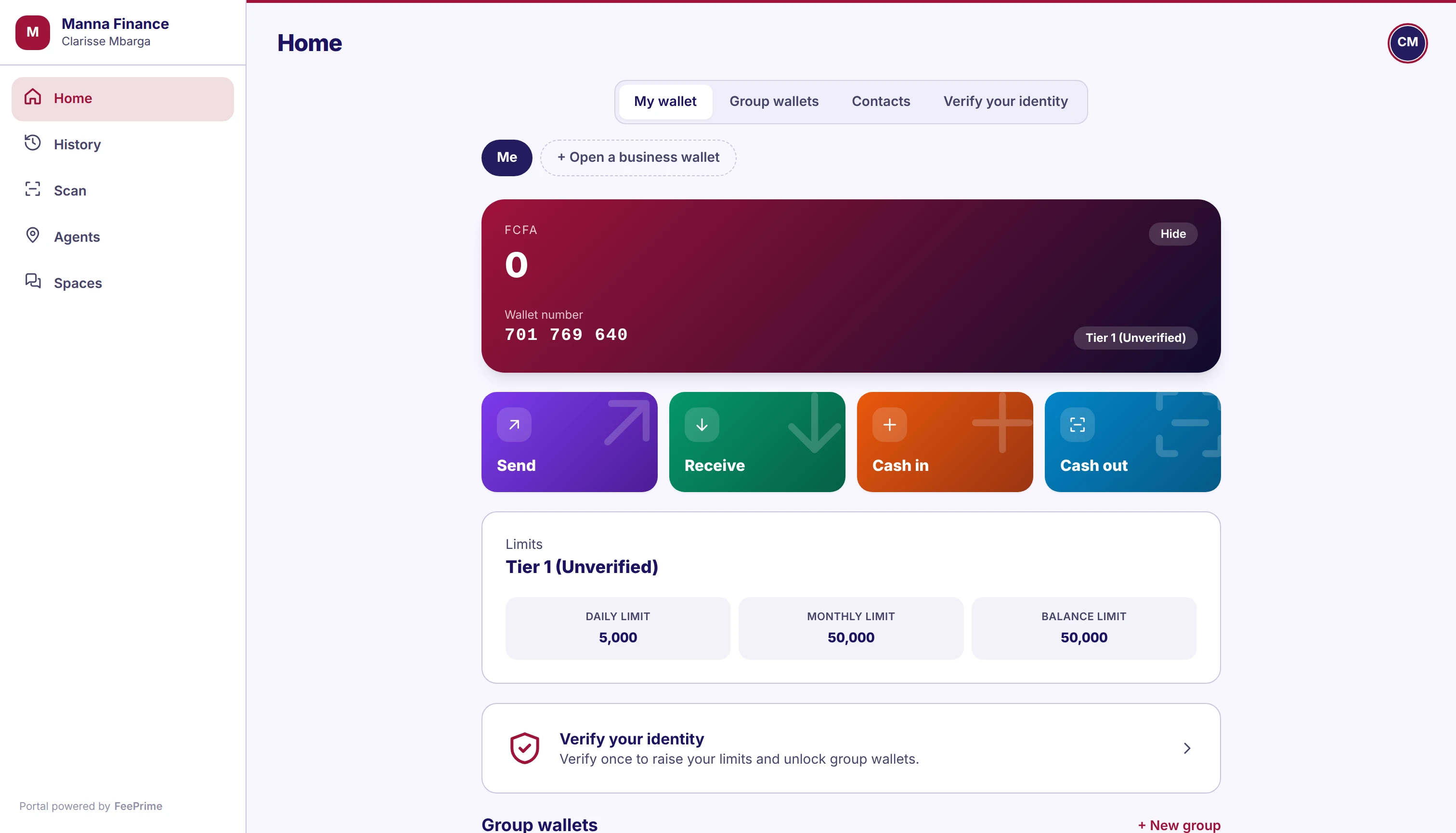 Manna Finance public Wallet Portal showing real-currency FCFA balance, Send/Receive/Cash-in/Cash-out, and Group Wallets.
2. Phone navigation: Home, History, Scan, Agents, and Me
On a phone, the entire Wallet Portal runs from five tabs anchored along the bottom bar:
+---------------------------------------------------------------+
|  [ Account Switcher: Me v ]                Manna Finance      |
|                                                               |
|   Balance: 65,000 FCFA          [ Send ]  [ Receive ]         |
|                                                               |
|   Group Wallets: Sunrise Staff Tontine (2-of-3)               |
+---------------------------------------------------------------+
|   Home   |  History  |  [ Scan ]  |   Agents   |     Me       |
+---------------------------------------------------------------+
- Home: Your current FCFA balance, quick Send and Receive actions, your Group Wallets, and any pending votes or payment prompts waiting for you.
- History: Your full receipt trail of incoming transfers, outgoing payments, agent cash-ins, and cash-outs — every line readable in plain FCFA.
- Scan: Opens your phone camera straight to the QR scanner. Use it to pay a friend, pay a merchant QR, or cash out at a field agent’s counter.
- Agents: A live directory of accredited field agents filtered by city or map, showing exact location pins, opening hours, and a photo of the kiosk.
- Me: Your personal wallet number, your Receive QR code, your verification tier (Tier 1, Tier 2, or higher), your security PIN settings, and your option to apply as a field agent once verified.
(If you later become an accredited field agent like Alain Fokou at Kiosk Bonapriso, a dedicated Agent tab appears automatically — we cover that in Lesson 6.)
3. Sending and receiving FCFA — and finding an open agent
Moving money between two Manna Finance wallets takes seconds:
- To receive: Tap Receive (or open Me) to show your Receive QR code or share your personal wallet number.
- To send: Tap Scan to scan the other person’s QR code, or tap Send and type their wallet number, enter the amount in FCFA, and confirm with your PIN.
Before you ever type your PIN, pause for two built-in safety checks:
- Always check the holder name shown on the confirmation screen. FeePrime looks up and displays who actually owns that wallet number before money leaves. Never confirm a transfer if the name looks unfamiliar — cancel and re-check the digits or scan their QR code instead.
- Receiver limits are checked up front. If Paul Kamga tries to send 450,000 FCFA to a cousin whose Tier 1 wallet cannot hold that much, FeePrime refuses the transfer right on the form and tells you why, rather than locking the money in limbo.
Turning physical cash into wallet FCFA (and back)
Never waste time looking for a mobile-money top-up button inside the Wallet Portal. FeePrime wallets do not rely on a mobile-money gateway on-ramp. Accredited Field Agents and Distributors (like Wouri Microfinance and its agents) are the cash on-ramp and off-ramp.
When Paul needs to load 30,000 FCFA of banknotes into his wallet: 1. He opens the Agents tab and filters for Bonapriso, Douala. 2. He checks the map pin, opening hours, and storefront photo for Alain Fokou (Kiosk Bonapriso) to be sure the kiosk is open. 3. At the counter, Paul hands over the cash and shows his Receive QR; Alain scans it and confirms with his Agent PIN. Both phones update immediately.
4. Upgrading your wallet from Tier 1 to Tier 2
Tier 1 lets you start immediately, but higher daily transfers, larger balances, and applying to become a field agent require Tier 2 verification.
From the Me tab, submit your personal details, photos of the front and back of your national ID, and a live camera selfie. Behind the scenes, Manna Finance’s compliance verifiers review your submission in Digital Wallets / Issuing / Wallet Portal Verification using 2-of-3 verifier consensus so no single reviewer can rubber-stamp or wrongly block an account.
Once you are above Tier 1, FeePrime stops nagging you to verify, and any higher tier granted later reads cleanly as Tier 3, Tier 4, and so on.
5. Running a Group Wallet for tontines, families, and clubs
A Group Wallet is an informal joint wallet inside the Wallet Portal designed for tontines (njangis), family emergency pots, church committees, and neighbourhood clubs.
Suppose twelve people around Sunrise Bakery — including Paul Kamga and Grace Ewane — pool 20,000 FCFA each month. Instead of handing cash to one person, they open a Group Wallet with three admins and a 2-of-3 vote rule.
  DEPOSITS (Open)                      PAYOUTS & RULE CHANGES (Voted)
  ---------------                      ------------------------------
  Any member or guest                  Admin 1 proposes payout (240,000 FCFA)
         |                                          |
         v                                          v
  Sends to Group Wallet #              Admin 2 reviews & votes YES (2 of 3)
         |                                          |
         v                                          v
  Lands immediately (0 votes)          FCFA leaves automatically + logged
Two simple rules make Group Wallets trustworthy:
- Open deposits: The Group Wallet gets its own wallet number. Any member — or even a family relative abroad sending through a local wallet — can deposit FCFA at any time without waiting for admin approval.
- Strict N-of-M admin votes: Not one franc leaves — and not one rule or admin changes — without N-of-M admin approval. Even the person who created the Group Wallet cannot quietly lower the threshold from 2-of-3 to 1-of-3 on their own; changing the rule itself requires a 2-of-3 vote.
Never park a family fund or tontine inside one person’s personal wallet. Even among honest friends, a lost phone, a personal dispute, or an unexpected absence freezes everyone else’s money. A Group Wallet keeps the balance visible and shared.
6. Group Wallet vs Business Wallet — and the Account Switcher
Do not confuse a Group Wallet with a Business Wallet:
- Use a Group Wallet for an informal shared pot (tontine, family, social club) where peer admins vote N-of-M on every withdrawal.
- Use a Business Wallet for an operating company like Sunrise Bakery that issues invoices, pays supplier bills and salaries, keeps OHADA books, and assigns structured roles (Owner, Approver, Payer, Viewer) backed by shared Spending Controls.
The best part? Amina Bello does not need a separate app to manage Sunrise Bakery’s wallet. Using the Account Switcher at the top of the same Wallet Portal, she taps between Me (her personal Manna Finance wallet) and Sunrise Bakery (the business wallet) in one tap. We explore full Business Wallet operations in Lessons 7 through 12.
Just a wallet customer or tontine treasurer? Everything you need lives inside the Wallet Portal on your phone — you never need to touch issuer settings. Running the portal for a currency issuer like Clarisse Mbarga? Configure your portal behaviour in Digital Wallets / Issuing / Wallet Portal Settings and keep customer tier upgrades flowing through Digital Wallets / Issuing / Wallet Portal Verification.
Try it
Practice on staging.feeprime.com — a practice copy of FeePrime, kept apart from the real thing — before you invite real members or move real FCFA:
- Open the issuer Wallet Portal (
/app/en/portal/<issuer>/wallet) on your phone or browser and sign in to a personal wallet. - Tap through Home, History, Scan, Agents, and Me, and locate your personal wallet number and Receive QR code.
- Open the Agents tab and inspect an accredited agent’s opening hours, city, and map pin.
- Start a test Send to another practice wallet number, verify that the recipient’s holder name appears before the PIN step, and confirm a small transfer.
- Create a practice Group Wallet with 2-of-3 admin voting, deposit a test amount into its Group Wallet number, and watch a proposed payout wait until the second admin casts their vote.
Once you have watched one voted Group Wallet payout clear in staging, running a real tontine or community fund on FeePrime feels effortless.