
Lot Traceability Reports and one-click EUDR Consignment GeoJSON for EU TRACES NT
Before you start, sign in and open Inventory / Reports / Lot Reports.
Can’t find it? It may be turned off for your business, or your account may not be allowed to open it. Ask the person who set up your FeePrime. They can fix both.

Photo: EqualStock on Unsplash
It is 4:00 PM on Friday in Douala. Alleluia Cocoa has 200 kg of dried, export-grade cocoa beans packed as batch EXP-EUDR-9404 and waiting for container loading. Then an email lands from the European importer in Hamburg: “Send the EUDR GeoJSON for EXP-EUDR-9404 before Monday’s vessel cut-off, or we cannot file the Due Diligence Statement in EU TRACES NT.”
Without connected records, this turns into a weekend scramble. You phone cooperative coordinators, hunt through WhatsApp voice notes, merge old spreadsheets, and pray nobody slips the wrong farmer’s coordinates into the file. One stray polygon from an unrelated village can trigger a compliance rejection at European customs.
Because Elise Njoya and SCOOP Cacaoculteurs de la Lekié already mapped their farm plots, tagged the inbound wet cocoa receipt (COC-EUDR-9404), and recorded the fermentation and drying Production Run, FeePrime already knows the exact lineage of EXP-EUDR-9404. In under a minute, Elise can generate an audit-ready Lot Traceability Report and download a clean, consignment-scoped GeoJSON file ready for EU TRACES NT.
(Running broader store grading, warehousing, or sales shipping alongside EUDR compliance? See our companion course, FeePrime for an agricultural business.)
1. Two kinds of Lot Reports — pick traceability for EUDR
Open Inventory / Reports / Lot Reports and click to create a new report. FeePrime offers two report_type choices:
expiry— Lists dated batches still in stock that expire on or before a chosenexpiry_beforedate (optionally filtered bybusiness_location). Useful for shelf-life control in a store or warehouse.traceability— Traces one specific batch all the way back through every processing step to the exact farm plots and farmers that supplied it. This is the option you use for EUDR filings.
As soon as you choose traceability, two fields appear:
inventory_item— Select the finished export product (for Alleluia Cocoa, Export-grade dried cocoa beans).lot_ref— Type the exact export batch reference:EXP-EUDR-9404.
Always fill in both inventory_item and lot_ref before saving. Because FeePrime computes Lot reports as a background job, leaving either field blank will not block the form — it will simply finish with an empty result and nothing to export.
Shipping single-cooperative direct batches? One production run and one traceability report takes 30 seconds. Blending cocoa across three cooperatives and two cleaning or grading stages? You follow the exact same screen — FeePrime walks every upstream branch automatically.
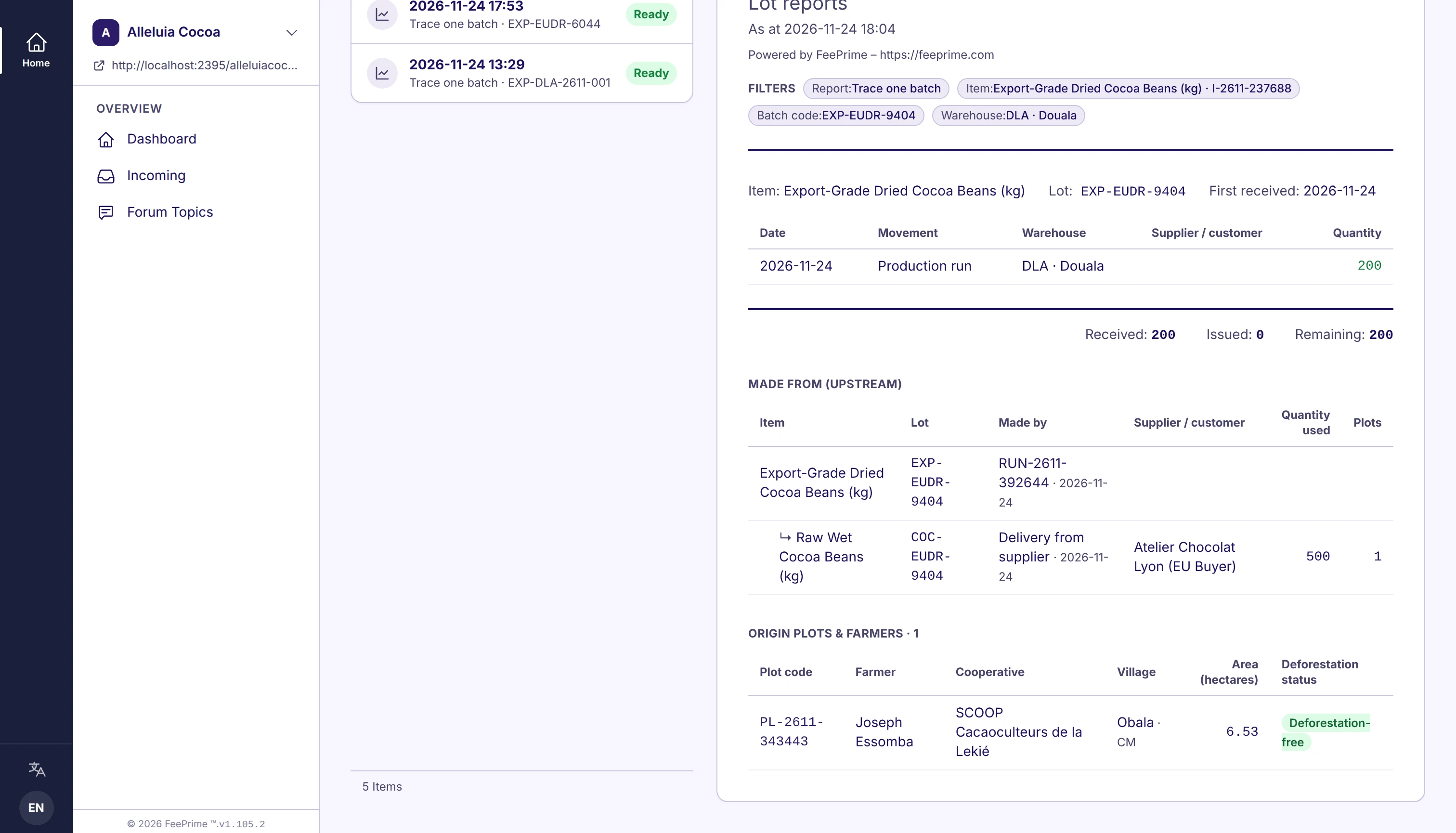 Lot Traceability Report for export batch EXP-EUDR-9404 showing recursive MADE FROM (UPSTREAM) lineage, ORIGIN PLOTS & FARMERS, and one-click Download GeoJSON (EUDR).
2. How FeePrime traces your export batch upstream
When the report finishes computing, open it in the detail pane. FeePrime reads the lot history in your own language and presents two clear sections: MADE FROM (UPSTREAM) and ORIGIN PLOTS & FARMERS.
Here is what FeePrime walks behind the scenes for Alleluia Cocoa’s consignment:
Export Batch: EXP-EUDR-9404 (200 kg dried export cocoa)
       │
       ▼  MADE FROM (UPSTREAM)
Production Run: Fermentation & Drying
  • Consumed INPUTS : COC-EUDR-9404 (500 kg wet cocoa)
  • Produced OUTPUTS: EXP-EUDR-9404 (200 kg dried cocoa)
       │
       ▼
Inbound Supplier Delivery: COC-EUDR-9404
  • Cooperative: SCOOP Cacaoculteurs de la Lekié (Jean Mvondo)
  • Tagged source_plot_ids: 2 verified plots
       │
       ▼  ORIGIN PLOTS & FARMERS
  ├── Joseph Essomba — 6.53 ha (Obala)    [Closed Polygon]  Deforestation-free
  └── Pauline Mvogo  — 2.40 ha (Monatélé) [GPS Pin]         Deforestation-free
       │
       ▼  Click "Download GeoJSON (EUDR)"
EU TRACES NT Consignment File (.geojson)
  • Strictly 2 features  • Closed rings  • ProducerCountry: "CM"
Look closely at both sections before downloading anything:
MADE FROM (UPSTREAM)shows the full recursive parent-child tree. Even if wet cocoa became fermented beans in one Production Run and dried, bagged export cocoa in a second Production Run, every step appears in order back to the original supplier delivery.ORIGIN PLOTS & FARMERSlists every smallholder, cooperative, plot area, and deforestation verdict linked to those upstream intake receipts. ForEXP-EUDR-9404, Elise immediately sees Joseph Essomba (6.53 ha in Obala) and Pauline Mvogo (2.4 ha in Monatélé) — and nobody else.
3. Check all four deforestation verdicts before you file
Every plot listed under ORIGIN PLOTS & FARMERS carries one of four exact deforestation verdicts:
Deforestation-free— Verified clear of post-2020 deforestation; ready for EUDR submission.Under review— Satellite check is still open; hold the filing until confirmed.Flagged— Potential deforestation overlap detected; do not include in an EU shipment.Not assessed— No satellite assessment has been recorded yet.
Never file a consignment to EU TRACES NT if any origin plot still reads Flagged, Under review, or Not assessed. If Elise spots an unverified plot, she calls Jean Mvondo at SCOOP Cacaoculteurs de la Lekié, opens Traceability / Farm Plots (and the Satellite Farm Plots Map) to complete the boundary check or segregate the lot, and only proceeds once every plot on the consignment is Deforestation-free.
4. Download the one-click EUDR GeoJSON for EU TRACES NT
Once the upstream tree and verdicts look clean, click Download GeoJSON (EUDR) right on the Lot report. FeePrime downloads an application/geo+json file formatted for EU TRACES NT and European buyer portals.
Four compliance rules are built into every download:
- Strict TRACES NT structure: The file is a clean
FeatureCollectioncontaining only thetypeandfeaturestop-level keys — no extra wrapper fields that cause schema rejections on upload. - EUDR geometry rules preserved: Plots at or above 4 hectares (like Joseph Essomba’s 6.53 ha farm in Obala) export as closed polygon rings where the final coordinate closes cleanly on the first. Plots under 4 hectares (like Pauline Mvogo’s 2.4 ha plot in Monatélé) export cleanly as GPS Point geometries.
- Complete producer attributes: Every feature carries
ProducerName,Area, and a valid ISO-2ProducerCountry. If a field enumerator left a plot’s country blank, FeePrime automatically falls back to your country code (such as"CM"for Cameroon) so EU TRACES NT never rejects a missing country. - Zero leaked plots: Alleluia Cocoa may manage 940 mapped plots across the Centre and Littoral regions, yet the GeoJSON for
EXP-EUDR-9404contains only the 2 plots that actually fedCOC-EUDR-9404andEXP-EUDR-9404. Not one unrelated farmer leaks into the file.
Never send your entire cooperative’s plot list for a single container. European buyers and competent authorities treat bloated plot lists as unverified declarations. Consignment-scoped exports keep your Due Diligence Statement accurate and defensible.
5. Why an untraceable lot safely exports 0 features (and how to fix it)
What happens if Elise runs a traceability report on an older cocoa lot whose receiving clerk never tagged any source_plot_ids — or if she mistypes EXP-EUDR-9440 instead of EXP-EUDR-9404?
FeePrime does not guess, and it does not fall back to exporting all plots in your organisation. Instead, Download GeoJSON (EUDR) deliberately exports a valid file with 0 features.
That 0-feature output is a safety lock. An empty file immediately warns your compliance team before upload, stopping you from accidentally filing a false Due Diligence Statement to EU TRACES NT.
Never ignore a 0-feature GeoJSON file, and never try to edit a finished Lot report. Lot reports are permanent audit snapshots — you cannot edit them after they run. Instead, trace the break in four quick steps:
- Check the spelling of
lot_refand confirm you picked the matchinginventory_item. - Open Inventory / Production / Production Runs and confirm the finished run actually lists the consumed upstream wet-cocoa lot under
INPUTSand your export lot underOUTPUTS. - Open Inventory / Movements / Goods Receipts (or Inventory / Movements / Inventory Transactions) for the upstream delivery and verify that
source_plot_idsare attached. - Create a new Lot report in Inventory / Reports / Lot Reports once the upstream link or plot verdict is fixed, then download the fresh GeoJSON.
Try it
Practice generating an EUDR compliance package on staging.feeprime.com — a practice copy of FeePrime, kept apart from the real thing.
- Sign in to staging.feeprime.com and open Inventory / Reports / Lot Reports.
- Create a new Lot report, set
report_typetotraceability, choose your export-grade cocoainventory_item, and enter your finished exportlot_ref(for exampleEXP-EUDR-9404). - Open the completed report and read
MADE FROM (UPSTREAM)to confirm the Production Run connects back to the wet cocoa intake lot (COC-EUDR-9404). - Check
ORIGIN PLOTS & FARMERSand verify that every listed plot showsDeforestation-freeand matches the expected farmers and areas. - Click
Download GeoJSON (EUDR), open the downloaded.geojsonfile in a text viewer, and confirm it contains onlytypeandfeatures, closed polygon rings for ≥4 ha plots,ProducerCountry: "CM", and zero unrelated plots.
You have just completed the full Cameroon-to-Europe traceability loop — from cooperative onboarding and mobile plot capture to batch-linked processing and one-click EU TRACES NT filing.