
Sellers: Managing your catalog, stock and order fulfillment
Before you start, sign in to your seller portal on MaketCM and open your Listings and Orders (if you are helping a seller from the marketplace back office, open Portal Marketplace / Marketplace / Product Listings and Marketplace Orders).
Can’t find it? It may be turned off for your business, or your account may not be allowed to open it. Ask the person who set up your FeePrime. They can fix both.
Photo: wisnu bagus on Unsplash
Publishing your first product gets your shopfront on the map. What actually brings in steady money—week after week—is what happens next.
Picture Hervé at KamerCraft in Akwa, Douala. On Monday morning he lists 12 Douala Leather Messenger Bags and 40 Mount Cameroon Arabica Coffee 500g packs on MaketCM. By Wednesday he has sold 5 bags to walk-in customers, roasted coffee prices have moved up by 700 XAF, and he forgot to touch his phone. At 2 PM, Stéphanie orders 10 leather bags on her phone for her team—then hears nothing until Friday. She cancels, buys elsewhere, and never checks KamerCraft again.
This lesson shows how to run your daily catalog, stock numbers, and order handovers in five calm minutes a day—so shoppers trust your shopfront and come back.
1. Keep every listing accurate—edit, never duplicate
A marketplace listing is a live offer, not a one-time flyer. Prices shift, coffee harvests change, and leather stock rises and falls. Whenever something changes on an item you already sell, open that existing listing and edit it.
Edit your existing listing—never post a duplicate for a new price. If coffee goes from 6,500 XAF to 7,200 XAF and you publish a second listing instead of updating the first, MaketCM ends up showing the same 500g pack at two different prices. Shoppers assume one of them is fake or outdated and walk away.
Here are the key fields to keep clean on every product listing:
product_nameandproduct_summary: Write the exact item, size, and material a busy buyer searches for—for example, Douala Leather Messenger Bag — 15-inch or Mount Cameroon Arabica Coffee 500g (Whole Bean).photos: Upload clear daylight photos of the real product. One sharp photo on a clean table beats five dark ones.asking_priceandcurrency: Keep your listed price aligned with what you actually charge so there are no awkward phone calls after checkout.available_quantity: Update this whenever you finish a new batch or sell stock outside the marketplace.city,brand, and categories (parent_category,product_category,product_subcategory): Keep these accurate so shoppers browsing Douala or Yaoundé find you immediately.unit,unit_other,pack_size, andminimum_order: Set how the item is sold (piece, bag, carton, kg), what is inside each pack, and the smallest quantity you will accept per order.
One craft shop selling single pieces? Set minimum_order to 1 and keep pack_size simple. Nothing breaks. Those extra pack and minimum-order fields matter most when you also supply hotels, offices, or resellers buying in cartons of 12 packs.
Never assume available_quantity drops on its own when you sell in person. MaketCM cannot see the customer who paid cash at your workshop door or market stall. Take two minutes at closing time to refresh your numbers.
Working from a busy market on weak 3G? Listing edits support offline sync. If your signal drops right after you tap save, FeePrime holds your update in the outbox and sends it automatically as soon as your connection returns. And if your phone is flat, marketplace staff like Nadine can still post or update a listing on your shopfront’s behalf when you send the details over WhatsApp.
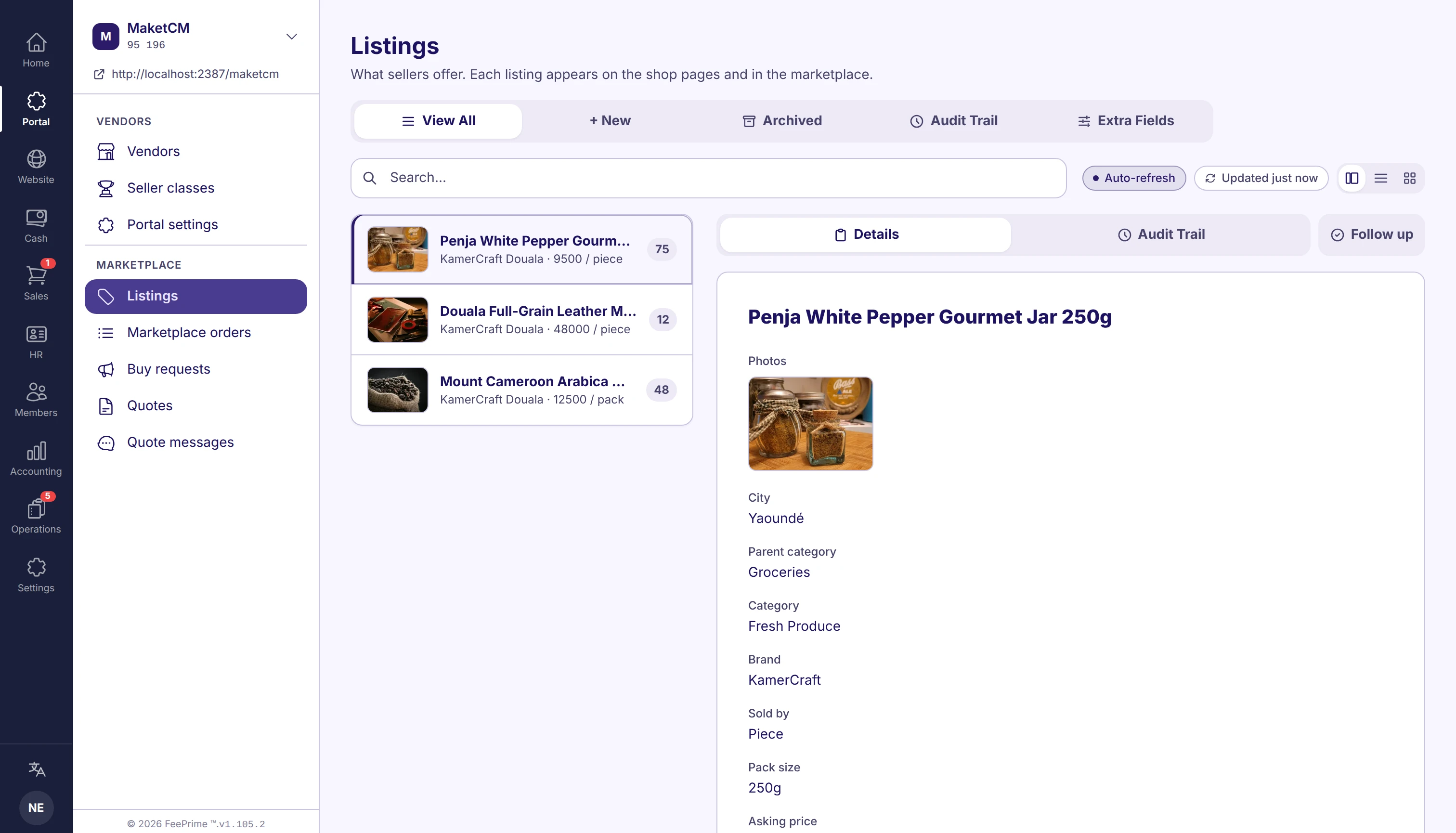 KamerCraft product listings with unit, pack size, asking price in XAF, and available quantity.
2. Archive sold-out products right away
When Hervé sells his last Douala Leather Messenger Bag and knows the next stitched batch will not be ready for two weeks, he does not wait for angry calls. He archives the listing.
Archive a sold-out or discontinued product immediately—never leave a dead listing live. Archiving takes the product off the buyer storefront right away while keeping your history intact. Leaving an unavailable item visible only invites orders you will have to cancel.
Never overwrite an old listing to sell a completely different product. Do not rename your sold-out leather bag listing into a coffee tin or a belt just to save thirty seconds. Archive the bag when it is gone, and create a clean new listing for the new item. (Once your first listing has been approved by staff like Nadine, most marketplaces let trusted sellers publish new listings directly without waiting each time.)
3. How a marketplace order moves from placed to done
When Stéphanie places an order on MaketCM, FeePrime records a clean receipt containing order_number, order_date, items, currency, total, buyer_name, buyer_phone, buyer_email, fulfilment, delivery_fee, delivery_location, and notes.
The order header is locked once placed—nobody can silently rewrite what was agreed. Instead of editing the receipt after the fact, you move the order forward by recording clear lifecycle events:
  Shopper places order on MaketCM (header locked)
                       |
       [If marketplace reviews orders first]
       Staff (Nadine) clicks "Pass to seller"
                       |
                       v
         Order appears in Seller Portal
                       |
         +-------------+-------------+
         |                           |
         v                           v
    [Confirmed]                 [Cancelled]
  (stock ready,              (add honest `reason`,
   buyer notified)            e.g. out of stock)
         |
         v
    [Delivered]
  (record `received_by_name`
   at handover)
There is no busywork or fake progress buttons here—just three real events: Confirmed, Delivered, and Cancelled.
Why didn’t a new order appear right away? Some marketplaces run in direct mode where orders land in your seller portal the second a buyer checks out. Others hold new public orders for the organisation first so staff can verify details; in that setup, the order stays invisible to you until Nadine clicks Pass to seller. If a shopper phones you about an order you cannot see yet, check with marketplace staff before asking the shopper to order twice.
4. Acknowledge new orders fast with Confirmed
When a new order lands in your Orders list, check four things before you tap anything:
itemsand quantities: Walk over to the shelf and confirm you actually have 2 Mount Cameroon Arabica Coffee 500g packs and 1 Douala Leather Messenger Bag ready to pack.fulfilmentanddelivery_location: Check whether Stéphanie is picking up at your Akwa workshop or expecting delivery to Bonapriso, along with the agreeddelivery_fee.notes: Read any special instructions (“Call on arrival at the gate”, “Whole beans, not ground”).buyer_phone: Keep it handy in case your rider needs directions.
Once you verify you can fulfil the order, record the Confirmed event right away.
Never wait until tomorrow to confirm an order. On a mobile marketplace, two hours of silence feels like a closed shop. Confirming within the hour reassures Stéphanie that KamerCraft is real, active, and packing her goods.
5. Record handover with Delivered—or cancel honestly
Two endings keep your reputation spotless: a clean handover, or a fast, honest cancellation when something genuinely goes wrong.
When Stéphanie picks up her order—or your rider hands it over in Bonapriso—open the order and record the Delivered event. Fill in received_by_name with the actual person who took the parcel.
- If Stéphanie took it herself, type Stéphanie Mbarga.
- If she was in a meeting and her receptionist accepted the bag, type Mireille (reception, Bonapriso office).
Never leave received_by_name blank when someone else accepts the parcel for the buyer. Three days later, if Stéphanie asks where her coffee went, that single name settles the question in five seconds instead of turning into a dispute with Nadine.
And what if rain ruined your last coffee packs or a wholesale buyer cleared your shelf ten minutes before Stéphanie ordered? Never pretend you have stock you cannot deliver. Record the Cancelled event immediately and type a plain reason—for example, “Last batch damaged by rain; next roast ready Friday.” Shoppers forgive an honest cancellation sent in ten minutes; they never forgive silence.
6. Turn first-time shoppers into repeat buyers
You do not need clever ads to win repeat orders on MaketCM. Every top seller follows the same five habits:
- Refresh
available_quantityandasking_priceat the end of every busy day. - Archive sold-out listings before heading home.
- Confirm new orders fast so shoppers never wonder if their order went into a black hole.
- Always record
received_by_nameat handover. - Keep your photos and
product_summarycompletely honest so what arrives matches the screen.
Do that consistently and Stéphanie stops comparing five strangers on MaketCM—she goes straight to KamerCraft.
Try it
Practice this full seller routine on staging.feeprime.com—a practice copy of FeePrime, kept apart from the real thing—so you can test every click without touching live customers:
- Sign in to the practice workspace and open your seller listings (or Portal Marketplace / Marketplace / Product Listings).
- Open an existing product listing, adjust
asking_priceandavailable_quantity, and save your edit without creating a duplicate. - Create a quick test listing for a seasonal item, then Archive it to see how cleanly a sold-out item leaves the catalog.
- Open a test order in Orders (or Portal Marketplace / Marketplace / Marketplace Orders), check
items,delivery_location, andnotes, and record the Confirmed event. - Finish that order by recording the Delivered event with a realistic
received_by_name, then test recording Cancelled with a shortreasonon a second practice order.
Once you have run through those five clicks once, handling real Douala and Yaoundé orders on your phone will feel second nature.