
Getting verified (Tier 2) and applying to become an Agent
Before you start, sign in to your issuer’s Wallet Portal and open /wallet/verify (then /wallet/agent/apply).
Can’t find it? Your issuer may not have turned on Wallet Portal verification or agent applications yet, or you may still need to finish setting up your personal wallet first. Ask your Distributor or the person who invited you to the portal. They can send you the right link.

Photo: Nel Ranoko on Unsplash
Alain Fokou runs Kiosk Bonapriso in Douala. He already uses an ordinary personal wallet on Manna Finance’s Wallet Portal to pay suppliers and receive small transfers. Every week, neighbours like Diane Tchoupo and staff from Sunrise Bakery down the street ask if they can deposit or withdraw cash at his counter.
Turning a personal wallet into an accredited cash counter does not require a new account or a stack of paper forms. It takes two clean steps inside the same Wallet Portal: proving who you are (Tier 2 KYC) and sending your shop details to a Distributor — in Alain’s case, Wouri Microfinance, led by Ibrahim Bello.
Here is how to move cleanly from a personal wallet to a live Agent counter without getting stuck in review.
1. The path from personal wallet to live Agent
Every FeePrime Wallet Agent starts as a verified individual. The issuer (Manna Finance, led by Clarisse Mbarga) verifies your identity first, and your Distributor (Wouri Microfinance) approves your counter second.
Personal Wallet (Tier 1)
  │  1. Set your 4-digit personal PIN
  ▼
/wallet/verify  (8 KYC fields)
  │  2. Independent N-of-M review
  │     (if anything is rejected -> fix ONLY that field)
  ▼
Verified Tier 2 Wallet
  │  3. Submit /wallet/agent/apply
  │     (Distributor, trading name, GPS pin, hours, photo)
  ▼
Distributor Review (Wouri Microfinance)
  │  4. Accepted!
  ▼
┌───────────────────────────────────────────────────┐
│ • Separate Agent Account Number created for you   │
│ • Agent tab unlocks inside your Wallet Portal     │
│ • Kiosk goes live in Find an Agent (/wallet/agents)│
└───────────────────────────────────────────────────┘
You cannot skip Tier 2. If you try to open /wallet/agent/apply while your wallet is still on Tier 1, FeePrime stops the form and asks you to verify your identity first. That rule protects customers handing real banknotes across your counter.
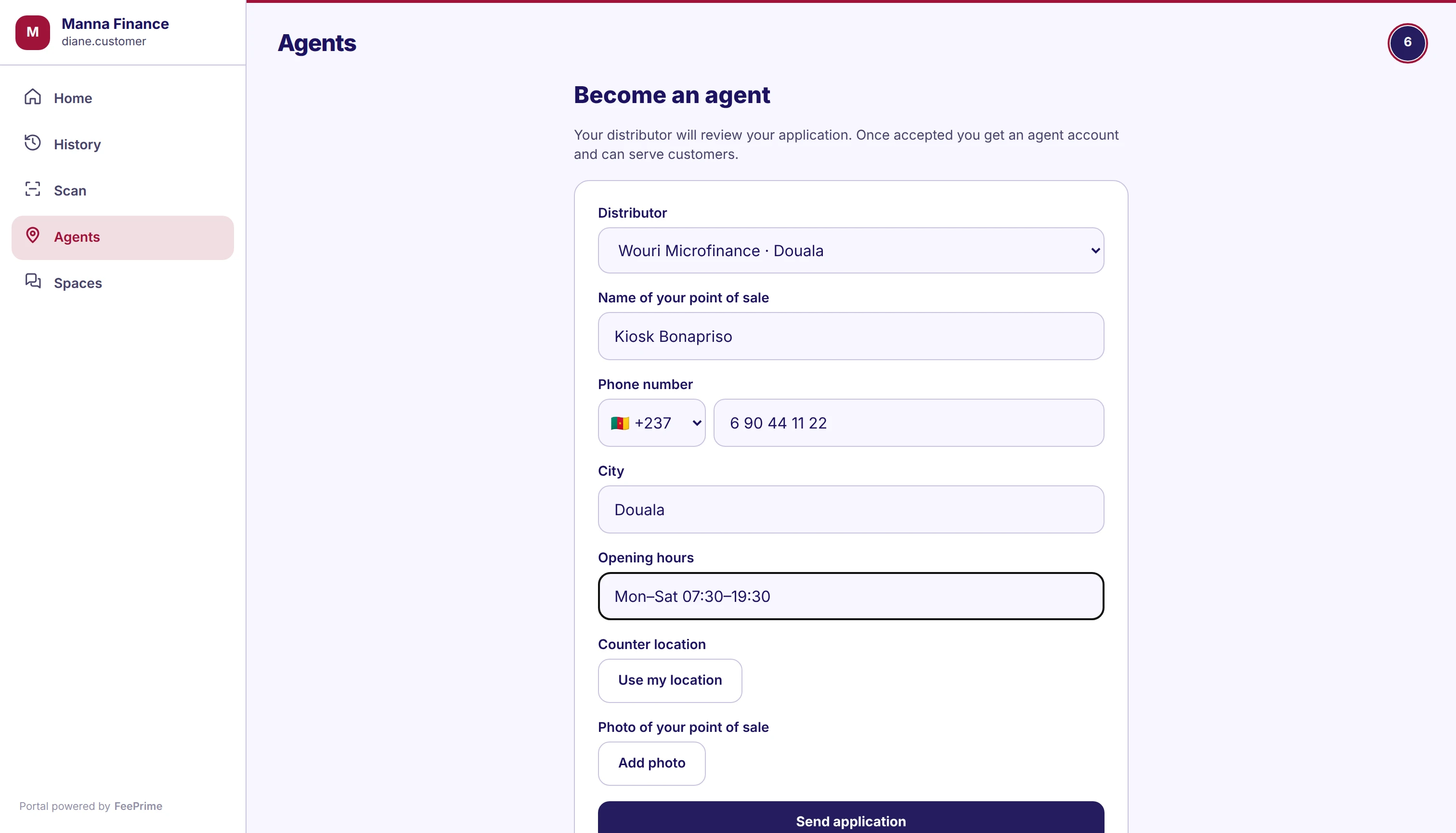 Live Apply to Become an Agent form inside Manna Finance Wallet Portal after Tier 2 KYC approval — choose your Distributor, trading name, city, GPS location, opening hours, and storefront photo.
2. Set your 4-digit personal PIN first
Before you touch verification or apply as an agent, set your 4-digit personal PIN inside your Wallet Portal settings.
This PIN is your signature. Right now it protects your personal transfers. Once Wouri Microfinance approves Kiosk Bonapriso, that same 4-digit PIN is what you will type on your phone to confirm every counter cash-in and float request.
- Pick four digits that are not your birth year,
0000, or1234. - Never share your 4-digit PIN with a customer, a distributor agent, or a verifier. Nobody at Manna Finance or Wouri Microfinance ever needs your PIN to approve your application.
3. Complete Tier 2 KYC on /wallet/verify
Before you tap Verify, put your physical ID card on a flat table in good daylight. Trying to photograph a laminated card under a dim bulb at night is the number-one reason applications bounce back.
The /wallet/verify screen asks for eight exact items:
- Full legal name — type it exactly as printed on your ID, including middle names.
- ID type — pick National ID, Passport, or Driver’s Licence.
- ID number — check every digit carefully before moving on.
- Date of birth — you must be 18 or older to pass Tier 2.
- ID expiry date — the document must not be expired. Never apply with an expired card or someone else’s ID, even if a renewal slip is on the way.
- Front of ID photo — all four corners visible, no flash glare covering the text or face.
- Back of ID photo — crisp and readable, including any barcode or issue details.
- Live selfie — face the camera in even light without sunglasses or a cap.
How independent review works
Once you submit, your case goes to independent verifiers appointed by the issuer (staff working in Digital Wallets / Issuing / Wallet Portal Verification). FeePrime uses N-of-M consensus, meaning independent verifiers confirm your details without relying on a single person’s say-so.
Two fairness rules are built straight into the system:
- No one can verify their own case. Even if someone works inside Manna Finance, their own Tier 2 check must be reviewed by other verifiers.
- Agents can never verify customers they signed up. Later, when Alain onboards walk-in customers like Mireille Ndongo or Samuel Ekani at Kiosk Bonapriso, FeePrime tags those KYC submissions so independent issuer verifiers review them — never Alain himself.
What if a verifier rejects part of your KYC?
Suppose a verifier flags Alain’s back-of-ID photo because a shadow hides two digits. Do not create a second wallet and do not retype all eight fields. Open /wallet/verify again: FeePrime highlights the rejected item so you fix and resubmit only the rejected field. Everything else stays intact.
4. Fill out the Agent application on /wallet/agent/apply
The moment your status flips to Tier 2, open /wallet/agent/apply. This form introduces your physical shop to your Distributor and to the customers who will look for you.
Fill in each field carefully:
- Distributor — pick from the issuer’s list of active Distributors. Alain chooses Wouri Microfinance because their treasury office is ten minutes from Bonapriso, making float top-ups easy.
- Currency — select the currency your counter will serve (for Alain, XAF).
- Trading name — the name printed on your signboard or known in the neighbourhood (e.g., Kiosk Bonapriso). Use your real shop name, not a vague label like Shop 1.
- Phone number — the active number customers and your Distributor can reach during business hours.
- City — select or enter your city (Douala). This is how customers filter the public directory.
- GPS pin — stand at your actual counter when you set your GPS pin, not at home. A pin dropped from your bedroom on Sunday night will send customers walking down the wrong street on Monday morning.
- Opening hours — list honest hours when someone is actually at the drawer (for example, Mon–Sat 07:30–19:30).
- Storefront photo — step back three metres in daylight and capture the front of your kiosk so a first-time visitor immediately recognizes it.
Check your Distributor choice before you submit. Your Distributor is the organisation that reviews your counter, sets your per-agent counter caps, and handles your float buys and float returns.
5. What changes the moment your Distributor accepts you
Ibrahim Bello’s team at Wouri Microfinance reviews Alain’s details, checks the storefront photo and location, and accepts Kiosk Bonapriso. The second they click accept, three things happen automatically:
- FeePrime allocates a separate Agent Account Number. Your personal wallet stays untouched for household expenses and family transfers. Digital float, customer cash-ins, customer cash-outs, and agent commissions live strictly on your new Agent wallet. Never mix personal household spending with your counter float.
- The
Agenttab unlocks in your Wallet Portal. When Alain opens Manna Finance’s Wallet Portal now, theAgenttab appears automatically. Inside it sit his live Counter screen, Float requests, Assisted Signup for feature-phone customers, Commissions ledger, and Day Close. - Your shop goes live in Find an Agent (
/wallet/agents). Any customer in Douala — whether Diane Tchoupo on her smartphone or a runner from Sunrise Bakery — can filter Find an Agent by Douala, check Kiosk Bonapriso’s hours and storefront photo, and walk straight to Alain’s counter.
Running a single one-person kiosk? You do not need any back-office modules or extra settings — once the Agent tab appears, move straight to Lesson 3 to buy your first float. Managing a Distributor treasury, minting currency, or setting up Business Vaults and Payroll? Explore our companion infrastructure course, Digital Wallets, Vaults & Transfers.
Try it
Practice the full application flow on staging.feeprime.com — a practice copy of FeePrime, kept apart from the real thing — in five minutes:
- Sign in to the demo issuer’s Wallet Portal and set a 4-digit personal PIN in your wallet settings.
- Open
/wallet/agent/applyonce while still on Tier 1 to see how FeePrime stops unverified accounts and points you to/wallet/verify. - Open
/wallet/verify, review all eight KYC fields, and submit a test Tier 2 verification using sample details. - Once the demo account is marked Tier 2, open
/wallet/agent/apply, pick a Distributor, enter a trading name, city, opening hours, GPS pin, and sample storefront photo, and submit. - After acceptance, confirm three things: your new Agent Account Number is distinct from your personal wallet, the
Agenttab is visible in the portal, and your kiosk shows up when you filter Find an Agent (/wallet/agents) by city.
Once you see that separate Agent Account Number, your counter is officially open for business — and ready for its first float in Lesson 3.