
Reading inventory reports and lot reports
Before you start, sign in and open Stock / Reports / Inventory Reports and Stock / Reports / Lot Reports.
Can’t find one? It may be turned off for your business, or your account may not be allowed to open it. Ask the person who set up your FeePrime. They can fix both.

Photo: Artem Beliaikin on Unsplash
It is Tuesday morning at Sunrise Bakery. Hôtel Akwa calls asking for 12 bags of Flour 50kg and 40 cartons of UHT Milk 1L by noon. At the same time, Amina needs to decide what to reorder for the Akwa bakery, the Bonapriso shop, and the Marché Central stall—without letting butter expire in the cold room.
A stock report is only useful when you open the right one for the question in front of you, and when you know how to verify a surprising number before you act on it. FeePrime gives you two stock reports under Stock / Reports. They answer completely different questions.
1. Two stock reports, two different jobs
Before you click anything, decide whether you are asking about total quantities right now or about specific batches and dates.
QUESTION YOU ARE ASKING              REPORT TO OPEN                    KEY FILTERS
-----------------------------------------------------------------------------------------------
"What do we hold right now,          Stock / Reports /                 Location (one shop/store)
 and where is it sitting?"      -->  Inventory Reports            -->  Category (one item group
                                                                       across all locations)

"Which batch is this, when           Stock / Reports /                 Item, Batch number,
 does it expire, and where      -->  Lot Reports                  -->  Expiry before, Location,
 did it come from?"                                                   Origin
Inventory Reports: what you have, and where
Open Stock / Reports / Inventory Reports to see what your business is holding right now. You narrow it down in two main ways:
- By location. Pick one shop, store, or warehouse (for example, Bonapriso shop). Use this when a branch manager asks what is currently on their shelves.
- By category. Pick a group of similar items (for example, Baking dry goods or Dairy). Use this when Amina wants to see total Flour 50kg across Akwa bakery, Bonapriso, and Marché Central in one view before calling the supplier.
Lot Reports: which batch, and how old
A lot is one batch of goods that arrived together. Open Stock / Reports / Lot Reports when totals are not enough and you need batch-level detail. You can filter by item, batch number, expiry date, location, and origin (where the goods came from).
One small shop selling non-perishable goods (phone chargers, hardware, stationery)? You will spend almost all your time in Inventory Reports by category. Leave lot tracking off on items that never expire—nothing breaks.
Selling food, drinks, medicine, cosmetics, or agro batches across branches? Make Lot Reports a weekly routine.
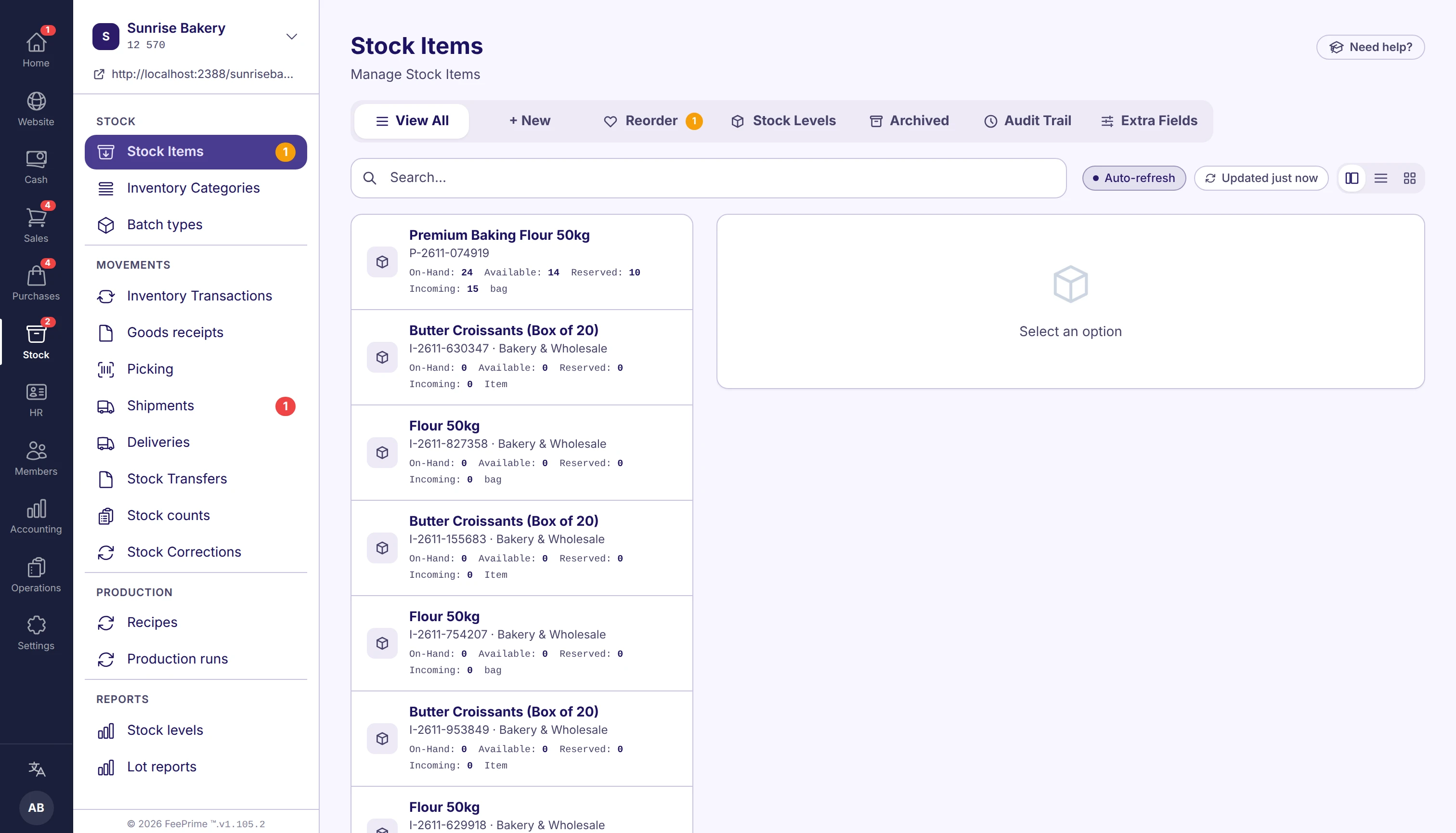 inventory items screen in FeePrime (Sunrise Bakery).
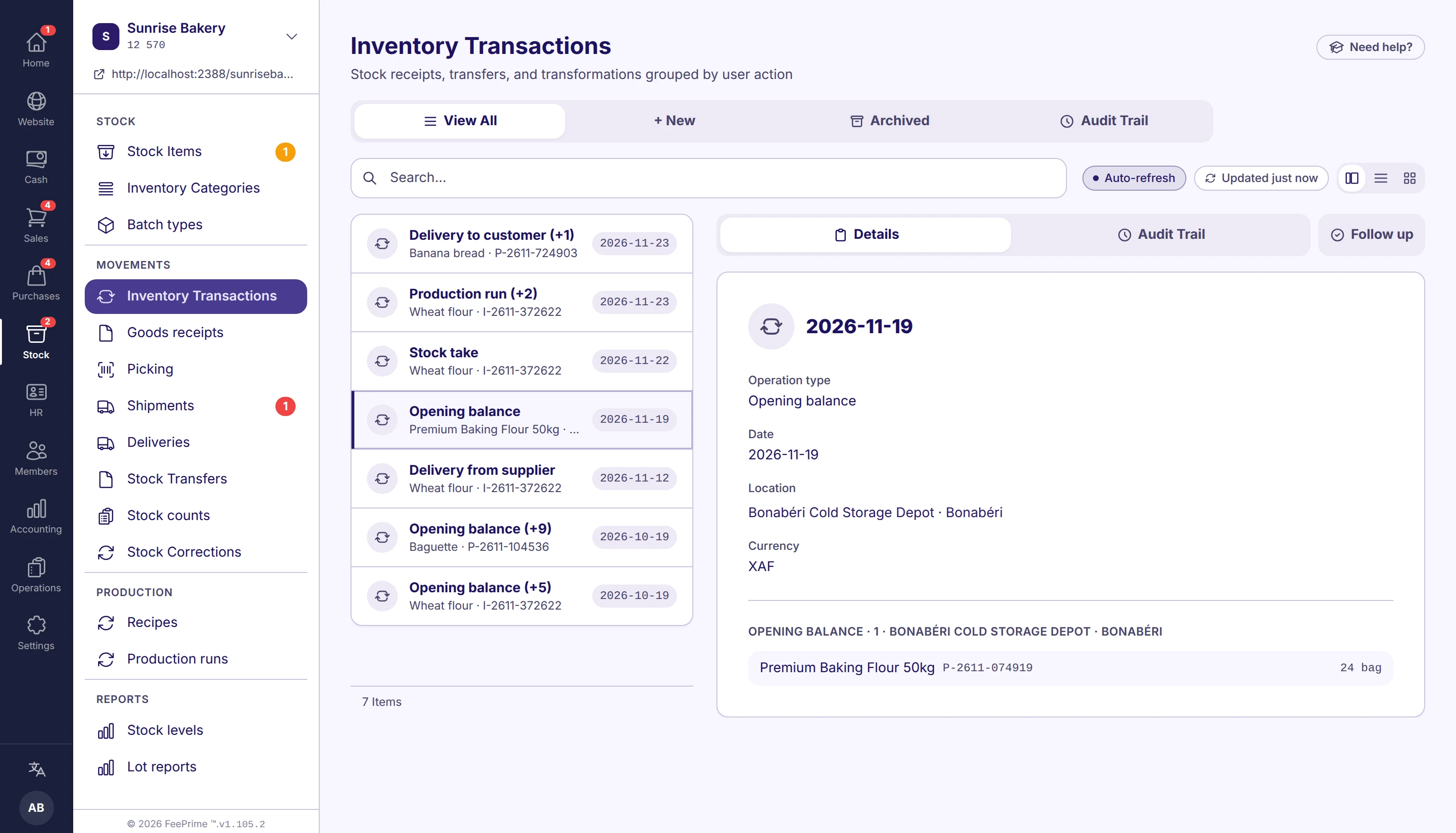 inventory transactions screen in FeePrime (Sunrise Bakery).
2. Two weekly habits in Lot Reports that save real cash
You met lots earlier in this course. Two habits in Stock / Reports / Lot Reports pay for themselves faster than anything else in inventory management.
- Run “expiry before” once a week. Pick a date 7 to 14 days ahead for fresh or chilled goods, or 30 to 60 days ahead for packaged items. Every Monday at 7:30 a.m., Amina runs expiry before ten days out. She spots 18 blocks of Butter 250g at Marché Central expiring Friday. She tells the bakers to use that batch for Wednesday’s 400 croissants instead of opening a fresh carton from Akwa—saving 36,000 XAF in spoilage in two minutes.
- Run “origin” or “batch number” the moment a recall hits. Suppose a dairy supplier calls to recall batch
#MLK-204of UHT Milk 1L over faulty seals. Instead of phoning three branches to guess what is left, Amina filters Lot Reports by batch number or origin. Within seconds she sees 14 cartons at Bonapriso and 6 at Akwa, pulls them off sale, and sends the supplier an exact return count.
3. What stock reports will NOT tell you
A stock report will never tell you that an item has quietly stopped selling.
A fast seller (Flour 50kg moving out every morning) and a dead item (gold-foil cake boxes sitting untouched in the back room for four months, locking up 180,000 XAF) look identical on a single report: just a quantity on a line.
Slow stock hurts a small business silently. It eats shelf space, traps cash you need for fast sellers, and eventually spoils or gets damaged.
No alarm rings for dead stock. You have to look for it in two simple ways:
- Compare the same report over time. Run Inventory Reports for the same location or category on the 1st of this month and compare it against last month. If a quantity barely budges across 30 days, ask why.
- Open the item and read its movements. Go to Stock / Stock / Inventory Items, open the item, and scan its movement history (also listed under Stock / Movements / Inventory Transactions). A long, busy list means healthy turnover. A short list with weeks of silence means your cash is parked on that shelf.
4. Check a number before you trust it
Never make a big decision—buying 500,000 XAF of stock, promising a large order to Hôtel Akwa, or writing off goods—without taking one minute to check the item’s movements first.
And never “fix” a weird stock number by typing over it or running a blind stock count to force it down. Always trace where the number came from:
Suspicious figure on Inventory Reports
  --> Open the item in Stock / Stock / Inventory Items
  --> Read its movements (Stock / Movements / Inventory Transactions)
  --> Spot which of the 4 usual mistakes happened
  --> Fix the missing or wrong record properly
When a stock number looks wrong in FeePrime, the arithmetic is not broken. It is almost always one of these four real-world mistakes:
- Recorded at the wrong shop or store. Someone received 10 bags of Flour 50kg into Akwa bakery instead of Bonapriso shop. Your company total is fine, but both locations look wrong.
- Sent on a transfer, never marked received. Junior drove 8 trays of butter from Akwa to Marché Central using Stock / Movements / Stock Transfer Orders. Akwa dropped by 8, nobody marked the delivery received at Marché Central, and the stall still shows 0.
- A known loss logged as a count shortage. Three cartons of milk broke in the storeroom. Everyone knew they were damaged, but someone opened Stock / Movements / Stock Counts and logged “counted 3 less than expected” instead of recording a damage loss. Now nobody looking at the report knows why those cartons vanished.
- A product was never linked to a stock item. Paul sold 40 boxed tarts at Bonapriso through Sales, yet the box balance never moved. The product under Sales / Catalogue / Products was never linked to its matching inventory item, so sales documents had nothing to deduct.
You can spot all four in one minute by reading the movement list. You cannot see any of them in the report total on its own.
5. Course recap: what you now run in Inventory & Stock
That finishes Inventory & Stock. Here is the full system you now know how to run:
- Only a stock transaction moves stock—every other document just causes one.
- One item has four different quantities, and you know which one to promise to a customer.
- You know what each stock movement type means and when to use it.
- You track lots, expiry dates, and origins to stop spoilage and handle recalls fast.
- You use production runs to turn raw materials into finished goods cleanly.
- You use stock transfer orders so goods stay visible while they are on the road.
- You separate known losses (damage, spoilage) from unexplained count discrepancies.
- You read Inventory Reports and Lot Reports with a sharp eye and verify movements before acting.
Your next course is Purchasing and Suppliers—where most of the stock you tracked in this course comes from in the first place.
Try it
Open staging.feeprime.com—a practice copy of FeePrime kept apart from your real business—and run this 5-minute check:
- Go to Stock / Reports / Inventory Reports and filter by one location to see what a single branch or store holds right now.
- Clear the location filter and filter by one category instead so you see that group of items across every location at once.
- Open Stock / Reports / Lot Reports and run an expiry before filter set 14 days from today to see which batches need to be used or discounted first.
- Still in Lot Reports, filter by a batch number or origin to practice tracing a supplier delivery in seconds.
- Pick one item whose balance looks higher or lower than expected, open it in Stock / Stock / Inventory Items, and read its recent movements in Stock / Movements / Inventory Transactions to verify the number.
Five minutes a week with these two reports catches spoilage, missing transfers, and quiet dead stock long before they eat into your cash.