
Linked invoices, bills, credit notes, and shared discussions
Before you start, sign in and open Purchases / Paying / Bills — and check Home / Incoming.
Can’t find it? It may be turned off for your business, or your account may not be allowed to open it. Ask the person who set up your FeePrime. They can fix both.

Photo: Microsoft Edge on Unsplash
Friday afternoon at Sunrise Bakery in Douala used to look like every busy shop’s worst hour. A delivery truck from Littoral Flour Mills drops 40 bags of Flour 50kg at the Akwa bakery. The paper invoice gets folded into a driver’s pocket. Three days later, a clerk re-types the bill from a blurry WhatsApp photo, misreads the 19.25% TVA line, and at month-end Amina Bello spends two hours on the phone with Samuel Nkeng arguing over why their balances disagree by 95,400 XAF.
When two businesses are mutually linked in FeePrime, that re-typing disappears. The invoice Samuel approves on his side arrives straight inside Sunrise Bakery’s Home / Incoming queue — prefilled with every line, tax, and purchase order reference — while still waiting for Amina’s team to check and approve it.
Better still, when a mistake happens later, a Credit Note becomes a Debit Note automatically, your cross-business questions stay attached to the document, and month-end reconciliation shrinks from two hours to two minutes.
1. How a linked invoice lands in your Incoming queue
Once Sunrise Bakery and Littoral Flour Mills are linked (from Lesson 1) and have agreed on an order (from Lesson 2), invoicing flows in one clean line:
Littoral Flour Mills (Supplier)           Sunrise Bakery (Buyer)
-------------------------------           ----------------------
Sales / Selling / Invoices                Home / Incoming (live badge)
  Approves Invoice #INV-1042   ------->     Reviews line totals, TVA & PO link
  (40 x Flour 50kg = 954,000 XAF)           Answers review checks -> Converts
                                              |
                                              v
                                          Purchases / Paying / Bills
                                            Approved Bill (linked to PO)

Need a correction after approval?
Sales / Selling / Credit Notes            Home / Incoming
  Approves Credit Note         ------->     Reviews -> Converts
  (4 damp bags = 95,400 XAF)                  |
                                              v
                                          Purchases / Paying / Debit Notes
                                            Tied to the original Bill
Say Samuel Nkeng approves an invoice in Sales / Selling / Invoices for 40 bags of Flour 50kg at 20,000 XAF each (800,000 XAF subtotal + 154,000 XAF TVA at 19.25% = 954,000 XAF). Seconds later, Home lights up with a live badge count in Sunrise Bakery’s sidebar, and the invoice appears in Home / Incoming — right under Dashboard — as well as in the Incoming tab of Purchases / Paying / Bills.
A linked invoice never drops straight into your accounting books. Your supplier cannot post debt onto your balance sheet without your say-so. Everything sits safely in Incoming (separate from your own internal pending approvals) until your team reviews and converts it.
Open the incoming invoice and you will see: - Clear totals at a glance: Every line shows its line total, with the subtotal, tax lines, and grand total at the bottom. - Automatic references: Littoral Flour Mills’ supplier invoice number is carried across for you, and if the deal came from a linked quote and purchase order, the matching PO number is already linked. - Built-in review checks: Before you convert the invoice into a bill, FeePrime prompts you for anything that needs a human decision — confirming stock lines (matching the supplier’s item to your own inventory item), picking the stock location (such as Akwa bakery store vs Bonapriso shop), and flagging a possible duplicate if someone already entered the paper bill. - A shareable document address: Every incoming document has its own URL. If Amina wants her Akwa storekeeper to verify the bag count before she approves, she can copy the link and send it straight to that screen.
What if your Bills module is turned off? Nothing gets lost. Littoral Flour Mills sees that the invoice is waiting for you to switch the module on, while the document still shows up inside your Home / Incoming. An owner can switch the module on in one tap right from Incoming, and the invoice delivers automatically.
Common mistake: Never re-type a linked supplier’s invoice by hand. If a clerk types the paper copy into Purchases / Paying / Bills and someone else converts the Incoming copy later, you risk doubling what you owe. Always check Home / Incoming first, and pay attention whenever FeePrime warns of a possible duplicate.
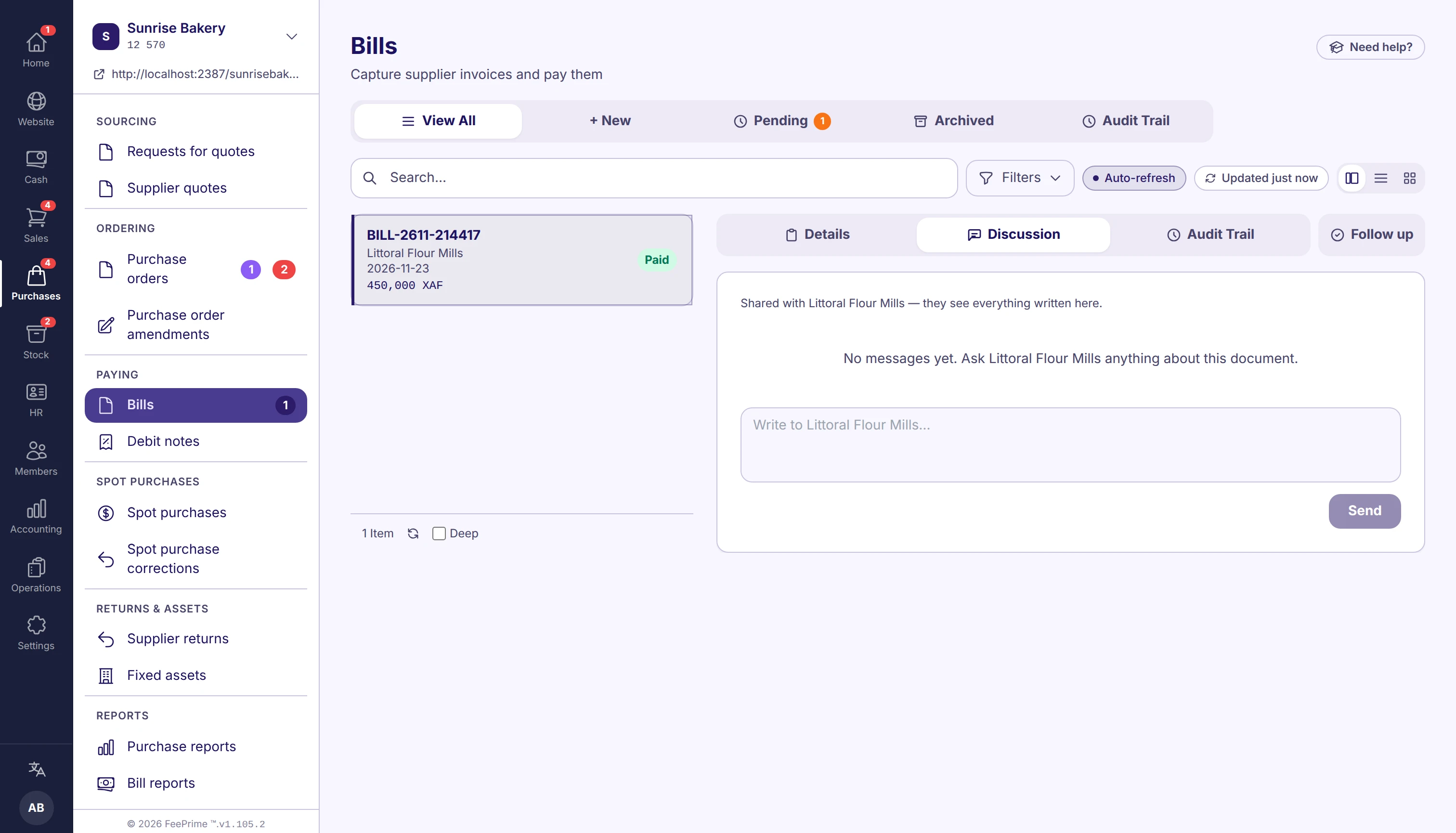 Purchases → Bills: Littoral Flour Mills’ approved invoice arrived automatically as a Bill with a shared cross-business Discussion thread.
2. Fixing mistakes after approval: Credit Notes and Debit Notes
Imagine Amina approves the 954,000 XAF bill on Friday. On Saturday morning, the baker opens the stack and finds 4 bags of Flour 50kg torn and damp from the rain. Samuel agrees to knock 4 bags off the bill: 80,000 XAF + 15,400 XAF TVA = 95,400 XAF.
Once approved, both Invoices and Bills are locked — you cannot edit them, and you cannot archive them to make a mistake disappear. Under OHADA accounting rules, quietly erasing a posted bill would wipe out the payable with no reversing entry, while leaving stock movements stranded behind.
Instead, both sides keep a clean paper trail: 1. Samuel opens Sales / Selling / Credit Notes and creates a credit note linked to Sunrise Bakery’s original invoice. 2. He fills in the reason — this field is mandatory, because a credit with no explanation looks like hidden revenue write-down to any auditor. 3. Goods back vs price cut: If Sunrise Bakery physically returns the 4 damp bags, Samuel links the Customer return. If it were purely a price discount or overcharge correction with no flour moving back, he leaves Customer return blank so warehouse stock is not double-counted. 4. Once Samuel approves the 95,400 XAF credit note (reversing revenue and VAT: Dr 7011 / 443, Cr 4111), it arrives automatically in Sunrise Bakery’s Home / Incoming. 5. Amina reviews and converts it into a Debit Note under Purchases / Paying / Debit Notes, tied directly to the original 954,000 XAF bill. Sunrise Bakery’s payable drops cleanly to 858,600 XAF (Dr 4011, Cr 601 / 604 + 445).
Common mistake: Never ask a linked supplier to “delete the invoice and send a new one” after approval — and never attach a customer return to a price-only credit note. One breaks your audit trail; the other invents phantom stock.
3. Private notes vs shared messages: Recent Activities and Discussion
Every linked document gives your team two separate places to write. Knowing the difference saves awkward moments:
+-----------------------------------+   +-----------------------------------+
|        RECENT ACTIVITIES          |   |            DISCUSSION             |
|     Strictly internal notes       |   |  Shared across BOTH businesses    |
+-----------------------------------+   +-----------------------------------+
| Who sees it: ONLY your business   |   | Who sees it: You AND your partner |
| Example: "Hold payment until      |   | Example: "4 bags arrived damp —   |
|   Ibrahim at Bello Group confirms |   |   can you send a credit note?"    |
|   Friday's transfer."             |   | Bonus: Carries earlier RFQ and    |
| Leaves your company? NEVER.       |   |   Quote messages forward!         |
+-----------------------------------+   +-----------------------------------+
- Recent Activities is your private internal log. Notes Amina writes for her cashier, her storekeeper, or Ibrahim Bello at Bello Group Holdings stay inside Sunrise Bakery. Littoral Flour Mills can never see them.
- The Discussion tab is the shared conversation thread between Sunrise Bakery and Littoral Flour Mills on that exact document. When you post a message there, the other business gets notified — with an email link that opens straight to the Discussion tab.
Best of all, Discussion carries forward earlier messages from the same deal. If Amina asked about Bonapriso delivery hours on the Request for quote and Samuel promised a bulk price on the Quote, that history stays visible right on the Invoice and Bill. Nobody has to hunt through three WhatsApp groups to prove what was agreed.
Common mistake: Never post internal cash-flow worries, profit margins, or staff criticism in the Discussion tab. Pause for one second and check which tab is open before you hit send.
4. Reconciling month-end in minutes with the Supplier statement
At the end of the month, stop exporting spreadsheets to compare with your supplier. Open the Supplier statement view for a linked supplier like Littoral Flour Mills. FeePrime places their invoices side by side with your bills and sorts every document into four buckets:
- Matched: Both businesses have the document and the totals agree. Nothing to chase.
- Only on their side: Littoral Flour Mills invoiced you, but Sunrise Bakery does not have a matching approved bill yet — usually because it is still sitting in Home / Incoming waiting for approval.
- Only on our side: Sunrise Bakery recorded a bill that does not match an invoice from Littoral Flour Mills — often a paper receipt typed manually, or a bill saved with the wrong supplier invoice number.
- Amounts differ: Both sides have the document, but the totals do not agree — most commonly because a credit note has not been converted into a debit note yet, or a tax line differs.
Small shop vs bigger operation: Running one bakery with two linked suppliers? Checking the Supplier statement once at month-end before paying takes two minutes. Managing multiple outlets or weekly flour deliveries across Douala? Check it every Friday before your payment run so Only on their side invoices never blindside your cash plan.
Try it
Practice the full flow on staging.feeprime.com — a practice copy of FeePrime, kept apart from the real thing — using two linked test businesses:
- On the supplier business, open Sales / Selling / Invoices, approve an invoice for your linked buyer business, and note the total and tax lines.
- Switch to the buyer business, click Home / Incoming (notice the badge on Home), open the incoming invoice, check the line totals and PO link, answer any stock location or duplicate prompt, and convert it into a bill.
- On that bill, write a short internal reminder in Recent Activities, then switch to the Discussion tab and post a question to the supplier — confirm which one appears on the supplier’s invoice.
- Back on the supplier business, open Sales / Selling / Credit Notes, create a partial credit note with a clear reason (leaving Customer return blank for a price adjustment), and convert the incoming Debit Note on the buyer side.
- Open the Supplier statement for that linked supplier and verify your test documents land under Matched.
Once you run that five-minute loop once, month-end supplier reconciliation will never feel like guesswork again.