
Three-way payments: when a third party pays a linked supplier's invoice
Before you start, sign in and open Cash / Money / Transactions (and keep Home / Incoming handy).
Can’t find it? It may be turned off for your business, or your account may not be allowed to open it. Ask the person who set up your FeePrime. They can fix both.

In a growing business group, the company that buys the goods is not always the company that wires the money.
Picture a normal Tuesday in Douala. Littoral Flour Mills (run by Samuel Nkeng) delivers 20 bags of 50kg flour to Sunrise Bakery (run by Amina Bello) and sends a linked invoice for 450,000 XAF. Sunrise Bakery is keeping cash in its till for daily shop purchases, so Bello Group Holdings (run by Ibrahim Bello) pays Littoral Flour Mills the 450,000 XAF straight from the holding company’s bank account.
Without FeePrime’s linked-business workflow, three finance teams spend the rest of the week chasing WhatsApp screenshots. Littoral sees a bank transfer from Bello Group Holdings and does not know which customer invoice it clears. Sunrise Bakery clears the supplier bill on paper but forgets to record what it now owes Bello Group. Bello Group logs a bank transfer with a vague memo and reconciles it weeks late.
When all three businesses are linked in FeePrime, one third-party bill payment notifies both other businesses automatically so all three sets of books agree with zero retyping—and without anyone posting blindly into someone else’s ledger.
1. How the three-way flow works
Here is how one 450,000 XAF flour bill moves across all three businesses:
1. Littoral Flour Mills ---[ Linked Invoice: 450,000 XAF ]---> Sunrise Bakery
                                                                    |
2. Bello Group Holdings ---[ Pays 450,000 XAF to Littoral ]         |
                                                                    v
3. Sunrise Bakery records Bill Payment:
   [x] Paid by a third party  |  Payer: Bello Group  |  Liability: Associate (462)
                                  |
              +-------------------+-------------------+
              |                                       |
              v                                       v
4a. Bello Group Holdings gets:          4b. Littoral Flour Mills gets:
    "Sunrise Bakery says you paid           "Bello Group Holdings paid
     450,000 XAF for them"                   450,000 XAF of Sunrise's invoice"
    -> [Record what we paid]                -> [Record the invoice payment]
Notice what happens to cash: zero cash moves on Sunrise Bakery’s books. Cash leaves Bello Group Holdings’ bank account and arrives in Littoral Flour Mills’ bank account. Sunrise Bakery’s supplier payable to Littoral drops to 0 XAF, while its inter-company liability to Bello Group rises by 450,000 XAF.
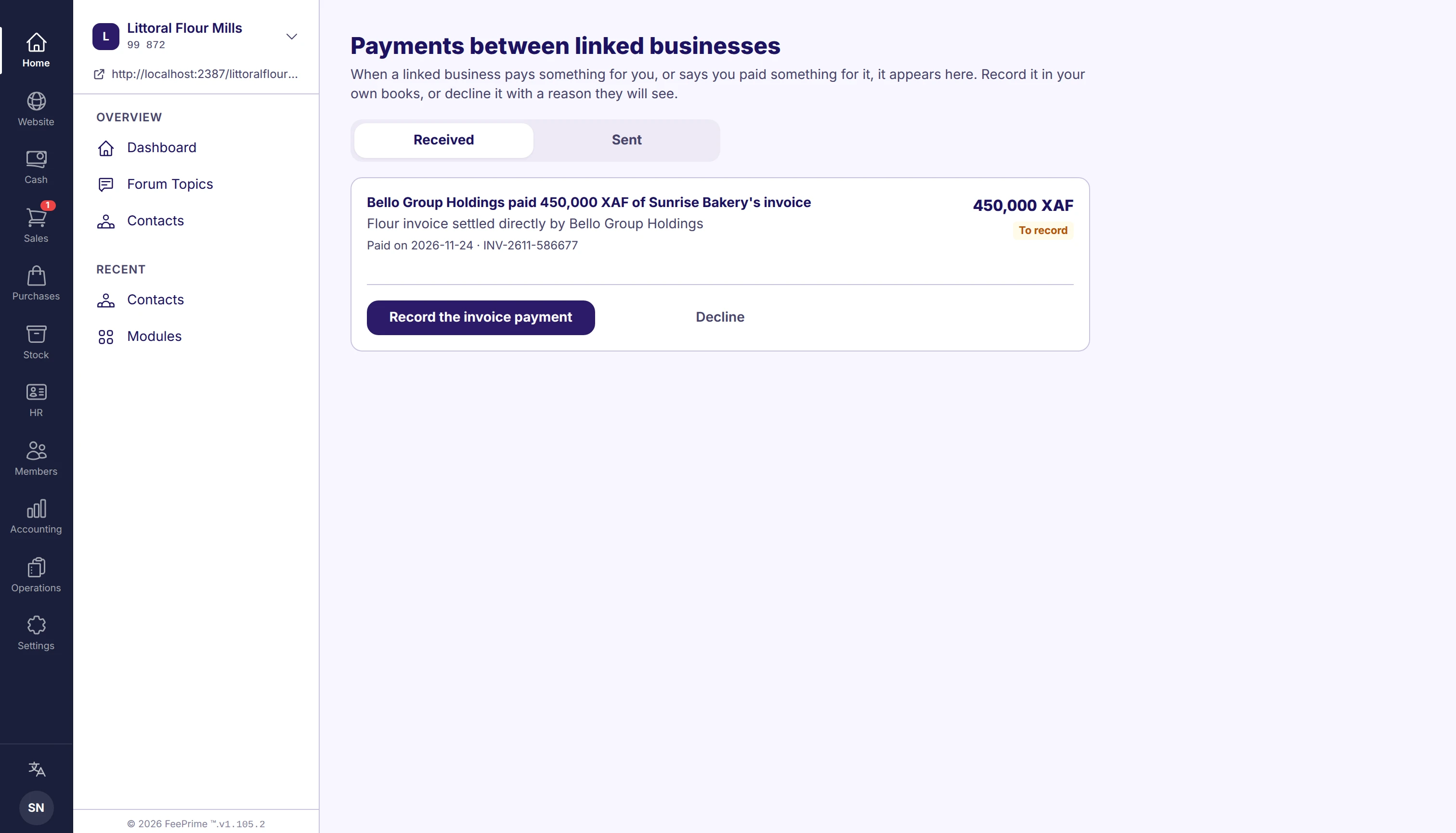 Three-way notification on Littoral Flour Mills: “Bello Group Holdings paid 450,000 XAF of Sunrise Bakery’s invoice” — ready to record with one click.
2. Before you start: what must be in place
For all three sides to receive automatic notifications, two things must already be true:
- Mutual links are active: Sunrise Bakery is mutually linked with both Littoral Flour Mills and Bello Group Holdings (either accepted in one tap or matched by business wallet number on Contacts). If a contact still shows amber Not linked yet, nothing flows until the other side accepts.
- The linked bill is posted: Littoral Flour Mills’ 450,000 XAF invoice has arrived in Sunrise Bakery’s Home / Incoming (and the Incoming tab of Purchases / Paying / Bills), showing each line’s total plus subtotal, taxes, and total at the bottom, and Amina has converted it into a posted bill.
Running a single shop with no linked group companies? You do not need linked accounts to use third-party payments. Ticking Paid by a third party on a bill payment works for any contact, linked or unlinked—it keeps your own books accurate and simply skips the live partner notifications.
3. Step 1 — Sunrise Bakery records the third-party bill payment
Once Ibrahim confirms Bello Group Holdings has paid Littoral Flour Mills, Amina records the settlement at Sunrise Bakery:
- Open Cash / Money / Transactions and click + New.
- Select the currency (XAF) and add a bill payment operation against Littoral Flour Mills’ open 450,000 XAF bill.
- Tick Paid by a third party.
The moment Amina ticks Paid by a third party, the Cash Account field disappears. Because none of Sunrise Bakery’s cash moved, FeePrime will not ask which till or bank account paid. Instead, it asks for two required fields:
- Payer: choose Bello Group Holdings.
- Liability type: choose the OHADA account where you track what you owe this payer:
- Associate (OHADA 462) — best for a parent company, sister company, or shareholder like Bello Group Holdings.
- Borrowing (OHADA 162) — formal loans or credit lines.
- Sundry creditor (OHADA 471) — general third-party creditors.
Common mistake — switching liability types for the same payer. Pick one liability type per third-party payer and use it every time. If Amina books Bello Group under Associate (462) in March and a clerk books Bello Group under Sundry creditor (471) in April, Sunrise Bakery’s debt to Bello Group splits across two ledger accounts and becomes painful to settle later.
When Amina saves (and the transaction clears maker-checker approval if enabled), Sunrise Bakery’s books are completely updated—and FeePrime immediately dispatches two separate reports.
4. Step 2 — Bello Group Holdings confirms what it paid
At Bello Group Holdings, Home lights up with a live badge count on Home / Incoming. Ibrahim can open the report from Home / Incoming, from the Task Board, or from the waiting banner in Cash / Money / Transactions (which opens Payments between linked businesses on the Received tab).
He sees a clear message:
Sunrise Bakery says you paid 450,000 XAF for them
Beside it sits the action button Record what we paid.
- Ibrahim checks his bank transfer slip to confirm 450,000 XAF left Bello Group Holdings for Sunrise Bakery.
- He clicks Record what we paid. FeePrime opens Bello Group’s own prefilled Paid on behalf of transaction with Sunrise Bakery and 450,000 XAF already filled in.
- He selects which Bello Group bank or cash account sent the money, checks the inter-company subtype, and saves.
FeePrime debits Bello Group’s class-4 receivable from Sunrise Bakery and credits Bello Group’s bank account.
What if Bello Group Holdings recorded the payment first? That order works just as cleanly. If Ibrahim records a Paid on behalf of transaction for Sunrise Bakery first (or pays a payment request naming the bill), Sunrise Bakery receives Bello Group Holdings paid 450,000 XAF for you. Amina clicks Record as a bill payment, attaches Littoral Flour Mills’ 450,000 XAF bill, and saves. That settles Sunrise’s bill and still triggers the invoice-payment report to Littoral Flour Mills—without echoing back to Bello Group.
5. Step 3 — Littoral Flour Mills records the invoice payment
At the same time Bello Group was notified, Samuel Nkeng at Littoral Flour Mills sees a live count on Home / Incoming and in Payments between linked businesses (Received tab):
Bello Group Holdings paid 450,000 XAF of Sunrise Bakery’s invoice
Beside it sits Record the invoice payment.
Common mistake — never record a linked payment before checking your bank. FeePrime’s report solves the mystery of why Bello Group Holdings appears on Littoral’s bank statement, so Samuel immediately knows it settles Sunrise Bakery’s flour invoice. It does not move money or auto-post into Littoral’s books. Always verify that the 450,000 XAF has actually landed in your bank or mobile money account first.
- Samuel confirms 450,000 XAF arrived on Littoral’s bank statement.
- He clicks Record the invoice payment. FeePrime opens Littoral’s own prefilled invoice payment form tied directly to that exact Sunrise Bakery invoice.
- He chooses the Cash Account (bank account) that received the funds and saves.
Common mistake — never archive Sunrise Bakery’s invoice to re-invoice Bello Group. In FeePrime, posted invoices and bills cannot be edited or archived. Sunrise Bakery ordered and received the flour, so Sunrise Bakery remains the customer on the invoice. Recording the linked payment closes Sunrise Bakery’s invoice cleanly while preserving the audit trail showing Bello Group paid it.
6. Built-in controls for group finance teams
Three-way payments move fast without loosening accounting discipline:
- Nothing posts automatically: Every report waits in Home / Incoming and Payments between linked businesses until a staff member reviews it and saves through their own form and maker-checker rules.
- No duplicate postings and no echoes: Claiming a report is compare-and-set. If two clerks at Littoral open the same report at the same time, only the first save can claim it—the second attempt is blocked. And because each partner records from the incoming report, FeePrime never bounces an echo notification back to Sunrise Bakery.
- Bank accounts stay private: Sunrise Bakery never sees which bank account Bello Group used, and Bello Group never sees which bank account Littoral credited. Each business chooses only its own account.
- Watch progress on the Sent tab: Amina can open Payments between linked businesses and switch to Sent to see whether Bello Group and Littoral have recorded or declined the report—no chasing phone calls needed.
- If an amount is wrong, Decline with a reason: If Bello Group only wired 400,000 XAF instead of 450,000 XAF, Samuel clicks Decline and writes why so Sunrise Bakery sees the reason immediately. If the original invoice itself had the wrong price or quantity, Littoral issues a Credit note under Sales / Selling / Credit Notes, which lands as a Debit note under Purchases / Paying / Debit Notes at Sunrise Bakery.
- If a partner’s module is switched off: The report is never lost. It waits in their Home / Incoming, explains which module is turned off, and lets an owner switch it on in one tap so delivery finishes automatically.
Try it
Practice the full three-way loop on staging.feeprime.com—a practice copy of FeePrime, kept apart from the real thing:
- Open Purchases / Paying / Bills in the buyer business and confirm an unpaid linked bill from your linked supplier is posted.
- Open Cash / Money / Transactions, click + New, add a bill payment for that bill, tick Paid by a third party, pick the linked holding company as Payer, and choose Associate (462)—watch the Cash Account field disappear, then save.
- Switch to the Sent tab of Payments between linked businesses and confirm both partner reports appear.
- Sign in to the payer business, open Home / Incoming, click Record what we paid, select the bank account that sent the money, and save.
- Sign in to the supplier business, open Home / Incoming, click Record the invoice payment on the exact invoice, pick the receiving bank account, and save.
Once you run that loop once on staging, reconciling third-party supplier payments across your real companies takes less than a minute.