
Publishing job openings and screening applicants
Before you start, sign in and open HR / Job openings.
Can’t find it? It may be turned off for your business, or your account may not be allowed to open it. Ask the person who set up your FeePrime. They can fix both.

Photo: Vitaly Gariev on Unsplash
Sunrise Bakery has a good problem: morning orders are growing faster than one rider can handle. Every Tuesday at 8:15 AM, Grace Ewane at the Bonapriso counter is calling Akwa because the second crate of 400 croissants from Paul Kamga’s ovens is still waiting for transport. Amina Bello tells Mireille Nkom, her HR & Admin Officer, to hire a second delivery rider.
The last time Sunrise Bakery hired, Amina posted the vacancy on WhatsApp status. By 6 PM her phone held 47 voice notes, blurry photos of paper CVs, and twenty messages asking whether the job was still open. Three reliable riders never got a callback because their messages sank to the bottom of the chat.
FeePrime solves this with two screens right next to each other under HR: Job openings to publish a clear vacancy with built-in screening questions, and Applications to compare every candidate in one clean table from first reply to hired.
1. How a job opening turns into a hire
Think of recruitment in FeePrime as two linked lists. HR / Job openings holds the seats you want to fill. HR / Applications holds the people applying for each seat.
HR / Job openings                          HR / Applications
─────────────────                          ─────────────────
Status: open   ──► Public Careers page ──► status: new
(role, location,    (or manual HR entry)        │
 3 screening Qs)                                ▼
                                           shortlisted ──► interview
                                                             │   │
Status: filled ◄────────────────────────────────── hired ◄───┘   └──► rejected
  (or closed)
                   Next step (Lesson 4): create Contact + Employee in HR / Employees
Every application stays linked to its exact job opening. When Mireille opens HR / Applications, she sees who applied for the Douala delivery rider role without mixing them up with last month’s cashier applicants.
Marking an application as hired does not put that person on payroll. Recruitment stops at the hiring decision. Once a candidate accepts, you still create their Contact and Employee record in HR / Employees (which you will do in Lesson 4) before they ever appear on a payroll run.
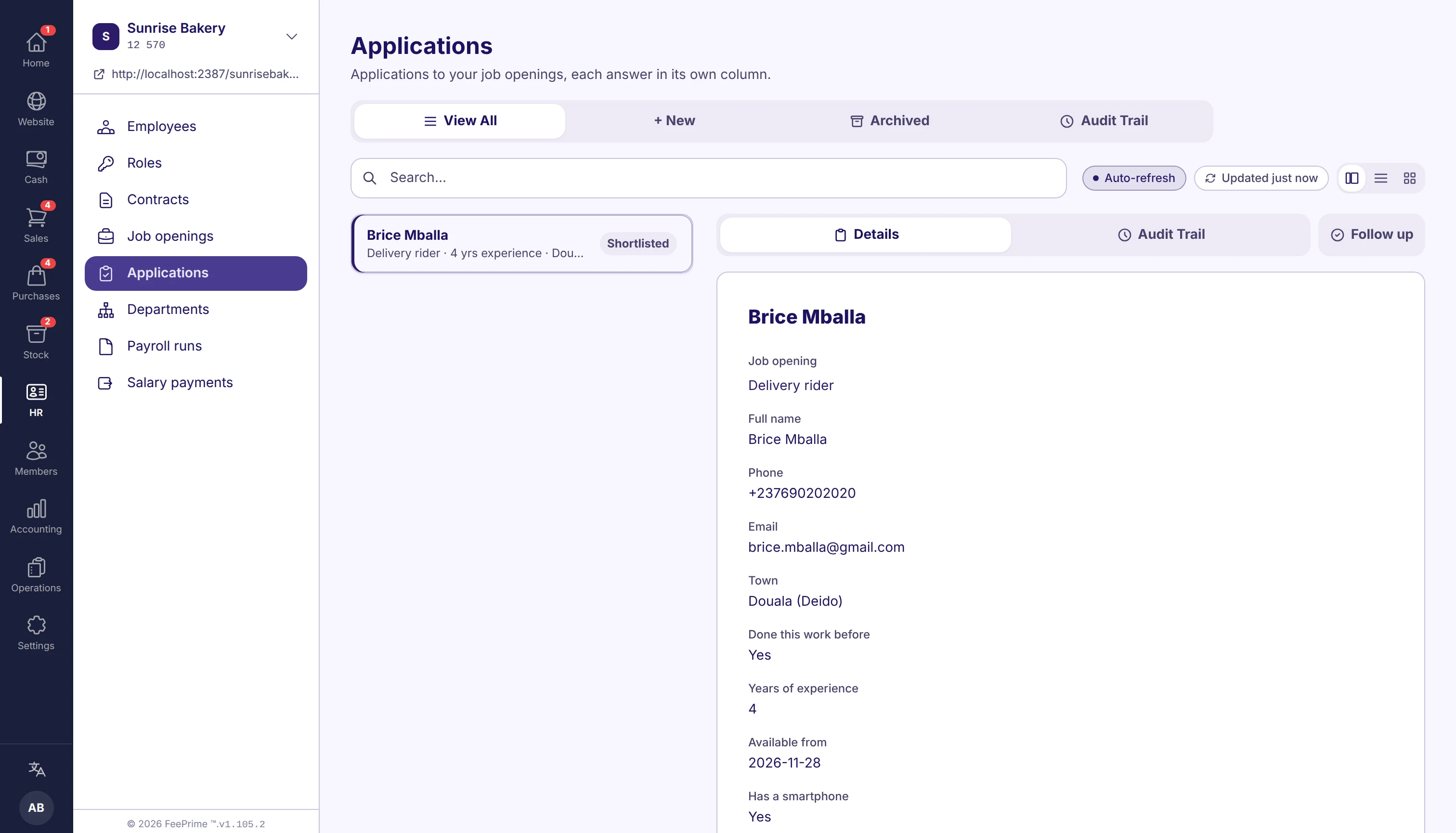 HR / Applications screening candidate Brice Mballa (Shortlisted) with experience, smartphone check, and custom screening answers.
2. Create a job opening that filters for you
Open HR / Job openings and click to create a new opening. Mireille fills out the vacancy for Sunrise Bakery’s new rider so the right people apply and obvious mismatches rule themselves out early.
Here is what each field does:
- Kind (
joborvolunteer): Choosejobfor paid roles like riders, bakers, and cashiers. Choosevolunteerif you are recruiting unpaid helpers for a community workshop or association event so unpaid sign-ups never mix with paid positions. - Title and Description: Write a plain, honest title like Delivery Rider — Akwa & Bonapriso. Use Description to spell out the daily reality: 5:30 AM start at the Akwa bakery, pastry drops to Bonapriso and Hôtel Akwa, and motorbike care.
- Role and Business location: Pick
delivery_riderand select Akwa Bakery (Douala). This ties your vacancy directly to the operational role gap you mapped in Lesson 2. - Contract type: Pick
cdi,cdd,internship,apprenticeship,consultancy, ordaily_worker. Mireille selectscddbecause Sunrise Bakery starts new riders on a 6-month fixed-term contract before confirming them on acdi. - Work arrangement: Pick
on_site,remote, orhybrid. A delivery rider ison_site. - Salary range and Closes on: Typing
95,000 – 115,000 XAF / monthsaves hours of awkward interviews with people expecting twice the budget. Setting Closes on tells applicants the deadline clearly. - Status (
open,closed,filled): Set it toopenso the vacancy appears on your public Careers page right away.
Running a small one-shop business and hiring a single helper? Only Kind, Title, Description, and Status are required. Role, business location, contract type, work arrangement, salary range, and closing date are optional — leave them off if you do not need them yet, and nothing breaks.
Never reuse an old filled job opening by editing its title for a new vacancy. Change the finished opening to filled (or closed) and create a fresh opening. Reusing an old record mixes last year’s rider CVs into this month’s cashier shortlist.
3. Write 3 screening questions that cut out guesswork
At the bottom of the job opening form, FeePrime gives you Question 1, Question 2, and Question 3.
These three fields are the biggest time-saver in hiring. Instead of opening 30 PDF attachments on a slow phone connection, every candidate’s replies land in Answer 1, Answer 2, and Answer 3 as clean columns in HR / Applications.
For the Douala delivery rider opening, Mireille writes three practical deal-breakers:
- Question 1: Do you hold a valid Category A motorbike licence and know Akwa and Bonapriso routes well?
- Question 2: Can you report to the Akwa bakery by 5:30 AM Monday to Saturday for the first pastry run?
- Question 3: How do you keep trays of croissants dry and intact during heavy Douala rain?
Do not waste your 3 screening questions asking for full name, phone number, town, or years of experience. FeePrime already captures all of those in dedicated fields on every application form. Save your three questions for the real-world conditions that separate a good hire from a bad fit.
4. Collect and screen applications in one place
Open HR / Applications. Candidates arrive here in two ways:
- Online through your public Careers page: When someone applies to an
openvacancy, FeePrime saves their answers straight into HR / Applications with statusnew. - Entered manually by HR: Good tradespeople, drivers, and riders often walk into the shop with a printed CV or call from a referral. Mireille clicks to add an application manually, selects the Job opening, and fills in Full name and Phone (plus whatever else the walk-in shares) so every single candidate is judged on the same screen.
Now Mireille screens 18 applications in ten minutes by scanning the structured fields side by side:
- Town: She immediately sees Brice Mballa lives in Douala (Akwa), while another applicant lives in Bafoussam and did not notice the job was
on_sitein Douala. - Worked before (
yes/no) and Years experience: Brice markedyeswith3years delivering across Akwa, Bonapriso, and Bonanjo. - Available from: Next Monday — right before a busy hotel catering week.
- Has smartphone (
yes/no): Brice selectedyes. For a delivery rider who calls clients at the gate and checks delivery updates on the road, this matters immediately. - Motivation and Answer 1–3: Brice confirms a valid Category A licence, offers to arrive at 5:15 AM to load before traffic builds on Boulevard de la Liberté, and describes strapping waterproof thermal crates flat so croissants never slide.
Another friendly applicant, Samuel, has no motorbike licence yet, but his motivation notes two years working a bakery counter. Mireille does not lose that detail.
Never delete or overwrite a rejected candidate’s application. Set their status to rejected and write one clear line in Notes (for example: “No motorbike licence yet — polite, 2 yrs bakery counter experience, call if Bonapriso counter opens”). Six months from now, your next shortlist is already half-built. Archive an application only when it is a duplicate or a test entry.
5. Move candidates through the pipeline and close the opening
Every application moves through five clear statuses in HR / Applications:
new— Just arrived; nobody on the team has reviewed it yet.shortlisted— Meets the essentials (town, experience, smartphone, screening answers) and deserves a phone call.interview— Invited to meet Mireille and Amina, or to complete a short practical test. Capture test impressions and reference checks in Notes while they are fresh.rejected— Not selected for this opening.hired— Chosen for the role and ready to onboard.
Mireille shortlists three riders, brings two in for a morning road test with Paul Kamga’s crates, and records her notes right on each application. Brice finishes on time with every croissant intact. Amina approves the hire.
That same afternoon, Mireille closes the loop in two quick steps:
- In HR / Applications, she changes Brice Mballa’s status to
hiredand switches the other finalists torejectedwith respectful notes. - In HR / Job openings, she changes Delivery Rider — Akwa & Bonapriso from
opentofilled. (If Amina had decided to cancel a vacancy without hiring anyone, Mireille would chooseclosedinstead.)
Leaving a filled job opening on open keeps new applications pouring in for a job that no longer exists. Flip it to filled the day your candidate says yes.
Brice Mballa is officially chosen — without a single lost WhatsApp message. Next, in Lesson 4, Mireille will onboard Brice into HR / Employees, set his probation period, and enter his pay terms.
Try it
Practice on staging.feeprime.com — a practice copy of FeePrime, kept apart from the real thing — so you can test the whole hiring flow in five minutes:
- Sign in to staging.feeprime.com and open HR / Job openings.
- Create a new opening: set Kind to
job, Role todelivery_rider, Title to Delivery Rider — Akwa & Bonapriso, Contract type tocdd, Work arrangement toon_site, Status toopen, and add 3 practical screening questions. - Open HR / Applications and create two test applications linked to your opening — one for Brice Mballa (Douala,
3years’ experience,has_smartphoneset toyes, clear answers) and one for a candidate missing a key requirement. - Open Brice’s application, move Status from
newtoshortlisted, then tointerview, type a short road-test comment in Notes, and finally switch it tohired. Set the second candidate torejectedwith a short note. - Return to HR / Job openings and change the vacancy’s Status from
opentofilled.
Once you run this loop once, you will never go back to hunting for CVs in WhatsApp chats.