
Managing customer contacts, history, and archiving
Before you start, sign in and open Sales / Customers / Contacts.
Can’t find it? It may be turned off for your business, or your account may not be allowed to open it. Ask the person who set up your FeePrime. They can fix both.

Photo: Christiann Koepke on Unsplash
On Tuesday morning at Sunrise Bakery, the manager of Hôtel Akwa calls in a bad mood. Paul the cashier just sent a reminder for 185,000 XAF, and the hotel swears they paid half of it last week. Amina opens Sales / Customers / Contacts to check — and finds three different records for the same hotel: Hotel Akwa, Hôtel Akwa SARL, and Nadege Fouda (Akwa). Two invoices sit under the first name, a Mobile Money payment sits under the second, and a credit note for 20 damaged croissants sits under the third.
Nobody stole money. Nobody made a math mistake. The customer list simply split one real buyer into three separate ghosts.
Everything you learned across Sales & Customers — quotes, orders, invoices, payments, credit notes, and returns — hangs on one thing underneath it: the contact record. A sales system is only as honest as the address book it rests on. This final lesson shows you how to keep every customer on one clean record from day one.
1. One customer, one contact record
In FeePrime, documents do not float on their own. Every quote in Sales / Selling / Quotes, every web or counter order in Sales / Selling / Orders, every fulfilment promise in Sales / Selling / Sales Orders, every bill in Sales / Selling / Invoices, and every adjustment in Sales / Selling / Credit Notes or Sales / Selling / Customer Returns points back to one contact in Sales / Customers / Contacts.
                            ┌─► Quotes & Orders
                            ├─► Sales Orders
   One Contact Record ──────┼─► Invoices (what they owe)
   (Hôtel Akwa)             ├─► Payments & Credit Notes (what settled it)
                            └─► Customer Returns (what came back)
Split one buyer across two contact records and you split their story in half. Now you have two balances, neither of them right, and no honest answer when someone asks, “How much does Hôtel Akwa owe us today?”
Search before you create. Every single time.
The search box in Sales / Customers / Contacts matches part of a word or phone number. Typing akw, foud, or the last four digits of a phone number takes five seconds. Those five seconds are the cheapest insurance in your whole business.
Common mistake: Letting each cashier invent their own spelling. On Monday Paul types Hôtel Akwa; on Friday another cashier types Hotel Akwa Douala because they did not search first. Pick one simple rule for the shop — for example, business name first for companies, surname and first name for individuals, plus their main phone number — and tell everyone to search before clicking new.
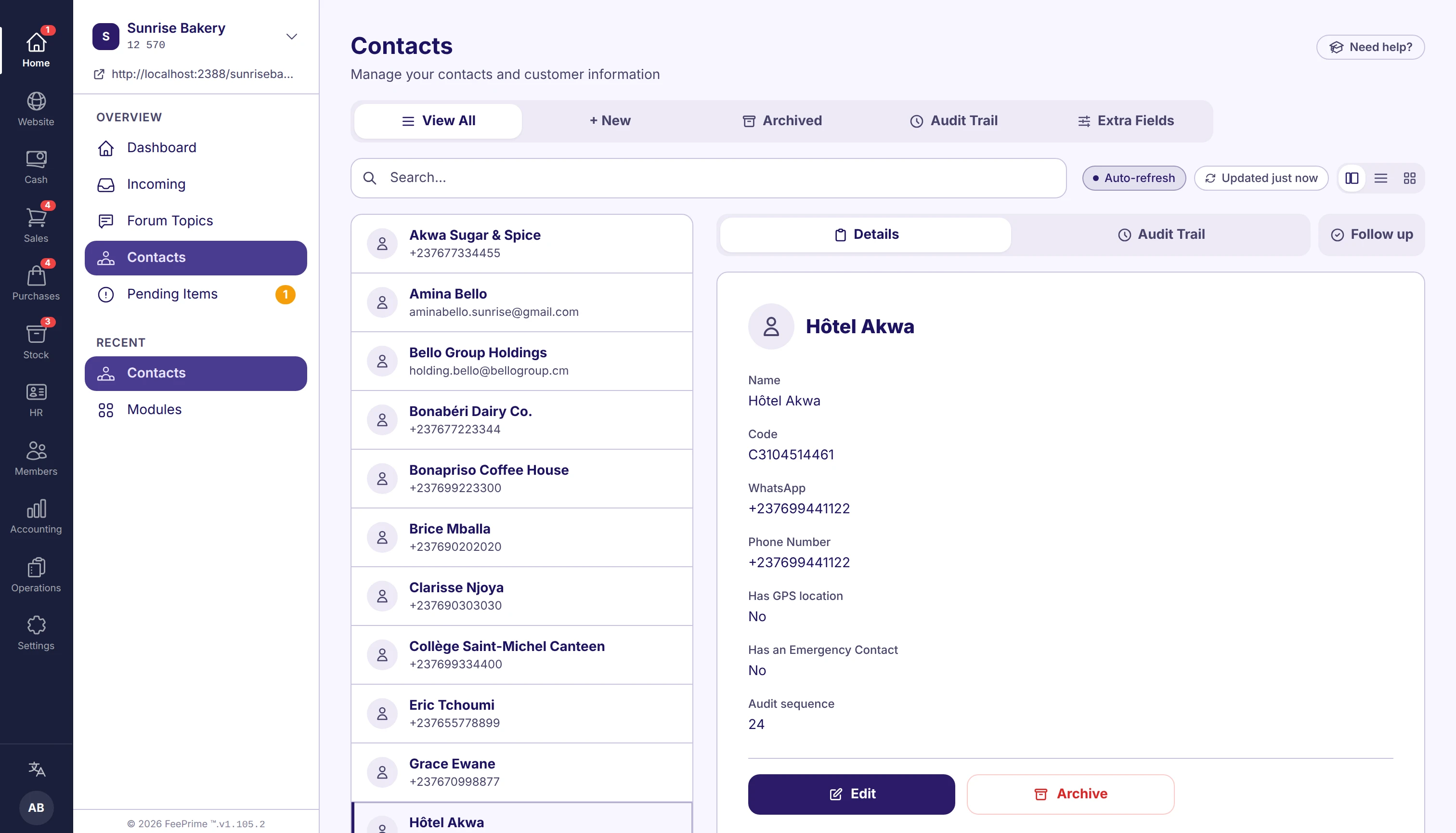 contacts screen in FeePrime (Sunrise Bakery).
2. Website and walk-in orders: where duplicates sneak in
Suppose Nadège Fouda orders 400 croissants from your online storefront at midnight. She is not yet in your address book, and FeePrime does not block her order for that. An order from someone new in Sales / Selling / Orders is completely normal.
When you turn that unlinked order into an invoice in Sales / Selling / Invoices, FeePrime creates the contact for you automatically.
That convenience is also the number-one place duplicates are born. Nadège orders on the first of the month as Nadege Fouda using her MTN number. Two weeks later she orders again as Mme Fouda using her Orange number. If Paul converts both orders straight into invoices without checking Sales / Customers / Contacts first, Sunrise Bakery now has two records for the exact same buyer.
Before you turn an online order into an invoice, search Contacts first. Check the phone number, email, or a few letters of the name. If the customer is already there, link the order to their existing record instead of spawning a twin.
Not every shop runs the same way, so match the habit to your size:
- One small counter with mostly walk-in cash buyers? You do not need an individual contact record for every stranger buying two baguettes in cash. Keep clean named contacts for repeat buyers, delivery clients, wholesale accounts, and anyone buying on credit. Never lump anonymous walk-in sales under a real client’s name.
- Multiple branches, online orders, or B2B hotel accounts? Have one person — like Amina the manager — scan newly created contacts in Sales / Customers / Contacts once a week so any accidental duplicate is spotted before a second invoice goes out.
3. Open the contact record before a difficult call
Because every document points back to the contact, opening a customer in Sales / Customers / Contacts gives you the entire relationship on one screen: what you quoted them, what they ordered, what you invoiced (including 19.25% TVA where it applies), what they paid, and what came back.
When Hôtel Akwa calls to question a 140,000 XAF invoice, Amina does not argue from memory or dig through carbon-copy receipt books. She opens Hôtel Akwa in Sales / Customers / Contacts and reads out the exact dates, invoice numbers, and settled amounts.
Open the customer record before you pick up the phone. The point is never to win an argument. The point is to be the calm person in the room who actually knows what happened, with dates and numbers in front of them.
4. Archive when they leave — never delete, never reuse
Customers move away, change suppliers, or close shop. When a customer stops buying from you, archive their contact record.
Archiving pulls them out of your everyday working lists so cashiers stop picking old names by mistake, while keeping every past quote, invoice, payment, and return safely attached for your accounts and Sales / Reports / Sales Reports.
Never delete a customer who has history, and never rename an old contact for someone new.
Here is what happens when someone ignores that rule: Boutique Bonapriso closes down after buying bread from Sunrise Bakery for two years. The next week, a brand-new client called Café Akwa opens nearby. To “keep the list tidy,” Paul opens Boutique Bonapriso’s contact and renames it to Café Akwa. Instantly, 2,400,000 XAF of Boutique Bonapriso’s past invoices, payments, and returns quietly become Café Akwa’s history. Six months later, Café Akwa asks for a statement and nobody can explain why it shows deliveries from before they even opened.
Renaming an old contact looks tidy on the day. It wrecks your accounts for good. Archive the old buyer, and create a fresh contact for the new one.
5. You have finished Sales & Customers
That wraps up Sales & Customers. Here is the discipline you now have under your belt:
- Which sales document answers which question (Quotes, Orders, Sales Orders, Invoices, Credit Notes, and Customer Returns).
- Why the links between documents keep your numbers honest.
- How to record honestly what you actually delivered, and why a posted invoice stays fixed instead of being silently rewritten.
- How payments settle against invoices instead of replacing them, and what a return must record.
- How to ask Sales / Reports / Sales Reports a useful question — backed by a clean, duplicate-free contact list.
Next up is Purchasing & Suppliers (under Procurements), which applies this exact same discipline to the people you buy from. After that comes Inventory & Stock (under Inventory), where the physical goods behind every order actually move.
Try it
Open staging.feeprime.com — a practice copy of FeePrime, kept apart from the real thing — and take five minutes to build the muscle memory:
- Open Sales / Customers / Contacts and type just three letters (like
akworbak) in the search box to see how fast partial matching works. - Create one clean business contact (for example, Hôtel Akwa with a main contact name and phone number).
- Return to the Contacts list and search using only the last four digits of that phone number or three letters of the name — confirm it pops straight up before you ever think about adding a second record.
- Open the contact record and inspect the linked sections where quotes, orders, invoices, and payments collect over time.
- Create a second practice contact (for example, Boutique Bonapriso — Closed) and archive it instead of deleting or renaming it, then notice how it steps out of your active working list.
Five seconds of searching before you click save will protect years of customer history.