
Issuers: KYC tiers, transaction limits, and crowd verification
Before you start, sign in and open Digital Wallets / Issuing / Wallet Tiers.
Can’t find it? It may be turned off for your business, or your account may not be allowed to open it. Ask the person who set up your FeePrime. They can fix both.

Photo: Christina @ wocintechchat.com M on Unsplash
Launching digital FCFA in Douala is only half the job. On day one, Clarisse Mbarga at Manna Finance faces two opposite risks. If onboarding takes three days of paperwork, everyday customers abandon the app and stay on cash. If limits are wide open with weak identity checks, a single fraud ring or duplicate-ID scheme can drain trust and trigger a regulator audit.
FeePrime solves this by pairing progressive KYC tiers with hard wallet limits and a crowd verification deck run by verifiers Manna Finance appoints. A market shopper can open a Tier 1 wallet in sixty seconds, while a field agent like Alain Fokou at Kiosk Bonapriso or a business like Sunrise Bakery proves who they are before handling larger FCFA volumes.
Everything displays in real FCFA under Manna Finance—never cryptic internal codes—and every limit is enforced automatically before a single franc moves.
1. How KYC tiers work: Tier 1, Tier 2, and Business KYB
FeePrime separates fast entry from high-value trust into clear levels:
- Tier 1 (Instant Signup): Every personal customer who opens a wallet on the portal starts here automatically. No documents are required upfront, so people can receive small transfers right away, capped by tight Tier 1 balance and daily limits.
- Tier 2 (Verified Individual): To unlock higher limits—or apply as a field agent under a distributor like Wouri Microfinance—the customer uploads the front and back of their national ID, takes a live camera selfie, and confirms their legal details. Once approved, FeePrime stops prompting them to verify again.
- Business KYB (Dedicated Business Verification): Companies like Sunrise Bakery do not squeeze into a personal ID form. Amina Bello verifies Sunrise Bakery on its own Business KYB page using company registration records and her director ID. In that same trip, she can even request a tier higher than Tier 2 so Sunrise Bakery can receive big invoice payments from Hôtel Akwa.
- Tier 3 and Above: Higher tiers display cleanly as Tier 3, Tier 4, and so on. A verified business clearly sees that its business is verified and can ask Manna Finance for a higher tier whenever its monthly sales outgrow its current cap.
When Sunrise Bakery submits Business KYB or a higher-tier request, FeePrime drops the review straight onto Manna Finance’s Task Board so compliance staff never hunt through email threads.
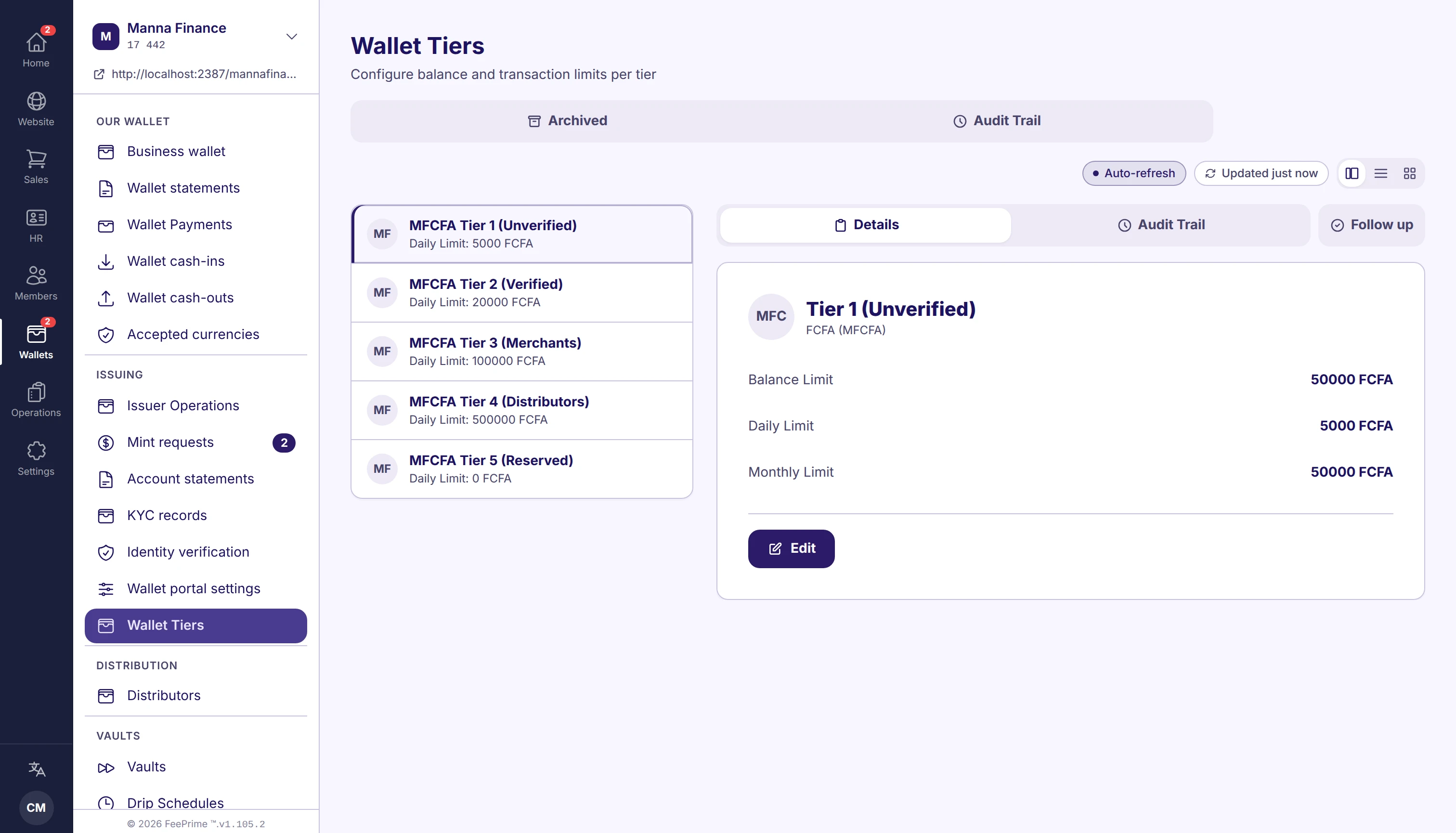 Wallet Tiers and KYC balance, daily, monthly, and prompt rate limits configured by the issuer.
2. Setting balance, period, and prompt limits in Wallet Tiers
Open Digital Wallets / Issuing / Wallet Tiers to define what each tier can hold and move. Each tier record controls five practical guardrails:
- Balance Limit: The maximum FCFA a wallet on this tier can hold at one moment. For example, Clarisse might cap Tier 1 at 200,000 FCFA, Tier 2 at 2,500,000 FCFA, and Tier 3 businesses at 25,000,000 FCFA.
- Daily Limit: Maximum FCFA that can flow through the wallet in a single day.
- Monthly Limit: Maximum FCFA over a rolling calendar month.
- Prompts per Hour (Optional): Caps how many payment prompts a holder can trigger per hour, stopping spam prompts against busy corporate buyers like Hôtel Akwa.
- Prompt Expiry in Minutes (Optional): Sets how long an unanswered payment prompt stays active before expiring cleanly.
Limits are checked up front, not after money leaves. If Hôtel Akwa tries to pay a 1,800,000 FCFA invoice to a business whose tier only holds 1,000,000 FCFA, FeePrime refuses the payment right on the form and names the receiver’s tier limit. On user dashboards, FeePrime stays quiet about limits until a wallet actually gets close to hitting one.
3. Attribute limits, transfer settings, and portal defaults
Alongside tier caps, three companion screens under Digital Wallets / Issuing keep your compliance policy tight:
- KYC Attributes & Wallet Transaction Limits: In KYC Attributes, choose which verified contact fields (
emailorphone_number) govern baseline limits. Then open Wallet Transaction Limits to set Daily, Weekly, Monthly, and Yearly limits tied to those attributes. - Wallet Transfer Settings: Review issuer transfer parameters here. Remember that platform-level four-way fee splits across Platform, Issuer, Distributor, and Agent are set on your issuer grant and shown read-only to Manna Finance—you never risk breaking partner commissions by editing a KYC screen.
- Wallet Portal Settings: Configure how your issuer portal behaves for signups and verification workflows.
Small issuer just launching in one city? Start with clean Tier 1, Tier 2, and Tier 3 caps in Wallet Tiers, and leave optional prompt throttling at sensible defaults until volume grows. Nothing breaks while you ramp up.
4. Running the crowd verification deck (2-of-3 consensus)
When hundreds of Douala residents and agents upload IDs in the same week, one compliance officer cannot inspect every photo alone. FeePrime’s Digital Wallets / Issuing / Wallet Portal Verification lets Manna Finance appoint trusted KYC verifiers who work through a structured queue with a live dashboard badge showing how many cases are waiting for them.
Customer submits ID front/back + live selfie + legal details
                           |
            [ Automatic Duplicate-ID Check ]
               /                       \
     (ID already used)             (Unique ID)
            |                           |
   AUTO-HOLD & ESCALATE       Sent to 2 Verifiers
   to Compliance Staff        (field-by-field ✓ / ✗)
                                   /         \
                           Both agree?     Disagree?
                               |               |
                          CASE RESOLVED   3rd Verifier
                          (Tier 2 live   (2-of-3 vote)
                           or rejected)       |
                                        Still split / flag?
                                              |
                                    ESCALATE TO STAFF
Every verifier checks each case field by field—legal name, parent names where provided, ID front, ID back, and live camera selfie—marking each field ✓ or ✗ with a clear rejection reason. That way, if Alain Fokou’s selfie is too dark, he is told which item failed instead of getting a mysterious rejection.
Never share one compliance login across several reviewers. Each verifier needs their own FeePrime account with the KYC verifier role assigned. If a staff member opens Wallet Portal Verification without that role, FeePrime tells them the exact role to request.
5. Watermarked privacy, verifier payouts, streaks, and automatic demotion
Handing customer ID photos to crowd verifiers requires strict privacy and quality controls. FeePrime builds both directly into the deck:
- Watermarked PII and Access Logs: Every ID image is watermarked with the viewer’s identity, and FeePrime logs every view. Verifiers cannot quietly screenshot customer IDs without leaving a clear audit trail.
- Accrued Verifier Payouts: Approved verifiers earn per-case fees that accrue automatically like payroll, removing messy manual spreadsheets at month-end.
- Bronze, Silver, and Gold Streaks: Accurate verifiers build streaks and climb from Bronze to Silver to Gold, earning higher trust and steady queue flow.
- Automatic Accuracy Demotion: Quality is enforced mathematically, not by guesswork. If a verifier’s rolling accuracy falls below 80%, FeePrime automatically halves their daily case allowance. If it falls below 60%, FeePrime suspends them until Clarisse or a senior compliance officer reviews their work.
Never override a duplicate-ID hold without investigating both accounts first. Duplicate-ID holds exist specifically to stop one person from farming multiple Tier 2 wallets to bypass daily caps.
6. Upgrading verified businesses and avoiding costly mistakes
When Sunrise Bakery grows and Amina asks for Tier 3, Clarisse opens Digital Wallets / Issuing / Wallet KYC, locates Sunrise Bakery’s business KYC record, and raises its tier.
Notice one crucial detail built for real businesses: Phone Number is optional on Wallet KYC. Because Sunrise Bakery verified through the Business KYB page with its company registration and director ID—not a personal mobile SIM—Clarisse can save the Tier 3 upgrade cleanly without inventing a fake phone number or dummy document expiry.
Keep these four compliance rules taped above your desk:
- Never invent placeholder data on a KYC record. Fake phone numbers or guessed expiry dates corrupt regulatory audits and trigger false duplicate-ID matches later.
- Never skip field-level rejection reasons. Clear reasons let honest customers fix a blurry ID photo on the first retry instead of flooding your support line.
- Never leave Tier 1 balance caps too high. Tier 1 exists for frictionless onboarding; keep its balance cap low enough that fraud is never profitable before Tier 2 ID checks run.
- Audit suspended verifiers before reinstating them. A verifier who drops under 60% accuracy is either rushing or guessing—retrain them before reopening their queue.
Try it
Practice on staging.feeprime.com—a practice copy of FeePrime, kept apart from the real thing—so you can explore every compliance screen safely:
- Open Digital Wallets / Issuing / Wallet Tiers and review the Balance Limit, Daily Limit, Monthly Limit, and optional prompt limits for Tier 1, Tier 2, and Tier 3.
- Open Digital Wallets / Issuing / KYC Attributes and Wallet Transaction Limits to see how email and phone-number limits map to daily, weekly, monthly, and yearly caps.
- Open Digital Wallets / Issuing / Wallet Portal Verification and inspect how the waiting-case queue, field-by-field ✓/✗ buttons, and watermarked ID view work.
- Open Digital Wallets / Issuing / Wallet KYC, create a test business KYC entry, and confirm you can save it without inventing a phone number.
- Check your Task Board to see where incoming Business KYB and higher-tier requests land for compliance review.
Once these four screens click together, you can grow Manna Finance’s wallet network across Douala while keeping every franc compliant.