
Paying Invoices with Wallet: Payment Prompts, QR links, and instant settlement
Before you start, sign in and open Sales / Selling / Invoices (and Digital Wallets / Our Wallet / Business Wallet Balances to watch payments arrive).
Can’t find it? It may be turned off for your business, or your account may not be allowed to open it. Ask the person who set up your FeePrime. They can fix both.

Photo: LinkedIn Sales Solutions on Unsplash
Sunrise Bakery delivers 400 fresh croissants and breakfast loaves to Hôtel Akwa every Tuesday morning. Baking takes four hours. For years, collecting the 185,000 FCFA (including 19.25% TVA) took four days — chasing payment screenshots on WhatsApp, guessing which unlabelled transfer belonged to which invoice, and typing cash receipts by hand so the accounts balanced.
With Sunrise Bakery’s Manna Finance business wallet, collecting revenue takes seconds and leaves zero reconciliation mess behind. Whether a walk-in shopper scans your counter QR for a 2,500 FCFA baguette order or Hôtel Akwa settles a 185,000 FCFA invoice from their office desk, the money lands in FCFA and FeePrime keeps your books straight.
1. Two ways to collect wallet payments (and when to use each)
FeePrime gives your business two distinct ways to receive money from customers. Picking the right one saves your accountant hours at month-end:
- Standing Business Receive QR & Pay Link (from the Manna Finance Wallet Portal):
Switch into Sunrise Bakery using the top Account Switcher in the wallet portal and open your receive screen. You get a permanent QR code for your counter plus a shareable pay link you can paste into WhatsApp or email.
- The amount is optional. Leave the amount blank on a printed counter stand at the Akwa bakery or Bonapriso shop so each walk-in customer scans and types their own total. Or type an amount before copying the pay link when a customer orders a 35,000 FCFA birthday cake over WhatsApp.
- Pay with Wallet on a public FeePrime Invoice (
Sales / Selling / Invoices): When Grace Ewane sends Hôtel Akwa their public invoice link (INV-2026-0418), the hotel’s finance officer sees a Pay with Wallet button right on the invoice. Paying through that button credits Sunrise Bakery’s wallet and automatically marks the invoice paid in your OHADA books.
Common mistake: expecting a plain counter QR scan to close an open Sales Invoice. A payment sent through your standing Business Receive QR — or a direct transfer carrying a casual note like “Tuesday bread” — lands safely in Sunrise Bakery’s wallet balance, but FeePrime will not guess which invoice it pays. Grace would still have to record that payment against the invoice manually. For billed customers, always send the public invoice link so they tap Pay with Wallet.
(Exception for B2B buyers paying directly from their own FeePrime ERP under Digital Wallets / Our Wallet / Wallet Payments: if the buyer enters the exact invoice payment reference invoice_payment:<invoice ID> in the Memo field, FeePrime automatically matches and settles that invoice on Sunrise Bakery’s books too. A free-text memo moves the money cleanly without touching any invoice.)
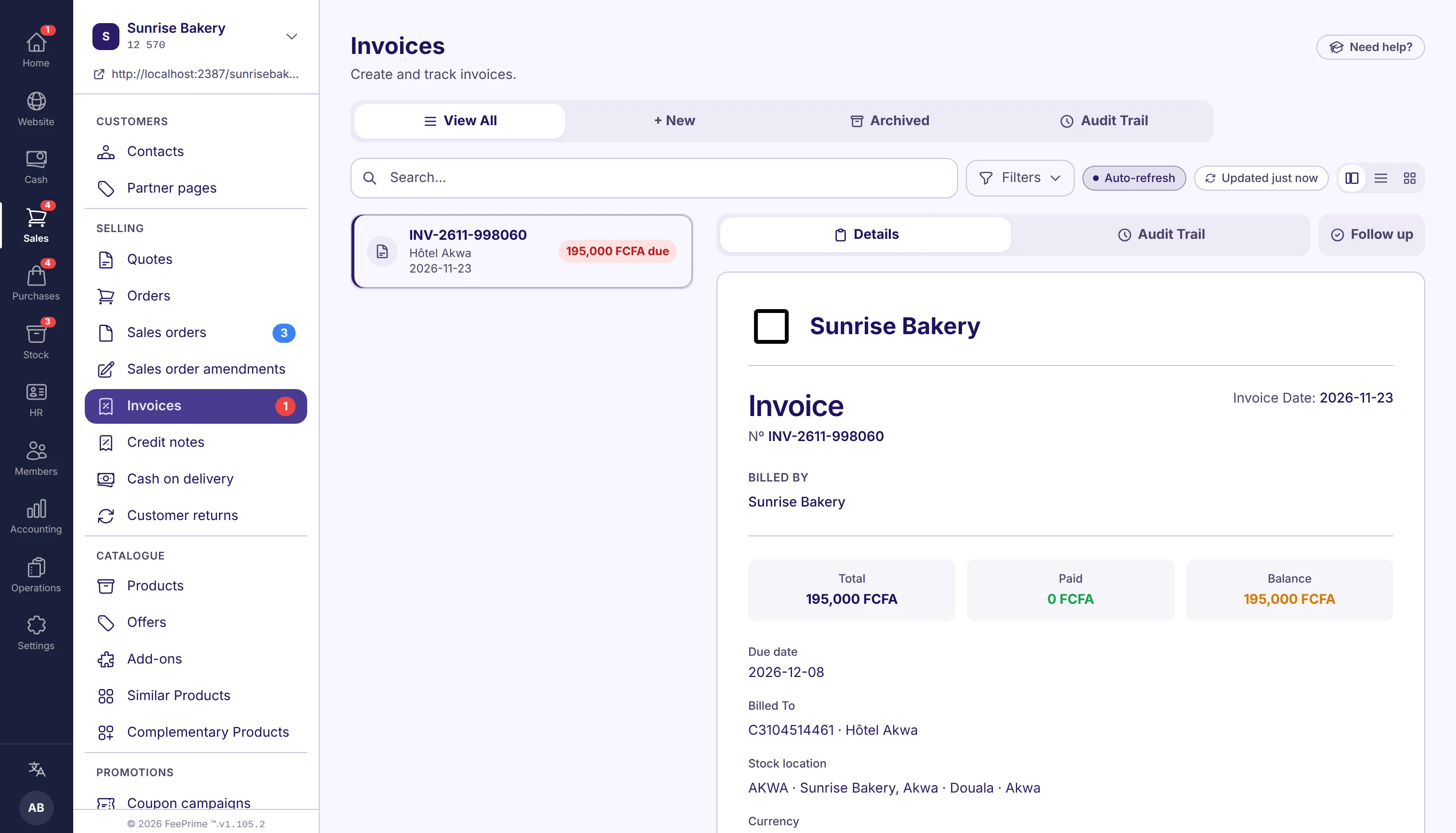 Customer invoices settled automatically via FeePrime Pay with Wallet prompts and standing business QR links.
2. How Pay with Wallet settles an invoice in seconds
Here is what actually happens the moment Grace emails Hôtel Akwa their weekly invoice link:
Sunrise Bakery (Sales / Selling / Invoices)
   │  Sends public invoice link (INV-2026-0418 · 185,000 FCFA)
   ▼
Hôtel Akwa opens the link in any browser → clicks [ Pay with Wallet ]
   │  Enters their Manna Finance wallet number and starts the payment
   ▼
Real-time payment prompt pops up in Hôtel Akwa's wallet
   │  Displays: Sunrise Bakery · 185,000 FCFA (Manna Finance)
   ▼
Hôtel Akwa's payer checks the details and confirms with their PIN
   │
   ├──► Instant FCFA credit in Digital Wallets / Our Wallet / Business Wallet Balances
   └──► Invoice flips to PAID + OHADA entry posted (clears customer receivable 4111)
Notice three things that keep both sides calm:
- Real money labels, never confusing codes. Every prompt, confirmation screen, and balance row shows FCFA alongside Manna Finance — never a raw internal token code.
- No FeePrime login needed to view the invoice. Hôtel Akwa opens the public link straight from their email or WhatsApp, sees only their own invoice details (never Sunrise Bakery’s internal notes or warehouse links), and triggers the prompt to their wallet.
- Instant visibility for Amina and Grace. The second Hôtel Akwa enters their PIN, 185,000 FCFA appears under Digital Wallets / Our Wallet / Business Wallet Balances, and Amina can pull a dated record anytime under Digital Wallets / Our Wallet / Business Wallet Statements.
If Hôtel Akwa pays from a Business Wallet with Spending Controls enabled (covered in Lesson 8), their Payer starts the transfer and their Approver sees Sunrise Bakery’s name and the exact FCFA amount on the approval screen before releasing the funds.
3. Cancelling, re-prompting, and preventing duplicate charges
Real shops run on busy desks and uneven 3G connections. What happens when something goes sideways halfway through an invoice payment?
- Wrong wallet number or distracted buyer? The person who started the payment prompt can click Cancel right on the invoice widget and immediately request a fresh payment prompt to the correct wallet number. You do not need to void or re-issue the invoice.
- One payer cannot cancel another person’s payment. If two staff members at Hôtel Akwa open the same public invoice link at the same time, only the person who initiated the active prompt is allowed to cancel it. Nobody else viewing the link can disrupt a payment in flight.
- No double-charge panic on slow connections. Every settled wallet payment carries a unique ledger stamp tied directly to that invoice. If the phone screen freezes right after the buyer types their PIN — or even if a network blip interrupts the browser — FeePrime will never charge Hôtel Akwa twice, and its background bookkeeping guard ensures the invoice and OHADA journal entry still close automatically.
Common mistake: asking a customer to “try paying again” before checking your wallet balance. If a customer says their screen froze right after entering their PIN, check Digital Wallets / Our Wallet / Business Wallet Balances or refresh the invoice first. Wait until you confirm the prompt was cancelled or refused before sending a fresh one.
4. Three guardrails: Accepted Issuers, Tier Limits, and Credit Notes
Set these rules once so revenue never gets stuck at the counter or in the ledger:
- Turn on your Accepted Issuers first. Sunrise Bakery can only receive Manna Finance FCFA when Manna Finance is active under Digital Wallets / Our Wallet / Accepted Issuers. If a customer opens your invoice and does not see Manna Finance available, check that list first.
- Watch your business wallet receiving tier. Every wallet tier has a maximum transaction and balance limit. If Hôtel Akwa tries to pay a 1,500,000 FCFA conference catering invoice that exceeds Sunrise Bakery’s current tier, FeePrime refuses the payment up front on the form and names the limit clearly — the hotel’s money is never stuck in limbo. Because Sunrise Bakery is a verified business, Amina can request a higher tier directly from Manna Finance whenever invoice sizes grow.
- Never try to archive or overwrite a posted invoice. In FeePrime, posted invoices cannot be archived or edited after the fact — removing one would silently break your OHADA revenue and receivable books while leaving stock movements behind. If Hôtel Akwa paid 185,000 FCFA this morning and returned one damaged tray of pastries worth 25,000 FCFA, issue a Credit Note under Sales / Selling / Credit Notes to reverse the 25,000 FCFA and its 19.25% TVA properly, then send the refund from Digital Wallets / Our Wallet / Wallet Payments.
5. One small counter vs corporate invoicing — what you actually need
- Running a single bakery counter with walk-in buyers? Print your standing Business Receive QR with the amount left blank and tape it next to the till. Customers scan, type their total in FCFA, and confirm with their PIN. You do not need to send invoices for every loaf of bread.
- Billing hotels, restaurants, or corporate clients on credit? Make sure Manna Finance is enabled under Accepted Issuers, keep your business wallet tier high enough for your biggest monthly invoice, and send the public FeePrime Invoice link every time so Pay with Wallet closes your receivables automatically.
Try it
Practice the full flow on staging.feeprime.com — a practice copy of FeePrime, kept apart from the real thing — in five minutes:
- Open Digital Wallets / Our Wallet / Accepted Issuers and verify that your test issuer (such as Manna Finance in FCFA) is turned on for your business.
- Open Sales / Selling / Invoices, create a practice invoice for Hôtel Akwa (for example, 400 croissants at 185,000 FCFA), and open its public invoice link.
- Click Pay with Wallet, start a payment prompt to a practice wallet number, then test cancelling that unconfirmed prompt and launching a fresh one.
- Confirm the fresh prompt with the wallet PIN, then check Digital Wallets / Our Wallet / Business Wallet Balances and Digital Wallets / Our Wallet / Business Wallet Statements to confirm the instant FCFA credit and automatic Paid status on the invoice.
- Switch to your business via the top Account Switcher in the Wallet Portal and generate both a blank-amount counter QR and a pre-filled Pay Link for a 35,000 FCFA order.
Once you see an invoice flip to Paid the same second the buyer enters their PIN, you will never go back to matching WhatsApp screenshots by hand.