
Managing Farmers and bulk-importing Cooperative registries (CSV / Excel)
Before you start, sign in and open Traceability / Farmers.
Can’t find it? It may be turned off for your business, or your account may not be allowed to open it. Ask the person who set up your FeePrime. They can fix both.
Two weeks before the main cocoa campaign opens in central Cameroon, Jean Mvondo sends an email from SCOOP Cacaoculteurs de la Lekié in Obala to Elise Njoya, Traceability Manager at Alleluia Cocoa in Douala. Attached is a spreadsheet holding 1,240 smallholder growers across Obala and Monatélé — names, villages, phone numbers, cooperative register codes, and national IDs.
If Elise’s team types 1,240 farmers into the system by hand, they will lose a full week and introduce dozens of spelling mistakes. Worse, one mistyped name creates duplicate farmer profiles — splitting a grower’s mapped plots across two records so their cocoa looks untraceable when it is time to file an EU TRACES NT Due Diligence Statement.
FeePrime solves this in two ways: approved cooperatives keep their own growers up to date through the portal, and any staff member with permission can load hundreds or thousands of farmers in minutes using Import farmers with automatic CSV/Excel column matching.
1. Where cooperative farmers live: Traceability / Farmers vs Portal / Farms / Portal Farmers
In Lesson 2, you saw how Alleluia Cocoa approves partner cooperatives on its Supply-Chain Portal before they can submit live records. Once SCOOP Cacaoculteurs de la Lekié is approved, Jean Mvondo does not have to wait in a Pending queue every time he adds a grower.
Why? Pushing 4,000 farmers through manual staff approval creates an operational bottleneck that stops a cooperative from keeping its register current. The real EUDR compliance gate is the farm plot evidence and deforestation verdict (which you will map and review in Lesson 4) — not typing a farmer’s name. Every farmer Jean creates or edits still leaves a full audit trail.
Here is how both entry paths feed the same clean registry:
  Path A — Cooperative self-service          Path B — Bulk spreadsheet onboarding
  ─────────────────────────────────          ────────────────────────────────────
  Jean signs in to Alleluia Cocoa's          Elise or Jean opens
  Supply-Chain Portal                        Traceability / Farmers -> Import farmers
            │                                          │
            ▼                                          ▼
  Portal / Farms / Portal Farmers            Upload CSV / Excel -> Check matched
  (cooperative-scoped: Jean sees             columns -> Preview rows -> Import
   only Lekié's growers)                               │
            │                                          │
            └────────────────────┬─────────────────────┘
                                 ▼
                      Traceability / Farmers
                 (Alleluia Cocoa's live registry)
                                 │
                                 ▼
                 Farmer profile -> PLOTS panel -> + Add plot
                                 │
                                 ▼
             Plot-linked intake (Lesson 5) -> EUDR GeoJSON (Lesson 7)
- Portal / Farms / Portal Farmers lets exporter staff review what partner cooperatives have filed through the portal, cleanly separated from internal edits. Each cooperative only ever sees its own growers.
- Traceability / Farmers is the full, live directory that downstream buying clerks, plot mappers, and traceability reports pick from. Every farmer added by an approved cooperative mirrors here automatically.
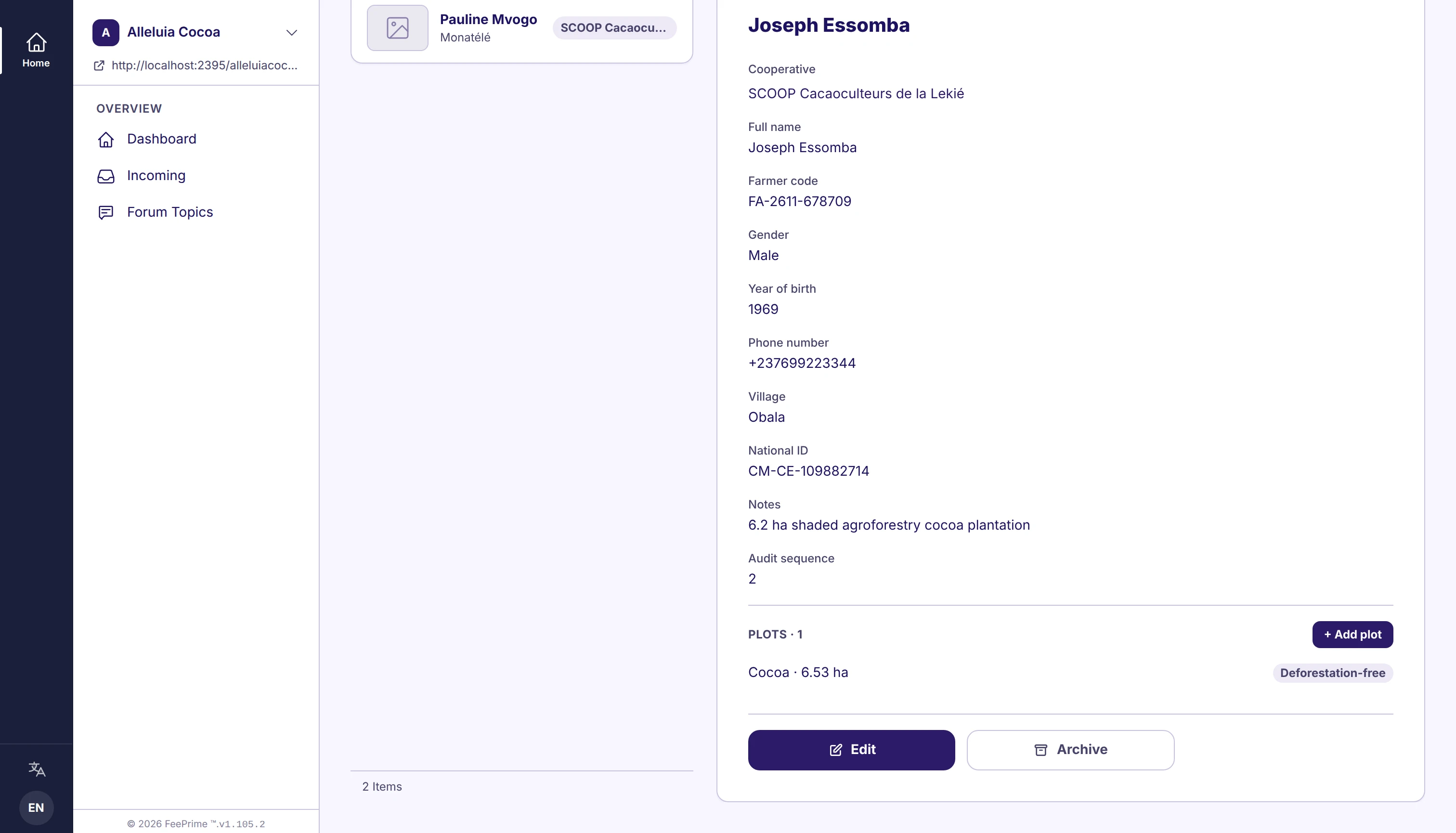 Farmers registry showing Joseph Essomba under SCOOP Cacaoculteurs de la Lekié with linked Plots panel, + Add plot shortcut, and bulk CSV/Excel Import farmers.
2. Reading a farmer profile — Joseph Essomba and Pauline Mvogo
Open Traceability / Farmers and click a grower such as Joseph Essomba (Obala) or Pauline Mvogo (Monatélé). Every farmer record holds the same practical fields so field officers in the bush and compliance leads in Douala speak the same language.
What every small cooperative needs on day one:
- Full name (
full_name) — Use the grower’s real name in consistent order (e.g., Joseph Essomba, not ESSOMBA J.) so buying clerks find them in two seconds. - Cooperative (
cooperative) — Automatically stamped when Jean adds a grower through his cooperative portal. When Elise’s staff add a farmer directly in Traceability / Farmers, they pick SCOOP Cacaoculteurs de la Lekié explicitly. - Village & City (
village,city) — Grounding each farmer in Obala or Monatélé prevents confusion when two growers share a common family name. - Phone number (
phone_number) — Essential for harvest coordination, payment follow-up, and field verification visits.
Useful fields for larger cooperatives and exporter audits:
- Farmer code (
farmer_code) — Store the cooperative’s existing register number (such asLEK-0142). If a field officer creates a farmer offline on patchy 3G in Obala and leaves this blank, FeePrime mints a reference right on the device so the code displayed in the field stays the same once it syncs. - National ID (
national_id), Gender (gender), Year of birth (year_of_birth), Photo (photo), and Notes (notes) — Helpful for sustainability certifications, cooperative payouts, and buyer audits. Small cooperatives just getting EUDR-ready can leave these empty and fill them in over time; nothing breaks.
3. Working from the linked PLOTS panel and + Add plot
A farmer record is only half the EUDR picture — the other half is the land they farm. Instead of forcing field officers to jump between two menus and risk picking the wrong grower from a long dropdown, every Farmer detail view displays a live PLOTS panel directly on the profile.
- Open Joseph Essomba, and his
PLOTSpanel shows his 6.53 ha cocoa farm in Obala (which requires a walked, closed polygon because it is 4 hectares or larger). - Open Pauline Mvogo, and her
PLOTSpanel shows her 2.4 ha cocoa plot in Monatélé (under 4 hectares, eligible for a single GPS pin). - Need to map a grower’s second parcel during a field visit? Click
+ Add plotright inside theirPLOTSpanel. FeePrime opens the plot form already attached to that exact farmer — eliminating misassigned plots before they happen.
We will walk through GPS pins, walked polygons, and deforestation verdicts in full detail in Lesson 4.
4. Bulk-importing a cooperative registry with Import farmers (CSV / Excel)
When onboarding a full cooperative like SCOOP Cacaoculteurs de la Lekié (500 to 4,000 growers), skip manual typing and use bulk import.
- Clean the spreadsheet first (2 minutes that save hours). Put one farmer per row with a single header row at the top (for example:
Full Name,Farmer Code,Phone,Village,City,National ID,Cooperative). Remove merged title banners, blank summary rows, and total lines at the bottom. - Open Import farmers. From Traceability / Farmers, click
Import farmers(or go directly to/farmers/import) and upload your.csvor Excel (.xlsx) file. - Verify the matched column for every field. FeePrime reads your headers and matches columns automatically — full name, cooperative, farmer code, phone, village, city, national ID, and more. Check the exact spreadsheet column shown beside each FeePrime field. If your Excel sheet called the phone column
TelorContactand FeePrime left it unmatched or paired it with the wrong field, switch the dropdown to the right column before moving on. - Inspect the row preview before committing. Scroll through the preview table and check familiar names like Joseph Essomba and Pauline Mvogo. Confirm phone numbers are not sitting in
national_id, villages are invillage, and every grower is linked to SCOOP Cacaoculteurs de la Lekié. - Run the import and spot-check. Click Import. Once finished, search for two or three imported growers in Traceability / Farmers and open one profile to confirm their cooperative link and
PLOTSpanel look clean.
5. Common mistakes that break traceability registries
- Search before you add. Before creating a farmer manually, search their surname or phone number in Traceability / Farmers. Creating both Joseph Essomba and Essomba Joseph splits his mapped plots from his wet-cocoa deliveries — a silent failure that only surfaces when an export batch refuses to trace back.
- Archive, never delete — and never rename an old farmer for someone new. If Pauline Mvogo retires and her nephew takes over her cooperative membership, never overwrite her name with his. Historical goods receipts, production runs, and past EUDR GeoJSON filings still point to Pauline’s record. Archive Pauline Mvogo and create a fresh farmer record for her nephew.
- Never click Import without checking the matched columns and row preview. One shifted column in a 1,500-row Excel upload creates 1,500 messy records you will have to clean up by hand.
- Never expect unapproved cooperatives to upload live farmers. Make sure the cooperative’s onboarding request is approved first (Lesson 2); once approved, their coordinator can maintain their own list cleanly.
Running broader warehouse grading, buying stations, and sales shipping alongside EUDR traceability? See our companion course, FeePrime for an agricultural business.
Try it
Open staging.feeprime.com — a practice copy of FeePrime, kept apart from the real thing — and complete these five quick checks:
- Sign in and open Traceability / Farmers from the sidebar.
- Open an existing farmer profile (or create a practice grower named Pauline Mvogo in Monatélé) and scroll down to inspect the live
PLOTSpanel. - Click
+ Add plotinside thePLOTSpanel to see how the new plot form automatically links back to that farmer (you can cancel without saving for now). - Create a tiny 3-row CSV on your computer with columns
Full Name, Village, Phone, National ID, clickImport farmers, and upload it. - Check the matched column badge beside each FeePrime field, inspect the row preview, complete the import, and search for one of your new farmers in Traceability / Farmers.
Five minutes on staging now will save your team days of cleanup once the cocoa harvest peaks.