
Multi-stage batch lineage through Production Runs
Before you start, sign in and open Inventory / Production / Production Runs.
Can’t find it? It may be turned off for your business, or your account may not be allowed to open it. Ask the person who set up your FeePrime. They can fix both.
Photo: Carles Rabada on Unsplash
In Lesson 5, Alleluia Cocoa received 500 kg of wet cocoa beans from SCOOP Cacaoculteurs de la Lekié into lot COC-EUDR-9404, tagged with Joseph Essomba’s 6.53 ha polygon in Obala and Pauline Mvogo’s 2.4 ha plot in Monatélé. Those wet beans cannot be stuffed into an export container bound for Antwerp. They must go through six days of wooden-box fermentation, sun-drying on raised tables, winnowing, and grading—shrinking from 500 kg of wet cocoa down to 200 kg of Grade I dried export beans.
This processing step is where most cocoa exporters accidentally destroy EUDR compliance. If a storekeeper writes off 500 kg of wet cocoa using a stock count and types 200 kg of dry cocoa in as a new manual receipt, the link to Joseph’s and Pauline’s farms snaps immediately. When Elise Njoya runs a traceability report on the dry export batch EXP-EUDR-9404, FeePrime finds zero upstream plots—and refuses to fake a GeoJSON filing for EU TRACES NT.
A Production Run solves this cleanly. It records what went into the fermentation boxes, what actually came off the drying tables, and locks parent-child batch lineage between COC-EUDR-9404 and EXP-EUDR-9404 automatically. (For broader store grading, warehousing, and sales shipping outside EUDR lineage, see FeePrime for an agricultural business.)
1. Set up your processing site in Business Locations
Before you can log a single batch, FeePrime needs to know which of your sites actually transforms goods. Open Settings / Business / Business Locations and check your fermentation shed or Douala processing plant.
Only locations marked as transforming goods appear in the Business Location picker when you create a Production Run. That site also supplies the location code used on batch references, so an auditor can tell whether a lot was dried at your Obala buying centre or your Douala export warehouse.
- Running one processing shed next to your store? Mark that single location as transforming goods and leave Inventory / Production / Recipes empty for now. Nothing breaks—a one-off yard batch works just fine without a recipe.
- Running multiple fermentation centres and a central Douala grading plant? Mark every physical site that ferments, dries, or re-grades cocoa so multi-stage runs show the exact path from bush shed to port warehouse.
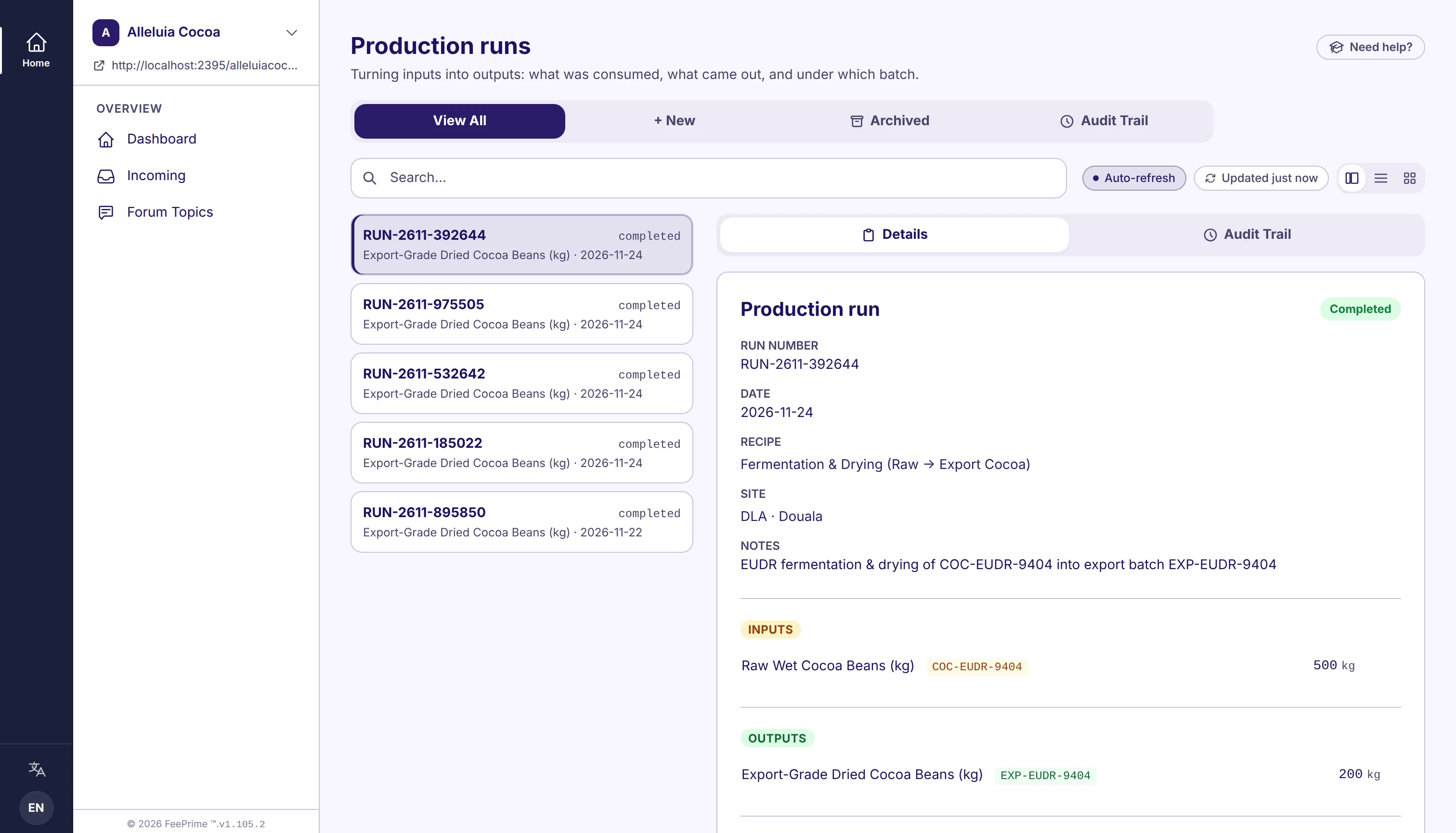 Completed fermentation & drying Production Run displaying both the consumed inbound batch (COC-EUDR-9404) and the finished export lot (EXP-EUDR-9404) side by side.
2. How a Production Run preserves EUDR lineage
Every time cocoa changes form, weight, or batch code, it must pass through a Production Run—not a manual stock adjustment. That applies whether you run one combined fermentation-and-drying step or separate multi-stage runs (fermentation -> drying -> export grading and bulking).
ORIGIN PLOTS (Traceability / Farm Plots)
  [Joseph Essomba · 6.53 ha polygon · Obala]
  [Pauline Mvogo  · 2.40 ha pin     · Monatélé]
                 │
                 ▼  (tagged via source_plot_ids on inbound delivery)
WET INTAKE LOT:  COC-EUDR-9404  (500 kg wet cocoa)
                 │
                 ▼  Inventory / Production / Production Runs
         ┌───────────────────────────────────────────┐
         │  PRODUCTION RUN (Douala Processing Shed)  │
         │  Started   -> Fermentation & sun-drying   │
         │  Completed -> Actual dry yield: 200 kg    │
         └───────────────────────────────────────────┘
                 │
                 ▼  (parent-child batch link preserved)
EXPORT BATCH:    EXP-EUDR-9404  (200 kg Grade I dry cocoa)
                 │
                 ▼  Inventory / Reports / Lot Reports
  Upstream Traceability Report + EU TRACES NT GeoJSON
Because FeePrime links every finished output batch to the exact input lots consumed in the run, Lesson 7’s Lot Report can walk backward across two, three, or four processing stages and pull only the verified farm plots that fed EXP-EUDR-9404.
3. Create the Production Run (even offline at the shed)
A processing house is often a tin-roofed shed with weak 3G. Production Runs support offline sync, so the plant manager can record the batch right beside the weighing scale and let FeePrime sync once signal returns.
Open Inventory / Production / Production Runs and create a new run:
- Run number (optional): Enter your shed batch reference or let FeePrime assign one.
- Run date and Due date: Set the Run date to the day work starts on the yard. Set the Due date to when the finished beans are needed—for example, the Thursday lorry booked for Douala port.
- Business location: Select the transforming site (such as Alleluia Cocoa’s Douala Processing Plant or Obala Drying Yard).
- Recipe (optional): If you configured a standard wet-to-dry cocoa yield under Inventory / Production / Recipes, pick it to prefill the lines. Treat recipe numbers as a starting guide, not a law. Rainy-season cocoa from Lekié holds more moisture than main-crop beans; correcting the quantities to match reality is normal, not an error.
- Lines (Inputs and Outputs):
- Input line: Select wet cocoa and choose exact lot
COC-EUDR-9404for 500 kg. - Output line: Select export-grade dry cocoa with your expected yield (200 kg).
- Input line: Select wet cocoa and choose exact lot
Save the run. At this point, it is planned—no beans have moved in stock yet.
4. Record the real events: Started, Completed, or Cancelled
You cannot edit a Production Run after saving it. That is deliberate. Under EUDR and food-safety audits, a batch record must read as what actually happened on the floor, not what someone quietly typed over two weeks later. Instead of editing, you move the run forward through three clear events:
- Started: Click when the 500 kg of
COC-EUDR-9404is tipped into the fermentation boxes. Nothing moves in stock yet—the beans are still physically on your floor. - Completed: Click only after drying, winnowing, and final weighing are finished. This is where the real numbers arrive:
- Confirm the actual dry weight (200 kg, or 196 kg if rain lowered the yield).
- Enter Output lot reference:
EXP-EUDR-9404. - Enter Output lot expiry (if your buyer requires a shelf-life or re-inspection date).
- Add Completion notes for Quality Control—for example: Moisture 7.2%, bean count 96/100g, Grade I, 6-day box fermentation.
- The moment you record Completed, FeePrime deducts 500 kg from
COC-EUDR-9404and books 200 kg intoEXP-EUDR-9404.
- Cancelled: If a planned run never happened (for example, the lot was diverted to another drying yard), record Cancelled with a plain Reason so the gap in run numbers is explained.
5. Verify both INPUTS and OUTPUTS lot badges
Before the Quality Control Lead releases EXP-EUDR-9404 for bagging and port delivery, take 30 seconds to inspect the finished Production Run.
Open the completed run and check the lot chips displayed side by side:
INPUTSlot badge: ShowsCOC-EUDR-9404(500 kg consumed).OUTPUTSbatch badge: ShowsEXP-EUDR-9404(200 kg produced).
If you see both badges cleanly linked, your EUDR chain survived processing intact. Clicking into EXP-EUDR-9404 later from Inventory / Reports / Lot Reports will automatically trace through this run straight back to COC-EUDR-9404, Jean Mvondo’s cooperative delivery, and Joseph’s and Pauline’s verified farm plots.
If a shift accidentally consumed the wrong input lot—or mixed a batch whose plots are still flagged or not_assessed alongside a deforestation_free lot—do not try to hide it. Quarantine the output lot for non-EUDR domestic or regional sale, and document why.
6. Common mistakes that break export compliance
- Never write off wet cocoa and add dry cocoa manually. A stock count or manual goods receipt severs the parent-child link and leaves your export batch with zero traceable plots.
- Never mix unmapped or
flaggedlots into an EUDR export run. One untraceable sack of roadside beans contaminates the entireEXP-EUDR-9404batch and blocks your EU Due Diligence Statement. - Never complete a run with guessed weights before drying finishes. Wait until the dry bags hit the scale so shrinkage and inventory balances stay accurate.
- Never leave Output lot reference blank on an export batch. Clear, consistent batch codes like
EXP-EUDR-9404are what connect your warehouse bags to EU TRACES NT paperwork. - Archive or cancel—never expect to overwrite history. Production Runs are audit records; if a run was created in error before completion, cancel it with a reason and start fresh.
Try it
Practice on staging.feeprime.com—a practice copy of FeePrime, kept apart from the real thing:
- Open Settings / Business / Business Locations and confirm your processing shed is marked as transforming goods.
- Open Inventory / Production / Production Runs and create a new run with today’s Run date, a Due date five days out, and your processing shed as Business location.
- Add wet cocoa lot
COC-EUDR-9404(500 kg) on the input line and export-grade dry cocoa (200 kg) on the output line, then save. - Record the Started event and verify that wet cocoa stock has not yet dropped.
- Record the Completed event with Output lot reference
EXP-EUDR-9404and a brief QC moisture note in Completion notes. - Open the finished run and confirm that both the
INPUTS(COC-EUDR-9404) andOUTPUTS(EXP-EUDR-9404) lot badges appear side by side.
Once those two lot chips sit together on the finished run, your batch is ready for Lesson 7’s one-click EUDR GeoJSON export.