
Curators: Vetting investors and monitoring intro health
Before you start, sign in and open Portals & Marketplaces / Dealroom / Investors (and keep Intros handy right below it).
Can’t find it? It may be turned off for your business, or your account may not be allowed to open it. Ask the person who set up your FeePrime. They can fix both.

Photo: Vitaly Gariev on Unsplash
A curated dealroom lives or dies on two quiet habits: who you let through the door as an investor, and whether founders actually answer when a serious investor knocks.
At Wouri Ventures in Douala, Cédric learned this the hard way in his first quarter. Before moving to FeePrime, an unverified visitor bluffed his way into a WhatsApp investor list, downloaded a founder’s numbers, and turned out to be a local competitor. Two weeks later, Clarisse—founder of KokoFresh, raising 150,000,000 FCFA at Seed stage—missed an email from Dr. Samuel of Mungo Angels for three weeks because it sat buried in spam. By the time she replied, he had already committed his 30,000,000 FCFA cheque elsewhere.
FeePrime separates these two jobs into two clean screens inside Portals & Marketplaces / Dealroom: Investors (where you vet, edit, and maintain your investor roster) and Intros (your read-only radar for seeing whether deal flow is healthy or stalling).
1. Why every investor waits for a human check
When a new investor applies through your public portal, FeePrime does not let them start requesting introductions right away. Every self-registered investor profile lands in Portals & Marketplaces / Dealroom / Investors waiting for staff approval.
That pause is intentional. Once you approve an investor, they can browse your dealroom teasers, send intro requests, see unlocked founder names once accepted, and enter private deal chats. Letting strangers skip that check destroys founder trust overnight.
Never approve an empty or anonymous investor profile. If someone signs up with a throwaway address, leaves their mandate blank, and writes “Interested in good businesses” in the About box, hold the application. Send a quick message or book a 10-minute call before you flip them to approved.
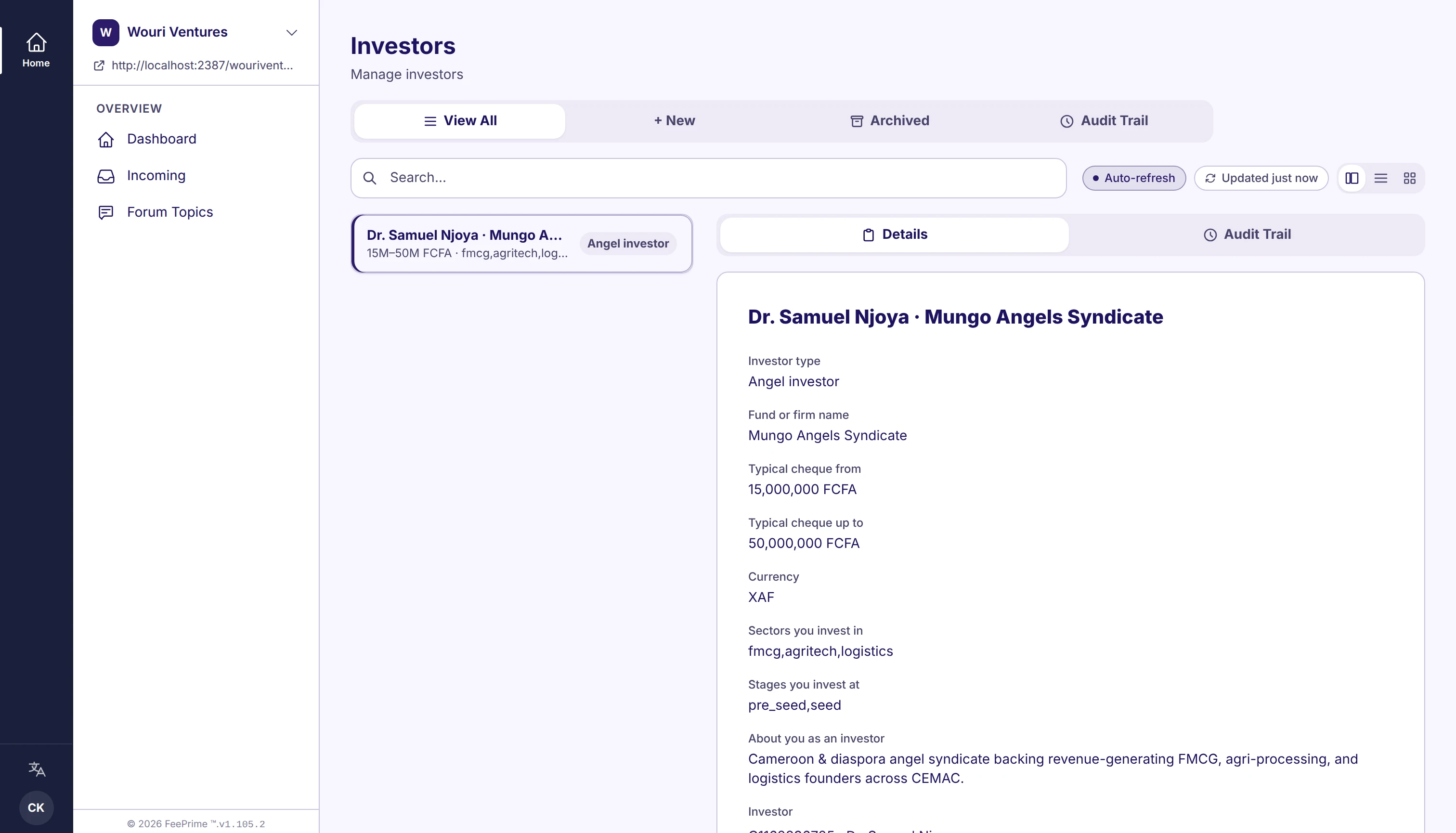 Vetted investor directory under Portal Deal Investors showing Mungo Angels ticket range and target sectors.
2. Reading and completing an investor profile
Open a pending record in Portals & Marketplaces / Dealroom / Investors—say, Dr. Samuel’s application for Mungo Angels. Here is what each field tells you and why it matters:
- Investor Type: Choose one of four roles—Angel, VC Fund, Corporate, or Family Office. Founders read this first because an angel syndicate like Mungo Angels can decide in three weeks, while a corporate investor may take four months.
- Fund Name: Optional. Dr. Samuel enters Mungo Angels; a solo angel investing personal savings leaves it blank.
- Ticket Min, Ticket Max, and Currency: Dr. Samuel lists
15,000,000to50,000,000inXAF. Always check the currency next to the ticket range. A diaspora angel typing25,000means something completely different inEURthan inXAF, and a wrong currency causes bad founder matches. - Sectors and Stages: Multi-select tags showing what the investor actually backs (for example, FMCG & Agri-Processing at Pre-Seed and Seed). FeePrime matches these tags against newly published pitches to power each investor’s daily pitch digest. Leaving them blank does not block browsing, but the investor stops receiving tailored daily alerts and visits the room less often.
- About: A plain-English summary of their track record, geography, and how they like to work with founders. Encourage specifics over slogans.
- Investor Contact: Links the investor profile to their underlying contact record in FeePrime.
Onboarding busy investors on their behalf
Some of the best capital in Cameroon and the diaspora will never fill out a web form on their own. If a Douala family office principal sends her mandate to Cédric over email, he does not have to chase her to self-register. Because staff can create and edit records in Investors, Cédric creates the profile directly, links her existing contact record in Investor Contact, fills in her ticket range and sectors, and saves.
Archive, never delete
What if an investor finishes deploying their fund, moves abroad, or breaks dealroom confidentiality? Archive their profile instead of trying to wipe it out. Archiving removes them from active deal flow while keeping every past intro record intact for your audit trail.
Running a tight 15-angel Douala club where you already know every member by first name? Focus on Investor Type, Ticket Min/Max, Currency, and a clean two-line About note. Running a larger pan-African dealroom with VCs, diaspora family offices, and corporates? Invest the extra minute to complete Sectors and Stages on every profile so the daily digest does your matching automatically.
3. Monitoring intro health in the read-only audit log
Now open Portals & Marketplaces / Dealroom / Intros. You will notice something immediately: there is no button to create a new intro and no way to edit an existing one.
Intros is a staff read-only audit log (you can search and archive, never create or edit). That is a feature, not a missing button. An introduction is mutual consent between an investor and a founder. If a curator could edit an investor’s message or click Accept on a founder’s behalf, founders would never trust the privacy of the room.
Instead, Cédric uses Intros like a control tower. Each row gives him the full health picture at a glance:
- Intro Number and Status (
requested,accepted,declined,withdrawn, orexpired) - Venture Name (e.g., KokoFresh)
- Investor Name, Investor Type, and Fund Name (e.g., Dr. Samuel · Angel · Mungo Angels)
- Note: The pitch-specific message the investor wrote when asking for the intro
- Decline Reason and Decline Note: Captured whenever a founder turns a request down, helping you spot mismatches in ticket size, sector, or stage
4. The four guardrails FeePrime enforces automatically
You do not need a spreadsheet to police response times or stop persistent investors from badgering founders. FeePrime runs four rules automatically on every introduction:
Vetted Investor requests intro (max 1 open intro per investor + pitch)
        │
        ▼
  [ requested ] ──► Day 7 unanswered ──► Auto reminder to Founder
        │
        ├──► Founder accepts   ──► [ accepted ]  (pitch unlocks + chat opens)
        ├──► Founder declines  ──► [ declined ]  (30-day cooldown starts)
        ├──► Investor cancels  ──► [ withdrawn ] (investor steps back)
        └──► Day 14 unanswered ──► [ expired ]   (expiry notices to both)
Here is how those four guardrails protect Wouri Ventures in daily life:
- One open intro per (investor, pitch): While Dr. Samuel has an active request open with KokoFresh, FeePrime blocks him from firing off a second duplicate request to the same pitch. No accidental double-taps, no inbox flooding.
- Automatic day-7 founder reminder: Suppose Clarisse is on the road in Yaoundé closing a supermarket contract and misses Dr. Samuel’s request. On day 7, FeePrime automatically nudges Clarisse before a serious cheque goes cold.
- Automatic day-14 expiry: If Clarisse still has not answered by day 14, FeePrime flips the intro to expired and notifies both Clarisse and Dr. Samuel. Stale requests never rot in the queue pretending to be active.
- 30-day cooldown after a decline: Suppose a corporate investor with a 5,000,000 FCFA maximum ticket requests KokoFresh, and Clarisse declines with a polite note explaining her 15,000,000 FCFA minimum cheque. FeePrime locks out repeat requests from that investor on KokoFresh for 30 days. Clarisse gets peace from pushy follow-ups, yet the door is not slammed forever if terms change a month later.
Never promise an investor you will override a decline or rewrite their sent note. If Dr. Samuel mistyped his ticket size in an open intro note, tell him to withdraw the request himself from his portal. If a founder declined, respect the 30-day cooldown and coach the investor on better fit.
5. Your 10-minute Monday curator check
Cédric keeps Wouri Ventures sharp with a simple weekly rhythm every Monday morning:
- Clear pending investors in under 48 hours. Good investors lose interest if an application sits untouched for a week.
- Scan
requestedintros older than five days. Before day 14 hits, send a quick friendly call or WhatsApp to any silent founder so good cheques do not expire by accident. - Read
declinedandexpiredpatterns. Three expired intros on one venture usually means the founder paused their raise—check in and pause the pitch if needed. Repeated declines on one investor usually means their ticket range or thesis is misaligned—update their profile together. - Audit Sectors and Stages on active angels. Clean tags keep the daily pitch digest bringing investors back without you lifting a finger.
Try it
Open staging.feeprime.com—a practice copy of FeePrime, kept apart from the real thing—and run this 5-minute drill:
- Sign in and open Portals & Marketplaces / Dealroom / Investors.
- Create a practice investor profile for Dr. Samuel (
Angel, fund nameMungo Angels, ticket15,000,000to50,000,000, currencyXAF), add at least two Sectors and one Stage, and save. - Edit that same profile to add a short two-sentence investment thesis in About, then test the search bar by searching for
Mungo Angels. - Open Portals & Marketplaces / Dealroom / Intros right below it in the sidebar and confirm there is no Create or Edit button—only search, view, and archive.
- Filter or scan the status column to spot how
requested,accepted,declined, andexpiredintros appear with their Intro Number and Decline Reason.
Five minutes a week across these two screens is all it takes to keep your founders protected and your best investors coming back.