
Commissions, counter limits, and closing your drawer with Day Close
Before you start, sign in to your issuer’s Wallet Portal and open Agent / Commissions and Agent / Day Close.
Can’t find the Agent tab? Your personal wallet may still need Tier 2 verification, your Distributor may not have accepted your application yet, or your agent profile may be suspended. Check with your Distributor.

Photo: Yi Sheng Low on Unsplash
It is 6:15 PM at Kiosk Bonapriso in Douala. Alain Fokou has spent the day taking cash deposits from Diane Tchoupo and Sunrise Bakery, paying out cash to Mireille Ndongo and Samuel Ekani, and taking a midday motorbike trip to Wouri Microfinance to buy more float. His drawer is full of bills, his phone is buzzing, and he wants to lock the gate.
This is the exact moment where many busy kiosks lose money without noticing. If you wait until the end of the week to count your cash, a missing 5,000 XAF note turns into a mystery nobody can solve. If you never check your commission breakdown or your counter caps, you either get surprised when a large deposit is blocked or lose track of what your kiosk actually earned.
FeePrime gives you three simple controls inside the Agent tab so you close every day calm and in control: instant commission tracking on Commissions, clear counter limits from your Distributor and Issuer, and a three-minute cash reconciliation on Day Close.
1. How your commissions are split and paid (/wallet/agent/commissions)
Every time you complete a counter cash-in, a counter cash-out, or an assisted sub-account transfer, FeePrime applies the fee schedule published by your Currency Issuer — in Alain’s case, Manna Finance (led by Clarisse Mbarga).
You do not have to chase monthly commission statements or wait for someone to pay you by hand. FeePrime splits every transaction fee automatically in the exact same ledger entry — dividing the fee across the platform, Issuer, Distributor, and Agent shares. Your share lands directly inside your separate Agent wallet the moment the transaction posts.
Open Agent / Commissions (/wallet/agent/commissions) whenever you want to check your earnings. The screen shows three things clearly:
- This month: total commissions credited to your Agent wallet since the start of the month.
- All-time: cumulative commissions earned since your Agent Account Number was activated.
- Line-by-line entries: every individual commission credit tied to the counter operation that generated it, so you can verify any single day.
Keep your Agent wallet separate from personal spending. When Wouri Microfinance accepted Alain’s application, FeePrime issued him a dedicated Agent Account Number distinct from his personal wallet. Your working float and earned commissions stay on that Agent wallet. Never spend directly out of your working float mid-week; transfer your profit cleanly to your personal wallet only after you reconcile.
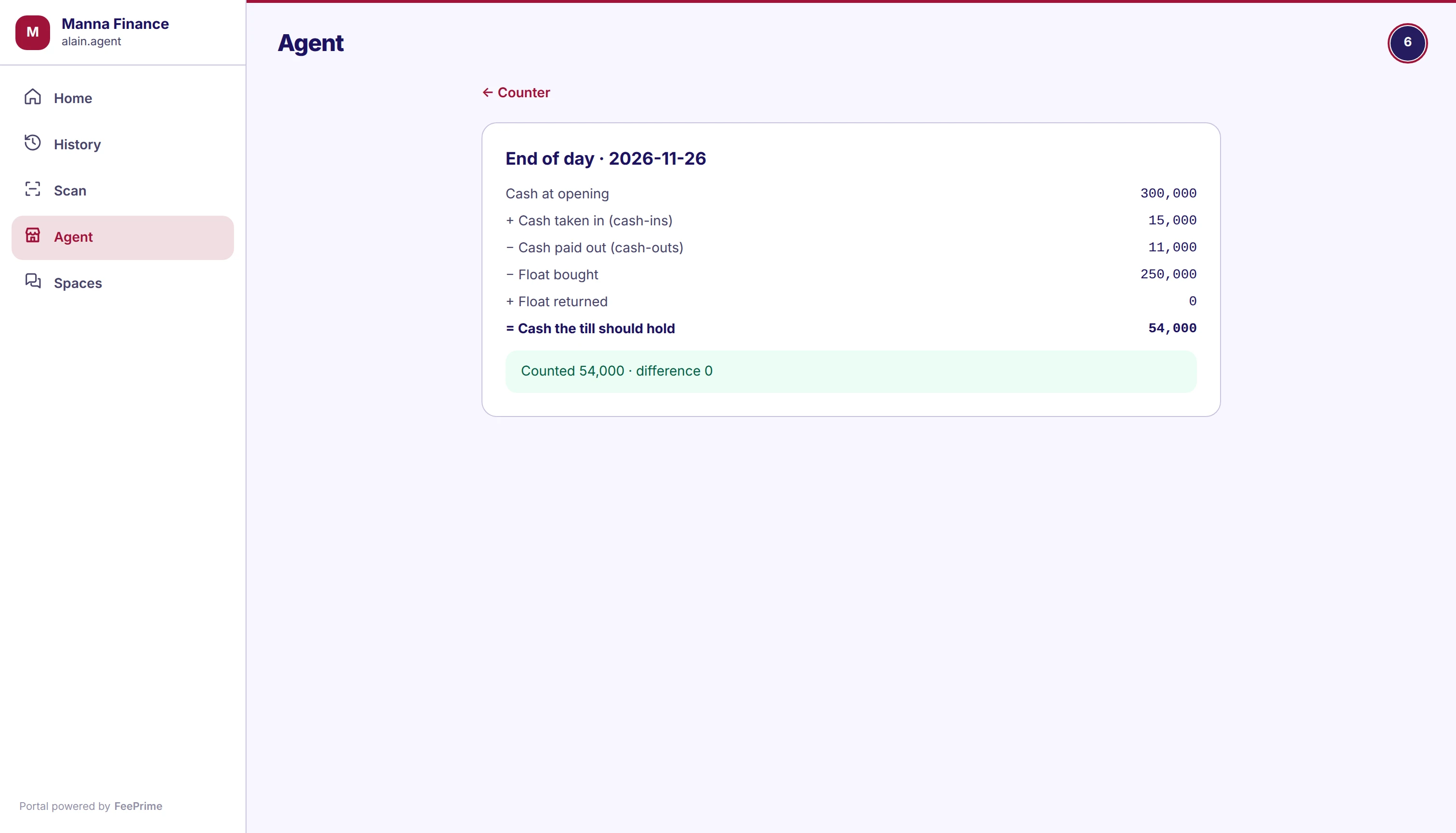 Live Day Close screen reconciling Kiosk Bonapriso’s opening cash, Cash-In, Cash-Out, Float Bought, Expected Cash, and Counted Cash down to 0 FCFA variance.
2. Counter limits: Issuer ceilings vs Distributor caps — and suspension
Two layers of limits protect your kiosk, your customers, and the wider payment network from fraud or cash shortages:
Manna Finance (Currency Issuer — Clarisse Mbarga)
Sets network-wide ceilings across ALL distributors:
  • Max per transaction   • Max daily cash-in   • Max daily cash-out
          │
          ▼   (Distributor caps can be LOWER, never higher)
Wouri Microfinance (Distributor — Ibrahim Bello)
Sets Kiosk Bonapriso's per-agent caps:
  • Per-tx cap   • Daily cash-in cap   • Daily cash-out cap
          │
          ▼
Live check before EVERY counter transaction
Think of Manna Finance’s ceilings as the hard outer fence for the whole network, and Wouri Microfinance’s caps as the specific lane assigned to Kiosk Bonapriso. For example, Manna Finance may allow up to 2,000,000 XAF in daily cash-ins across the network, while Ibrahim Bello starts a newer kiosk at 800,000 XAF per day until it builds a clean track record. FeePrime checks your caps live before every counter operation posts, under a strict per-agent lock, so even back-to-back transactions cannot slip past your daily limit.
What if Sunrise Bakery walks in with 950,000 XAF when your daily cash-in cap is 800,000 XAF? Never split one large transaction into multiple smaller ones to dodge a cap. Splitting is a classic compliance red flag that can get your kiosk suspended. Instead, decline the amount above your cap politely, direct the merchant to a higher-cap agent or Distributor branch for that day, and ask your Distributor to review your caps once you have clean Day Close history.
What triggers a suspension?
The Currency Issuer (Manna Finance) holds network-wide authority to suspend an agent across all distributors — and to reinstate them once an issue is resolved. While suspended, counter operations stop immediately. Common causes include:
- Paying a smartphone cash-out from a screenshot instead of matching the live 4-digit Counter Code on your own Agent screen.
- Paying a business cash-out without a valid 6-digit collection code generated inside the merchant’s business workspace.
- Breaking KYC boundaries — remember, you can capture assisted Tier 2 KYC for walk-in customers at your counter, but you can never verify your own KYC or verify a customer you signed up yourself.
- Repeatedly splitting transactions to bypass per-transaction or daily caps.
Follow the counter rules from Lessons 4 and 5 and your kiosk stays in good standing with both your Distributor and Issuer.
3. Why your cash drawer moves opposite to your digital float
Before you touch Day Close, lock in one simple rule: physical cash in your drawer always moves in the exact opposite direction of your digital float.
Counter Operation       Digital Float (Agent Wallet)    Physical Cash (Drawer)
────────────────────    ────────────────────────────    ──────────────────────
Customer Cash-In        GOES DOWN  (-)                  GOES UP    (+)
Customer Cash-Out       GOES UP    (+)                  GOES DOWN  (-)
Buy Float               GOES UP    (+)                  GOES DOWN  (-)
Return Float            GOES DOWN  (-)                  GOES UP    (+)

DAY CLOSE FORMULA:
Expected Cash = Opening Cash + Cash-In - Cash-Out - Float Bought + Float Returned
Let’s walk through a real Tuesday at Kiosk Bonapriso:
- Opening Cash in Alain’s drawer at 8:00 AM:
150,000 XAF - Cash-In (Diane Tchoupo deposits
70,000 XAF; Sunrise Bakery deposits350,000 XAF):+420,000 XAF - Cash-Out (Mireille Ndongo withdraws
110,000 XAF; Samuel Ekani withdraws150,000 XAF):-260,000 XAF - Float Bought (Alain hands
200,000 XAFcash to Wouri Microfinance for digital float):-200,000 XAF - Float Returned:
+0 XAF
Now plug those numbers into the Day Close formula:
150,000 + 420,000 - 260,000 - 200,000 + 0 = 110,000 XAF Expected Cash
On a heavy cash-out day, the opposite happens with float: if Alain returns 100,000 XAF of excess digital float to Wouri Microfinance and brings physical bills back to the kiosk, Float Returned adds +100,000 XAF to his Expected Cash.
4. Closing your drawer every evening with Day Close (/wallet/agent/day)
Make Day Close the last three minutes of every shift before you pull the shutter down:
- Sync your offline queue first. If mobile data dropped earlier while serving assisted feature-phone customers like Samuel Ekani or Mireille Ndongo, make sure your offline queue has synced online before you close the drawer. Otherwise those cash-ins and cash-outs will not appear in today’s Expected Cash.
- Open Agent / Day Close (
/wallet/agent/day). On your first Day Close, type your morning Opening Cash manually. On every day after that, FeePrime automatically carries forward yesterday’s Counted Cash as today’s Opening Cash — no guesswork and no notebook math. - Count the actual bills and coins in your drawer. Count carefully before comparing with the screen.
- Enter Counted Cash and optional Notes. FeePrime immediately calculates the Difference (
Counted Cash - Expected Cash). If the drawer is short or over — even by 1,000 XAF — enter the true physical count and write a brief note (for example: “Short 2,000 XAF — torn bill set aside for Wouri Microfinance” or “Short 5,000 XAF — rechecking afternoon cash-out receipts”). - Submit Day Close. FeePrime records one Day Close entry per day and locks your Counted Cash as tomorrow morning’s Opening Cash.
Four costly mistakes to avoid
- Never type Expected Cash into Counted Cash just to force a zero difference. If you are missing 5,000 XAF tonight and pretend the drawer is full, tomorrow’s Opening Cash starts 5,000 XAF too high — and the gap compounds until nobody trusts the books.
- Never take personal cash out of the counter drawer. Buying lunch, topping up personal airtime, or lending a cousin 5,000 XAF from the till guarantees a shortfall at 6:00 PM.
- Never skip Day Close on a quiet day. Even if you only served two customers, close the drawer. Skipping days hides exactly when a variance happened.
- Never forget pending float requests. If you submitted a Buy Float or Return Float request that Wouri Microfinance has not approved yet, remember it only affects today’s ledger once approved (or cancel it if the trip did not happen).
Running a solo kiosk vs a busier multi-shift counter? If you operate alone like Alain at Kiosk Bonapriso, one honest Day Close every evening plus a weekly review of Agent / Commissions keeps everything spotless. If your shop has two cashiers or heavy merchant deposits from businesses like Sunrise Bakery, do a quick midday cash check after large float trips and always count the drawer before handing the shift over.
Want to see the full Wallet ecosystem behind your Agent portal? Explore Digital Wallets, Vaults & Transfers to see how Issuers like Manna Finance mint supply, how Distributors like Wouri Microfinance manage treasury, and how merchants like Sunrise Bakery run Business Vaults and Payroll.
Try it
Open staging.feeprime.com (a practice copy of FeePrime, kept apart from the real thing) and finish this 5-minute drill:
- Sign in to the practice Wallet Portal with a demo Agent account and open the Agent tab.
- Open Commissions (
/wallet/agent/commissions) and inspect your This month total, All-time total, and at least two line-by-line commission entries. - Run one small practice Cash-In and one small practice Cash-Out on the Agent counter, then revisit Commissions to confirm your commission share posted straight to your Agent wallet.
- Open Day Close (
/wallet/agent/day) and check how Opening Cash, Cash-In, Cash-Out, Float Bought, and Float Returned add up to Expected Cash. - Enter a practice Counted Cash that is 1,000 XAF below Expected Cash, add a short note explaining the difference, submit Day Close, and confirm that FeePrime records the exact
-1,000Difference cleanly.
Keep this three-minute habit every evening and you will always know — to the last franc — what belongs in your drawer and what your kiosk earned.