
Managing your Float: buying float from your Distributor and returning excess float
Before you start, sign in to your issuer’s Wallet Portal and open Agent / Float.
Can’t find it? Your agent application may still be awaiting approval from your Distributor, or your account may not yet be verified to Tier 2. Check your application status or ask your Distributor for help.

Photo: Muhammad-Taha Ibrahim on Unsplash
It is 11:30 AM on a Tuesday at Kiosk Bonapriso in Douala. Sunrise Bakery just deposited 350,000 XAF in morning takings, followed by two hardware shops down the road. Alain Fokou’s cash box is stuffed with crisp notes — and his digital float is down to 12,000 XAF. When the next shopkeeper walks up to deposit 100,000 XAF, Alain has to shake his head and send her across the street.
Three days later, on payday Friday, the exact opposite happens. Diane Tchoupo, Samuel Ekani, and a queue of commuters arrive to withdraw cash. By 2:00 PM Alain is sitting on 900,000 XAF of digital float — and only 15,000 XAF in banknotes. Again, he has to turn paying customers away.
Every time you say “No float” or “No cash,” you lose a commission and teach your regulars to try another kiosk next time. Managing your float is the habit that keeps both pockets ready all day.
1. Two pockets that always move in opposite directions
When Wouri Microfinance accepted Alain’s agent application on Manna Finance’s Wallet Portal, FeePrime created a separate Agent Account Number for his kiosk. Your float, counter transactions, and commissions live strictly inside that Agent account — never mixed with your personal household wallet.
At the counter, you are really managing two pockets: your Digital Float (electronic balance in your Agent account) and your Physical Cash (banknotes locked in your drawer). Every counter operation pushes those two pockets in opposite directions:
                        DIGITAL FLOAT          PHYSICAL CASH
                     (Agent Account)          (Counter Drawer)
  ------------------------------------------------------------
  Customer Cash-In   |  GOES DOWN   (-)    |    GOES UP    (+)
  Customer Cash-Out  |  GOES UP     (+)    |    GOES DOWN  (-)
  ------------------------------------------------------------
  Buy Float          |  GOES UP     (+)    |    GOES DOWN  (-)
  Return Float       |  GOES DOWN   (-)    |    GOES UP    (+)
Notice the pattern. A customer Cash-In fills your drawer with banknotes and spends your digital float. A customer Cash-Out fills your digital float and empties your drawer of banknotes. Your total working capital stays intact (and grows with every commission), while the split between digital and paper constantly shifts.
Never mix personal spending money or unrelated shop till cash into your Agent drawer. Keep your Agent cash box dedicated to wallet operations so your count matches FeePrime to the last franc at closing time.
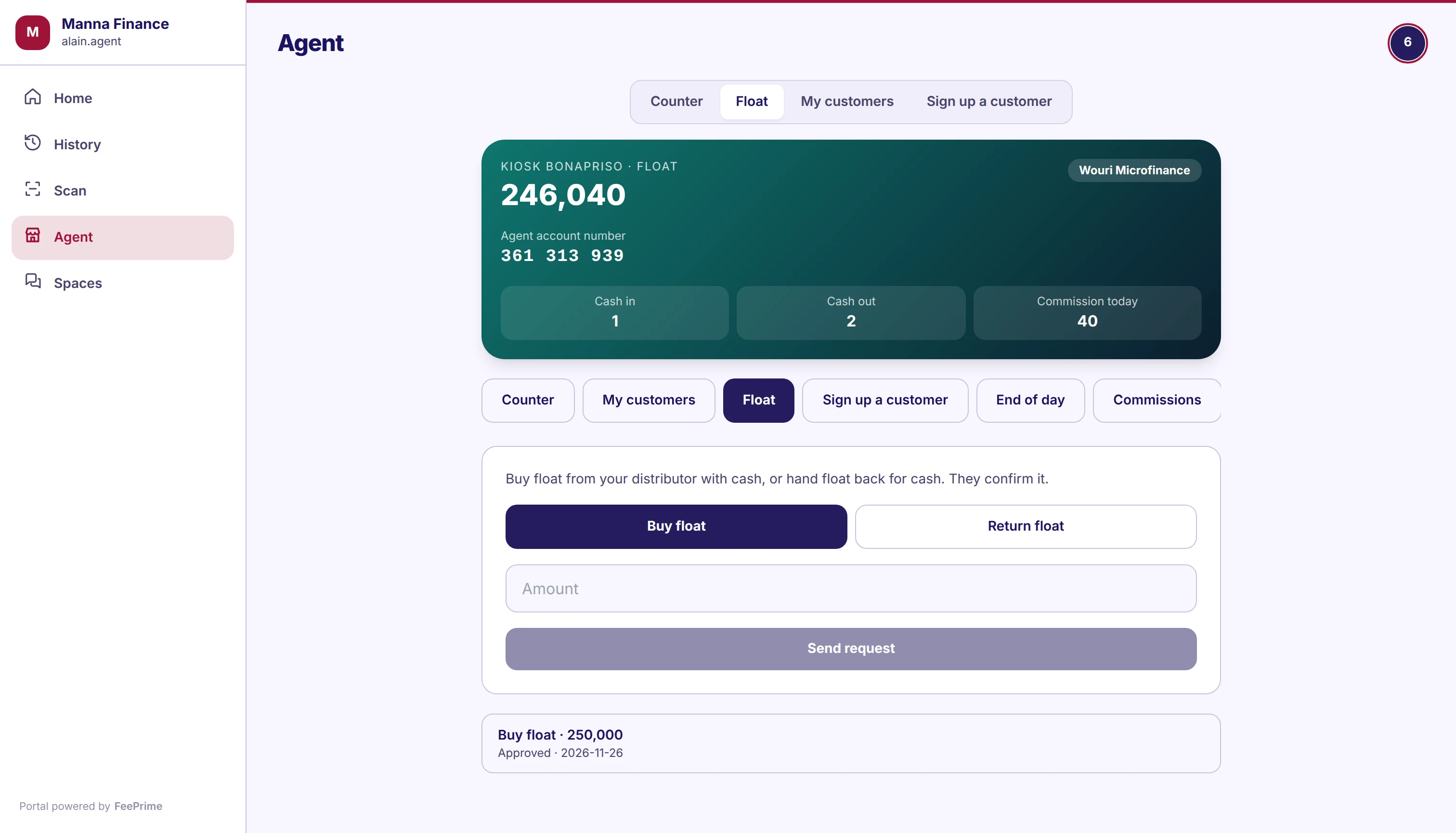 Agent Float management screen showing Kiosk Bonapriso’s live FCFA float balance, Buy / Return float controls under Wouri Microfinance, and approved float request history.
2. Keeping a healthy 50⁄50 float-to-cash ratio
Most reliable kiosks open the morning close to a 50⁄50 split — half your working capital in digital float, half in physical banknotes. If Alain runs Kiosk Bonapriso with 1,000,000 XAF of total working capital, starting the day with roughly 500,000 XAF in digital float and 500,000 XAF in drawer cash lets him handle both deposits and withdrawals without scrambling before lunch.
Adjust slightly for your street’s rhythm:
- Small solo kiosk on a quiet street: Start 50⁄50 and check your balance once at midday. If either pocket drops below 25% of your working capital, schedule a top-up or return before the evening rush.
- Busy market stall or multi-cashier shop: Expect waves. Mornings near merchants like Sunrise Bakery are usually Cash-In heavy (start closer to 60% digital float / 40% cash). Paydays and Saturday afternoons are Cash-Out heavy (hold more banknotes in the drawer and arrange a scheduled midday float run with your Distributor).
Do not wait until a pocket hits zero to act. Distributor approval and physical cash handover take time; request early while you can still serve walk-in customers.
3. Buying float when heavy Cash-Ins drain your digital balance
When morning deposits fill your drawer and shrink your digital float, you convert excess banknotes back into digital float through your Distributor (for Alain, Wouri Microfinance, led by Ibrahim Bello).
- Count the exact physical banknotes you want to convert — for example, 300,000 XAF.
- Open Agent / Float in your Wallet Portal and choose Buy Float.
- Enter 300,000 XAF and add a short note if helpful (such as “Midday top-up — Kiosk Bonapriso”).
- Submit the request. Its status stays Pending while Wouri Microfinance reviews it.
- Hand the 300,000 XAF in cash to Wouri Microfinance’s branch desk or authorised collector according to your Distributor agreement. Once their staff approve the request in Digital Wallets / Distribution / Distributor Operations, 300,000 XAF in digital float moves immediately from Wouri Microfinance into your Agent account.
Never hand over physical cash without a matching Buy Float request open on your screen — and never assume float is usable until the status changes from Pending to Approved.
4. Returning excess float when Cash-Outs empty your cash drawer
After a wave of withdrawals — say Mireille Ndongo, Samuel Ekani, and a row of payday customers cashing out — your digital float swells while your cash box runs dry. That is when you Return Float to get banknotes back.
- Check how much digital float you want to turn back into paper cash — for example, 400,000 XAF.
- Open Agent / Float and choose Return Float.
- Enter 400,000 XAF, add an optional note, and submit the request.
- Visit Wouri Microfinance (or meet their cash runner). Their staff approve the Return Float request in Digital Wallets / Distribution / Distributor Operations, moving 400,000 XAF of digital float back to their treasury and handing you 400,000 XAF in physical notes for your drawer.
Always count the banknotes in front of your Distributor before walking away, and check that your Agent screen shows the Return Float request as Approved.
5. Fixing a mistake: cancelling a pending float request
Typos happen in a busy shop. Suppose Alain counts 300,000 XAF for his morning top-up, types 350,000 XAF by mistake, and taps submit — or accidentally selects Return Float instead of Buy Float.
As long as your Distributor has not acted on the request yet, you can cancel it yourself:
- Stay on Agent / Float and find the Pending request in your list.
- Select Cancel on that pending request.
- Submit a clean new request with the exact amount and direction.
Never submit a second request to “correct” a typo without cancelling the first pending request. Two pending requests can easily be approved back to back, throwing your cash handover and drawer count out of sync.
What if Wouri Microfinance has already approved the request? Approved float transfers are posted to the ledger and cannot be cancelled or deleted. If you bought 50,000 XAF too much float, simply submit a Return Float request for 50,000 XAF (or keep the extra digital float for the afternoon rush).
6. How float movements appear at Day Close
You never have to guess whether a float top-up or return threw off your cash drawer at the end of the evening. FeePrime’s Day Close screen (covered in full in Lesson 6) automatically tracks every approved float request inside one formula:
Expected Cash = Opening Cash + Cash-In - Cash-Out - Float Bought + Float Returned
Look at Alain’s Tuesday at Kiosk Bonapriso:
- Opening Cash: 200,000 XAF
- Customer Cash-In: +350,000 XAF (notes came into the drawer)
- Customer Cash-Out: -180,000 XAF (notes left the drawer)
- Float Bought: -200,000 XAF (Alain handed 200,000 XAF in cash to Wouri Microfinance)
- Float Returned: +0 XAF
- Expected Cash in Drawer: 170,000 XAF
Notice the signs: Float Bought subtracts from expected drawer cash because you handed banknotes to your Distributor; Float Returned adds to expected drawer cash because your Distributor handed banknotes back to you.
Want to see the Distributor and Issuer side of float — including how Wouri Microfinance manages its treasury and how Manna Finance mints currency? Explore our companion course Digital Wallets, Vaults & Transfers.
Try it
Practice on staging.feeprime.com — a practice copy of FeePrime kept apart from your real business.
- Sign in with a practice Agent account on your issuer’s Wallet Portal and open Agent / Float.
- Check your current Agent account digital float balance and confirm it is separate from your personal wallet balance.
- Submit a Buy Float request for 150,000 XAF with the note “Practice morning top-up” and observe its Pending status.
- Practice fixing a typo: click Cancel on that pending request, then submit a clean Buy Float request for 100,000 XAF.
- Submit a sample Return Float request for 50,000 XAF so you know exactly how both directions look before serving live customers.
Five minutes of practice now means you will never freeze up when a midday rush drains your float or your cash box.