
Settling inter-company balances and repayments between linked businesses
Before you start, sign in and open Cash / Money / Transactions.
Can’t find it? It may be turned off for your business, or your account may not be allowed to open it. Ask the person who set up your FeePrime. They can fix both.

Photo: Microsoft 365 on Unsplash
All month long, Bello Group Holdings stepped in to keep Sunrise Bakery running in Douala. Ibrahim Bello’s holding company paid 185,000 XAF for the bakery’s Akwa shop rent, covered a 120,000 XAF generator repair, and even settled a 450,000 XAF flour bill directly with Littoral Flour Mills. Thanks to FeePrime’s linked-business payments, every one of those transactions sat cleanly on both companies’ books without anyone chasing paper receipts.
Now it is the end of the month. Sunrise Bakery has had a strong few weeks of croissant and baguette sales, and Amina Bello wants to transfer 200,000 XAF from the bakery’s bank account back to Bello Group Holdings to start paying down what the bakery owes.
This is where many multi-company groups accidentally tangle their books. One side books the transfer as a generic expense, the other side logs it as revenue, or both clerks type separate entries and trigger duplicate balances. In FeePrime, settling an inter-company balance uses two mirrored transaction operations — Credit repayment and Credit received — so both companies stay in lockstep to the last franc.
1. Check what each business owes before moving money
Before Amina sends a single franc, both companies need to look at the exact same starting number.
- Open Home / Incoming (right under Dashboard). Check if any waiting bills, third-party payment notices, or repayment reports are still sitting unrecorded. If the Home menu has a badge count, clear those items first.
- Open the waiting banner at the top of Cash / Money / Transactions (or click any payment card on your Task Board) to view Payments between linked businesses. Check both the Received tab and the Sent tab so nothing is left hanging.
- Open Accounting Reports / Trial Balance Reports or Accounting Reports / General Ledger Reports and look up the inter-company balance for the linked partner.
Never guess an inter-company balance from WhatsApp messages or bank SMS alerts alone. A single unrecorded generator repair or a supplier bill paid on your behalf can easily put the two companies 100,000+ XAF apart.
Running just two family companies with occasional cash help? A five-minute check of Home / Incoming and the General Ledger before each transfer is all you need. Running three or more subsidiaries with weekly inter-company transfers? Pair this check with the monthly close checklist in Section 5.
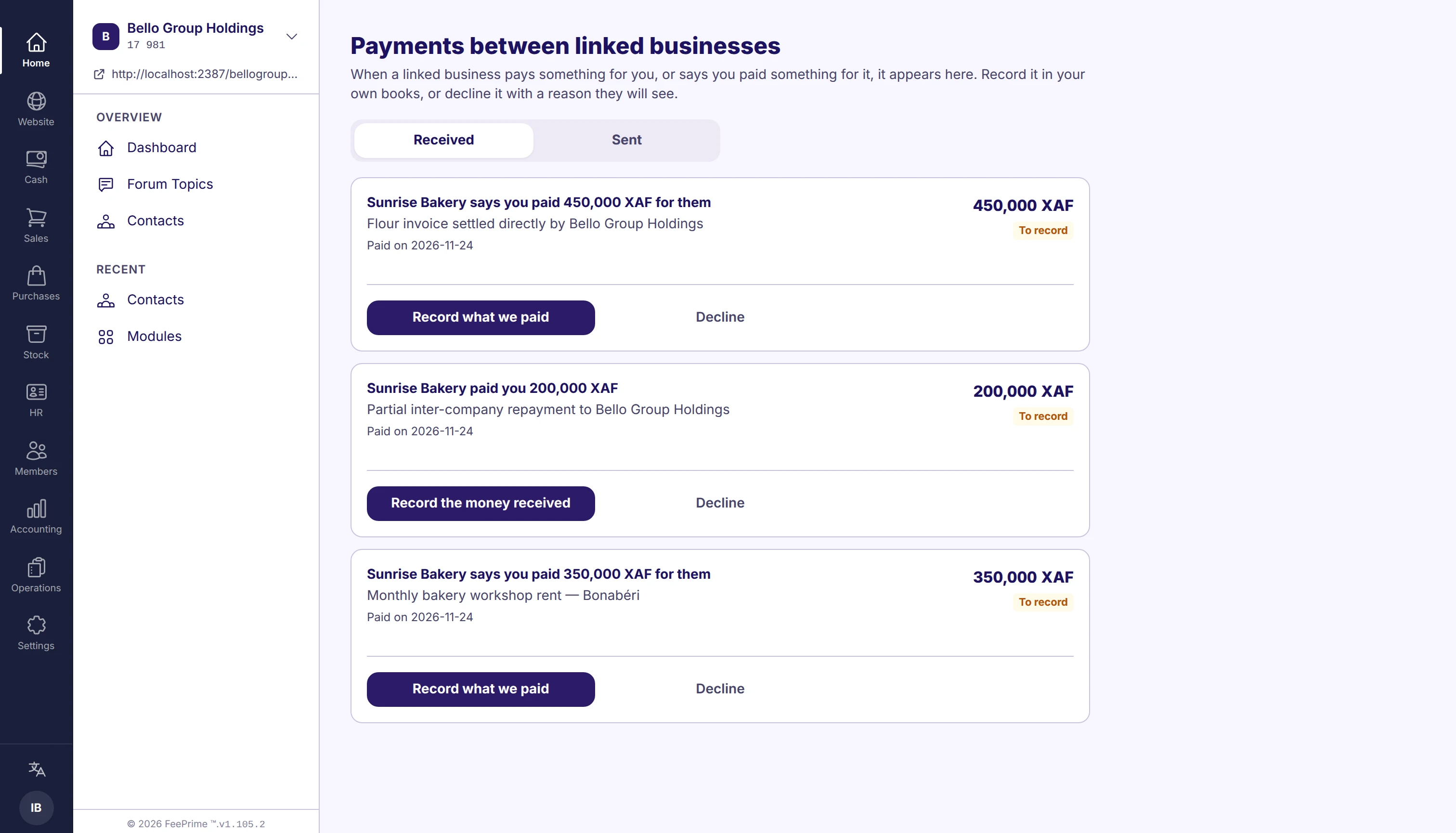 Bello Group Holdings’ Linked Payments inbox: tracks both inter-company repayments (“Sunrise Bakery paid you 200,000 XAF”) and third-party settlements side by side.
2. Keep the same liability type on both sides (462, 471, or 162)
Earlier in this course, you saw that every third-party payment or payment on behalf of another business asks for a Liability type. Each choice maps to a specific OHADA account:
| Liability type | OHADA account | Best used when |
|---|---|---|
| Associate | 462 | A sister company, parent holding company, or shareholder advances money (like Bello Group Holdings helping Sunrise Bakery) |
| Sundry creditor | 471 | A one-off non-trade advance or short-term clearing balance with a linked partner |
| Borrowing | 162 | A formal medium- or long-term loan with a repayment schedule |
Always pick the exact same liability type on the repayment that you used when the balance was built.
If Bello Group Holdings’ payments for Sunrise Bakery were booked under Associate (462), Amina must record Sunrise Bakery’s 200,000 XAF repayment under Associate (462) as well. If she accidentally selects Sundry creditor (471), Sunrise Bakery’s 462 balance stays overstated by 200,000 XAF while account 471 suddenly shows a strange 200,000 XAF balance running the opposite way.
3. Record the repayment — whichever company moves first
In real life, the two companies rarely sit at their desks at the same minute. Sometimes Amina records the transfer right after leaving the bank. Other times, Ibrahim spots the 200,000 XAF bank alert first and records the money arriving before Amina opens FeePrime. FeePrime handles both directions cleanly.
PATH A — SUNRISE BAKERY (PAYER) RECORDS FIRST

  Sunrise Bakery                              Bello Group Holdings
  Cash / Money / Transactions > + New         Home / Incoming  or  Task Board
  [ Credit repayment | 200,000 XAF ]   --->   "Sunrise Bakery paid you 200,000 XAF"
  Cash Account: Sunrise Bank (XAF)                   |
  Liability type: Associate (462)                    v
                                              Click [ Record the money received ]
                                                     |
                                                     v
                                              Prefilled [ Credit received ] form
                                              Ibrahim picks Bello Group's Bank Account
                                              Save -> No echo back to Sunrise Bakery


PATH B — BELLO GROUP (RECEIVER) RECORDS FIRST

  Bello Group Holdings                        Sunrise Bakery
  Cash / Money / Transactions > + New         Home / Incoming  or  Task Board
  [ Credit received | 200,000 XAF ]    --->   "Bello Group Holdings says you paid
  Cash Account: Bello Bank (XAF)               them 200,000 XAF"
  Liability type: Associate (462)                    |
                                                     v
                                              Click [ Record what we paid ]
                                                     |
                                                     v
                                              Prefilled [ Credit repayment ] form
                                              Amina picks Sunrise Bakery's Bank Account
                                              Save -> No echo back to Bello Group
How Amina records a Credit repayment (Path A)
- Go to Cash / Money / Transactions and click + New.
- Select the Currency (
XAF). - Add a Credit repayment operation line.
- Choose the Cash Account that actually sent the money (for example, Sunrise Bakery’s bank account or mobile money wallet — each cash-bearing line names its own account).
- Select Bello Group Holdings as the partner, choose Associate (matching the original 462 balance), enter 200,000, and save.
The moment Amina saves, Sunrise Bakery’s bank account drops by 200,000 XAF and its 462 liability to Bello Group Holdings drops by 200,000 XAF. At the same time, Bello Group Holdings receives a Paid you notification in Home / Incoming, on Payments between linked businesses (Received tab), and as a Task Board card.
How Ibrahim completes the other half
- Ibrahim opens the Paid you notice and clicks Record the money received.
- FeePrime opens Bello Group Holdings’ own Credit received form with the partner, amount, currency, and liability type already filled in.
- Ibrahim picks which Bello Group bank or mobile account received the 200,000 XAF and saves.
Notice why FeePrime asks Ibrahim to pick his own Cash Account: Sunrise Bakery does not know — and should never control — which bank account or till Bello Group Holdings uses internally. Each company always controls its own cash accounts and approval checks.
Built-in safety against double entries
Two safeguards keep busy finance teams out of trouble:
- No double recording: If two accountants at Bello Group Holdings open the same Paid you report at once, only the first save can claim it. The second click cannot create a duplicate deposit.
- No endless ping-pong: Because Ibrahim clicked Record the money received from Amina’s notice, saving his Credit received transaction will not send a new You paid alert bouncing back to Sunrise Bakery.
Never ignore a waiting payment report and type a second transaction from scratch. Typing it manually breaks the link between the two entries, leaves the original notice hanging in Incoming, and sends a fresh duplicate notice back to the other company.
4. Handle wrong amounts, reversals, and switched-off modules
Even careful teams make mistakes on transfer day. Here is how to fix them cleanly without polluting your ledger:
- The amount or partner on an incoming report is wrong: Do not accept it and plan to fix it later. Click Decline and type a short, clear reason — for example, “Bank statement shows 200,000 XAF received on 28 Nov, not 250,000 XAF.” That reason appears straight on the sender’s Sent tab so they know what to correct.
- You saved a Credit repayment with the wrong amount or wrong liability type: Posted transactions in FeePrime are immutable — you cannot edit or delete them after saving. Instead, open Cash / Corrections / Transaction Reversals, reverse the incorrect transaction with a note, and enter the corrected Credit repayment.
- One business has the Cash or Accounting module switched off: Nothing is lost. The Paid you or You paid report waits safely inside Home / Incoming with a note explaining which module is off. An owner can switch that module on in one tap right from Incoming, and the payment report is ready to record immediately.
Never try to fix an inter-company mistake by editing a Cash Account balance or posting an unlinked cash adjustment. Reversals keep a clear audit trail that your external accountant and tax inspector can follow in seconds.
5. Run this 5-step month-end inter-company close
Set a recurring 15-minute slot on the last working day of each month for Amina and Ibrahim (or their accountants) to run these five steps together:
- Empty every linked inbox. Clear Home / Incoming and the Received and Sent tabs of Payments between linked businesses in every group company. Zero items should be left waiting across a month boundary.
- Match linked commercial suppliers. Before looking at internal group balances, check the Supplier statement against linked suppliers like Littoral Flour Mills so every invoice and three-way payment sits as Matched (with nothing stuck in Only on their side, Only on our side, or Amounts differ).
- Compare the class-4 balance side by side. Pull Accounting Reports / Trial Balance Reports (or General Ledger Reports) in both Sunrise Bakery and Bello Group Holdings. Sunrise Bakery’s payable to Bello Group on account 462 must equal Bello Group Holdings’ receivable from Sunrise Bakery to the exact franc.
- Settle and mirror any net repayment. If the subsidiary is sending a month-end cash repayment, record Credit repayment on one side and click Record the money received on the other (or Credit received followed by Record what we paid).
- Confirm zero variance and close. Re-run the General Ledger for the inter-company account on both sides. When the closing balances mirror each other cleanly, your group books are reconciled and ready for monthly reporting.
Try it
Practice this full month-end settlement on staging.feeprime.com — a practice copy of FeePrime, kept apart from the real thing, where you can experiment freely without touching real books.
- Sign in to staging.feeprime.com and open Cash / Money / Transactions in your operating company.
- Click + New, pick your currency, add a Credit repayment operation line for 200,000, choose a bank Cash Account, select your linked holding company, choose Associate (462), and save.
- Switch to the linked holding company and open Home / Incoming (or the waiting banner in Cash / Money / Transactions).
- Open the Paid you notification, click Record the money received, choose the receiving Cash Account, and save.
- Open Accounting Reports / General Ledger Reports in both businesses and verify that the 200,000 repayment reduced the exact same class-4 balance on both sides with no echo notification sent back.
Congratulations — you have completed all eight lessons of Linked Businesses & Third-Party Payments, from one-tap linking and shared orders all the way through three-way supplier settlements and a clean month-end group close.