
Organizing departments and operational roles
Before you start, sign in and open HR / Departments and HR / Roles.
Can’t find it? It may be turned off for your business, or your account may not be allowed to open it. Ask the person who set up your FeePrime. They can fix both.

Photo: nick jenkins on Unsplash
When Sunrise Bakery was just one oven in Akwa with four people, everybody knew who did what. Amina Bello ran the business, Paul Kamga baked, and whoever stood nearest the counter took cash.
Two years later, Sunrise Bakery has a production bakery in Akwa, a busy shop in Bonapriso, a growing branch in Yaoundé, and a delivery motorbike on the road. Suddenly, questions start slowing every morning down: Who approves stock requests for Bonapriso? Which team does Brice Mballa belong to on payday? Why did nobody claim the overdue delivery task on the dashboard?
That is what HR / Departments and HR / Roles fix. Together, they turn a list of staff names into a working map of your business — one that routes daily tasks, drafts employment contracts, flags staffing gaps, and keeps payroll clean across branches.
1. Departments, operational roles, and login access are three different things
New managers often mix up three screens in FeePrime. Keeping them separate saves hours of confusion later:
  HR / Departments               HR / Roles                       Settings / Access / Users & Roles
  (Where you sit)                (What job you do)                (Which screens you can open)
  ─────────────────────          ─────────────────────────        ──────────────────────────────────
  • Bakery Production            • Production Operator (Akwa)     • Can open Stock & Production
  • Bonapriso Retail             • Cashier (Bonapriso)            • Can open Tills & Sales Orders
  • Logistics & Delivery         • Delivery Rider (Douala)        • No office login needed yet
         │                                  │                                     │
         ▼                                  ▼                                     ▼
  Groups Task Board tabs         Routes tasks, spots gaps,        Protects cash, payroll, and
  & filters Payroll runs         auto-drafts HR / Contracts       approvals inside FeePrime
Never confuse an operational role with a software login. Giving Grace Ewane the Cashier role in HR / Roles tells FeePrime what her job is at Bonapriso. It does not unlock the Till screen for her. To let her sign in and operate a till, Mireille Nkom still grants her software permissions under Settings / Access / Users & Roles. Conversely, giving someone a FeePrime login does not put them on your staffing map or draft their job duties.
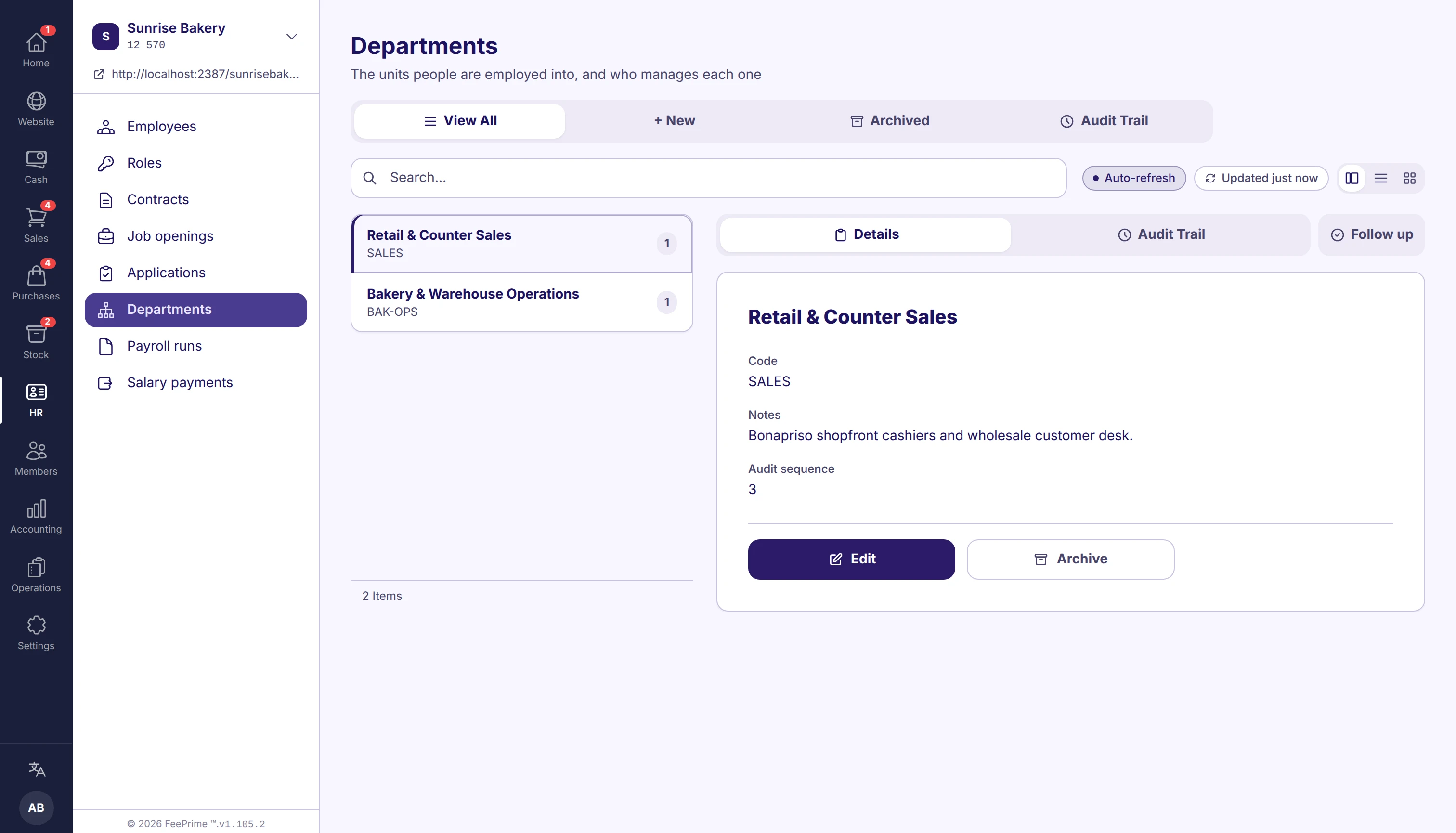 HR / Departments organizing Bakery Production and Retail & Counter Sales by branch location.
2. Building your department tree in HR / Departments
A department is a team or unit inside your business — anything from a whole division (Operations) down to one shop counter (Bonapriso Counter). Open HR / Departments and click New to create one.
Here is what each field does:
- Name (required): Plain label your team already uses, like Akwa Production or Bonapriso Counter. If your company uses both English and French in FeePrime, you can enter both names; single-language businesses see one box.
- Code (optional): Your short finance or payroll code — for example,
PROD-AKW,SLS-BON, orDEL-DLA. FeePrime does not force a strict format; it carries your own code cleanly onto exports and payslips. - Parent (optional): Nest a sub-department under a broader one so your chart mirrors how the business really runs. FeePrime blocks loops automatically — never try to nest a department underneath itself or one of its own sub-departments; the form will refuse to save it.
- Manager (optional): The employee who leads this team and approves for them. Notice it links to an employee record in HR / Employees, not a customer contact.
- Business location (optional): Tie the department to a specific branch (such as Douala — Akwa, Douala — Bonapriso, or Yaoundé), or leave it blank for a company-wide team like Finance & HR.
- Notes (optional): Handover notes, shift times, or branch details.
Here is how Amina and Mireille structure Sunrise Bakery:
Sunrise Bakery
├── Finance & HR            [Code: ADM]      Manager: Mireille Nkom   (All branches)
├── Operations              [Code: OPS]      Manager: Amina Bello     (All branches)
│   ├── Akwa Production     [Code: PROD-AKW] Manager: Paul Kamga      (Douala — Akwa)
│   ├── Bonapriso Counter   [Code: SLS-BON]  Manager: Grace Ewane     (Douala — Bonapriso)
│   └── Douala Delivery     [Code: DEL-DLA]  Manager: Amina Bello     (Douala — Akwa)
└── Yaoundé Branch          [Code: YDE]      Manager: (to assign)     (Yaoundé)
What if you create departments before adding employees? That is normal — and it is why Manager is optional when you first save a department. Create your departments, add your staff under HR / Employees (assigning each person’s department), then come back and link the manager. Never leave a live department without a manager once your team is in FeePrime. If a department sits with no manager, FeePrime puts an HR reminder card right on your dashboard Task Board until you assign one.
Never rename an old department for a brand-new branch. If Sunrise Bakery closes a temporary holiday stall at Marché Central, Mireille clicks Archive on that department instead of renaming it to Yaoundé Branch. Archiving keeps every past payroll run and employee history accurate while clearing the old unit out of daily pickers.
3. Assigning operational roles in HR / Roles
A department says where someone sits. An operational role says what work they actually carry out. Open HR / Roles to see your company’s role map and assign roles to employees.
FeePrime ships with 23 built-in operational roles covering how real SMEs operate:
- Leadership & Management: Managing Director, Operations Manager, Head of Sales, Finance Manager, Technology Lead
- Finance & HR: Accountant, HR Officer
- Sales, Marketing & Customer Care: Sales Representative, Customer Service, Catalogue Manager, Marketing Officer, Membership Officer, Events Coordinator
- Buying & Warehouse: Purchasing Officer, Storekeeper, Picker / Packer
- Shop, Production & Field: Shop Attendant, Cashier, Production Operator, Delivery Rider, Driver, Fleet Manager, Field Agent
To assign a role, choose:
- Employee (required): Pick the person from HR / Employees (you can even add a missing employee right from the picker without losing your place).
- Role (required): Pick one of the 23 operational roles.
- Business location (optional): Pick the branch where they hold that role — for example, Grace Ewane as Cashier at Douala — Bonapriso, and Brice Mballa as Delivery Rider at Douala — Akwa. Leave Business location blank when the person holds that role across the entire company, like Amina Bello as Managing Director or Mireille Nkom as HR Officer.
- Notes (optional): Useful for shift coverage or backup duties.
One person can hold more than one role — and in most SMEs, they do. At Akwa Bakery, Paul Kamga leads baking and also controls raw-material flour sacks. Mireille does not invent a fake second employee record or a custom job label; she simply gives Paul both Production Operator and Storekeeper at Douala — Akwa. When Sunrise Bakery grows and hires a dedicated storekeeper later, Mireille archives Paul’s Storekeeper role and assigns it to the new hire.
4. Spotting staffing gaps and access mismatches
This is where HR / Roles pays for itself every week. Because FeePrime knows which modules and business locations you have active, it calculates which operational roles your business actually needs — and shows three things at a glance:
- Who holds each needed role at each branch.
- Where the staffing gaps are — for example, you turned on deliveries at Yaoundé, but nobody holds the Delivery Rider role there yet.
- Whether each role holder can actually do the job in FeePrime. If Grace is listed as Cashier at Bonapriso, FeePrime checks her login permissions under Settings / Access / Users & Roles. If she does not yet have access to run a till, HR sees the mismatch immediately instead of discovering it when morning customers are waiting in line.
What if FeePrime flags a role you are not ready to hire for yet — say, Fleet Manager, while Amina still tracks the single motorbike herself? You cannot permanently hide a gap, because businesses forget hidden rules. Instead, mute the gap for 1, 3, 6, or 12 months. When the reminder wakes back up, Amina checks whether the fleet has grown enough to assign someone.
5. How departments and roles power the rest of FeePrime
Setting up HR / Departments and HR / Roles is not paperwork for a binder. Three parts of FeePrime use them every day:
- Dashboard Task Board: Work cards are grouped under bold, colour-coded department tabs with weekly Done columns, and operational roles determine who should claim each card. Missing managers, staff on ending probation, and unpaid salaries also surface automatically under HR.
- Employment Contracts (
HR / Contracts): When Mireille drafts Brice’s or Grace’s contract, FeePrime automatically pulls their job title, standard duties, and place of work straight from their employee record and assigned roles. If someone changes roles later, HR creates a formal contract amendment rather than rewriting history. - Payroll Runs (
HR / Payroll runs): Need to run payroll for Akwa Production separately from Bonapriso Counter or Yaoundé Branch? The payroll run’s department filter is a clean picker fed directly by HR / Departments, so you never mis-type a team name and miss an employee.
6. One shop vs. a growing multi-branch business
- One shop, 3–6 staff? Keep HR / Departments flat — two or three departments (Production, Counter, Admin) with no nested parents is plenty. Assign multiple roles to the same person where they wear two hats, and leave Business location blank if you only have one address. Nothing breaks.
- Two cities, multiple shifts, or separate warehouses? Use parent and child departments so each branch manager sees their own unit while the owner sees the roll-up. Always set Business location on branch roles (Cashier, Storekeeper, Delivery Rider) so tasks and gap checks stay tied to the right city.
Try it
Open staging.feeprime.com — a practice copy of FeePrime, kept apart from the real thing — and wire up a mini team structure in five minutes:
- Go to HR / Departments and create a parent department called
Operationswith codeOPS. Leave Manager blank for now if you have no employees yet. - Create a child department called
Akwa Productionwith codePROD-AKW, set Parent toOperations, and link it to a business location. - Check HR / Employees (or add two sample staff members), then return to HR / Departments and assign a Manager to
Akwa Production. - Open HR / Roles and assign one employee two operational roles at the same branch (for example, Production Operator and Storekeeper).
- Assign a second employee Managing Director and leave Business location blank so it covers the whole business.
- Review the staffing gaps list on HR / Roles, mute one gap you do not need today for 3 months, and check whether your assigned role holders have matching login access under Settings / Access / Users & Roles.
Once your departments and roles reflect how your shop actually runs, hiring, contracts, tasks, and payroll all snap into place.