
Invoices
Before you start, sign in and open Sales / Selling / Invoices.
Can’t find it? It may be turned off for your business, or your account may not be allowed to open it. Ask the person who set up your FeePrime. They can fix both.

Photo: Emmanuel Ikwuegbu on Unsplash
An invoice is the formal document that says what a customer owes you. Of every sales record in FeePrime, this is the one your accounts, your customer’s accountant, and eventually an auditor all rely on.
If you run a shop like Sunrise Bakery in Douala, orders move fast all week. Hôtel Akwa adjusts its morning croissant count, a wedding client calls to swap a cake flavour, and walk-in buyers pay at the counter. An order is allowed to change while the work is still in motion. An invoice is where the final truth lands.
Once you understand how FeePrime times, links, and locks invoices, month-end stops being a detective hunt through notebooks and WhatsApp screenshots.
1. What an invoice holds — and why the links matter
Every invoice in Sales / Selling / Invoices is built to answer four questions without anyone having to phone the shop: who issued it, who owes it, what was delivered, and when is the money due?
Here are the fields you will see:
- Header details: invoice number, invoice date, due date, client, and invoice title (a short description such as Weekly pastry delivery — Hôtel Akwa).
- Issuing site: from location and business location record which part of your business issued the invoice.
- Lines and totals: invoice items carry each line’s description, quantity, unit price, and discount, alongside currency, payment options, payment terms, and notes.
- Traceability links: order id, sales order, quote, and purchase order connect the invoice straight back to the documents that led to it.
One small shop, one counter? Your from location and business location stay the same, and you do not need to fill extra reference fields on a simple counter sale. Bigger operations — for instance, Sunrise Bakery baking at its Akwa kitchen and supplying both its Bonapriso shop and Hôtel Akwa — rely on those location fields and links so every franc can be traced back to the exact order and site.
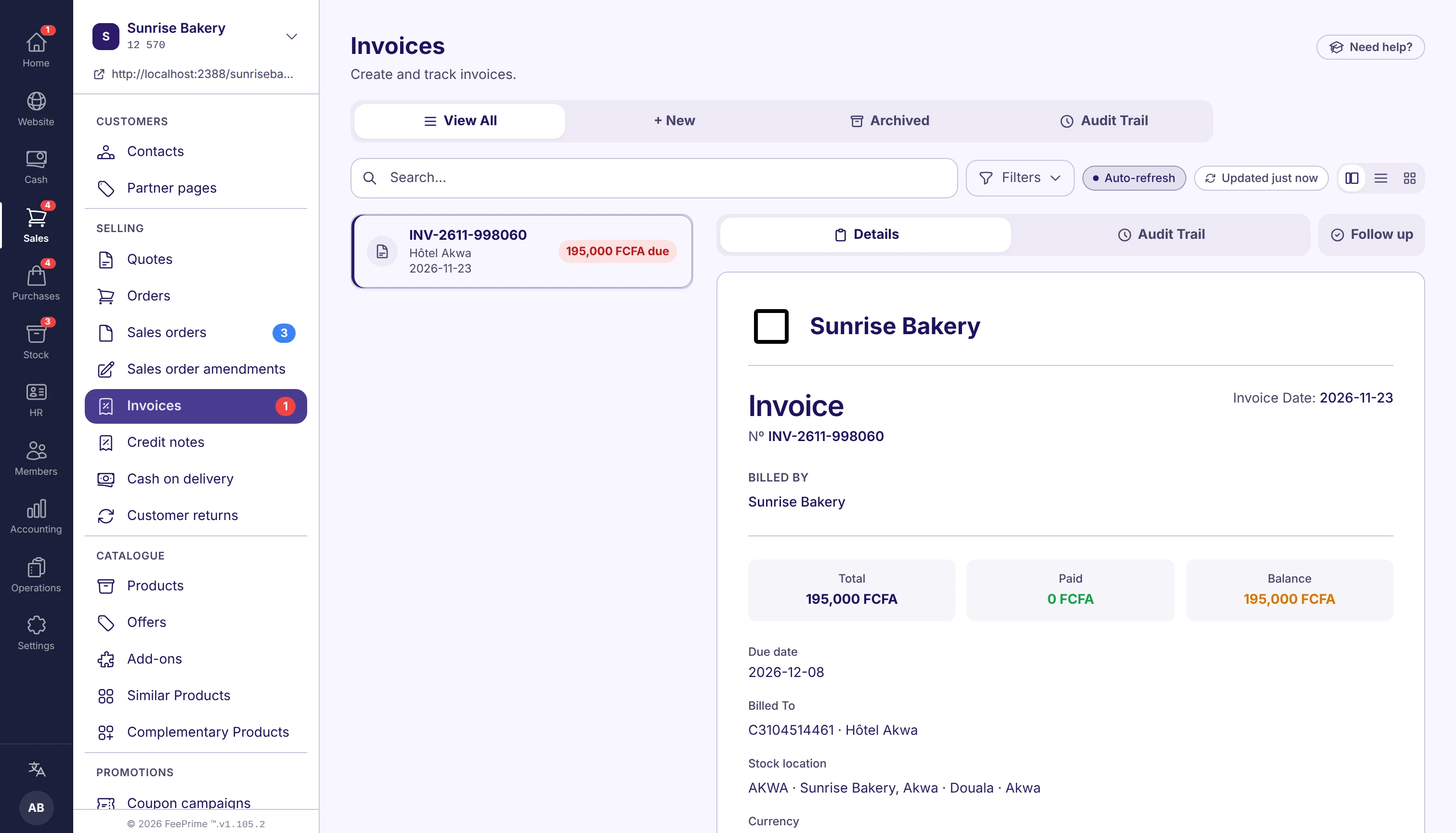 invoices screen in FeePrime (Sunrise Bakery).
2. For physical goods, the invoice comes last
This is the part that surprises people arriving from spreadsheets or older billing tools, and it is FeePrime’s default behaviour rather than a hidden setting somebody switched on.
An invoice must not change, whereas an order can change right up to dispatch. For physical goods, FeePrime waits until fulfilment is complete, then raises the invoice for what actually left your premises. Any money the customer paid upfront is held safely as an advance against the order and applied automatically when the invoice is raised.
Customer places order (400 croissants — XAF 180,000)
        │
        ├── Pays upfront ──► Held as advance on the Order (no invoice yet)
        ▼
Kitchen bakes & Junior dispatches what is ready (360 croissants)
        │
        ▼
Invoice raised after fulfilment for 360 croissants (XAF 162,000)
        │
        └── Order advance applied automatically (no double entry)
Picture a busy Tuesday morning at Sunrise Bakery. Hôtel Akwa orders 400 croissants at XAF 450 each (XAF 180,000, plus 19.25% TVA where applicable) and transfers the money on Monday afternoon. Overnight, an oven tray spoils, so only 360 croissants go out with Junior on the delivery motorbike.
Because the invoice is raised after fulfilment:
- Do not panic when a freshly paid stock order has no invoice yet. That is FeePrime working properly, not a missed payment.
- The invoice matches reality. Hôtel Akwa is billed for the 360 croissants that actually arrived, not the 400 originally requested.
- The invoice can appear already paid with no new payment entry. The advance held on the order is applied straight to the invoice instead of being banked twice.
The one exception: memberships, event tickets, and credit top-ups have their invoice raised at payment, because the invoice itself is what delivers them.
3. Convert from the order — never retype lines
When it is time to bill an order from Sales / Selling / Orders (or Sales / Selling / Sales Orders), convert the order directly into an invoice.
Never open a blank invoice and retype the lines from an existing order. A retyped invoice looks fine at first glance, but it has no link back to the order. Six weeks later, nobody can tell whether that order was billed once, billed twice, or still waiting.
Converting directly gives you two wins at once:
- Every line and reference travels across intact, keeping the order id, sales order, and quote links clean.
- New buyers become real contacts automatically. Suppose Nadège Fouda orders a celebration cake on your website for the first time and is not yet in Sales / Customers / Contacts. Converting her order creates her contact card automatically — complete with her details — without Paul the cashier retyping a single phone number.
4. Due date is a decision, not a formality
Typing Payment terms: 30 days inside Notes feels helpful when you are in a hurry, but it creates work later. Notes are prose a human has to open and read; a due date is data FeePrime can filter.
Without a real due date, finding every overdue customer at the end of the month means opening invoices one by one. With a real due date, overdue balances stand out immediately.
Say Hôtel Akwa’s accounts team calls Amina the manager and asks for 15 extra days on a XAF 420,000 monthly invoice. Change the due date on the invoice right away instead of relying on memory. Your future self — and whoever covers your shift next week — will not remember a phone agreement.
Selling strictly cash-on-the-spot at a counter like Marché Central? Your due date simply matches the invoice date. Keep it simple.
5. Invoice items are frozen snapshots, not live catalogue records
Every line inside Invoice items stores its own description, quantity, unit price, and discount. FeePrime copies those values from Sales / Catalogue / Products at the moment the invoice is raised, and they never change afterwards.
Suppose flour prices jump in November, so Sunrise Bakery updates croissants in Sales / Catalogue / Products from XAF 450 to XAF 500. Hôtel Akwa’s invoice from 25 October stays at XAF 450.
Never expect a catalogue price change to rewrite an issued invoice — and never try to force it. An invoice is a permanent record of what was charged on that day. If past invoices moved every time you repriced an item, your accounting history would break overnight.
What if you genuinely overcharged a customer or a crate arrived damaged after the invoice was issued? Do not try to erase the past. Issue a credit note under Sales / Selling / Credit Notes so both the original invoice and the reduction remain visible and auditable.
6. From invoice to money in the bank
Raising an invoice says what is owed — it does not settle the balance by itself.
Unless an earlier order advance already covered the full amount, the invoice stays open until you record the customer’s payment against it (which connects to your cash and bank records under Cash / Money / Transactions). Recording payments is what we cover in the next lesson.
Try it
Open staging.feeprime.com — a practice copy of FeePrime, kept apart from the real thing — and spend five minutes trying this flow yourself:
- Open Sales / Selling / Orders, pick an existing order, and convert it into an invoice instead of typing a new one from scratch.
- Open the new invoice in Sales / Selling / Invoices and confirm the order id link and client record are filled in automatically.
- Set a clear due date (for example, 14 days from today) rather than writing the deadline only in Notes.
- Open Sales / Catalogue / Products, pick the product on that invoice, and raise its price by XAF 50.
- Go back to Sales / Selling / Invoices and check the invoice line — confirm the original price did not move.
Seeing that immovability once takes away any doubt about changing prices in your catalogue later.