
Paying on behalf of others (Cash > Money > Paid for others)
Before you start, sign in and open Cash / Money / Paid for others.
Can’t find it? It may be turned off for your business, or your account may not be allowed to open it. Ask the person who set up your FeePrime. They can fix both.

Photo: Vitaly Gariev on Unsplash
On a busy Tuesday morning in Douala, Sunrise Bakery runs into a cash crunch. Its standby generator stops working in Akwa, or Littoral Flour Mills delivers 40 bags of 50kg flour worth 1,120,000 XAF while the bakery is still waiting for Hôtel Akwa to settle its monthly invoice. To keep the ovens running, Ibrahim Bello steps in from Bello Group Holdings and pays the mechanic — or transfers 1,120,000 XAF straight to Littoral Flour Mills — out of Bello Group’s bank account.
Money has left Bello Group Holdings, but that payment is not a Bello Group expense. Sunrise Bakery owes that money back. If the cashier logs it under Cash / Money / Expenses, Bello Group’s profit drops artificially, its tax reports look wrong, and nobody has a formal receivable tracking what Sunrise Bakery still owes.
Cash / Money / Paid for others solves this cleanly. It gives cashiers and finance staff one dedicated screen to record money paid on someone else’s behalf — whether it is a sister company, a subsidiary, a business partner, or a founder — without ever opening raw accounting journals.
1. What happens in your books when you pay for someone else
When you pay a bill for another business or person, two things happen at the same time in your own books: your cash goes down, and the amount they owe you (your receivable) goes up. Your expenses do not move by a single franc.
Bello Group pays 1,120,000 XAF to Littoral Flour Mills for Sunrise Bakery
                                 |
                                 v
             [ Cash / Money / Paid for others ]
                                 |
        +------------------------+------------------------+
        |                                                 |
        v                                                 v
  Cr Cash Account                                 Dr Receivable
  Afriland Bank XAF                               Sunrise Bakery (OHADA 471)
  -1,120,000 XAF                                  +1,120,000 XAF
                                                          |
                                                          v
                                            Shows on Balance Sheet until
                                            Sunrise Bakery repays you
Notice what is not in that diagram: Bello Group Holdings’ Income Statement. The flour belongs to Sunrise Bakery’s kitchen, not Bello Group’s overheads. In Lesson 2, we saw how Sunrise Bakery records the flour bill on its own books as paid by Bello Group. Here, we are sitting in Bello Group’s chair recording the other side of the story.
You do not need to be linked on FeePrime to use Paid for others. Even if Sunrise Bakery is not on FeePrime — or if you are paying a supplier on behalf of an unlinked partner or shareholder — it works straight away using an ordinary contact from Sales / Customers / Contacts. If both companies are linked on FeePrime, the workflow gets even faster through the Incoming tab (more on that in Section 4).
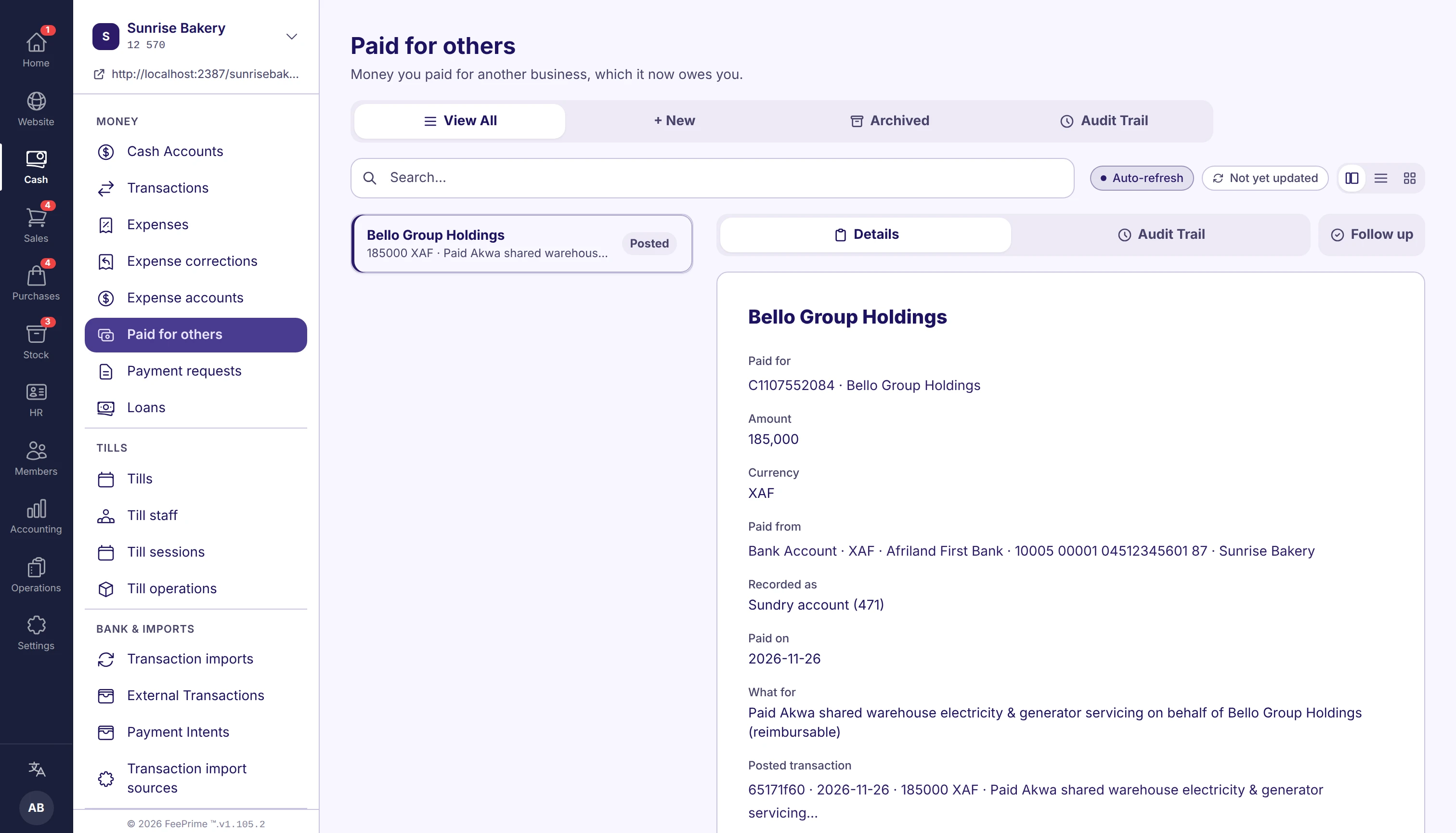 Cash / Money / Paid for others recording money paid on behalf of Bello Group Holdings with OHADA class-4 tracking.
2. Why use Paid for others instead of raw Transactions
Many growing companies face a control problem: the cashier or accounts payable clerk needs to record payments made for sister businesses every week, but the finance manager does not want every staff member editing raw ledger entries inside Cash / Money / Transactions.
Paid for others creates a clean safety boundary:
- Your cashier only needs permission to open
Cash / Money / Paid for others— no access toCash / Money / Transactionsis required. - When the cashier saves the record, FeePrime automatically posts the underlying paid-on-behalf transaction through the authorised payment poster and links that posted transaction directly to the record.
- Every record keeps the description, date, account type, and uploaded receipt in one place for the group controller to inspect.
Never book a payment made for a sister company under Cash / Money / Expenses. Putting it in Expenses hides the debt from your Balance Sheet, inflates your operating costs, and forces your accountant to reverse it at month-end.
3. Recording a payment field by field
Let’s walk through a real example. Suppose Bello Group Holdings pays 350,000 XAF from its Afriland Bank account to ElectroCam for an urgent generator overhaul at Sunrise Bakery’s Akwa shop.
Open Cash / Money / Paid for others, click to create a new record, and fill in each field carefully:
- Beneficiary: Choose Sunrise Bakery from your Contacts list.
- Common mistake: Put the party who owes you the money back in Beneficiary — NEVER the vendor who received the cash. If Bello Group pays ElectroCam or Littoral Flour Mills on Sunrise Bakery’s behalf, ElectroCam does not owe Bello Group anything. Sunrise Bakery does. Always pick Sunrise Bakery as the Beneficiary and name the vendor inside the Description.
- Amount and Currency: Enter
350000and selectXAF. - Cash Account: Select the exact bank account, till, or Mobile Money account the money actually left — for example, Bello Group — Afriland Bank XAF.
- Account Type (OHADA subtype): Choose the account that matches your relationship with the beneficiary:
- Sundry creditor (OHADA 471): Use this for sister companies, subsidiaries, or commercial partners when covering operating bills, repairs, or supplier invoices (such as Sunrise Bakery’s generator overhaul or Littoral Flour Mills flour bill).
- Borrowing (OHADA 162): Use this for formal medium- or long-term loans or major equipment financing (such as Bello Group financing a 6,500,000 XAF rotary deck oven for Sunrise Bakery on a 24-month repayment plan).
- Associate (OHADA 462): Use this for owner, founder, or shareholder current accounts (such as Bello Group paying a personal expense on behalf of founder Amina Bello that she will reimburse).
- Common mistake: Never mix OHADA subtypes for the same beneficiary. If Bello Group records Sunrise Bakery’s generator repair under 471 in January and its flour bill under 462 in February, the running balance splits across two ledger accounts and reconciliation becomes messy.
- Paid Date: Enter the exact date the money left your bank or till so your bank reconciliation matches to the day.
- Description: Write a clear, plain-language trail naming what was paid, who received the funds, and the invoice number — for example: “Generator overhaul at Akwa bakery paid to ElectroCam (Invoice #EC-412) on behalf of Sunrise Bakery.”
- Receipt: Upload a photo or PDF of the bank transfer slip, Mobile Money confirmation, or stamped supplier receipt. Future-you (and your auditor) will thank you.
- Request Number (optional): If Sunrise Bakery gave you a Payment Request reference (for example,
PR-2026-014), type it here. Paying an ad-hoc bill for an unlinked contact? Leave it blank.
Double-check every field before you save. Because Paid for others records post directly into your accounting ledger, they cannot be edited in place afterwards. If you spot a typo after saving, do not ignore it — archive or reverse the entry cleanly with your accountant and re-enter it accurately.
4. Handling Incoming requests from linked businesses
Running an unlinked business or paying on behalf of a sister shop that is not on FeePrime? You can skip the Incoming tab completely — nothing breaks. Everything in Section 3 works with ordinary Contacts.
If both companies are connected on FeePrime (see Linked Businesses & Third-Party Payments), Cash / Money / Paid for others includes a built-in Incoming inbox:
- When Sunrise Bakery submits and approves a Payment Request asking Bello Group to settle its Littoral Flour Mills invoice, that request lands automatically inside Bello Group’s
Paid for others > Incomingtab. - The Beneficiary, Amount, Currency, Description, and Request Number are already filled in — zero re-typing.
- Bello Group’s cashier simply selects which Cash Account paid the supplier (or clicks Pay by Wallet when a supplier wallet is attached, which settles all books automatically — we cover that in Lesson 5).
- As soon as Bello Group approves the payment, FeePrime sends the proof straight back into Sunrise Bakery’s Incoming hub so Amina’s team can accept it without typing a single number twice.
5. Checking the receivable and audit trail
Once the payment is saved, take thirty seconds to confirm your books tell the exact truth:
- Open the saved record in
Cash / Money / Paid for others. Confirm the attached Receipt is readable and note the linked Posted Transaction reference. - Open
Accounting Reports / Balance Sheet(orAccounting Reports / General Ledger). Confirm that:- Your chosen Cash Account decreased by 350,000 XAF.
- Your receivable balance for Sunrise Bakery under OHADA 471 (or 162 / 462) increased by 350,000 XAF.
- Your Income Statement expenses did not change.
That 350,000 XAF receivable now stays open on Bello Group Holdings’ Balance Sheet as an honest, traceable record until Sunrise Bakery repays it. In Lesson 4, we switch back to Sunrise Bakery’s seat to see how Amina’s team sends formal Payment Requests, and in Lesson 6, we will bring these inter-company balances cleanly back down to 0 XAF.
Try it
Open staging.feeprime.com — a practice copy of FeePrime, kept apart from the real thing — and complete this 5-minute drill:
- Sign in and confirm that Sunrise Bakery exists in
Sales / Customers / Contacts(create it quickly if it is not there yet). - Open
Cash / Money / Paid for othersand start a new entry. - Set Beneficiary to Sunrise Bakery, Amount to
350000, Currency toXAF, Cash Account to your main bank account, and Account Type to Sundry creditor (OHADA 471). - Fill in Paid Date with today’s date, write a clear Description naming ElectroCam and Invoice
#EC-412, attach any sample image as the Receipt, and save. - Open
Accounting Reports / Balance Sheet(orGeneral Ledger) and verify that your bank balance dropped by 350,000 XAF while your OHADA 471 receivable increased by 350,000 XAF.
Once you see that receivable appear cleanly without touching your Income Statement, you have mastered the payer’s side of third-party payments.