
Inventory items
Before you start, sign in and open Stock / Stock / Stock Items and Stock / Stock / Inventory Categories.
Can’t find it? It may be turned off for your business, or your account may not be allowed to open it. Ask the person who set up your FeePrime. They can fix both.

Photo: Centre for Ageing Better on Unsplash
Picture Monday morning at Sunrise Bakery in Akwa. Amina opens the storeroom and finds three names for the same 50kg sack of flour: Flour 50kg, Farine 50, and Wheat Flour Bag. Nobody knows how many sacks are truly free to bake 400 croissants for Hôtel Akwa, which batch expires first, or why eight sacks are already spoken for.
Setting up your inventory items cleanly stops that confusion before your first sack ever crosses the door. An inventory item is what you hold in your storeroom, warehouse, or delivery van. A product is what you sell to a customer. Sunrise Bakery holds Flour 50kg and Fresh Yeast 500g as inventory items, then turns them into croissants and baguettes sold as products. A corner shop buying crates of bottled water to sell as-is uses both sides too: the inventory item tracks what sits on the shelf, and the product sets how you sell it.
1. What goes on every inventory item
Open Stock / Stock / Stock Items and start with the facts your storekeeper and buyer actually rely on:
- Name: Plain and consistent, with the pack size included (Flour 50kg, Cooking Oil 5L, Cake Box Medium).
- SKU (optional): Your short internal code, such as
FLR-50KG, for shelf labels and fast searches. - Barcode (optional): The manufacturer’s barcode printed on the pack (GTIN, EAN, or UPC). Unlike your own SKU, a manufacturer barcode means the exact same thing to you and a new supplier on day one—so first orders match without manual mapping. Leave it blank for loose or locally packed goods.
- Inventory category: Files the item and tells your accounts what buying it means (covered in Section 4).
- Price unit of measurement: Defines one unit—kilograms, litres, bags, cartons, or pieces—so nobody orders 50 cartons when they meant 50 bottles.
- Description and photos: Help a new storekeeper recognise the right pack at a glance.
- Supplier prices: Track what different wholesalers quote in XAF so buying stays transparent.
Search before you add. Type a few letters into the search box before creating any item. Two records for the same 50kg flour sack split your balance in half and break every stock count that follows.
Need to track something specific to your trade—like cocoa grade, voltage, or colour code? An administrator can add custom fields under Settings / Documents / Extra Field Definitions. Inventory items also stay available offline if your connection drops mid-shift.
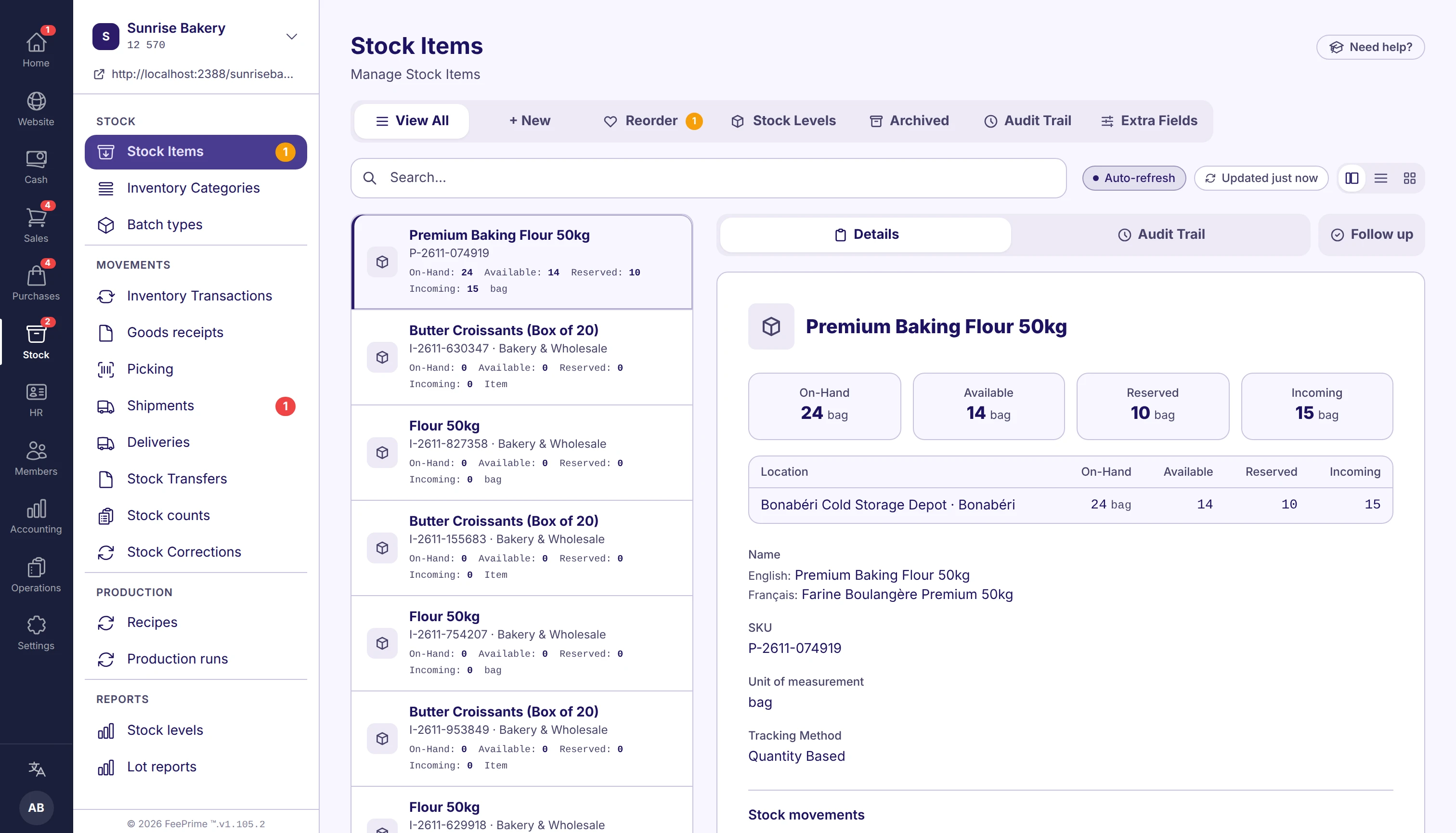 inventory items screen in FeePrime (Sunrise Bakery).
2. Choose the tracking method before your first receipt
The tracking method decides how much detail FeePrime asks your team to record on every receipt, transfer, and pick. Get this right before your first stock receipt—once stock has moved, changing the tracking method later is heavily restricted.
| Tracking method | What it tracks | Best for | Watch out for |
|---|---|---|---|
| Quantity based | How many units you hold, not which specific ones | Salt, cement, screws, bottled drinks, office paper | Most everyday items belong here |
| Lot tracked | Groups of units sharing a batch identity and expiry | Flour, fresh yeast, milk, medicine, cocoa consignments | Requires entering a batch on receipts and picks |
| Serial number based | Every individual physical unit by its own ID | Delivery motorbikes, ovens, laptops, phones under warranty | Heavy daily work—never use for loose consumables |
| Indefinite | Appears on stock documents without running out | Paperwork-only stock lines with no counted pile | Never use for real physical stock you need to count |
Pick the lightest tracking method that answers the questions you will actually be asked. Putting serial numbers on sugar packets or screws will make your storekeeper dread every delivery. On the other hand, if a customer or health inspector could ask which batch of yeast went into last week’s bread, choose Lot tracked from day one.
3. Batches, shelf life, and FEFO vs FIFO
When an item is set to Lot tracked, three extra settings stop perishable stock from spoiling quietly at the back of the storeroom:
- Shelf life days: How long a batch stays good.
- Lot type: Defines the kind of batch identity used (set up under Stock / Stock / Lot Types).
- Lot allocation strategy: Tells FeePrime which batch to suggest first when stock is picked.
You can choose from three allocation strategies:
- First expired, first out (FEFO): Suggests the batch expiring soonest, even if it arrived after an earlier delivery. If a supplier drops off Fresh Yeast 500g today expiring in 14 days while last week’s delivery expires in 25 days, FEFO puts today’s shorter-lived batch first so nothing goes to waste.
- First in, first out (FIFO): Suggests the oldest received batch first, regardless of printed expiry date.
- Manual: Your storekeeper picks the exact batch by hand each time.
For food, drinks, cosmetics, and pharmacy stock, First expired, first out is almost always the safest default.
4. Inventory categories tell your accounts what buying means
Open Stock / Stock / Inventory Categories before entering a long list of items. Each category holds a name, an optional default lot type, and a purchase treatment:
- For resale: Goods you buy and sell as-is (bottled juice, bagged rice, phone chargers).
- Raw material: Ingredients or parts you turn into something else (50kg flour, cocoa butter, yeast).
- Consumable: Supplies used up running the business (cleaning soap, receipt rolls, generator oil).
- Packaging: Bags, boxes, bottles, and labels used to pack goods (cardboard cake boxes, bread sleeves).
Purchase treatment is not just tidy filing. It tells your accounts what spending money on that category means. Take ten seconds to choose it deliberately instead of leaving whatever sits at the top of the list.
5. Reading the item page: promises, archiving, and access
Open any inventory item to see its supplier prices, stock balances, and open reservations (promises) laid out clearly as tables and chips—even on a phone screen. Stock is often spoken for before a single bag leaves the shelf:
               [ Inventory Item: Flour 50kg ]
                   (what you hold in store)
                             |
         +-------------------+-------------------+
         |                   |                   |
         v                   v                   v
   Purchase Order      Production Run       Sales Order
   (ordered supply)   (reserved for dough)  (promised to buyer)
         |                   |                   |
         +-------------------+-------------------+
                             |
                             v
            Each open reservation on the item
            names and links to its real document
If Paul sees 8 bags of Flour 50kg reserved even when no customer placed a wholesale order today, he never has to guess. Each open reservation names and links straight to the real document behind it—a Sales Order (Sales / Selling / Sales Orders), a Purchase Order (Procurements / Ordering / Purchase Orders), or a Production Run (Stock / Production / Production Runs). Even before an item’s first physical stock movement, FeePrime shows those promises clearly instead of a blank screen.
Two daily habits keep your catalogue trustworthy over time:
- Archive, never delete—and never rename an old item for a new one. When Sunrise Bakery switches from 25kg sugar bags to 50kg bags, Amina archives the old 25kg item and creates a fresh item for the 50kg bag. Archiving hides discontinued goods while keeping past receipts, recipes, and accounts honest.
- A restricted page is not an empty warehouse. If Junior the rider opens Stock / Stock / Stock Items and sees a notice that the page is outside his role, nothing was deleted. Ask the owner or administrator if his role needs access.
6. Small shop vs bigger operation
One small shop selling packaged goods with no kitchen or factory? Keep setup light: create one category set to For resale, set items to Quantity based, enter the name, unit, and pack barcode, and leave lot types, serial numbers, and extra fields off. Nothing breaks.
Bakery, pharmacy, agro-business, or multi-warehouse team? Separate Raw material, Packaging, and For resale categories, turn on Lot tracked with First expired, first out for perishables, record manufacturer barcodes for faster receiving, and click open reservations to trace commitments across orders and production runs.
Try it
Open staging.feeprime.com—a practice copy of FeePrime, kept apart from the real thing—and spend five minutes testing what you just learned:
- Open Stock / Stock / Inventory Categories and create two categories: one set to Raw material and one set to For resale.
- Open Stock / Stock / Stock Items and create a Quantity based item in your For resale category with a short SKU and a sample barcode.
- Create a second item in your Raw material category (such as Flour 50kg), choose Lot tracked, enter Shelf life days, and select First expired, first out.
- Open the item detail page and inspect how supplier prices, balances, and open reservations appear.
- Receive a test quantity on staging, then try changing that item’s tracking method so you see firsthand why FeePrime protects that setting.
Get these basics clean on your first ten items and every stock count, purchase order, and bakery run that follows will feel effortless.