
Curators: Launching your Dealroom portal and public welcome page
Before you start, sign in and open Portal Marketplace / Vendors / Portal Settings.
Can’t find it? It may be turned off for your business, or your account may not be allowed to open it. Ask the person who set up your FeePrime. They can fix both.

Photo: Christina @ wocintechchat.com M on Unsplash
When Cédric started Wouri Ventures in Douala, every deal lived inside WhatsApp threads and forwarded PDFs. Clarisse would send her KokoFresh Seed deck for a 150,000,000 FCFA raise, and within a week it had landed in the inbox of people who were not even active investors. Meanwhile, Dr. Samuel from Mungo Angels had to ask three times which companies were still raising and what the minimum ticket was.
A real dealroom solves both problems at once. Founders get a safe place to publish a clean public teaser while keeping their full memo private. Investors get one calm front door where they can apply, browse live rounds, and request introductions.
In FeePrime, you do not need a web agency or custom code to launch that front door. Once your organisation has a Dealroom grant and you save a single settings screen, FeePrime builds your public welcome page automatically.
1. Activating Dealroom on your organisation
Before any curator can configure dealroom rules, the platform team grants the Dealroom capability to your organisation under Organisations / Grants / Portal Deal Grants.
That grant links three simple pieces of information:
- Organisation (
organisation_id) — the business account receiving the Dealroom, such as Wouri Ventures. - Marketing name (
marketing_name) — optional public display name if your dealroom brand differs from your registered company name. - Notes (
notes) — internal launch notes for your team.
You only need this grant once. As soon as it is active, FeePrime unlocks the Portal Marketplace / Dealroom menu (pitches, investors, and intros) plus Portal Marketplace / Vendors / Portal Settings for your staff.
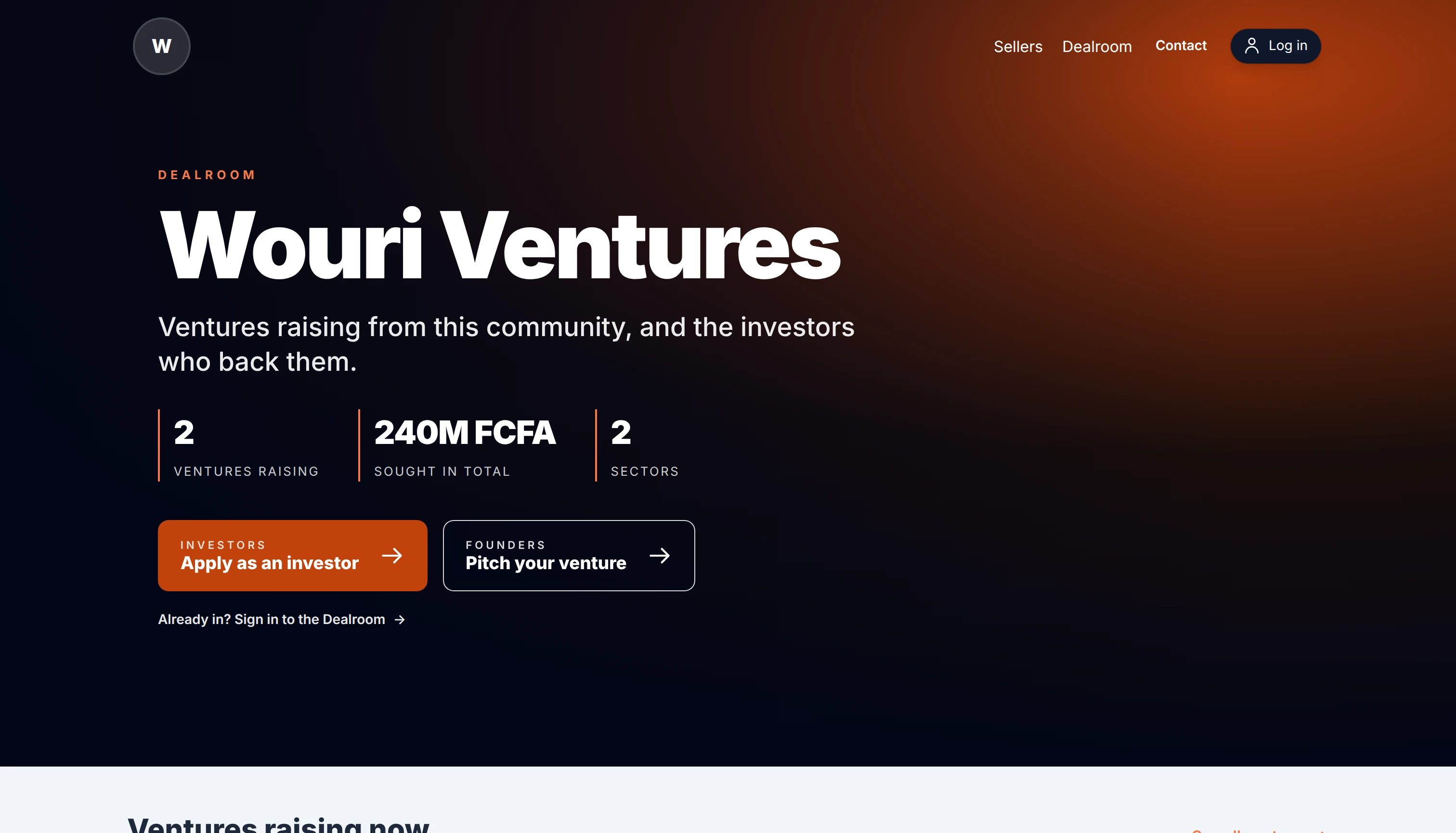 Built-in public Dealroom welcome page showing teased ventures, headline stats, and doors in for investors and founders.
2. Configuring Portal Settings: vertical, approvals, and allowances
Open Portal Marketplace / Vendors / Portal Settings. Your organisation has one single Portal Settings record — you open and edit it in place rather than creating separate settings records.
Work through the three core controls first:
- Portal vertical (
vertical) — If Wouri Ventures was granted only Dealroom, FeePrime setsdealroomautomatically and does not even ask you to choose. If your organisation also runs another portal (such as a marketplace or services board), choosedealroomhere. - Pitch approval policy (
listing_approval) — Decides how tightly your curators review founders before a teaser goes live:profile_only— You vet the founder once, and every pitch they submit after that goes live right away. Good for tightly curated alumni networks.first_listing(default) — You vet the founder plus their first pitch (for example, Clarisse’s KokoFresh round). Once approved, any follow-on venture they submit is trusted.every_listing— Curators must approve every single pitch before it appears publicly. Best when you want strict editorial review on every deal.
- Free pitch allowance (
free_listing_allowance) — Sets how many live pitches a founder without a paid membership can hold at one time. Leave it blank for the default of 3, or enter0if every founder must hold an active membership before publishing their first pitch.
Just starting out with five Douala founders and a small circle of local angels? Keep listing_approval on first_listing and leave free_listing_allowance blank. You can tighten both later without losing any existing pitches.
3. Setting Spaces contributors and what your portal shows
Scroll down in the same Portal Settings screen to control how people interact and which sections appear publicly:
- Spaces contributors (
spaces_contributors) — Venture update rooms run on Spaces so founders can post quarterly milestones and answer questions from vetted backers. You choose who is allowed to post:members— Only approved members can post. Pick this for a curated angel network like Wouri Ventures so Dr. Samuel and vetted angels can discuss KokoFresh traction without outside noise.subscribers— People subscribed to your updates can also contribute. Useful for broader investor clubs or founder communities.anyone— Open to any signed-in visitor. Avoid this on private dealrooms where sensitive fundraising questions come up.
- Portal shows (
portal_shows) — Controls which public sections and tabs appear on your portal. Keep it focused on what Wouri Ventures actually runs today so visitors never click into empty tabs.
Here is how those setup steps flow straight into your live Dealroom front door:
Organisations / Grants / Portal Deal Grants
  (Unlocks Dealroom for Wouri Ventures)
                    |
                    v
Portal Marketplace / Vendors / Portal Settings
  (vertical = dealroom, listing_approval,
   free_listing_allowance, spaces_contributors, portal_shows)
                    |
                    +---> Branding & Languages (logo, colours, EN / FR)
                    |
                    v
Built-in Dealroom Public Welcome Page (live automatically)
  |-- Teased Ventures (public teaser cards — full memo stays locked)
  |-- Headline Stats (live count of active raises & community size)
  |-- How It Works (teaser -> intro request -> pitch unlock)
  |-- Founder Door   ---> Apply once & submit a pitch
  +-- Investor Door  ---> Apply for vetting & request intros
4. Branding, languages, and your built-in public welcome page
Before you share your portal link, take five minutes on two quick polish steps:
- Open Website / Site / Organisation Branding and upload your logo, set your brand colours, and check your organisation display name. Wouri Ventures uses its clean green-and-gold mark so both Douala founders and diaspora investors recognise it immediately.
- Open Settings / Business / Organisation Languages and enable every language your audience uses. For Cameroon, turning on both English and French means Clarisse can manage her raise comfortably while diaspora investors in London, Paris, or Yaoundé browse in the language they prefer.
Once your grant, Portal Settings, and branding are saved, FeePrime automatically gives your Dealroom a built-in public welcome page. You do not need to write HTML or build a custom page under Website / Site / Organisation Landing Page before launching.
Visitors who open your welcome page immediately see four things:
- Teased ventures — Public cards showing the venture name, one-liner, sector, stage, city, and raise size (for example, KokoFresh, Agri-Processing, Seed, Douala, 150,000,000 FCFA). The full pitch memo, financials, and use of funds stay locked until an investor is vetted and the founder unlocks access.
- Headline stats — Live numbers reflecting your active dealroom so new visitors immediately see it is active and real.
- Two clear doors in — One button for Founders to apply and pitch, and one button for Investors to apply for dealroom access.
- How it works — A plain step-by-step explanation of the teaser, intro request, and pitch unlock flow so nobody wonders what happens after they click.
Running a lean first cohort? Use the built-in welcome page as-is and focus your energy on vetting great founders and investors. You can always layer in extra pages later once deals are flowing.
5. Common launch mistakes to avoid
- Never wait for a custom website before opening your doors. Your built-in Dealroom welcome page already shows teasers, headline stats, and both application doors the day you save Portal Settings.
- Never leave
spaces_contributorsonanyonefor a private angel group. Unvetted visitors should not be posting in the same rooms where founders share revenue updates. - Never confuse blank with
0infree_listing_allowance. Blank gives founders 3 free live pitches by default;0blocks any pitch until the founder holds an active membership. - Never paste private financials into the public teaser fields. Remind founders that the one-liner, sector, stage, and target raise appear on the public welcome page, while full memos stay gated behind approval.
- Enable both English and French before sending invites. Setting languages after investors start signing up creates avoidable confusion for bilingual diaspora networks.
Try it
Practice the full setup safely on staging.feeprime.com — a practice copy of FeePrime, kept apart from the real thing.
- Sign in to your practice Dealroom organisation and open Portal Marketplace / Vendors / Portal Settings.
- Check that Portal vertical is set to
dealroom, set Pitch approval tofirst_listing, and test switching Free pitch allowance between blank and0. - Set Spaces contributors to
membersand review Portal shows so only active Dealroom sections are enabled, then save. - Open Website / Site / Organisation Branding and Settings / Business / Organisation Languages to add a logo, brand colour, and both English and French.
- Open your organisation’s public welcome page in a fresh browser tab and verify that teased ventures, headline stats, how it works, and both Founder and Investor doors load cleanly.
Five minutes on staging now saves hours of messy back-and-forth when your first real cohort arrives.