
Curators: Vetting founders, reviewing pitches and featuring ventures
Before you start, sign in and open Portal Marketplace / Vendors / Portal Vendors and Portal Marketplace / Dealroom / Portal Deal Pitches.
Can’t find it? It may be turned off for your business, or your account may not be allowed to open it. Ask the person who set up your FeePrime. They can fix both.

An investor dealroom lives or dies on one thing: signal. If Dr. Samuel from Mungo Angels opens Wouri Ventures on a Tuesday morning in Douala and sees three half-baked listings, a phone number nobody answers, and an expired round from last year, he closes the tab and stops checking the portal. Worse, serious founders like Clarisse at KokoFresh will not spend an afternoon writing a thoughtful Seed memo if the room feels cluttered.
As the curator, your job is not to chase founders on WhatsApp for 30-page PDF decks or re-approve every typo fix. Your job is to guard the front door once, keep live pitches crisp and honest, and put your strongest ventures where investors see them first.
FeePrime splits your supply-side work cleanly across two screens: Portal Vendors (who is allowed to pitch) and Portal Deal Pitches (what they are raising for, who can see it, and whether it is pinned on Home).
1. The vet-once rule: how founder approval unlocks pitching
At Wouri Ventures, Cédric does not bottleneck founders every time they update their monthly revenue or tweak their use of funds. FeePrime enforces a strict vet-once workflow:
  FOUNDER APPLIES            CURATOR VETS ONCE               PITCHES GO LIVE
+------------------+      +---------------------+      +-------------------------+
| Portal Vendors   | ---> | Check ID, ownership | ---> | Portal Deal Pitches     |
| vertical =       |      | & dealroom vertical |      | Written memo + updates  |
| dealroom         |      | Approve profile     |      | publish immediately     |
+------------------+      +---------------------+      +-------------------------+
                                                                   |
                                                                   v
                                                       +-------------------------+
                                                       | Curator controls:       |
                                                       | - Round status          |
                                                       | - Access membership tier|
                                                       | - Featured on Home      |
                                                       +-------------------------+
When Clarisse submits her founder profile from the portal, it lands in Portal Vendors waiting for a human check. Until Cédric approves that profile under the dealroom vertical, FeePrime locks the pitch creation door—no unvetted stranger can post a deal.
The moment Cédric approves her profile, Clarisse can publish KokoFresh’s 150,000,000 FCFA Seed pitch and edit her traction figures whenever she signs a new supermarket. Even better, one vetted founder can run several ventures, one pitch each, without re-submitting identity papers every time.
Common mistake: approving a founder under the wrong vertical. Because Portal Vendors is shared across all FeePrime portals (Marketplace, Cars, Real Estate, Services, and Dealroom), approving Clarisse under marketplace instead of dealroom will still block her from publishing a pitch. Always check the Vertical field first.
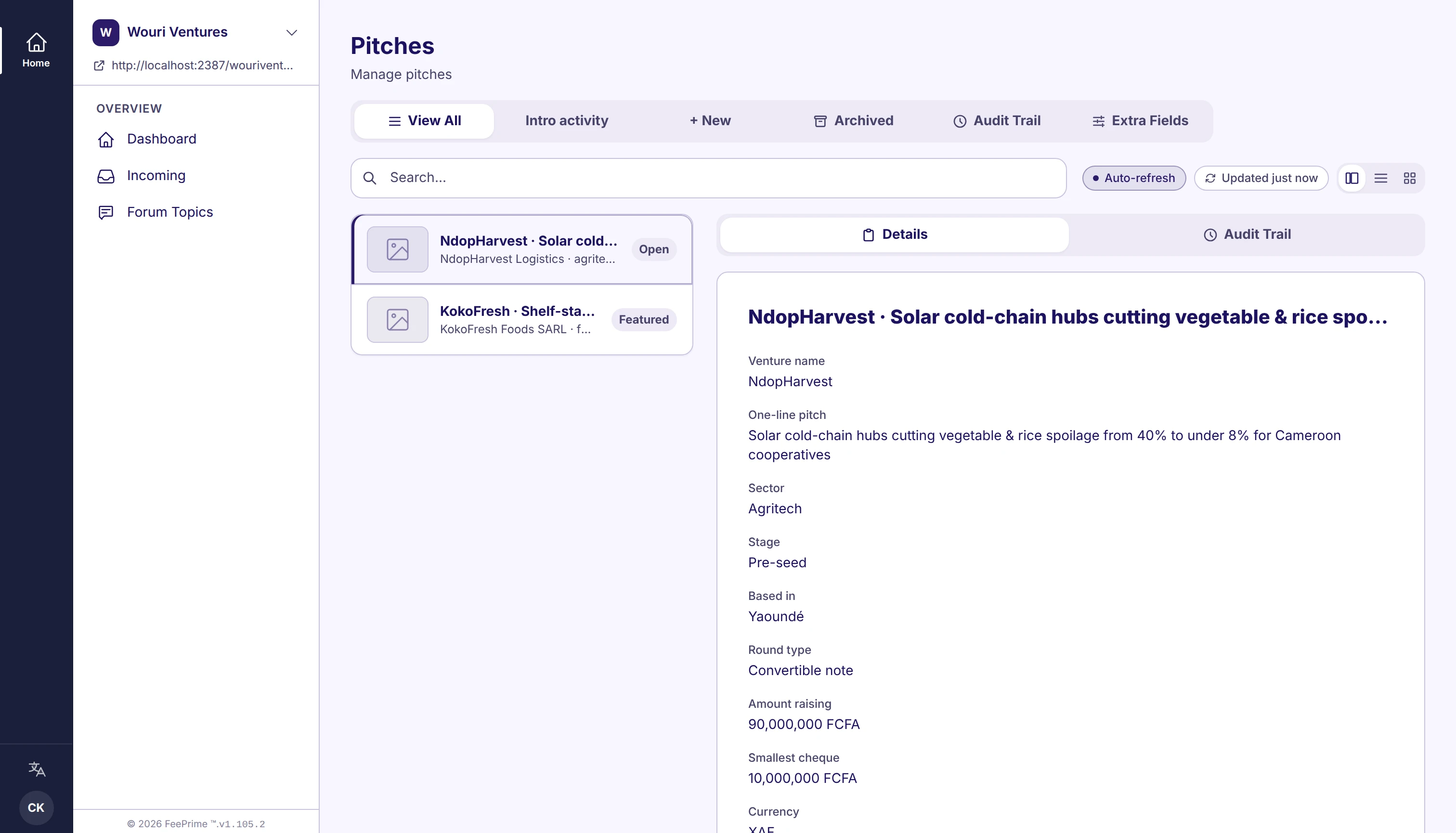 Curator view of Portal Deal Pitches showing KokoFresh (FMCG, Seed, 150M FCFA, Featured) and NdopHarvest.
2. Reviewing a founder application in Portal Vendors
Open Portal Marketplace / Vendors / Portal Vendors to review incoming applications. Click into Clarisse’s pending profile and verify five essentials before approving:
- Vertical: Confirm it is set to Dealroom (
dealroom). - Identity and contact details: Check Trading Name (e.g., KokoFresh Agro-Processing), City (Douala), Phone Number, Email, and a brief About summary.
- Verification documents: Open the attached ID Document and Ownership Document (and Licence Number if applicable, such as an RCCM or business registration number). Confirm the person submitting the profile actually runs the business.
- Verified badge and tags: Mark Verified once your checks pass. Use Tags if your dealroom groups founders publicly (for example, Douala Cohort or Female-Founded).
- Ignore shop-only fields: Because Portal Vendors serves multiple portal types, you will see fields like delivery fee, pickup address, and opening hours on the form. For a dealroom founder, leave those blank. Nothing breaks.
Common mistake: deleting or overwriting an inactive founder. Founders cannot archive their own vendor profile—stopping a live trading identity is always the curator’s call. If a founder breaches your rules or shuts down permanently, archive their vendor profile rather than renaming it for someone else. That preserves the audit trail on past pitches and investor intros.
3. Reading and auditing a pitch in Portal Deal Pitches
Once Clarisse is approved, she writes KokoFresh’s raise from the portal, and it appears immediately under Portal Marketplace / Dealroom / Portal Deal Pitches. Because edits go live as written, Cédric schedules a quick 10-minute quality audit twice a week.
Here is the single most important rule to explain to founders: there is no PDF pitch deck upload and no data room on a FeePrime deal pitch. The Logo is the only file upload on the form. Everything Dr. Samuel reads—first on the public teaser card, then in the unlocked pitch after Clarisse approves his intro—lives in crisp, structured fields.
When Cédric reviews KokoFresh’s pitch, he checks three layers:
- Headline and classification: Venture Name (KokoFresh), One Liner (clear enough to understand in five seconds), Logo, City, Sector, and Stage. FeePrime supports ten clean sectors—Fintech, Agritech, Climate, Health, Mobility, Edtech, Logistics, Commerce, FMCG, and Media—and stages ranging from Idea through Series B+.
- Deal terms: Round Type (Equity, Convertible, Debt, or Grant), Amount Raising (e.g., 150,000,000), Min Ticket (e.g., 15,000,000 so Dr. Samuel immediately knows Mungo Angels fits), and Currency (XAF).
- Written investment memo: Problem, Solution, and Team are mandatory so no blank pitch ever hits the room. Strong founders also complete Market Size, Business Model, Competition, Traction, Why Now, and Use of Funds.
Need to help a busy founder get their first pitch live? In Portal Deal Pitches, a curator can create or polish a pitch directly on a vetted founder’s behalf by selecting their profile in Marketplace Seller. Just make sure the founder confirms every number before you leave it open.
Common mistake: letting vague one-liners slide. “Disrupting African food” tells Dr. Samuel nothing. Ask Clarisse to sharpen it to “Shelf-stable Cameroonian fruit and cocoa snacks stocked in 48 Douala and Yaoundé supermarkets.” Specific numbers earn investor intros.
4. Controlling visibility with Round Status: Open, Paused, and Closed
Every pitch carries a Round Status that controls exactly what investors see in Browse and whether they can request an intro:
| Round Status | Visible in Browse? | New intro requests? | When Cédric uses it |
|---|---|---|---|
| Open | Yes | Yes | Active raise accepting investor intros (e.g., KokoFresh raising 150M FCFA). |
| Paused | No (hidden) | No | Founder is fixing numbers, renegotiating terms, or temporarily off the market. |
| Closed | Yes (with Raised badge) | No | Round is complete—shows Wouri Ventures’ track record without letting new requests pile up. |
Common mistake: archiving a pitch that successfully raised. Archiving removes the pitch from view completely. When KokoFresh finishes closing its 150,000,000 FCFA Seed round, Cédric switches Round Status to Closed instead of archiving it. New angels visiting Wouri Ventures see the Raised badge as proof that deals actually close here, while Clarisse stops getting late intro requests. Save Archive for withdrawn, duplicate, or policy-breaking pitches.
5. Tier-gating pitches and featuring top ventures on Home
As your dealroom grows, not every investor should see every deal on day one, and not every deal deserves top billing.
- Tier-gating with Access Membership Types: On any pitch record, you can select one or more investor tiers in Access Membership Types (configured under Members / Membership / Membership Types, covered in Lesson 9). For example, Cédric can give Mungo Angels Syndicate pass holders first look at a tight 200M FCFA Climate raise while keeping general raises open to all vetted investors. Running a small dealroom with one open investor list? Leave Access Membership Types blank. Nothing breaks.
- Pinning flagship ventures with Featured: Only the curator can turn on Featured on a pitch record—founders cannot feature themselves. Turning Featured on pins KokoFresh onto the Dealroom Home showcase so returning investors spot high-conviction raises immediately.
Common mistake: featuring ten deals at once. If every venture on Wouri Ventures is marked Featured, none of them stand out. Keep Featured to your top 2 to 4 active, well-written raises, and turn it off as soon as a round closes or pauses.
Try it
Practice the full curator workflow on staging.feeprime.com—a practice copy of FeePrime, kept apart from the real thing:
- Sign in as a curator and open Portal Marketplace / Vendors / Portal Vendors.
- Create or open a sample founder profile (such as KokoFresh), verify Vertical is set to Dealroom, tick Verified, and save.
- Open Portal Marketplace / Dealroom / Portal Deal Pitches and create a practice Seed pitch in FMCG for 150,000,000 XAF with Min Ticket
15,000,000, Round TypeEquity, and Round StatusOpen. - Fill in Problem, Solution, Team, and Traction—notice how Logo is the only upload and no PDF deck is needed.
- Turn Featured on to pin the pitch to Home, then switch Round Status from Open to Paused and finally to Closed so you know exactly how each state behaves.
Five minutes on staging now will save hours of back-and-forth when your first real cohort applies.