
One product order, end to end
What a FeePrime Product Marketplace does: It links buyers with independent sellers in one trusted online shop that you operate — without you having to buy, stock, or warehouse every product yourself. Independent merchants open their own shopfronts, list products with prices, cities, and delivery terms, and fulfill customer orders; shoppers browse by city and order in one place; and FeePrime keeps every approval, delivery update, commission, and seller payout connected in one system.
Before you start, sign in and open Portal Marketplace / Marketplace / Orders.
Can’t find it? It may be turned off for your business, or your account may not be allowed to open it. Ask the person who set up your FeePrime. They can fix both.

Photo: Joel Friedrich on Unsplash
Most multi-vendor marketplaces in Douala and Yaoundé start the same way: a WhatsApp group, a handful of Instagram posts, and a spreadsheet that nobody trusts by Friday evening. A shopper asks whether a product is available in her city. The operator texts the merchant. The merchant forgets to reply. When a delivery finally happens, nobody is sure how much commission the marketplace earned or how much cash still belongs to the seller.
FeePrime replaces that scramble with one connected system. Staff, independent sellers, and shoppers all work against the same live records—from seller approval to product listing, city browsing, order confirmation, delivery, and seller payout.
In this first lesson, we will follow one real order from start to finish on MaketCM, a multi-vendor product marketplace serving Douala and Yaoundé. You will meet the three people you will follow through all ten lessons of this course:
- Nadine — marketplace staff and portal admin at MaketCM.
- Hervé — independent artisan running KamerCraft, selling Mount Cameroon Arabica Coffee 500g packs and Douala Leather Messenger Bags.
- Stéphanie — a shopper ordering on her phone in Douala.
Whether you run the marketplace, sell on it, or buy from it, seeing the whole journey once makes every screen in the rest of this course click into place.
1. Three people, one shared marketplace
A product marketplace only works when all three sides see the exact truth they need—without stepping on each other’s toes. Nadine sets the rules and keeps the marketplace trustworthy. Hervé manages his own shopfront and fulfills his orders. Stéphanie browses by city, sees clear delivery terms, and tracks what she bought.
Here is how one single order moves across MaketCM in FeePrime:
[1. NADINE: Staff Setup]          [2. HERVÉ: Seller Portal]        [3. STÉPHANIE: Shopper]
Portal Settings +                 Applies for KamerCraft           Opens MaketCM on phone,
Approves KamerCraft      --->     shopfront & posts Coffee   --->  filters by Douala &
& first product listing           (works even on weak 3G)          places order (pending)
                                                                            |
                                                                            v
[5. NADINE: Money & Payouts]      [4. HERVÉ: Fulfillment]
Commission (10%) vs               Confirms stock & dispatches
KamerCraft payout tracked   <---  rider in Marketplace Orders
in Sales & Cash                   (pending -> confirmed -> delivered)
Notice what is missing from that diagram: zero re-typing. Nobody copies an order from WhatsApp into an invoice, and nobody guesses at month-end whether Hervé actually delivered Stéphanie’s coffee.
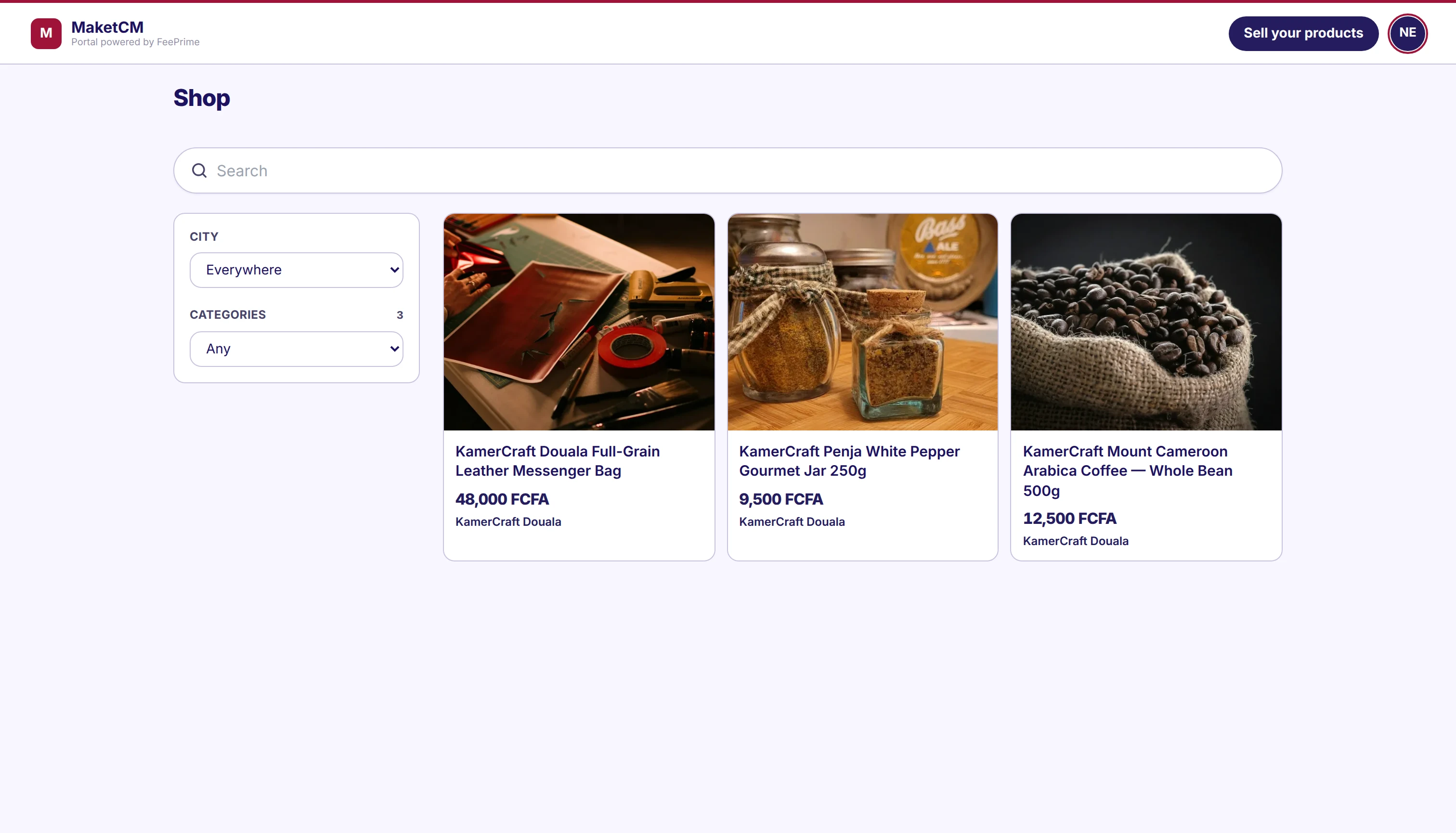 MaketCM public product marketplace portal opening directly onto live Cameroon listings.
2. Before the first order: Nadine’s rules and Hervé’s shopfront
Every marketplace starts in Portal Marketplace / Vendors / Portal Settings. Your organisation has one set of marketplace settings—you never create duplicate settings records for the same marketplace. Before inviting sellers, Nadine checks three core choices:
- Marketplace type (Vertical): Set to product marketplace so listings and shopfronts appear in the right public storefront.
- Listing approval policy: Choose how tightly staff review new products:
- Profile only: Approve the seller’s shopfront once, then trust every listing they post.
- First listing (the default for products): Approve the shopfront and the seller’s very first product listing. Once that passes, future listings go live right away.
- Every listing: Staff review every single product before shoppers see it.
- Free listing allowance: How many live listings a seller without a paid membership can keep active. Leave it blank for the default of 3, or set it to 0 if every seller must hold an active membership before listing anything.
Starting small with ten trusted local artisans? Keep approval on First listing and leave free listings at the default of 3. Running a large regulated catalog where every item needs inspection? Switch to Every listing and require a membership if needed.
With the rules saved, Hervé opens MaketCM’s seller portal and submits his KamerCraft shopfront application. He enters his trading name, Douala city, phone number, email, logo, short description, ID document, delivery fee (1,500 XAF in Douala), delivery lead time, opening hours, and pickup address.
Every new seller profile waits for a human approval in Portal Marketplace / Vendors / Vendors. FeePrime never lets an unreviewed trading name and phone number go live on its own—a fake shopfront with a bad phone number is the fastest way to burn buyer trust.
Common mistake: Never approve a vendor profile without checking their contact details, city, and ID document first. Once Nadine approves KamerCraft, Hervé can edit his own shopfront details whenever his hours or delivery fee change. Notice one deliberate safeguard: sellers cannot archive their own shopfront. Walking away from a live store while customers still have open orders is always a staff decision, never a self-service button.
3. From shelf to screen: Hervé publishes Mount Cameroon Arabica Coffee 500g
Once KamerCraft is approved, Hervé opens his seller portal to list his flagship item: Mount Cameroon Arabica Coffee 500g at 6,500 XAF. He adds clear photos, a short product summary, and sets the city to Douala.
Two practical touches in Portal Marketplace / Marketplace / Listings matter a lot on the ground in Cameroon:
- Built for shaky market signal: If Hervé is standing in a busy Douala market on poor 3G when he taps save, FeePrime queues the listing offline and syncs it automatically as soon as his phone regains signal.
- Staff can help less-digital artisans: If an artisan sends product photos and prices to Nadine on WhatsApp, Nadine does not need their password. She opens Portal Marketplace / Marketplace / Listings, creates the product on their behalf, and selects their approved shopfront on the form. Ownership still stays cleanly tied to that seller’s account.
Because MaketCM uses the default First listing rule, Hervé’s coffee pack waits briefly in Nadine’s review queue. Nadine checks the photos, price, and description and approves it. The following week, when Hervé adds his Douala Leather Messenger Bag at 28,000 XAF, it publishes straight to shoppers without waiting on Nadine.
Common mistake: Never publish listings before setting your city and delivery or pickup terms on your vendor profile. Shoppers filter by city and check delivery fees before buying—missing city or delivery details turn interested browsers into abandoned carts.
4. Stéphanie orders in Douala and the order moves through three clear states
On Thursday morning, Stéphanie opens MaketCM on her phone. She filters by Douala, spots KamerCraft’s Mount Cameroon Arabica Coffee 500g, checks the price (6,500 XAF) and Douala delivery fee (1,500 XAF), and places an order for one pack (8,000 XAF total).
The moment she checks out, a live order appears in Portal Marketplace / Marketplace / Orders—visible to Hervé in his seller portal and to Nadine on the staff desk. From here, the order moves through three clear fulfillment events:
  [ pending ]  ---------->  [ confirmed ]  ---------->  [ delivered ]
  Stéphanie placed           Hervé checked his           Rider handed the
  the order; waiting         shelf & accepted            coffee to Stéphanie;
  on KamerCraft              the order for dispatch      order complete
- Pending: The order just landed. Hervé checks his shelf to make sure a fresh 500g pack is ready.
- Confirmed: Hervé confirms the order in FeePrime. Stéphanie immediately sees that KamerCraft has accepted it and is preparing delivery.
- Delivered: Hervé’s rider drops off the coffee in Akwa and Hervé marks the order delivered. Now Stéphanie, Hervé, and Nadine share the exact same proof of completion.
Common mistake: Never confirm or deliver an order only over WhatsApp or a phone call without updating the order in FeePrime. If Hervé skips the status updates, the order stays stuck in pending. Stéphanie is left guessing, and if a dispute comes up later, Nadine has no verified fulfillment trail to back anyone up.
5. How Nadine tracks commissions and pays KamerCraft without spreadsheets
When Stéphanie’s order reaches delivered, the money picture is already crystal clear. Suppose MaketCM charges a 10% marketplace commission on product sales, while KamerCraft handles its own local rider:
- Total paid by Stéphanie: 8,000 XAF (6,500 XAF coffee + 1,500 XAF delivery)
- MaketCM’s commission (10% of 6,500 XAF): 650 XAF — this is MaketCM’s actual revenue
- Payout owed to KamerCraft: 7,350 XAF (5,850 XAF coffee share + 1,500 XAF delivery fee)
Because MaketCM runs inside FeePrime, Nadine does not rebuild these numbers by hand in a spreadsheet. Marketplace sales connect straight into your business ledger across Sales / Promotions / Revenue Share, Sales / Selling / Invoices, Cash / Money / Cash Accounts, and Cash / Money / Transactions. At payout time, Nadine sees exactly what MaketCM earned, what is owed to KamerCraft, and which delivered orders each payout covers.
Common mistake: Never treat seller payout money as marketplace revenue. If Nadine counts the entire 8,000 XAF as MaketCM income and spends it on office bills, she will come up short the day Hervé asks for his 7,350 XAF payout. Keep commission revenue and seller payables separate from day one.
6. Where to go next in this course
You now have the full picture of one product order from setup to payout. From here, jump straight into the lessons built for your role—or read all ten if you wear every hat:
- Marketplace staff (Nadine’s track): Lessons 2, 3, and 4 cover setup, seller & listing moderation, and monitoring live orders. Lessons 8, 9, and 10 cover commissions, payouts, delivery expenses, payroll, and financial reports.
- Sellers (Hervé’s track): Lessons 5 and 6 show you how to register your shopfront, publish great listings, and fulfill orders cleanly. Lessons 8 and 9 cover your payouts and delivery costs.
- Shoppers (Stéphanie’s track): Lesson 7 walks through browsing by city, checking out on mobile, and tracking orders.
Try it
Open staging.feeprime.com—a practice copy of FeePrime, kept apart from the real thing—and walk through one order in five minutes:
- Open Portal Marketplace / Vendors / Portal Settings and inspect the marketplace vertical, listing approval rule, and free listing allowance.
- Open Portal Marketplace / Vendors / Vendors and open a sample seller profile to see its city, delivery fee, lead time, and approval state.
- Open Portal Marketplace / Marketplace / Listings and check how a product links to its seller shopfront and city.
- Open Portal Marketplace / Marketplace / Orders and follow an order’s status trail from pending to confirmed to delivered.
- Open Cash / Money / Cash Accounts and Sales / Promotions / Revenue Share to see where marketplace money and commissions stay separated from seller payouts.
Once you see how these five screens connect on staging, running your live marketplace feels calm and predictable.