
Assisted Signup and serving feature-phone customers (including offline mode)
Before you start, sign in to your issuer’s Wallet Portal and open Agent / Assisted Signup (/wallet/agent/signup) and Agent / Customers (/wallet/agent/customers).
Can’t find it? It may be turned off for your business, or your account may not be allowed to open it. Ask the person who set up your FeePrime. They can fix both.

Photo: V Srinivasan on Unsplash
At Kiosk Bonapriso in Douala, smartphone regulars like Diane Tchoupo are only half the neighborhood. Every morning, Alain Fokou serves walk-in neighbors who do not own a smartphone — people like Mireille Ndongo, who sells plantains down the street with a basic keypad phone, and Samuel Ekani, a motorbike rider who keeps mobile data switched off most of the week.
Without Assisted Signup, those customers stay stuck carrying folded banknotes everywhere, and your kiosk misses steady daily commissions. Worse, if a heavy Douala rainstorm knocks out 3G for two hours, an online-only counter freezes while a queue builds outside.
FeePrime solves both problems together. You can open real digital wallets for walk-in customers right from your counter device, serve them without them ever needing a smartphone, and keep running their transactions even when your internet connection drops.
1. Opening a wallet with Assisted Signup (/wallet/agent/signup)
When Mireille walks up and asks to open a wallet on Manna Finance’s network, Alain opens Agent / Assisted Signup (/wallet/agent/signup). Creating her wallet takes under two minutes and asks for four things:
- Full name — use the exact name on her national ID if she has one, so upgrading later is smooth.
- Phone number — her real mobile number, which friends, family, and buyers can use to send her money.
- Email address — optional. Leave it blank if she does not use email.
- Customer’s 4-digit PIN — the private PIN she will use to authorize withdrawals and transfers at your counter.
Never choose, guess, or write down a customer’s PIN. Hand your phone or tablet across the counter — or turn the screen away — while Mireille enters her own 4-digit PIN. That PIN is her signature. If an agent knows a customer’s PIN, trust breaks the moment a dispute happens.
As soon as you save, FeePrime creates a real wallet for Mireille and attaches it to your Agent account as a sub-account. You can see all the walk-in customers you have onboarded anytime under Agent / Customers (/wallet/agent/customers).
Optional: Capturing Tier 2 KYC at the counter
New assisted wallets start at Tier 1. If Samuel Ekani brought his identification document and wants higher transaction limits, you can capture his Tier 2 KYC right at the counter without making him borrow a smartphone:
- Full name, date of birth (must be 18 or older), and ID type (National ID, Passport, or Driver’s License)
- ID number and a valid, non-expired expiry date
- Clear photos of the ID front, ID back, and a live selfie of the customer
You can never verify a customer you signed up yourself. FeePrime automatically records that your agent account assisted with the submission and routes the case to Manna Finance’s independent verification team (Clarisse Mbarga’s appointed verifiers, who approve cases by multi-verifier consensus). That wall protects both Samuel and your agency license under Wouri Microfinance. (Want to see how issuers set up Tier 2 rules and multi-verifier approvals? Read Digital Wallets, Vaults & Transfers.)
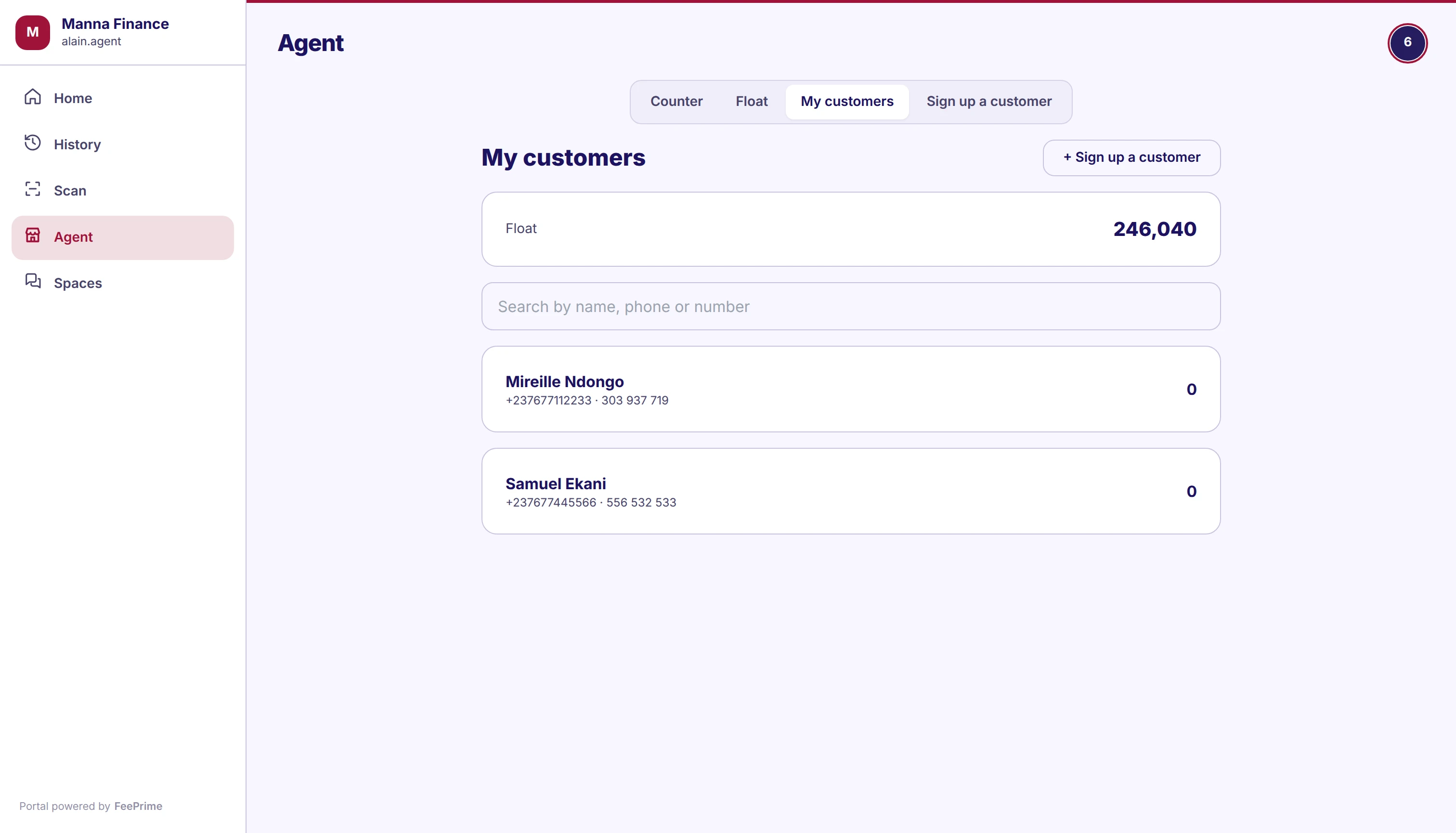 Assisted Customers screen listing Mireille Ndongo and Samuel Ekani’s feature-phone sub-accounts with live balances, offline queue support, and counter actions.
2. How sub-accounts work — and the one-writer rule
An assisted customer’s wallet behaves just like any other wallet for receiving money, with one smart protection on spending:
- Money IN is open to the entire network. Diane Tchoupo on her smartphone, a cousin in Yaoundé, or Sunrise Bakery paying for supplies can send money directly into Mireille’s wallet anytime using her phone number or wallet number.
- Money OUT happens only through your kiosk. Only the agent who opened a sub-account can debit it for a cash-out or transfer. Another agent across town in Akwa cannot withdraw from Mireille’s sub-account.
[Walk-in Customer: Mireille] --(Assisted Signup)--> [Sub-Account under Alain]
                                                            |
     +------------------------------------------------------+--------------------------------------+
     |                                                                                             |
     v                                                                                             v
  MONEY IN (Open to anyone)                                                       MONEY OUT (Alain's counter ONLY)
  - Diane pays from her smartphone                                                - Assisted Cash-Out (Mireille's PIN)
  - Family transfers from anywhere                                                - Sub-Account Transfer (Mireille's PIN)
  - Alain does Counter Cash-In                                                                     |
                                                                              +--------------------+--------------------+
                                                                              |                                         |
                                                                              v                                         v
                                                                         Online Now                               Signal Drops
                                                                    Posts immediately                         Queues locally with
                                                                    to live ledger                            cached balance & fees
                                                                                                                        |
                                                                                                                        v
                                                                                                                Internet Returns
                                                                                                              Offline Sync replays
                                                                                                              in order (Agent PIN)
Why does FeePrime limit debits to one agent? Because one writer per sub-account is what makes offline mode safe. If two different kiosks could debit Mireille’s sub-account while disconnected from the internet, someone could withdraw the same 25,000 XAF twice before the network came back. With one writer, your counter device always holds the single reliable balance for Mireille’s sub-account.
Busy city shop serving mostly smartphone regulars? You may only open a few sub-accounts for older neighbors and nearby market sellers — and everything still runs smoothly on the same counter screen. Rural kiosk or cash-heavy market stall? Sub-accounts plus offline mode become the backbone of your daily business.
3. Running assisted Cash-In, Cash-Out, and Transfers
You serve sub-account customers from the same Agent workspace (/wallet/agent and /wallet/agent/customers), but pay close attention to whose PIN confirms each action:
- Assisted Cash-In (customer deposits physical cash): Samuel hands you 15,000 XAF in cash. Look him up by phone number or wallet number, enter the amount, and check the live fee preview together. Confirm with your Agent 4-digit PIN. Digital float moves from your Agent wallet into Samuel’s sub-account (minus the fee), and you put his cash in your drawer.
- Assisted Cash-Out (customer withdraws physical cash): Unlike Diane Tchoupo — who scans your Counter QR on her smartphone and matches a live 4-digit Counter Code — Mireille has no smartphone screen. Select Mireille’s sub-account, enter the withdrawal amount, review the fee together, and hand the device to Mireille so she types her own 4-digit PIN. Once FeePrime confirms the entry, your digital float increases and you hand her the physical notes.
- Sub-Account Transfer (customer sends money to someone else): Mireille wants to pay 8,000 XAF from her sub-account to Sunrise Bakery or to Diane Tchoupo. Select her sub-account, enter the recipient and amount, review the fee, and let Mireille enter her own 4-digit PIN on your device. Her wallet pays the recipient, and your agent commission share on the transfer fee is credited automatically.
Never mix up PIN roles. Cash-in uses your Agent PIN because your float is leaving your Agent wallet. Assisted cash-out and sub-account transfers use the customer’s PIN because money is leaving their sub-account. Never hand over cash before FeePrime confirms the operation on your screen.
4. Working through outages with Offline Mode and Offline Sync
When mobile data cuts out during an afternoon storm in Bonapriso, Alain does not have to turn his sub-account regulars away.
While your device is online, FeePrime quietly caches two things locally for your kiosk:
- The current balances of your sub-account customers
- Manna Finance’s exact fee rules, so the fee your screen shows offline matches the exact fee the server will apply later
What works offline vs. what waits for signal
- Works in Offline Mode (sub-accounts only): Cash-in to your sub-accounts, cash-out from your sub-accounts (using the customer’s 4-digit PIN), and transfers out of your sub-accounts. Each action updates the local cached balance immediately so a customer cannot overdraw their sub-account while you are offline.
- Waits for a live internet connection: Smartphone Cash-Outs using your Counter QR and live 4-digit Counter Code, business Cash-Outs using a 6-digit collection code (such as Sunrise Bakery’s manager collecting cash), new Buy Float or Return Float requests with Wouri Microfinance, and new Assisted KYC photo uploads.
Syncing safely when bars come back
FeePrime continuously checks for real connectivity rather than guessing from phone signal bars. As soon as your connection returns:
- Open your pending Offline Sync queue inside the Agent workspace.
- Review the queued operations waiting to post.
- Tap Sync and confirm with your Agent 4-digit PIN.
FeePrime replays every queued operation in exact chronological order, re-verifying balances, Manna Finance’s fee rules, and Wouri Microfinance’s counter limits on the server — and credits your commission shares in the same batch.
What if 3G stutters halfway through syncing and you have to tap retry? You are protected. Every offline transaction carries a unique idempotency key (a one-time replay-safe reference). If the server already posted transaction #1 and #2 before the signal blinked, retrying the sync cleanly skips those two and finishes #3 and #4 — never double-charging or double-crediting a customer.
Three offline mistakes to avoid
- Never clear your browser data or sign out while offline entries are waiting. Unsynced offline transactions live on your device until they reach the server. Wiping browser storage or switching phones before syncing will lose those queued records.
- Always sync before running Day Close (
/wallet/agent/day). Your Day Close drawer check (Expected Cash = Opening Cash + Cash-In - Cash-Out - Float Bought + Float Returned) only counts transactions that have posted to the server. If three offline cash-outs have not synced yet, your physical cash count will look short. - Keep an eye on your physical cash drawer while offline. Cached balances protect sub-accounts from overdrawing, but only you can see how many physical banknotes are left in your cash box.
Try it
Practice the full assisted customer and offline flow on staging.feeprime.com — a practice copy of FeePrime, kept apart from the real thing, where mistakes cost nothing.
- Sign in as an active Agent on staging.feeprime.com and open Agent / Assisted Signup (
/wallet/agent/signup). - Create a practice walk-in customer (for example,
Mireille Test) with a practice phone number, and enter a private 4-digit PIN as the customer. - Open Agent / Customers (
/wallet/agent/customers) and confirm the new sub-account appears in your list. - Run a practice Cash-In of 10,000 XAF using your Agent 4-digit PIN, then run an Assisted Cash-Out of 4,000 XAF using the customer’s 4-digit PIN on your screen.
- Turn on airplane mode (or switch your browser to offline), queue one small practice sub-account cash-in, turn internet back on, and run Offline Sync with your Agent PIN to see it post cleanly in order.
Five minutes of practice now means you will never hesitate when a walk-in neighbor arrives during a real 3G outage.