
Running payroll runs and accruing salaries
Before you start, sign in and open HR / Payroll runs.
Can’t find it? It may be turned off for your business, or your account may not be allowed to open it. Ask the person who set up your FeePrime. They can fix both.

Photo: Vitaly Gariev on Unsplash
Month-end payday is where spreadsheet payroll breaks down. At Sunrise Bakery, Amina Bello runs teams in both Douala and Yaoundé. When payroll lived in a spreadsheet, Mireille Nkom had to copy last month’s tab, chase Paul Kamga’s Sunday overtime by WhatsApp, remember Brice Mballa’s transport allowance, and hope nobody got listed twice between branches. Worse, when bank transfers cleared on 2 November, October’s profit looked artificially high and November looked like a disaster.
HR / Payroll runs fixes all of that in one disciplined flow. A payroll run gathers every active employee who belongs to a pay period, calculates base pay plus additions and deductions, puts the sheet in front of a second pair of eyes for approval, generates each person’s PDF Payslip, and posts the salary expense into your OHADA books for the month actually worked — before a single franc leaves your bank, till, Mobile Money, or wallet.
1. Check who is ready before you open a run
Before Mireille starts the October run, she glances at two places:
- The Task Board at the top of the dashboard. FeePrime raises HR cards automatically when payroll is due to run, when a probation or fixed-term contract is ending, when someone is still marked active past their
end_date, or when an employee is missing details needed to get paid. - HR / Employees, to confirm everyone who worked this period has
employment_statusset toactive, the rightcurrency(XAF), the rightpay_frequency, and the rightbase_salary.
Inactive employees are skipped automatically when you load a run. Fix any wrong salary or status on the employee card before creating the run so the lines pull in clean.
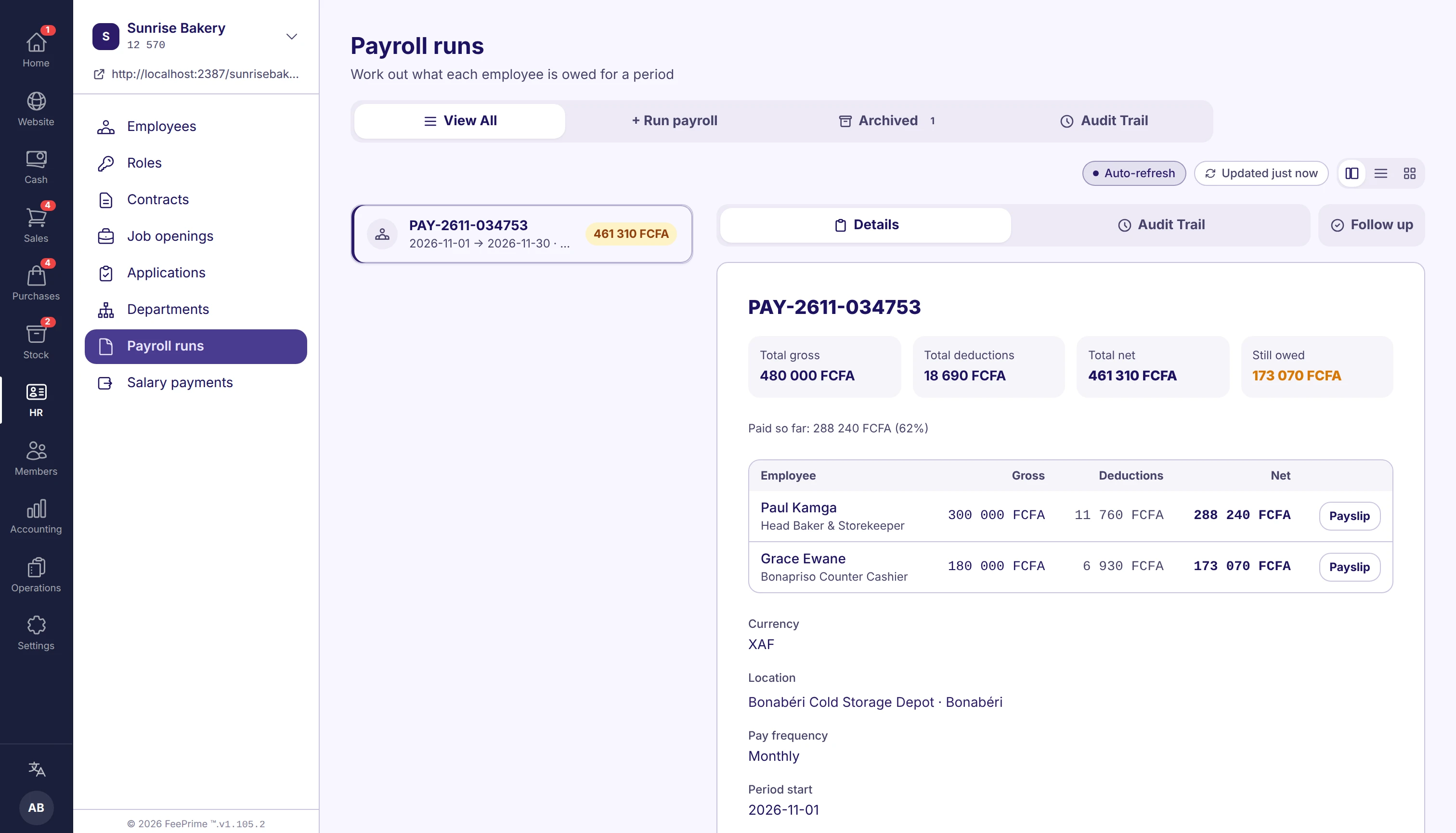 HR / Payroll runs accruing November 2026 monthly salaries with transport allowances, CNPS deductions, and PDF payslips.
2. Set the scope: currency, location, frequency, and period
Click New inside HR / Payroll runs. FeePrime gives the run a unique payroll_run_number and asks you to set its boundaries:
currency: Pick the currency for this run (for Sunrise Bakery,XAF). Never mix currencies in one payroll run. Journal entries post per currency, so an employee or consultant paid inEURorUSDgoes in their own separate run.pay_frequency: Choosemonthly,semimonthly,biweekly, orweekly. Never mix pay frequencies in one run. Sweeping a weekly helper into a monthly run would pay their weekly figure for the whole month; putting a monthly baker into a weekly run would pay a full month every week — silent four-times errors.- Pay period (
period_startandperiod_end): A new run starts on the current pay period automatically. Pick the whole period (month and year for monthly pay, or a date for weekly pay) and FeePrime fills inperiod_startandperiod_endfor you. You do not type free dates, because free dates let people accidentally create overlapping runs like 1–30 September and 1–31 September for the same work. pay_date: The date you expect money to be paid out (for example, 2 November for October’s work).business_locationand department filter (optional): Running one bakery with one monthly team? Leavebusiness_locationand the department filter blank — nothing breaks. Running Douala and Yaoundé on different days, or running Production before Counter Sales? Pick the branch inbusiness_locationand choose the department straight from your HR / Departments list.
3. Load employees, catch duplicates, and add adjustments
As soon as currency and pay_frequency are set, click Load employees. FeePrime pulls every active employee matching your scope into the run’s lines.
What if Mireille ran Douala on 29 October, and on 31 October opens an all-locations October run? FeePrime checks who is already carried by another payroll run for that same period and flags them right on the screen so Paul Kamga and Grace Ewane are never paid twice.
Now review each line and enter the month’s real-world adjustments:
additions: Transport allowances, Sunday or night-shift overtime, meal stipends, or sales bonuses.deductions: Employee CNPS share, IRPP tax withholding, or an agreed salary advance recovery.
Here is how three lines look on Sunrise Bakery’s October Douala run (in XAF):
| Employee | Base salary | Additions | Deductions | Net payable |
|---|---|---|---|---|
| Paul Kamga (Head Baker, CDI) | 280,000 | +25,000 (Sunday overtime) | -32,000 (CNPS & IRPP) | 273,000 |
| Grace Ewane (Bonapriso Cashier) | 160,000 | +10,000 (Sales target bonus) | -14,500 (CNPS & IRPP) | 155,500 |
| Brice Mballa (Delivery Rider) | 135,000 | +15,000 (Fuel & phone) | -20,000 (Advance recovery) | 130,000 |
Check the run total carefully before submitting.
4. Maker-Checker approval — why two pairs of eyes matter
Payroll is one of the largest cash outflows in any SME. FeePrime supports Maker-Checker approval so the person who builds the run does not approve it alone:
- Maker (Mireille Nkom): Loads the lines, keys in overtime, bonuses, and deductions, verifies the figures against shift sheets, and submits the run.
- Checker (Amina Bello): Opens the approval screen — which displays clear employee names and formatted XAF totals — checks for surprises, and approves.
Never try to edit an approved payroll run. Just like posted invoices and supplier bills, a posted payroll run is locked so your audit trail stays honest. If Grace Ewane calls ten minutes after approval to say a 15,000 XAF shift bonus was missed (and no cash has been sent yet), archive the mistaken payroll run and create a clean replacement run for approval.
5. What approving a run posts to your OHADA books
Here is the full flow from active employee card to payday:
Active Employees (HR / Employees)
        |
        v
New Payroll Run (HR / Payroll runs)
  - Currency + Frequency + Whole Period + Optional Location/Department
  - Load employees (flags anyone already in another run for this period)
  - Add per-employee additions & deductions
        |
        v
Maker-Checker Approval (Amina reviews Mireille's draft)
        |
        +---> OHADA Books: Accrues Personnel Expense + Salary Payable
        |     (for the period worked — BEFORE cash leaves the bank)
        |
        +---> Employee Detail Cards update live:
        |     [ Total accrued ]  [ Total paid: 0 ]  [ Still owed ]
        |
        +---> One-click PDF Payslip generated per employee
        |
        v
Next step (Lesson 7): HR / Salary payments
  - Cash / Bank / Mobile Money / Wallet moves out
  - Still owed drops to 0
Do not confuse approving a payroll run with sending money. When Amina approves Sunrise Bakery’s October run on 31 October:
- October carries October’s cost. FeePrime posts personnel expense and an accrued salary liability (salary payable) into your OHADA books for October, even if the bank transfer or Mobile Money payout happens on 2 November. Your October Income Statement shows true bakery profit, and your Balance Sheet shows exactly what you still owe staff.
- Live employee balances update immediately. Open Brice Mballa under HR / Employees right after approval: his
Total accruedandStill owedcards rise by 130,000 XAF, whileTotal paidstays at 0 until you record or send payment under HR / Salary payments (covered in Lesson 7). - Payslips are ready in one click. Open the approved run and click Payslip on any employee line to generate a clean PDF payslip showing base pay, additions, deductions, and net pay.
6. Four common payroll run mistakes to avoid
- Skipping the Task Board before loading. If Brice’s trial ended or an ex-cashier is still marked
active, you will pull the wrong roster into the run. - Running one mixed sheet for monthly and weekly staff. Keep each
pay_frequencyand eachcurrencyin its own run. - Trying to patch a posted run off-book. If you spot a mistake before paying, archive the run and create a corrected one — never pay a quiet cash difference out of the till without recording it.
- Assuming approval pays employees. Approval accrues what you owe. Actual cash, bank, Mobile Money, or wallet payouts happen next in HR / Salary payments.
Try it
Practice on staging.feeprime.com — a practice copy of FeePrime, kept apart from the real thing.
- Sign in and open HR / Payroll runs, then click New.
- Pick
XAFforcurrency,monthlyforpay_frequency, leavebusiness_locationblank, and notice the current pay period is already selected. - Click Load employees and inspect the active staff lines pulled in.
- Add a
15,000XAF transport addition to one employee line and a10,000XAF deduction to another, then save and approve the run. - Download one employee’s PDF Payslip, then open that employee under HR / Employees and verify that
Total accruedandStill owedincreased whileTotal paidstayed at zero.
Once you have run one clean accrual on staging, month-end payroll stops feeling like a scramble and becomes a calm ten-minute routine.