
Writing and amending employment contracts (CDI, CDD and more)
Before you start, sign in and open HR / Contracts.
Can’t find it? It may be turned off for your business, or your account may not be allowed to open it. Ask the person who set up your FeePrime. They can fix both.

Photo: Igor Starkov on Unsplash
In a growing business, verbal promises are where expensive misunderstandings begin. You tell a new rider he is on a three-month trial at 95,000 XAF a month, six months pass, and nobody can find the paper saying when probation ended or what notice applies. Or you give your head baker a raise over WhatsApp, and two years later during a labour inspection nobody can prove how his salary moved from 220,000 XAF to 260,000 XAF.
At Sunrise Bakery in Douala and Yaoundé, Amina Bello used to keep Word files scattered across laptops. Every time someone got a raise, a file was saved over the old one, and half the staff had outdated job descriptions. Now Mireille Nkom drafts every agreement inside HR / Contracts.
Each contract sits cleanly beside the person’s employee record, pulls in their operational duties automatically, goes through approval before it becomes official, and preserves every promotion or salary change as a linked amendment instead of erasing history.
1. How a contract fits beside the employee record
New users often wonder why FeePrime has both HR / Employees and HR / Contracts. They do two different jobs, and keeping them clear saves headaches at month-end:
- HR / Employees is the live operational profile. It controls who appears in HR / Payroll runs, what base salary payroll loads, how they get paid, and when the dashboard Task Board warns HR about ending trials or fixed terms.
- HR / Contracts is the formal legal record. It documents the exact agreement between your business and the worker — type of contract, place of work, duties, hours, trial and notice days, pay terms, confidentiality, and termination rules — plus every signed change over time.
  HR / Roles                   HR / Employees
  (operational roles)          (live payroll & probation profile)
         |                                |
         +------- pre-drafts duties ------+
                         |
                         v
                  HR / Contracts
       +----------------------------------+
       | Original Contract (CDI / CDD...) |
       +----------------------------------+
                         |
                         | amends (raises, promotions, transfers)
                         v
       +----------------------------------+
       | Formal Amendment Contract        | ---> Print via PDF Template
       +----------------------------------+
Keep both records in step. When a signed amendment changes someone’s pay, title, or end date, update their live fields in HR / Employees too so the next payroll run and Task Board alerts match the paper they signed.
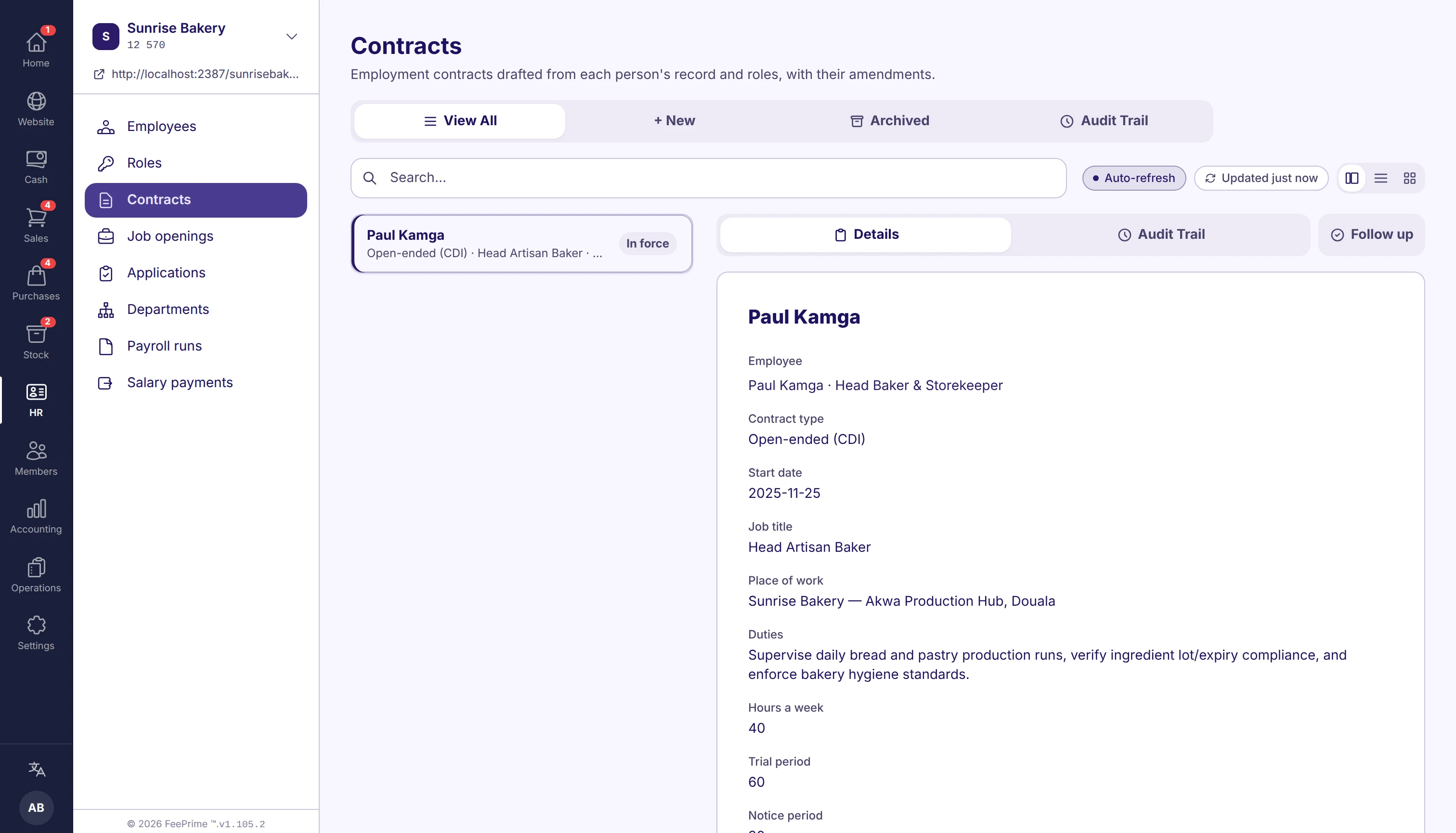 HR / Contracts showing Paul Kamga’s formal CDI contract with weekly hours, probation, notice period, and printable clauses.
2. Picking the right contract type
Open HR / Contracts and start a new contract. The first decision after choosing the Employee is Contract type. FeePrime supports six real-world arrangements used across Cameroon and African SMEs:
- CDI (Contrat à Durée Indéterminée): Permanent employment with no fixed end date. Use this for core staff like Paul Kamga (Head Baker) or Grace Ewane (Bonapriso Counter Cashier). Leave End date blank.
- CDD (Contrat à Durée Déterminée): Fixed-term employment with both a Start date and an End date. Useful when Brice Mballa joins on a six-month delivery contract or for seasonal production peaks.
- Internship: Structured student or graduate placements with clear learning duties and a fixed end date.
- Apprenticeship: Longer hands-on trade training (for example, an apprentice pastry baker working under Paul).
- Consultancy: Independent specialists hired for a defined mandate — such as an external technician servicing Sunrise Bakery’s ovens or an IT specialist setting up branch printers.
- Daily worker: Short-term casual help paid by the day during holiday rushes or special catering orders.
Never leave End date blank on a CDD, internship, or apprenticeship. An open-ended fixed-term contract looks like a CDI if a dispute lands at the labour inspectorate, and HR loses sight of renewal deadlines.
3. Letting FeePrime draft duties from assigned roles
Writing job descriptions from scratch is the reason most small businesses procrastinate on contracts. In FeePrime, you do not start from a blank page.
If Mireille assigns Brice Mballa the Delivery rider role under HR / Roles before creating his contract, FeePrime drafts his contract duties directly from the roles he holds. She simply reviews the generated Duties, tweaks anything unique to Sunrise Bakery’s Akwa and Bonapriso routes, and uses Other duties for reasonable extra tasks (like keeping the delivery motorbike logbook up to date).
Fill in the practical working terms cleanly:
- Job title: The plain title the person holds (e.g., Head Baker, Delivery Rider, Bonapriso Counter Cashier).
- Place of work: The primary branch or town (e.g., Sunrise Bakery — Akwa Kitchen, Douala, or Bonapriso Shop, Douala).
- Weekly hours: Standard agreed hours per week (commonly 40 hours in Cameroon for non-agricultural businesses).
Assign operational roles in HR / Roles before drafting the contract. It keeps the person’s Task Board responsibilities and their signed legal duties saying the exact same thing.
4. Setting trial periods, notice, pay, and clauses
Next, lock down the numbers and protections that matter if anything goes wrong later:
- Trial period (days): Enter the agreed probation length in days (for example, 30 or 60 days depending on category and local labour rules). Mirror the probation end date on HR / Employees so the dashboard Task Board alerts HR before the trial expires.
- Notice period (days): How much advance notice either party must give to end the agreement after probation.
- Currency, Base salary, and Pay frequency: Pick the currency (such as XAF), enter the agreed base pay (e.g., 220,000 for Paul, 95,000 for Brice), and pick the matching frequency: Monthly, Semimonthly, Biweekly, Weekly, or Daily (ideal for daily workers and short-term consultants).
- Confidentiality and Termination: Plain-language clauses covering recipes, customer lists, cash handling, and lawful grounds or procedure for ending the contract.
One small shop with two staff? Fill in employee, contract type, start date (and end date for CDD), job title, duties, and pay terms. You can keep confidentiality and termination short and plain — nothing breaks if optional clauses stay brief.
Multi-branch operation or regulated team? Fill in every clause, match trial and notice days strictly to your collective agreement or Cameroon Labour Code category, and let your approver verify the draft before printing.
Every save on HR / Contracts goes through maker-checker approval. Mireille drafts Brice’s contract as the maker; Amina reviews the salary, dates, and duties and approves it as the checker. No unauthorized contract slips into the file.
5. Handling raises, promotions, and renewals with amends
This is the single most important habit in the entire module:
Never edit a signed contract to record a raise, promotion, or transfer.
If Mireille opened Paul Kamga’s 2024 CDI and typed 260,000 XAF over 220,000 XAF, she would destroy proof of what Paul earned during his first two years. Instead, she creates a new contract in HR / Contracts, enters the new effective Start date, updated Job title or Base salary, and selects Paul’s previous contract in the Amends field.
  [Contract #1: Paul Kamga — CDI, Baker, 220,000 XAF, starts 01 Jan 2024]
                        ^
                        | amends
  [Contract #2: Paul Kamga — CDI, Head Baker, 260,000 XAF, starts 01 Nov 2026]
                        ^
                        | amends
  [Future Contract #3: Branch Transfer or Raise — full timeline intact]
The Amends chain gives Amina, her accountant, and any labour inspector a clean, unbroken timeline of every employee’s career at Sunrise Bakery.
Use an amendment whenever you:
- Give a salary increase or change pay frequency.
- Promote someone or substantially change their duties or branch (for example, moving Grace Ewane from Akwa to manage the Bonapriso counter).
- Renew a CDD or convert a worker from CDD to CDI after a successful term.
Archive, never delete. If a draft was created by mistake before approval or before anyone signed, archive it rather than trying to wipe history. And remember: once the amendment is approved and signed, update Base salary, Job title, or End date on HR / Employees so the very next payroll run pays the new rate.
6. Printing, signing, and staying audit-ready
A contract in FeePrime becomes legally binding on paper once both your business and the worker sign it. Your administrator can maintain your branded contract layout under Settings / Documents / PDF Templates so every CDI, CDD, or amendment prints with Sunrise Bakery’s header, registration details, and signature blocks.
Print two copies, have both the employer representative (Amina) and the employee sign and date both, hand one copy to the employee, and keep the signed original in your HR file.
Never let a trial period or CDD end quietly. Keep On trial / Probation end date and Has end date / End date up to date on HR / Employees. FeePrime’s Task Board watches those dates and raises an HR card before a trial or fixed term lapses — giving you time to confirm, renew via an amendment, or close cleanly.
Try it
Practice on staging.feeprime.com — a practice copy of FeePrime, kept apart from the real thing — in five minutes:
- Open HR / Roles and confirm your test employee (such as Brice Mballa) has at least one operational role assigned.
- Go to HR / Contracts and create a new CDD contract for that employee; watch how duties pre-fill from their assigned role, then add Place of work, Weekly hours (
40), Trial period (days) (30), Currency (XAF), and Base salary. - Submit the contract and approve it (or check how it waits in maker-checker approval).
- Create a second contract for the same employee with a higher Base salary and pick the first contract in the Amends field to build a clean amendment chain.
- Open HR / Employees for that person and verify that their live Base salary and End date match the latest approved agreement.
Once you have done one original contract and one amendment, you know the full lifecycle for every hire your business will make.