
Asking someone to pay for you with Payment Requests
Before you start, sign in and open Cash / Money / Payment requests.
Can’t find it? It may be turned off for your business, or your account may not be allowed to open it. Ask the person who set up your FeePrime. They can fix both.

Photo: Akinyemi Gbadamosi on Unsplash
Picture a busy Tuesday afternoon at Sunrise Bakery in Akwa, Douala. A truck from Littoral Flour Mills has just delivered 50kg sacks of flour, and the 850,000 XAF invoice is due before Friday. The bakery’s own bank balance is tight after paying staff salaries, so the branch manager calls Ibrahim Bello at Bello Group Holdings (the parent company) — or sends a quick WhatsApp message to founder Amina Bello — asking them to settle the supplier directly.
When that request lives only in a WhatsApp chat or a phone call, three costly problems follow fast. The payer forgets which supplier or invoice reference to use, nobody remembers the exact due date, and worst of all, when the payment comes through, the accountant accidentally records the 850,000 XAF a second time as a new expense while Littoral Flour Mills’ bill is still sitting unpaid in Purchases / Paying / Bills.
Cash / Money / Payment requests replaces scattered voice notes with one clean, formal record that says: “Please pay this for us, we will owe you.” It tells the payer exactly who gets the money, how much, by when, and which bill or fixed asset it settles — so your books stay clean on the very first try.
1. What a payment request is (and when to use it)
In Lesson 3, you used Cash / Money / Paid for others when your company spent money on behalf of someone else. Cash / Money / Payment requests is the other side of the counter: your business needs a third party to pay a cost, a supplier bill, or an equipment purchase on your behalf.
A payment request does not move any cash out of your bank or till, and it does not post an accounting entry yet. Think of it as an official instruction and audit trail before the payer moves money:
- Parent or sister company paying a supplier: Sunrise Bakery asks Bello Group Holdings to pay Littoral Flour Mills 850,000 XAF for flour, or to pay an equipment dealer 4,200,000 XAF for a new rotary deck oven.
- Founder or associate covering an urgent cost: The Bonapriso shop manager asks Amina Bello to pay 250,000 XAF of storefront rent from her personal Mobile Money when the bakery till is low.
- External partner covering an operating expense: A trading partner advances 75,000 XAF to an electrician for an urgent generator repair.
You do NOT need a linked FeePrime business to use Payment requests. Whether the payer is a linked parent company or an ordinary contact in Sales / Customers / Contacts, creating a request gives both sides one shared reference number, amount, due date, and supporting document.
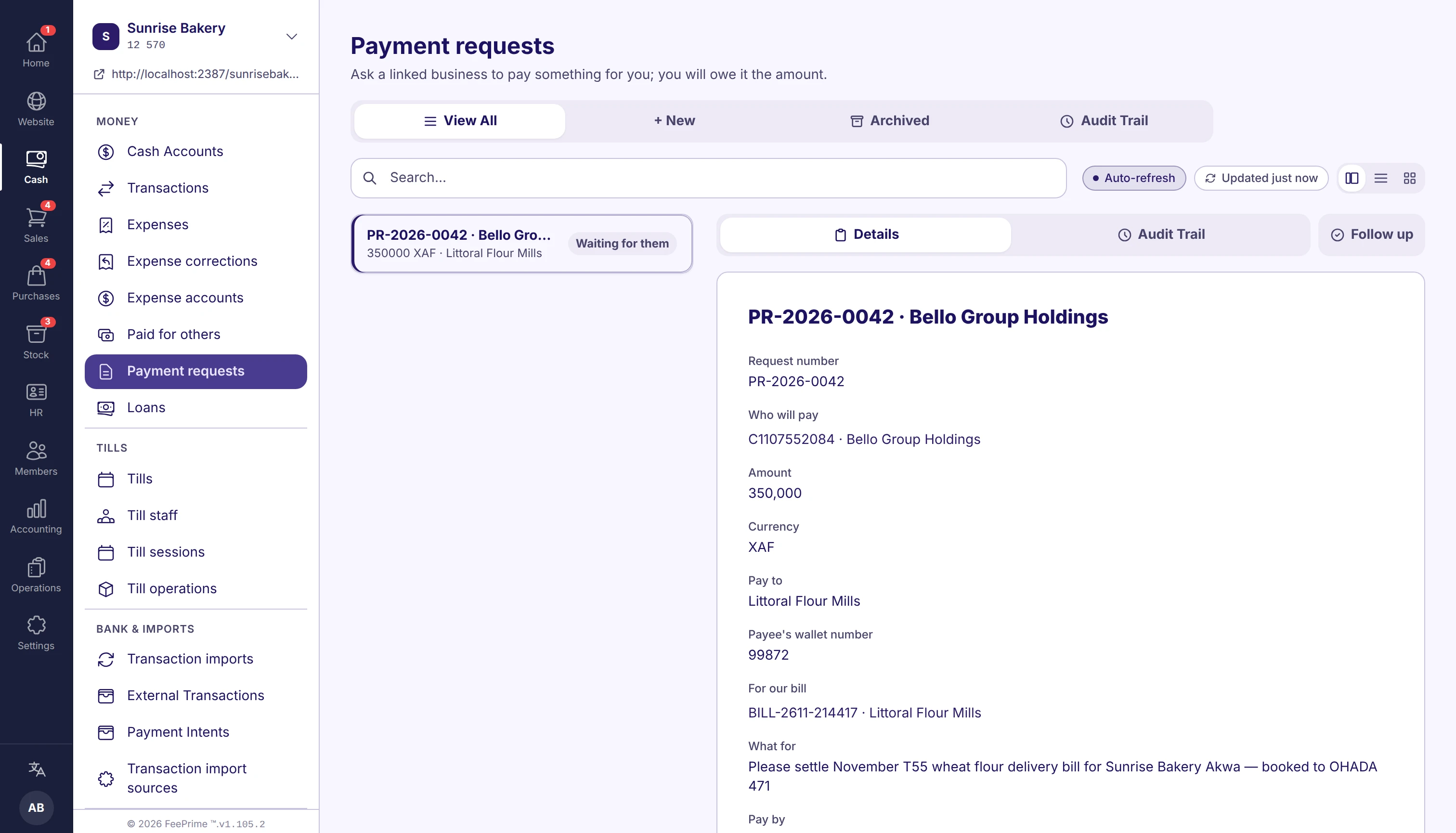 Cash / Money / Payment requests asking Bello Group Holdings to settle Littoral Flour Mills bill PR-2026-0042.
2. Filling out a payment request cleanly
Open Cash / Money / Payment requests and click to create a new request. Each field does one clear job:
- Request number (optional): Give it a clear reference such as
PR-2026-0042. When Bello Group Holdings records the payment later inPaid for others, matchingPR-2026-0042makes month-end reconciliation effortless. - Payer (required): Pick the Contact who is paying on your behalf — the person or company you will owe afterwards (for example, Bello Group Holdings or Amina Bello).
- Amount and Currency (required): Enter the exact figure and currency, such as
850,000XAF. - Pay to (required): Type the name of who actually receives the money — for example,
Littoral Flour Mills,Akwa Landlord — Immeuble Ndong, orDouala Bakery Equipment SARL. - Pay to wallet (optional): The recipient’s wallet identifier. If you select a supplier Bill below and that supplier contact already has a wallet saved, FeePrime fills Pay to wallet automatically so a linked payer can settle by Wallet.
- Bill (optional): Pick the exact unpaid supplier bill from
Purchases / Paying / Billsif this request pays a bill already on your books. - Fixed asset (optional): Pick the exact asset from
Purchases / Returns & assets / Fixed assetsif this request pays an equipment supplier for an asset you already recorded. - Description (required): Write a plain note any cashier or controller can understand at a glance — e.g., “20 bags 50kg flour — Invoice LFM-0419, Akwa bakery delivery.”
- Due date (optional): Set the supplier deadline so the payer knows what is urgent.
- Attachments (optional): Upload a photo of the supplier invoice, proforma, repair quote, or Mobile Money payment details.
Never swap Payer and Pay to. Payer is who fronts the money for you (Bello Group Holdings). Pay to is who actually pockets the payment (Littoral Flour Mills). Mixing them up sends the money — and the debt — to the wrong place.
3. The golden rule: link the exact Bill or Fixed asset
This is the single most important habit in this lesson. Before you save a payment request, ask one question: Is this cost already sitting on our books as a Bill or a Fixed asset?
Your answer decides where the settlement lands once the payer pays:
Sunrise Bakery creates Payment Request (PR-2026-0042)
                     |
     +---------------+---------------+------------------+
     |                               |                  |
     v                               v                  v
[No Bill / No Asset]           [Bill linked]      [Fixed asset linked]
 e.g. 75,000 XAF                e.g. 850,000 XAF   e.g. 4,200,000 XAF
 urgent repair                  Littoral Flour     new rotary deck oven
     |                          (BILL-2026-0118)        |
     v                               |                  v
Settles in EXPENSES                  v            Settles in FIXED ASSETS
- Books the repair once       Settles THAT BILL   - Asset stays capitalized
- Cr 471 / 462 Payer          - Clears 401 Mill   - Liability shifts from
                              - Cr 471 Payer        dealer to 471/162 Payer
                              - ZERO double cost  - ZERO extra entry needed
Look closely at why linking matters in real life:
- When the cost is NOT yet recorded (leave both
BillandFixed assetblank): Suppose Sunrise Bakery needs 75,000 XAF for an emergency generator repair that has no supplier bill in FeePrime. Leaving both fields blank tells FeePrime that when Bello Group pays, the settlement should arrive in Cash / Money / Expenses and book the repair expense once as paid by Bello Group. - When a supplier bill IS already entered (select
Bill): Littoral Flour Mills’ 850,000 XAF invoice is already inPurchases / Paying / BillsasBILL-2026-0118, which already booked the flour cost and created a payable under OHADA 401 (Supplier). If you leaveBillblank, the returning payment lands in Expenses and books the 850,000 XAF flour cost a SECOND time — whileBILL-2026-0118still shows as unpaid! SelectingBILL-2026-0118in theBillfield routes the settlement straight back to Bills, marking that exact bill paid by Bello Group (clearing OHADA 401 and crediting OHADA 471 Sundry creditor). - When an equipment purchase IS already in Fixed assets (select
Fixed asset): Sunrise Bakery recorded its 4,200,000 XAF rotary deck oven inPurchases / Returns & assets / Fixed assets. Linking that asset on the payment request means that once Bello Group pays the dealer, the asset settles itself: Sunrise Bakery now owes Bello Group Holdings (471 Sundry creditor or 162 Borrowing) instead of the oven dealer — with nothing extra to re-type and zero chance of accidentally burying a capital oven inside monthly expenses.
4. Unlinked vs linked businesses (and Pay by Wallet)
Payment requests work smoothly whether your payer uses FeePrime or not:
- Unlinked payers (works for every shop): If Amina Bello is simply a Contact in
Sales / Customers / Contacts(not a separate linked FeePrime business), savePR-2026-0042as your formal record, share the details with her, and once she sends the Mobile Money payment, mark the expense, bill, or asset as Paid by a third party under 462 Associate (as you practiced in Lesson 2). One bakery, no linked holding company? LeavePay to walletblank and use Payment requests as your clean internal tracker. Nothing breaks. - Linked businesses on FeePrime: When Sunrise Bakery and Bello Group Holdings are connected (see Linked Businesses & Third-Party Payments), saving
PR-2026-0042drops it straight into Bello Group’s Cash / Money / Paid for others → Incoming inbox automatically. Ibrahim Bello sees the amount,Pay to, due date, and invoice photo with zero re-typing. When he pays from his bank or cash account, the confirmation flows straight back to Sunrise Bakery’sExpenses,Bills, orFixed assetsIncoming. - Pay by Wallet auto-settlement: If Littoral Flour Mills is also linked and Pay to wallet is filled in on
PR-2026-0042, Ibrahim Bello can click Pay by Wallet insidePaid for others. FeePrime transfers the funds to Littoral Flour Mills’ wallet and settles all three companies’ books automatically — Bello Group’s receivable, Sunrise Bakery’s bill, and Littoral Flour Mills’ invoice — in one single step.
5. Common mistakes to avoid
- Never leave
Billempty for an invoice already inPurchases / Paying / Bills. That is the #1 cause of double-counted expenses and phantom overdue supplier bills. - Never mix OHADA liability types for the same payer when settling. Keep Amina Bello on 462 (Associate), Bello Group Holdings on 471 (Sundry creditor) for operating advances, and 162 (Borrowing) only for formal medium- or long-term loans.
- Archive canceled requests — never recycle them. If the generator mechanic cancels the job before Bello Group pays, archive
PR-2026-0042instead of overwriting itsAmountandPay tofor next month’s rent. Archiving keeps your audit trail clean. - Always attach the invoice or quote. A quick phone photo in Attachments saves three back-and-forth calls with the parent-company controller before they approve the payout.
Try it
Open staging.feeprime.com — a practice copy of FeePrime, kept apart from the real thing — and build a clean payment request in five minutes:
- Open Purchases / Paying / Bills and note the bill number, supplier name, and XAF amount of one unpaid supplier bill (or create a quick practice bill for Littoral Flour Mills).
- Go to Cash / Money / Payment requests and start a new payment request.
- Enter
PR-2026-0042as the Request number, pick your parent company or founder contact as Payer, enter the exact Amount and Currency, and put the supplier’s name in Pay to. - Select the unpaid bill in the Bill field (notice how Pay to wallet fills in automatically if the supplier contact has a wallet), add a clear Description, set a Due date, and save.
- Create a second practice request for a canceled 40,000 XAF repair quote, then Archive it so you know how to clear canceled requests without overwriting real records.
Once you get used to linking the right Bill or Fixed asset on every request, your third-party payments will stop creating month-end cleanup work for good.