
Expense corrections, linked-business Incoming handoffs, and Wallet auto-settlement
Before you start, sign in and open Cash / Money / Expense corrections (and keep Cash / Money / Paid for others handy).
Can’t find it? It may be turned off for your business, or your account may not be allowed to open it. Ask the person who set up your FeePrime. They can fix both.

Photo: Vitaly Gariev on Unsplash
Even careful finance teams make two kinds of messes once third-party payments become routine.
First, someone enters a paid expense claim wrong. Last Tuesday at Sunrise Bakery in Akwa, Amina Bello paid 45,000 FCFA from her personal Mobile Money so a technician could fix the dough mixer before the morning bake. The clerk recorded the claim properly as paid by Amina (associate, OHADA 462), got it approved, and closed the day — then realised on Friday it was booked under Office Supplies and dated 3 March instead of 28 February.
Second, when a parent company pays suppliers for an operating company, staff end up re-typing the same 1,250,000 FCFA flour bill three times across three companies while chasing bank slips on WhatsApp. One typo creates an inter-company mismatch that takes hours to untangle at month-end.
FeePrime solves both problems cleanly: Expense corrections fixes paid claims safely under maker-checker approval, and linked-business Incoming handoffs + Pay by Wallet let connected companies settle up to three sets of books without re-typing a single line.
1. Fixing paid expense claims safely with Expense corrections
Once an expense claim is paid — whether out of Sunrise Bakery’s own till or paid by a third party like Amina Bello (OHADA 462) or Bello Group Holdings (OHADA 471) — it is locked. Nobody can quietly edit the numbers behind an auditor’s back.
Never try to patch an expense mistake inside Cash / Money / Transactions. Most finance clerks should not even have edit access to raw transactions, and manual patches break the link between the expense claim and your ledger.
Unpaid claim? Archive it — never use Expense corrections. If a claim has not been paid yet, open Cash / Money / Expenses, archive the wrong claim, and enter a clean one. Cash / Money / Expense corrections is strictly for paid claims.
Paid Expense Claim (locked)
        |
        v
Cash / Money / Expense corrections
  1. Pick Expense + Correction type
  2. Fill required field + Reason
        |
        v
Maker-Checker Approval
  (Reviewer checks Reason & Held reason)
        |
        v
Ledger Adjusted Cleanly (audit trail intact)
The four correction types
When you create a new record in Cash / Money / Expense corrections, pick the paid Expense, choose one of four Correction type options, and write a plain Reason explaining what went wrong:
reverse— Reverses the entire paid claim. Use this when a paid claim was entered twice or recorded against the wrong company. If Amina Bello paid it personally, reversing it also clears the 45,000 FCFA from her OHADA 462 balance.reverse_lines— Reverses only specific line numbers on a multi-line claim (1,2, and so on; a single-line claim is line1). Enter the bad line numbers inLines. If Bello Group Holdings covered a three-line generator service claim and line2was duplicated,reverse_linesstrips out line2while leaving lines1and3untouched.change_category— Moves one, several, or all lines to the rightExpense category(and optionalExpense account, which filters to match that category). That fixes Amina’s 45,000 FCFA mixer repair from Office Supplies to Repairs without touching her OHADA 462 payable.correct_date— Updates the accounting date usingCorrected dateso the cost lands in the right reporting month. Moving Amina’s receipt from 3 March back to 28 February keeps February’s profit and loss honest.
After you submit, the correction cannot be edited (Filed requests and Held reason show its review status). Your manager or finance lead approves it under the same maker-checker rule as the original claim.
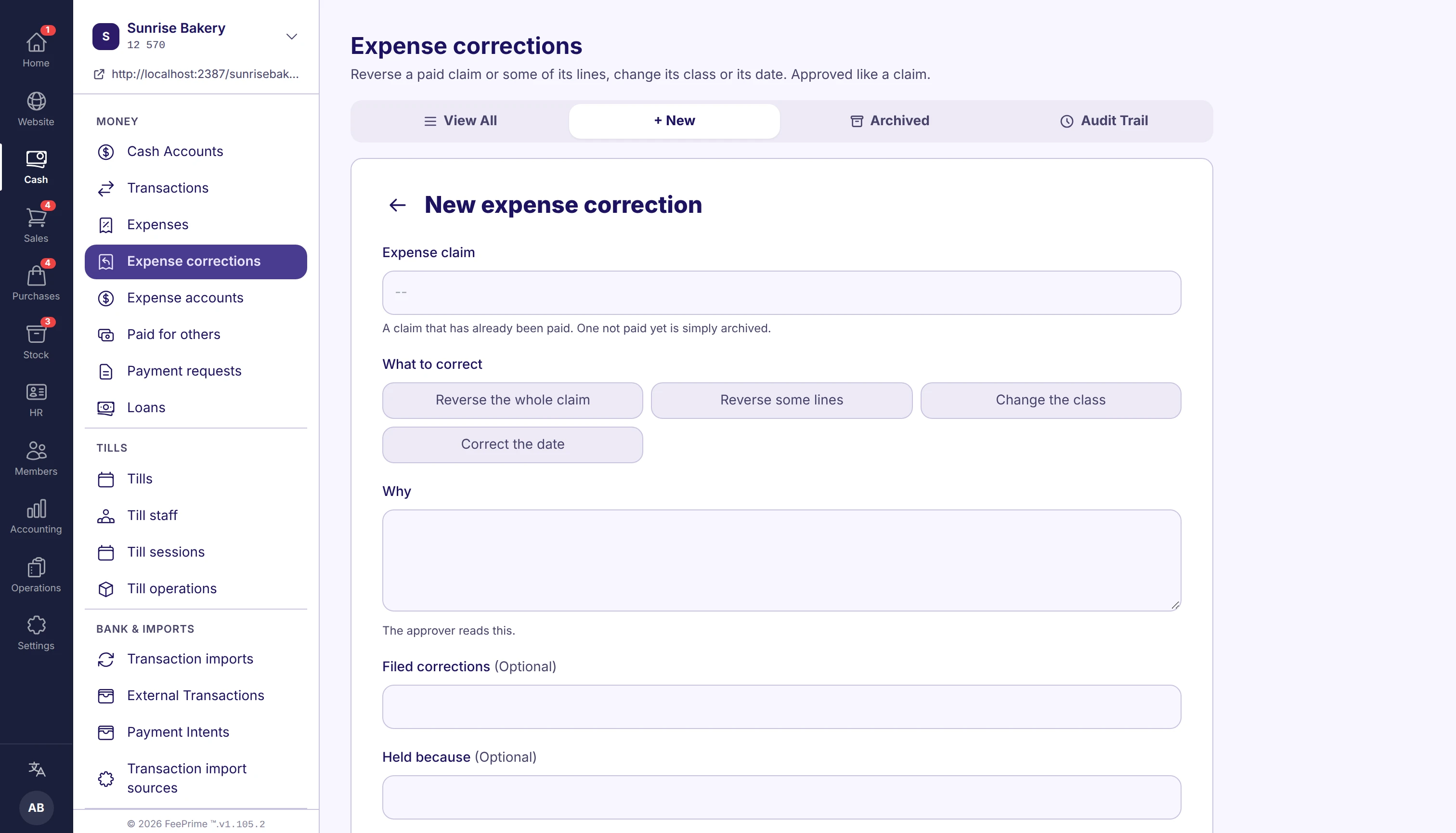 Cash / Money / Expense corrections form safely reversing or reclassifying paid expense claims under maker-checker approval.
2. How linked-business Incoming handoffs work (zero re-typing)
Before going further, remember one core rule: you never have to be linked on FeePrime to record third-party payments. Amina Bello paying Sunrise Bakery’s rent from her personal Mobile Money, or a sister business that does not use FeePrime yet, works smoothly with ordinary Contacts.
When both businesses ARE linked on FeePrime, however, FeePrime removes all the double-typing between them. (Need to link two companies first? Follow our dedicated course Linked Businesses & Third-Party Payments.)
Here is what happens when Sunrise Bakery asks linked Bello Group Holdings to pay a 1,250,000 FCFA flour bill from Littoral Flour Mills:
SUNRISE BAKERY                         BELLO GROUP HOLDINGS
--------------                         --------------------
Cash / Money / Payment requests   -->  Cash / Money / Paid for others > Incoming
(Names Payer, Pay to, Bill)              (Arrives pre-filled — zero re-typing)
                                                 |
                                       Ibrahim picks Cash account
                                       + Credit subtype (OHADA 471)
                                                 |
Purchases / Paying / Bills        <--  Posts paid_on_behalf receivable
(Bill marked paid by Bello Group;        (No echo-back loop!)
 no duplicate Expense booked)
- Sunrise Bakery sends the Payment Request under
Cash / Money / Payment requests, filling inPayer(Bello Group Holdings),Amount(1,250,000 FCFA),Currency,Pay to(Littoral Flour Mills), and linking the exactBill. - It lands automatically in Bello Group’s
Incominginbox insideCash / Money / Paid for others. Ibrahim Bello’s cashier sees the request already filled out — amount, currency, beneficiary, and reference. - Bello Group pays by bank or cash and confirms one question: which
Cash accountthe money left, plus the matchingCredit subtype(sundry_creditor/ OHADA 471 for flour bills,borrowing/ OHADA 162 for formal loans, orassociate/ OHADA 462 for owner accounts). - Sunrise Bakery’s books update automatically without an echo-back. Bello Group’s
Paid for othersrecord sends a notification back into Sunrise Bakery’sIncoming— straight intoPurchases / Paying / Bills— so Sunrise accepts it in one click. Accepting it does not ping Bello Group again.
What if Bello Group pays unprompted? Suppose Ibrahim pays 180,000 FCFA for an urgent Akwa generator repair without waiting for a formal request. When Bello Group records it under Cash / Money / Paid for others, it still arrives automatically in Sunrise Bakery’s Cash / Money / Expenses Incoming as an expense paid by Bello Group.
Always link the Bill or Fixed asset on a Payment Request when one already exists. If Sunrise Bakery already entered Littoral Flour Mills’ bill and forgets to pick it in the Bill field, the completed payment returns to Cash / Money / Expenses instead of Purchases / Paying / Bills — booking the same 1,250,000 FCFA flour cost twice while leaving the original supplier bill open. Linking a Fixed asset (such as a 3,600,000 FCFA deck oven) does the same job in Purchases / Returns & assets / Fixed assets, settling the asset as owed to Bello Group instead of the equipment vendor.
3. Three-way auto-settlement with Pay by Wallet
When all three parties are on FeePrime — Bello Group Holdings (payer), Sunrise Bakery (beneficiary), and Littoral Flour Mills (linked supplier with a FeePrime wallet) — you can eliminate bank slips and supplier follow-up calls completely.
When Sunrise Bakery links Littoral Flour Mills’ bill on the Payment Request, FeePrime automatically pulls in two extra details from the linked supplier and invoice: Pay to wallet (Littoral Flour Mills’ wallet) and the supplier’s invoice reference.
Inside Cash / Money / Paid for others > Incoming, Bello Group clicks Pay by Wallet instead of logging an external bank transfer. One click moves 1,250,000 FCFA from Bello Group’s business wallet to Littoral Flour Mills’ business wallet and settles all three ledgers at once:
                   [ BELLO GROUP clicks Pay by Wallet ]
                                    |
       +----------------------------+----------------------------+
       |                            |                            |
       v                            v                            v
BELLO GROUP (Payer)         SUNRISE BAKERY (Beneficiary)  LITTORAL FLOUR MILLS
- Wallet drops 1,250,000    - Littoral Bill marked PAID   - Sales Invoice marked PAID
- Dr Receivable (Sunrise)     by Bello Group                via payment memo
  under OHADA 471           - Supplier 401 cleared        - Wallet rises 1,250,000
                            - Cr Bello Group (OHADA 471)
                            - Bakery cashflow: 0 FCFA
Every party keeps clean, honest books:
- Bello Group Holdings sees the wallet outflow and the 1,250,000 FCFA receivable from Sunrise Bakery.
- Sunrise Bakery sees Littoral Flour Mills’ bill closed, zero cash taken from the bakery till, and 1,250,000 FCFA owed to Bello Group under OHADA 471.
- Littoral Flour Mills sees its invoice under Sales / Selling / Invoices automatically matched and settled — zero WhatsApp screenshots, zero manual bank reconciliation.
Never mix OHADA liability subtypes for the same payer. Keep Amina Bello’s personal advances strictly on associate (462), Bello Group’s day-to-day supplier and operating bills on sundry_creditor (471), and formal multi-year oven financing on borrowing (162). Mixing subtypes splits one relationship across multiple balance-sheet accounts and turns Lesson 6’s reconciliation into detective work.
4. One shop vs a multi-company group
- Running one bakery or shop where the owner occasionally pays rent or repairs personally? You only need
Cash / Money / Expense correctionswhen a paid claim has a wrong date, wrong category, or duplicate line. Leave linked-businessIncominghandoffs and Pay by Wallet unused. Nothing breaks. - Managing a holding company and operating branches (like Bello Group Holdings and Sunrise Bakery)? Link your companies, train branch managers to always attach the
BillorFixed asseton Payment Requests, and turn on Pay by Wallet with linked suppliers to cut month-end inter-company reconciliation time in half.
Try it
Practice both workflows safely on staging.feeprime.com — a practice copy of FeePrime, kept apart from the real thing.
- Open Cash / Money / Expenses, check that you have at least one paid expense claim (including one marked paid by a third party), and note its date and category.
- Open Cash / Money / Expense corrections, click New, pick that paid claim, choose
change_categoryorcorrect_date, enter a clearReason, and submit it for approval. - Try opening an unpaid expense claim in
Cash / Money / Expensesand verify that you can Archive it directly instead of filing an expense correction. - Open Cash / Money / Payment requests, start a draft request to a payer contact, and inspect the
Bill,Fixed asset, andPay to walletfields so you know where to link an existing supplier bill. - Open Cash / Money / Paid for others and check the Incoming tab to see where linked-business Payment Requests arrive waiting for your
Cash accountor Pay by Wallet click.
Once you have walked through those five steps, you will never touch raw Transactions to fix a paid expense or re-type a sister company’s supplier bill again.