
Setting up cash accounts for tills, banks, and mobile money
Before you start, sign in and open Cash / Money / Cash Accounts.
Can’t find it? It may be turned off for your business, or your account may not be allowed to open it. Ask the person who set up your FeePrime. They can fix both.
Photo: Ömer Haktan Bulut on Unsplash
Picture closing time at Sunrise Bakery in Douala. Paul counts the drawer at the Akwa counter. Nadège checks the Bonapriso shop. Junior hands over the cash collected on his delivery motorbike, and Amina opens the back-office safe. On paper, the business should have 1,420,000 XAF on hand. When everything is counted, 18,500 XAF is missing.
If all of your shop’s money sits inside a single bucket called “Cash”, Amina now has a mystery she cannot solve. Was the shortage at Akwa, at Bonapriso, in the safe, or on the MTN Mobile Money phone? Nobody can tell — and guessing starts arguments with good staff.
In FeePrime, money is never simply “in the business”. It always sits in a specific, real place, and each real place gets its own cash account.
1. One cash account per real place
A till drawer, a bank account, a mobile money merchant wallet, and a petty cash box are four different places. In Cash / Money / Cash Accounts, create one record for each real place where money actually sits, each with its own currency and its own live balance.
REAL WORLD AT SUNRISE BAKERY               CASH / MONEY / CASH ACCOUNTS
────────────────────────────               ────────────────────────────
Akwa counter drawer            ──────►     Akwa Till (XAF)
Bonapriso shop drawer          ──────►     Bonapriso Till (XAF)
Back-office metal box          ──────►     Petty Cash Safe (XAF)
Afriland First Bank account    ──────►     Afriland Bank - Main (XAF)
MTN Mobile Money merchant SIM  ──────►     MTN MoMo - Akwa (XAF)
Foreign supplier euro account  ──────►     Euro Supplier Bank (EUR)
When you create an account, the type you choose controls the details FeePrime asks for:
- Bank account: bank name, account number, IBAN, SWIFT, and address.
- Till: cash register name and location (for example, Akwa Front Counter or Marché Central Stall). Later, when you run shifts under Cash / Tills / Tills, each till connects cleanly to its real location.
- Mobile account: phone number and merchant code (such as your MTN MoMo or Orange Money business line).
- Wallet account: its issuer and currency code.
- Crypto account: its network, asset, and address.
Never lump two tills, a safe, and a mobile money phone into one generic “Cash” account. One combined total hides where shortages happen. Separate accounts turn a mystery into a two-minute check.
Check the list before you add a new account. Duplicate accounts like “Afriland Bank” and “Afriland Main” split your history in half and turn month-end reconciliation into a headache.
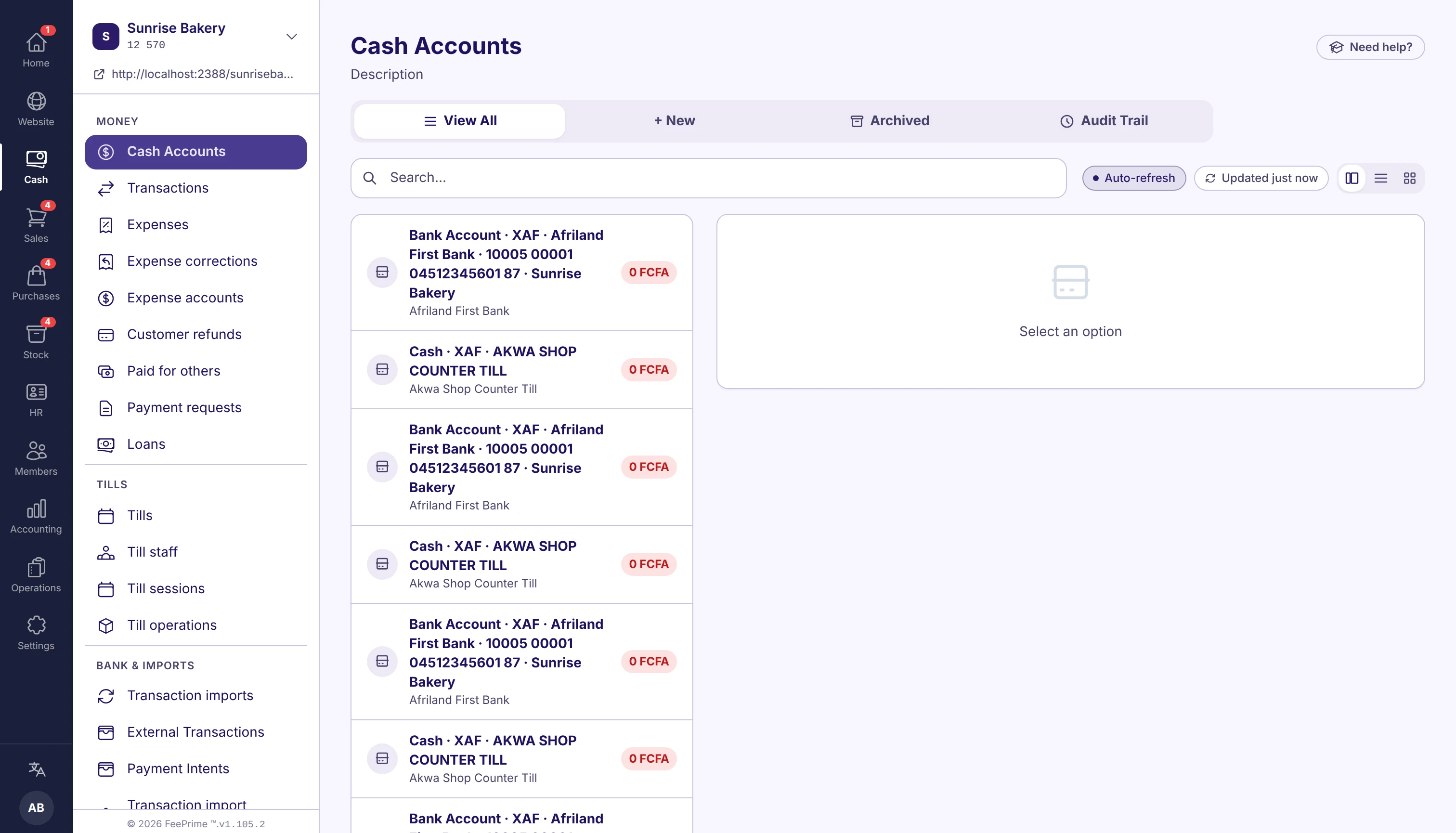 cash accounts screen in FeePrime (Sunrise Bakery).
2. Why naming the account on every payment matters
Every payment in FeePrime — whether a customer pays an invoice, Paul logs a flour purchase in Cash / Money / Expenses, or Amina transfers cash from a till to the bank in Cash / Money / Transactions — names the exact cash account the money entered or left.
That single habit is the foundation of trustworthy books:
Customer / Supplier Payment
        │
        ▼  (names exact cash account)
Named Cash Account Balance
        │
        ▼  (checked in Cash / Bank / Reconciliation Queue or at shift close)
Bank Statement / Mobile Money History / Physical Till Count
At any moment, you can put FeePrime’s balance for Afriland Bank - Main (XAF) side by side with the real bank statement, or compare Akwa Till (XAF) against the banknotes sitting in Paul’s drawer. A total that is not tied to a real place can only be believed — never verified.
3. One currency per account (and why FeePrime never mixes them)
Every cash account holds exactly one currency. That is not a software restriction; it is how money works in the real world. Your XAF current account holds francs, and your EUR bank account holds euros. They are two different accounts.
Suppose Hôtel Akwa collects room payments in XAF at the reception desk and receives EUR wire transfers from overseas guests. Hôtel Akwa needs at least two cash accounts: one in XAF and one in EUR. If Sunrise Bakery buys a spare oven part from Europe using a EUR account while selling bread in XAF every day, it keeps those two accounts strictly separate.
- Never record EUR transfers inside an XAF cash account by hand-converting the amount just to avoid creating a second account. You will lose track of what the euro bank statement actually says.
- No report should ever add XAF and EUR balances together on one line. Keeping one currency per account ensures every balance is honest and checkable.
- Need a currency that is not in the dropdown yet? Enable it first under Settings / Business / Currencies.
4. Connecting accounts to gateways, SMS alerts, and wallets
Some cash accounts are wired to external services so payments arrive without anyone typing them by hand:
- Payment gateway link: Connects a cash account to an online gateway configured under Settings / Payments / Payment Gateway Accounts. When a customer pays online, the money lands in the right account automatically.
- SMS endpoint: Links a cash account to an alert feed set up under Settings / Payments / SMS Endpoints, helping bank or mobile money alert messages flow straight into your records.
- Wallet accounts: Carry their issuer and currency code so digital wallet balances stay matched to the issuing provider.
When these connections are active, reconciliation under Cash / Bank / Reconciliation Queue gets faster and cleaner because fewer entries depend on manual typing.
One shop, cash and manual mobile money only? Leave payment gateway and SMS endpoint links blank for now. Nothing breaks. You can connect them later when your shop adds online payments or automated alert feeds.
5. Assigning treasurers and keeping accounts clean over time
Every cash account lets you name a treasurer — the person accountable for that real place.
At Sunrise Bakery: - Paul is named treasurer on Akwa Till (XAF). - Nadège is named treasurer on Bonapriso Till (XAF). - Amina is named treasurer on Afriland Bank - Main (XAF) and Petty Cash Safe (XAF).
Combined with staff permissions in Settings / Access / Members — deciding who may record a payment and who may approve it — naming treasurers lets a growing business stay in control without the owner personally signing off on every bag of flour or taxi fare.
Two habits protect your financial history as the years go by:
- Never rename an old bank account or closed till for a new one. If Sunrise Bakery closes its old account at Bank A and opens a new account at Bank B, create a brand-new cash account for Bank B. Renaming Bank A scrambles past statements and makes last year’s audits impossible.
- Archive, never delete. Once an account has recorded payments, keep its history intact instead of trying to wipe it out. You can also take periodic check-ins under Cash / Planning / Balance Snapshots so your historical balances stay clear.
Try it
Open staging.feeprime.com — a practice copy of FeePrime, kept apart from the real thing — and practice setting up your shop’s real cash places in five minutes:
- Sign in and open Cash / Money / Cash Accounts.
- Create a Till account in your local currency (for example, Akwa Counter Till), enter its cash register name and location, and assign a treasurer.
- Create a Bank account in the same currency, filling in the bank name and account number.
- Open Cash / Money / Transactions, record one small cash-in into your till and one into your bank account, then return to Cash / Money / Cash Accounts to see both balances separately.
- Open one of those transactions and confirm that the exact cash account name is shown clearly on the payment record.
Once every real place where money sits has its own account, every number in Cash & Accounting becomes something you can check — not guess.