
Investors: Applying, browsing teasers and requesting high-signal intros
Before you start, sign in to the Dealroom portal and open the avatar menu to check your investor profile and intro requests.
Can’t find the Dealroom or the Apply to invest option? The portal may not have its Dealroom turned on yet, or you may still be on the public welcome page without signing in. Ask the dealroom curator who invited you. They can fix both.

Photo: Oluwatobi Fasipe on Unsplash
If you invest in early-stage companies across Douala or the diaspora, you already know how deal flow usually arrives. Someone forwards a 28-slide PDF on WhatsApp. Half the numbers are out of date. You do not know whether the round is still open, what the minimum ticket is, or whether the founder even wants angel cheques. Meanwhile, founders guard their real traction because half the people asking for a deck never write a cheque.
Dr. Samuel leads Mungo Angels in Douala, writing 15,000,000 to 50,000,000 FCFA tickets into Cameroonian startups. On Wouri Ventures, he does not chase decks across five chat apps. He opens the Dealroom straight onto live venture teasers, applies once to be vetted by Cédric (the curator), sends a sharp intro note when a venture fits his thesis, and tracks every reply in one clean list.
1. Open the Dealroom straight onto live pitches
When Dr. Samuel opens the Wouri Ventures Dealroom, he lands directly on the live pitch list—no paywall wall of forms before he can see what kind of ventures are raising.
Each card gives him the exact screening facts he needs in ten seconds:
- Venture name, one-liner, and logo (the logo is the only file a founder uploads—FeePrime Dealroom uses structured pitch fields instead of scattered PDF decks or external data rooms).
- Sector, stage, and city (for example, FMCG & Agri-processing, Seed, Douala).
- Round terms: Round type (
Equity,Convertible,Debt, orGrant), Amount raising, and Minimum ticket in the round’s currency. - Round status:
- Open: listed and accepting intro requests.
- Raised (Closed): still visible with a Raised badge so you can see the dealroom’s track record, but closed to new intro requests.
- (Paused pitches stay hidden from browse completely while the founder takes a break.)
Never treat a locked teaser as a broken page. Before a founder accepts your intro, FeePrime intentionally shows the summary and the Problem teaser while holding back the rest of the pitch (Solution, Market size, Business model, Competition, Team, Traction, Why now, and Use of funds) and founder chat. That protects founders from sharing sensitive numbers with strangers.
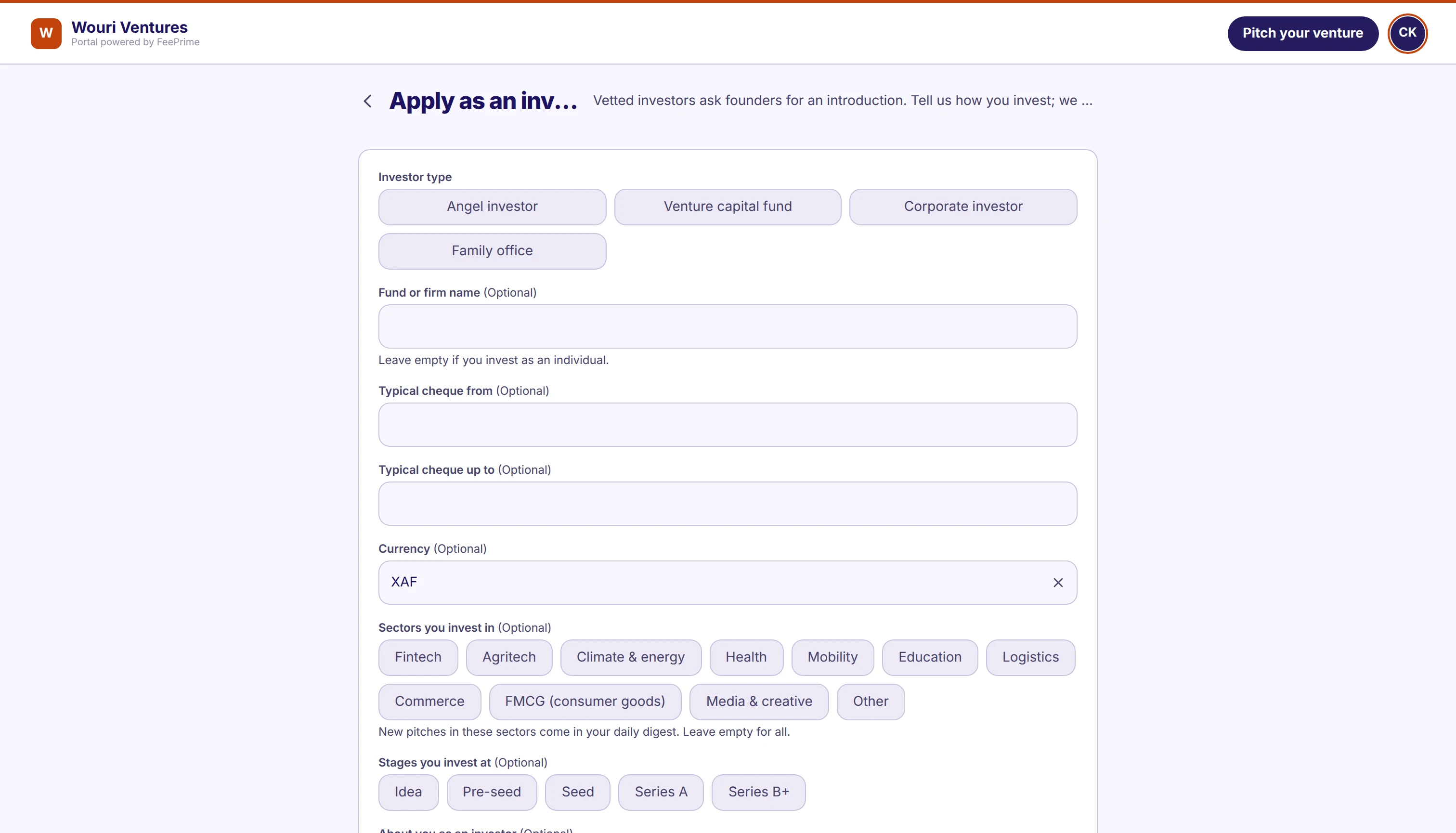 Investor application form where angels, VCs, corporates, and family offices submit ticket range and focus sectors.
2. Apply once from the avatar menu
Anyone signed in can browse teasers, but only a vetted investor can request introductions and chat with founders. To get vetted, Dr. Samuel clicks his avatar menu at the top of the portal and opens his investor application.
He fills in one clean profile:
- Investor type: choose Angel, VC Fund, Corporate, or Family Office.
- Fund name: Dr. Samuel enters Mungo Angels. Investing solo as an angel? Leave Fund name blank—nothing breaks.
- Ticket min, Ticket max, and Currency: Dr. Samuel sets 15,000,000 to 50,000,000 in XAF so founders immediately know whether his cheque fits their round.
- Sectors and Stages: multi-select the industries and stages you actively back. FeePrime also matches these two fields against newly posted pitches for your daily digest, so relevant ventures come to you.
- About: two to four plain sentences on your background, what you bring beyond capital, and recent investments.
Never submit a bare profile with blank ticket sizes, sectors, and About. Cédric vets every investor application by hand before turning on intro access, and founders read your profile before accepting your request. A blank profile slows approval and gets declined by busy founders.
  Open Dealroom (Live Teasers)
               |
               v
  Avatar Menu -> Apply to Invest
  (Type, Ticket Range, Sectors, Stages, About)
               |
               v
  Curator Vetting by Cédric (Pending -> Approved)
               |
               v
  Request Intro on an Open Pitch (Write High-Signal Note)
               |
               v
  Founder Decides ----+----> Accepted  --> Full Pitch Unlocks + Direct Chat
                      +----> Declined  --> Optional Reason & Note Shown
                      +----> Expired   --> No Reply in Time (Status Logged)
                      +----> Withdrawn --> You Cancelled Before Reply
Your profile is never locked in stone. If Mungo Angels raises its maximum ticket to 75,000,000 FCFA next year or adds Clean Energy to its sectors, Dr. Samuel opens his investor profile from the avatar menu and updates it in thirty seconds.
3. Browse locked teasers while you wait for vetting
Submitting your application does not put you in a blank waiting room. While Cédric reviews Dr. Samuel’s profile, Dr. Samuel keeps browsing live teasers on Wouri Ventures.
He spots KokoFresh, founded by Clarisse—an FMCG and agri-processing venture in Douala raising 150,000,000 FCFA at Seed stage via Equity, with a minimum ticket that fits Mungo Angels. On the locked pitch page, he reads the venture summary, round terms, and Clarisse’s Problem statement. That is enough to judge whether KokoFresh belongs on his shortlist the moment Cédric approves his profile.
Occasionally, Dr. Samuel may also see a pitch gated to a specific investor membership tier. If your portal uses investor passes to unlock premium or syndicate-only deals, you will see which membership tier is required right on the pitch—we cover investor passes and tier-gated pitches in the next lesson.
4. Request a high-signal intro once vetted
As soon as Cédric approves Dr. Samuel’s investor profile, the Request intro action unlocks on open pitches. Now Dr. Samuel opens KokoFresh and writes his intro note.
FeePrime already carries Dr. Samuel’s investor name, investor type, and fund name from his vetted profile straight onto the intro request. He does not waste his note repeating his bio from scratch.
Compare what gets ignored with what gets accepted in ten minutes:
- Low-signal note: “Interested. Please send me your pitch deck and financial model.”
- High-signal note: “Clarisse, Mungo Angels writes 15M–50M FCFA Seed cheques into Cameroonian agri-processing. Two of our members run cold-chain distribution across Douala and Yaoundé. I would love to read KokoFresh’s traction and understand how you source raw cocoa inputs during the dry season.”
Never blast copy-pasted intro requests to every open pitch on the portal. Curators monitor intro acceptance health across the Dealroom, and founders quickly spot mass requests. Three targeted intros with clear ticket fit beat twenty generic pings every time.
5. Track Requested, Accepted, Declined, Withdrawn and Expired intros
Every intro Dr. Samuel sends lands in one clean view under his portal menu, each with its own intro number and live status:
- Requested: sent to the founder and waiting for a decision.
- Accepted: the founder said yes. The rest of KokoFresh’s structured pitch (Solution, Market size, Business model, Competition, Team, Traction, Why now, and Use of funds) unlocks immediately, and direct chat opens between Dr. Samuel and Clarisse.
- Declined: the founder passed—perhaps the round is nearly full or they want a lead investor with a larger cheque. If the founder included a decline reason or decline note, you see it right on the intro record so you know why without awkward guessing.
- Withdrawn: you cancelled a pending request yourself.
- Expired: the request sat unanswered past the response window and closed automatically so your list stays clean.
Withdraw early instead of leaving dead requests in Requested. If your syndicate commits its capital elsewhere while a founder has not replied yet, click Withdraw on the intro. It keeps your own pipeline honest and stops the founder from wasting time reviewing an intro you no longer plan to pursue.
Try it
Practice the full investor flow on staging.feeprime.com—a practice copy of FeePrime, kept apart from the real thing:
- Open the sample Dealroom portal and scan three live venture teasers, noting which rounds are Open and whether any show a Raised badge.
- Open the avatar menu and fill in a test investor profile with an Investor type, Ticket min / max, Currency, Sectors, Stages, and a three-sentence About.
- Open one open pitch and inspect what is visible in the locked teaser (summary, terms, and Problem) versus what unlocks after acceptance.
- Once vetted (or using a vetted staging investor account), submit a concise, three-sentence intro note referencing ticket fit and one specific question.
- Open your Intros list to inspect the Requested status, and practice withdrawing a test intro you do not plan to pursue.
Five minutes on staging makes your very first live Dealroom intro sharp, fast, and impossible to ignore.