
Shoppers: Browsing by city, checking out and tracking your order
Before you start, open the marketplace link on your phone or browser (or, if you are checking shopper orders as marketplace staff, sign in and open Portal Marketplace / Marketplace / Marketplace Orders).
Can’t find the back-office menu? It may be turned off for your business, or your account may not be allowed to open it. Ask the person who set up your FeePrime. They can fix both.

Photo: Pharaoh Fontain on Unsplash
Stéphanie is on her lunch break in Bonapriso, Douala. She wants two 500g packs of Mount Cameroon Arabica Coffee for home and a Douala Leather Messenger Bag for her brother’s birthday on Saturday.
Normally, buying online on a phone means scrolling through scattered WhatsApp statuses, sending five “is this still available?” messages, guessing the delivery fee, and wondering all afternoon whether the motorbike rider ever left. On MaketCM, powered by FeePrime, she lands straight on live products, filters to her city, checks out in two minutes, and follows clear status updates all the way to handover.
This lesson walks through the shopper journey from first tap to final delivery — whether you are buying on your phone or running a marketplace and checking what your buyers actually experience.
1. Open straight on products and filter by your city
A shopper does not have to create an account just to look around. When Stéphanie taps the MaketCM link on her phone, the storefront opens directly on active product listings from approved sellers.
On a mobile screen over 3G, narrowing the list first saves time and data. Stéphanie filters by City (Douala) and picks a Category (narrowing from parent category down to the specific product category or subcategory she wants). Right away, out-of-town offers disappear and she sees goods already near her.
Before tapping a product to buy, scan six details on the listing:
- Asking price and currency — for example,
6,500 XAFfor coffee or32,000 XAFfor a leather bag. - Unit and pack size — confirm whether the price covers one
500g pack, one1kg bag, or a single piece. - Minimum order — a seller may accept
1leather bag, while requiring a minimum of2packs on roasted coffee. - Available quantity — the latest count the seller posted.
- Brand, photos, and product summary — what is actually in the box.
- Shopfront name — here, KamerCraft, run by Hervé in Douala.
Treat available quantity as the seller’s latest estimate, not a guaranteed lock. Artisans and merchants like Hervé also sell in person at their workshops, so stock can move offline between updates. That is why every order still goes through seller confirmation. When an item sells out completely and Hervé archives the listing, it leaves the storefront immediately so no one orders a gone item.
Common mistake: Never skip the city, pack size, and minimum order before adding to cart. A cheap coffee listing posted in Yaoundé with a 10-pack wholesale minimum will not solve a Friday lunch-hour order in Douala.
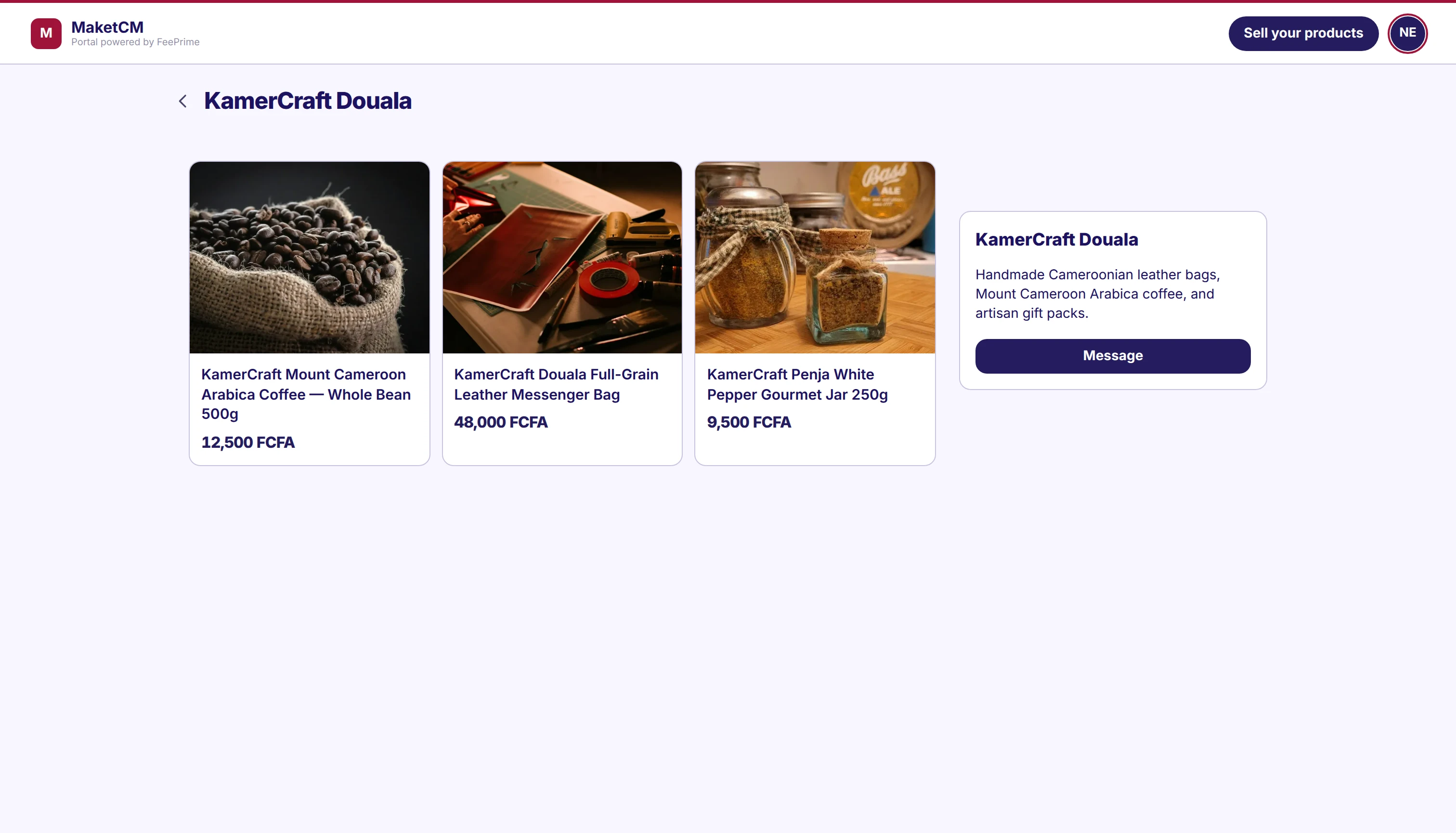 Verified seller shopfront on MaketCM where shoppers browse KamerCraft items by city and price.
2. Check the seller and compare delivery vs pickup
Tapping KamerCraft opens Hervé’s shopfront details so Stéphanie can see who she is buying from, where they operate, and what else they sell. On MaketCM, Nadine’s team reviews sellers before their shopfronts and first listings go live, which takes the guesswork out of paying an unknown contact.
Each marketplace order belongs to one seller shopfront. Because Stéphanie is buying both the 2 × 500g coffee packs (13,000 XAF) and the Douala Leather Messenger Bag (32,000 XAF) from KamerCraft, they stay together on one 45,000 XAF order with one handover. If she also wants honey from a second seller, that becomes a separate order with its own confirmation and delivery or pickup choice.
Before heading to checkout, check how you want to get the goods:
- Delivery — convenient when you are at the office or home; check the Delivery fee shown at checkout and be ready with a clear neighborhood landmark.
- Pickup — free of delivery charges if you pass near Akwa anyway, as long as you wait for confirmation before making the trip.
3. Choose guest checkout or a signed-in shopper account
MaketCM can let shoppers check out in two ways, depending on how often you buy:
- One-off purchase? Use guest checkout (no login needed). If the marketplace enables guest checkout, Stéphanie fills in her Name, Phone, Email, Fulfilment choice (Delivery or Pickup), Delivery location, and any Notes, then places the order right away. Nothing breaks if you do not want another password for a single gift.
- Buying regularly? Sign in to a shopper account. Because Stéphanie plans to buy coffee every month, signing in links every order to her account automatically. She can open My Orders anytime on her phone to see every order number, date, seller, item list, total, and live status update in one clean list.
When filling out checkout for delivery in Douala, write a landmark a rider can actually find — for example, “Bonapriso, Rue Toyota, opposite Pharmacie des Palmiers” — and use Notes for practical handover tips such as “Call on arrival; if I am in a meeting, leave with office reception.”
Common mistake: Double-check your phone number, items, and delivery landmark before you tap submit. Once an order is placed, FeePrime locks the order header permanently. Items, totals, fulfilment choice, and contact details cannot be silently rewritten afterward — your order is a receipt that both buyer and seller can trust. If you spot a typo right after submitting, contact MaketCM support or the seller using your Order number rather than placing a duplicate order.
4. Follow your order from Pending to Delivered
After checkout, you do not have to guess what is happening behind the scenes. FeePrime tracks every marketplace order through a simple, honest chain of events:
Storefront (Filter by City & Category)
      |
      v
Checkout (Delivery or Pickup -> Order Placed)
      |
      +--> [Optional: Held by MaketCM staff -> Passed to seller]
      |
      v
[ Pending ]  ---> Seller checks stock & accepts
      |
      +-----------------------------+
      |                             |
      v                             v
[ Confirmed ]                [ Cancelled ]
      |                      (with reason)
      v
[ Delivered ]
(with Received by name)
Here is what each step means in plain terms:
- Pending (Order placed): Your order is saved with its Order number, date, items, delivery fee, and total. On some marketplaces, Nadine’s team reviews public orders first (held for the marketplace) before clicking Pass to seller so Hervé sees it. Either way, your order is safely on record.
- Confirmed: Hervé has checked his shelf at KamerCraft, set aside your two coffee packs and messenger bag, and confirmed he will fulfil the order.
- Delivered: The handover is done. If Stéphanie is in a meeting when the rider arrives and her brother or the receptionist collects the bag at the gate, the Received by name is logged directly on the Delivered event. Everyone can see exactly who took the parcel.
- Cancelled: If an item ran out at the workshop before confirmation, or you ask to stop the order before handover, a Cancelled event is logged with a plain Reason (for example, “Brown leather bag out of stock until Tuesday”).
Notice what is missing: FeePrime skips noisy progress theatre like “Preparing” or “Almost packed.” Every status change you see means a real person took a real step.
Common mistake: Do not place a second identical order just because the first one still says Pending. Sellers check stock and confirm during working hours, and marketplace staff may review the order first. Wait for Confirmed, or send your order number to support if it sits too long.
5. Four habits for smooth pickups and deliveries
- Wait for Confirmed before heading out for pickup. Never pay for a taxi across Douala while an order is still Pending.
- Keep your phone reachable during the handover window so the rider or shop can confirm the final turn.
- Name your backup recipient in Notes if a colleague, guard, or family member might collect the parcel for you.
- Use the same account email or phone on repeat orders so your full buying history stays under one roof.
Try it
Practice the whole shopper flow on staging.feeprime.com — a practice copy of FeePrime, kept apart from the real thing — in five minutes:
- Open the sample marketplace storefront on staging.feeprime.com and filter listings by one city and one product category.
- Tap a product listing and verify its Asking price, Unit, Pack size, Minimum order, and Shopfront name.
- Start checkout, switch between Delivery and Pickup to see how the delivery fee and location fields change, and add a clear neighborhood landmark in Notes.
- Submit the test order and write down the Order number shown on the confirmation screen.
- Open My Orders (or Portal Marketplace / Marketplace / Marketplace Orders if you are testing with a staff login) to see how Confirmed and Delivered (with Received by) appear as events while the original order receipt stays locked.
Once you run through one test order from city filter to Delivered, every real order on your phone feels effortless.