
Staff: Approving sellers and moderating product listings
Before you start, sign in and open Portal Marketplace / Vendors / Portal Vendors and Portal Marketplace / Marketplace / Marketplace Listings.
Can’t find them? They may be turned off for your business, or your account may not be allowed to open them. Ask the person who set up your FeePrime. They can fix both.

On MaketCM, trust is everything. When Stéphanie opens her phone in Douala to order a bag or a pack of coffee, she is not trusting a stranger — she is trusting MaketCM. One fake shopfront, one seller who never delivers, or one listing priced at 1 XAF — call me on WhatsApp can cost you ten loyal shoppers in a single afternoon.
That is why Nadine, who runs marketplace operations at MaketCM, treats Portal Vendors and Marketplace Listings as her two daily quality gates. No independent merchant goes live without a human checking who they are, and no first product appears in front of buyers until staff confirm the photos, category, pack size, and price are real.
This lesson walks you through both queues, step by step, using Hervé and his Douala workshop KamerCraft as our example.
1. How seller approval and listing moderation fit together
Every new independent seller passes through two separate gates before Stéphanie ever sees their goods:
[1. SELLER APPLIES]                [2. STAFF VETTING]                  [3. FIRST LISTING]
Hervé creates KamerCraft   --->   Nadine reviews in            --->   Hervé submits 1st item
in his seller portal              Portal Vendors                      in Marketplace Listings
(Pending — NOT live)              (ID, docs, city, delivery)          (Pending — NOT live)
                                          |                                     |
                                   Approve shopfront                     Approve listing
                                   (+ optional Verified)                        |
                                                                                v
                                                                      LIVE ON MAKETCM
                                                              (Later items follow Portal Settings)
Notice why these two gates stay separate. Portal Vendors answers one question: Is this a real business we want representing MaketCM? Marketplace Listings answers a second question: Is this specific product honest, clear, and ready for a shopper to buy today?
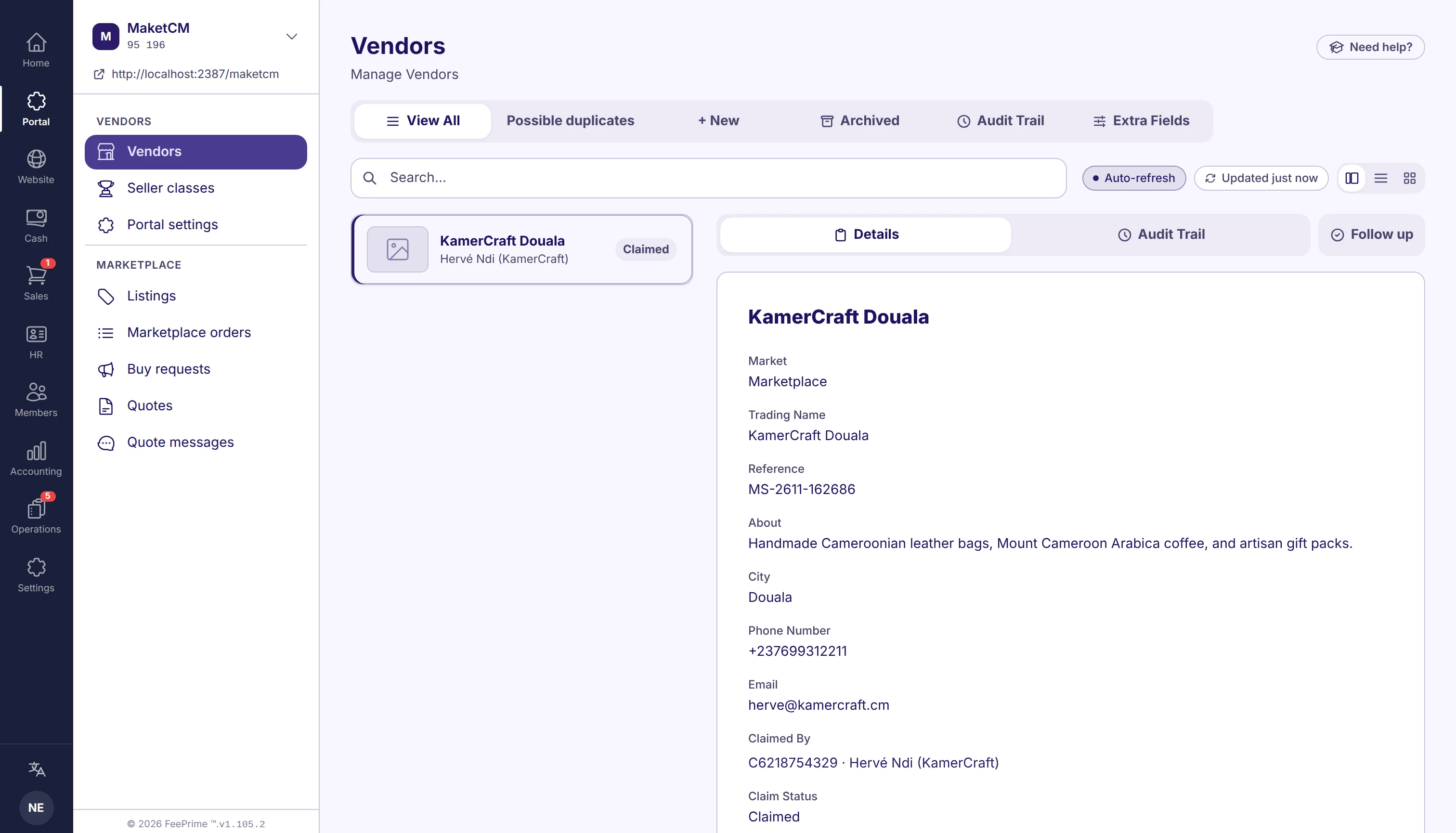 Approved seller KamerCraft Douala under Portal Vendors with delivery fee, lead time, and pickup details.
2. Reviewing a seller application in Portal Vendors
Open Portal Marketplace / Vendors / Portal Vendors and check the pending applications waiting for review. Whenever a merchant like Hervé applies from their portal, FeePrime holds the profile in a pending queue. An unapproved seller cannot publish live listings.
Why? A public shopfront with a phone number and logo is the very first thing a scammer tries to forge. Waiting for a human reviewer stops impersonators before they ever reach shoppers.
Open KamerCraft’s application and check these fields in order:
- Vertical: Confirm it is set to Marketplace. FeePrime supports several portal markets (such as cars, real estate, services, and farmers), and the vertical controls which documents are required and where the shop’s products appear.
- Trading name & Logo: Check that KamerCraft is a real, readable shop name — not a phone number, ALL-CAPS slogan, or copied brand name. Make sure the Logo and About text match the business.
- City, Phone number & Email: Confirm the city (Douala) and check that the phone number actually answers. A quick two-minute call saves weeks of buyer disputes.
- ID document, Ownership document & Licence number: Inspect the uploaded national ID or passport alongside proof that Hervé owns or represents KamerCraft (business registration, trade licence, or workshop lease). If a photo is blurry or cut off, do not guess — ask for a clear resend.
- Claimed contact & Claim state: Every shopfront is tied to the specific signed-in contact who applied for it. Because staff verify ownership documents before approving, nobody can hijack another merchant’s contact or take over an existing shopfront behind their back.
- Opening hours, Portfolio & Tags: Check that opening hours make sense for local buyers. Tags act as public filters on your sellers page (for example, Leather Goods or Local Coffee), helping shoppers discover trusted artisans.
3. Delivery terms, pickup details and the Verified badge
Before you click approve on KamerCraft, scroll to the fulfilment fields. Half of all marketplace complaints start right here because a seller over-promised.
- Offers delivery, Delivery fee & Delivery lead time: If Hervé delivers in Douala for 1,500 XAF, make sure Offers delivery is enabled, the Delivery fee is realistic, and Delivery lead time matches how his shop actually works. FeePrime gives four clear choices: Same day, Next day, Two days, or Within a week. If a seller ships once a week by agency bus, never leave them on Same day.
- Offers pickup & Pickup address: If shoppers can collect orders in person, check that Pickup address names a real neighbourhood and landmark (for example, Rue Joss, Akwa, Douala — opposite Total station), not just “Douala”.
- Verified badge: Never tick Verified automatically just because you approved a seller. Approval means the shop may trade on MaketCM. Verified is your stronger trust badge — switch it on only after you have confirmed their ID document, ownership document, and physical presence.
Only marketplace staff can archive a shopfront. Unlike a product listing, a seller cannot archive their own profile in Portal Vendors. That protects buyers: a merchant cannot walk away from a shopfront that still has open orders or refunds to settle. If a seller closes permanently or breaks your rules, Nadine archives the profile from Portal Vendors.
Running a small local marketplace with ten sellers? Keep it simple: focus on Trading name, City, ID document, and realistic delivery lead times. You can add Tags, Portfolio galleries, and strict Verified tiers once your catalogue grows.
4. Moderating product listings in Marketplace Listings
Once KamerCraft is approved, Hervé submits his first two products: Douala Leather Messenger Bag and Mount Cameroon Arabica Coffee 500g. Open Portal Marketplace / Marketplace / Marketplace Listings to review them.
By default on a product marketplace, a seller’s first listing waits for staff approval. After you have checked that Hervé understands your standards, your organisation’s setting in Portal Marketplace / Vendors / Portal Settings decides whether his next listings go straight online or continue waiting in the approval queue.
Inspect every pending listing against this seven-point check:
- Product name & Product summary: Clear, specific, and honest. “Mount Cameroon Arabica Coffee 500g – Medium Roast” beats “Best Coffee!!!”. The summary should state material, weight, or condition plainly.
- Photos: Real, well-lit photos of the actual item. Reject blurry screenshots, stolen catalogue images, or photos stamped with a personal phone number to pull buyers off MaketCM.
- City & Categories: Check City (Douala) so city filters work, then verify all three category levels (Parent category, Product category, and Product subcategory) so buyers browsing Leather Goods or Coffee actually find the item.
- Brand: Optional, e.g. KamerCraft, when the maker has a recognisable label.
- Unit, Unit (other) & Pack size: Make sure buyers know exactly what one purchase buys — e.g. Unit: Pack, Pack size: 500g (or Unit: Piece for the leather bag). Clear pack sizes prevent arguments where a shopper expects a whole carton.
- Asking price & Currency: Check that 35,000 XAF for the leather bag and 6,500 XAF for the 500g coffee pack are genuine selling prices in the right currency.
- Available quantity & Minimum order: Confirm both numbers agree. For retail items, Minimum order is usually 1; for wholesale packs it might be 5 — but Minimum order must never exceed Available quantity.
Helping sellers who have weak signal or send photos on WhatsApp
Not every artisan has fast internet at their workshop. FeePrime handles this in two practical ways:
- Drafting offline: Sellers using their phone in a busy market can still create a listing with patchy signal; FeePrime queues it safely and syncs once network returns.
- Posting on a seller’s behalf: If Hervé sends product photos and prices to Nadine on WhatsApp, Nadine does not need his password. She opens Marketplace Listings, creates the listing directly, and picks KamerCraft in Marketplace seller so it publishes under his shopfront and appears in his portal.
Why sellers can edit prices and archive sold-out items themselves
Unlike shopfronts, sellers can update and archive their own listings at any time. Prices for coffee, produce, and leather move. Letting Hervé edit his asking price stops him from creating four duplicate coffee listings at four different prices. And when he sells his last leather bag to a walk-in buyer at his workshop, archiving the listing removes it from every buyer page immediately so Stéphanie never pays for an item that is already gone.
5. Five moderation mistakes that break a marketplace
- Never approve “1 XAF” or “call for price” bait listings. Shoppers lose trust in every price on your platform the moment they hit fake pricing.
- Never let personal phone numbers sit inside product photos. Off-platform deals leave buyers unprotected and cost MaketCM its commission.
- Never approve a listing where Minimum order is higher than Available quantity. No shopper can complete the purchase cleanly.
- Never rename an old seller profile for a brand-new merchant. Past orders, reviews, and payout history stay attached to that record. Archive the old shopfront and approve a fresh profile.
- Archive, never delete. Archiving hides closed sellers and sold-out listings from shoppers while keeping your order and audit history intact.
Try it
Practice on staging.feeprime.com — a practice copy of FeePrime, kept apart from the real thing, where you can click freely without affecting live shoppers.
- Open Portal Marketplace / Vendors / Portal Vendors and review a pending seller profile (or create a test shopfront for KamerCraft in Douala with Offers delivery, a 1,500 XAF fee, and Next day lead time).
- Check the ID document, Ownership document, and Pickup address, then approve the profile without turning on Verified yet — notice the difference between approved and verified.
- Open Portal Marketplace / Marketplace / Marketplace Listings and create a listing on the seller’s behalf by picking KamerCraft in Marketplace seller (try Mount Cameroon Arabica Coffee 500g at 6,500 XAF, Available quantity 40, Minimum order 1).
- Check that City, Parent category, Product category, Unit, and Pack size are all filled cleanly, then save and approve.
- Edit the asking price from 6,500 XAF to 7,000 XAF on the same listing, then practice archiving a sold-out test listing so you see how cleanly it leaves the live catalogue.
Five minutes of disciplined vetting each morning keeps your marketplace clean, trustworthy, and effortless for shoppers to buy from.