
Staff: Monitoring marketplace orders, fulfillment events and buyer trust
Before you start, sign in and open Portal Marketplace / Marketplace / Marketplace Orders.
Can’t find it? It may be turned off for your business, or your account may not be allowed to open it. Ask the person who set up your FeePrime. They can fix both.

It is Tuesday at 10:15 AM in Douala. Stéphanie finds a Douala Leather Messenger Bag (35,000 XAF) and two Mount Cameroon Arabica Coffee 500g packs (12,000 XAF) from KamerCraft on MaketCM. She places her order on her phone, gets her order number, and waits.
Six hours later, her order still says Pending. Nobody has called. Nobody has confirmed. By 5:00 PM, Stéphanie messages MaketCM on WhatsApp asking if the marketplace is even active. Meanwhile, Hervé at KamerCraft has no idea the order exists—either because MaketCM holds public orders for staff review first, or because Hervé never finished claiming his shopfront.
This is where a marketplace wins or loses buyer trust. Shoppers do not blame one artisan when an order goes silent—they blame the marketplace. As marketplace staff, Nadine does not pack parcels for every seller, and she does not chase deliveries all day. Her job is to watch Marketplace Orders, release held orders promptly, spot stuck orders before shoppers lose patience, and keep a clean event trail whenever a dispute comes up.
1. One locked receipt, three clear events
In FeePrime, a marketplace order has two parts: the order header (what buyer and seller agreed to) and the event timeline (what actually happened next).
The order header holds the order number, order date, seller shopfront, items, currency, total, buyer name, phone, email, fulfilment method, delivery fee, delivery location, and notes. Once an order is created, its header is locked. Nobody—not the shopper, not the seller, and not staff—can quietly edit the items or change the total afterward. A receipt someone can rewrite after checkout is a receipt nobody trusts.
Instead of editing fields, order status comes directly from immutable lifecycle events:
[Shopper checks out]
         |
         v
  (Held for organisation?)
     |               |
    Yes              No
     |               |
  Staff clicks       |
  "Pass to seller"   |
     |               |
     +-------+-------+
             |
             v
         PENDING  (no events recorded yet)
             |
     +-------+-------------------+
     |                           |
     v                           v
  CONFIRMED                  CANCELLED
     |                       (+ Reason)
     v
  DELIVERED
  (+ Received by name)
Notice what is not in that diagram. FeePrime deliberately avoids noisy micro-stages like “Being wrapped” or “Loaded on bike.” In a busy Douala or Yaoundé marketplace, fake progress buttons just go stale and confuse shoppers. Three honest milestones cover what actually matters:
- Pending: The order exists, waiting for acceptance.
- Confirmed: The seller (or staff, when stepping in) confirms stock is available and the order is moving forward.
- Delivered: The parcel has been handed over, with an optional Received by name field to record who accepted it.
- Cancelled: The order will not happen, with an optional Reason field explaining why.
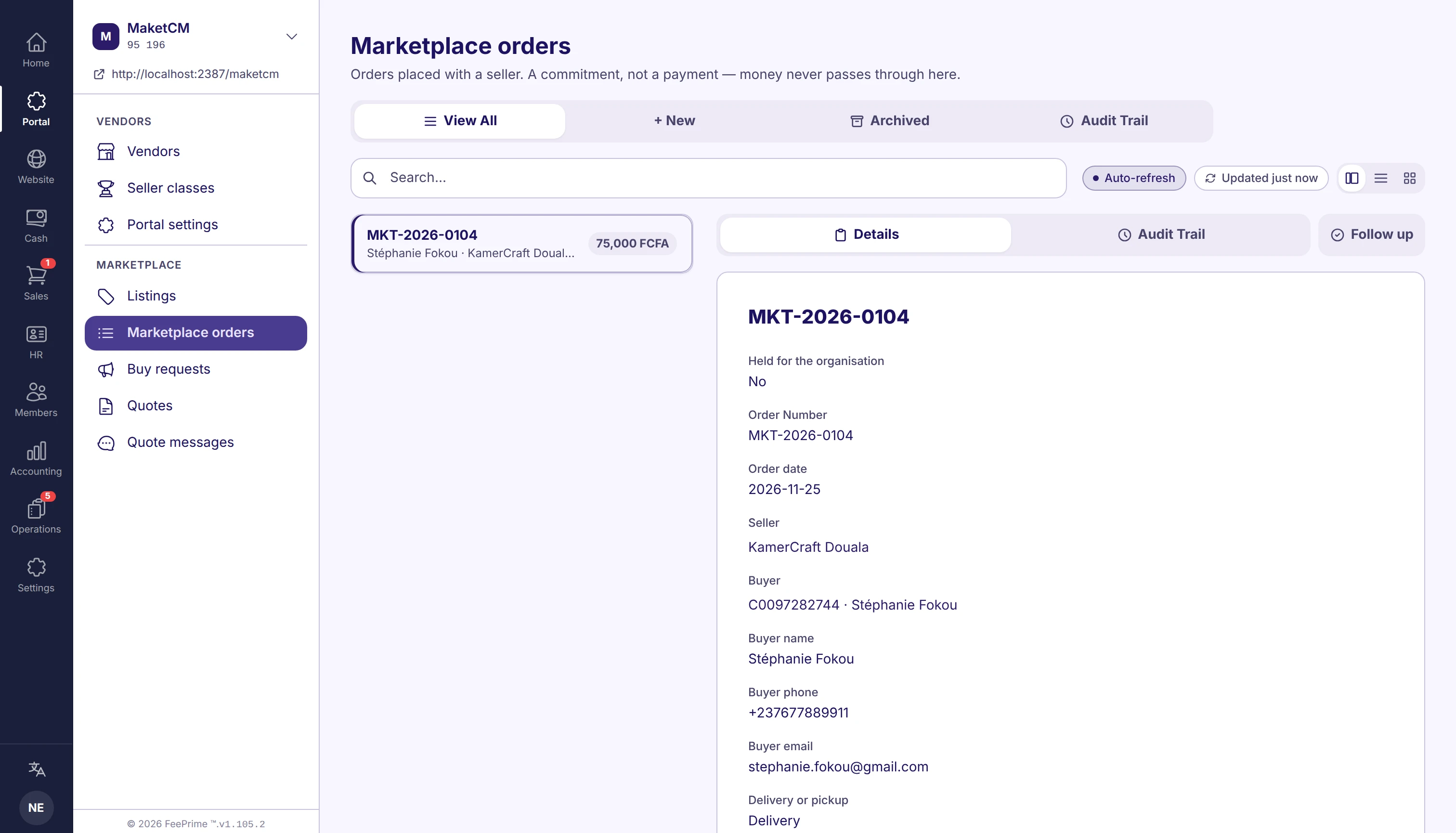 Marketplace order MKT-2026-0104 showing buyer details, delivery location, and immutable fulfillment event timeline.
2. Held for your organisation vs direct to the seller
Every marketplace chooses how public orders reach sellers in Portal Marketplace / Vendors / Portal Settings using the order contact setting. That single choice creates two very different daily workflows for Nadine:
- Held for your organisation (staff review first): When Stéphanie checks out, FeePrime marks the order as Held for organisation. Hervé cannot see it in his seller portal yet. Nadine opens the order in Marketplace Orders, checks that the phone number, delivery location, and items make sense, and clicks Pass to seller. The moment she clears the hold, the order appears in KamerCraft’s portal.
- Direct to the seller (vendor-handled): Public orders go straight to the seller’s portal with no hold. Hervé sees Stéphanie’s order immediately and clicks Confirmed himself. Nadine only steps in if an order stalls.
Launching MaketCM with five new artisans? Holding orders for your team is smart. Nadine can call a first-time buyer in Bonapriso to verify the address and payment plan before the artisan cuts leather or roasts coffee. Running 60 orders a day with twenty proven sellers? Switch to direct-to-seller routing so Nadine’s desk does not become a four-hour bottleneck.
Never assume a seller is ignoring an order before checking whether it is still held for your organisation. Half of “unresponsive seller” complaints on new marketplaces turn out to be orders waiting for someone on staff to click Pass to seller.
3. Who can see an order (and why a seller says “I don’t see it”)
A marketplace order is visible in three places: your staff list in Marketplace Orders, the shopper’s portal, and the seller’s portal.
- Stéphanie (the shopper) sees her own orders because the order is tied to her buyer contact. She can check the items, total, delivery fee, delivery location, and live event status right from her phone.
- Hervé (the seller) sees KamerCraft’s orders through his claimed shopfront. In FeePrime, the order points to the vendor shopfront, and the seller portal matches that shopfront to the signed-in contact who claimed it.
That one link explains the most common seller support call. Suppose Nadine already clicked Pass to seller, the hold is cleared, and Hervé still insists his orders list is blank. Check two things in Portal Marketplace / Vendors / Vendors:
- Is the shopfront actually claimed? If Nadine created KamerCraft’s listing on Hervé’s behalf and he never claimed it with his portal account, FeePrime has no signed-in contact to show the order to.
- Is Hervé signed in with the same contact that claimed the shopfront? If he claimed KamerCraft using his business email or phone contact and later signed in with a second account, the second account will show zero orders.
Fix the claim link once, and every future order for KamerCraft will show up cleanly without staff hand-holding.
4. The daily 10-minute buyer-trust check
Shoppers forgive an out-of-stock item much faster than they forgive radio silence. Build a quick habit of opening Portal Marketplace / Marketplace / Marketplace Orders twice a day—once at 9:30 AM and once at 3:00 PM—and scanning for three red flags:
- Orders still held for your organisation: If your marketplace uses staff review, clear this queue first. A held order is invisible to the seller, so every hour it waits is pure delay.
- Pending orders past your response window: Decide a clear rule for MaketCM—for example, sellers must confirm within 2 hours during business hours. Use search and order date sorting to spot anything still Pending past that mark, then call the seller.
- Confirmed orders sitting open too long: If KamerCraft confirmed a Douala delivery on Monday morning and there is still no Delivered event by Wednesday afternoon, check in. Either the parcel arrived and nobody logged it, or the delivery hit a snag.
When a seller cannot fulfil an order, help them record Cancelled quickly with an honest reason and message the shopper right away. A fast, honest cancellation builds more trust than a silent three-day wait.
5. Recording delivery proof, cancellations, and disputes cleanly
Good event habits turn messy WhatsApp arguments into two-minute resolutions.
- Always fill in Received by name on Delivered: When Stéphanie’s messenger bag is dropped off at her office reception in Akwa, record Delivered with something concrete like “Receptionist — Clarisse N.” or “Stéphanie M. (buyer)”. Never mark an order Delivered just because the rider left the workshop. Wait until handover is confirmed and you know who took the parcel.
- Always write a factual Reason on Cancelled: Leave out emotion and write what happened—for example, “KamerCraft out of Arabica 500g; buyer declined substitute” or “Buyer unreachable after 3 phone attempts.” Over a month, those reasons tell you which sellers have stock discipline problems and which delivery zones cause trouble.
- Never try to rewrite an agreed order when a shopper changes their mind: Because the header is locked, you cannot edit items or prices on an existing order. If Stéphanie asks to drop one bag of coffee before dispatch, record Cancelled with the reason “Replaced by new order with updated items”, then create a fresh order for the exact new items and total.
- Archive old resolved orders instead of hunting for a delete button: You can archive closed orders to keep your working view tidy without destroying the history behind them.
Try it
Open staging.feeprime.com—a practice copy of FeePrime, kept apart from the real thing—and run this 5-minute check:
- Sign in and open Portal Marketplace / Marketplace / Marketplace Orders.
- Open an existing order (or create a test order for KamerCraft with a delivery location in Douala) and verify that the order header fields stay locked once saved.
- Check whether the order shows a Held for organisation flag. If it does, click Pass to seller and note how the hold clears.
- Record a Confirmed event, then record a Delivered event and type a realistic Received by name such as “Stéphanie M.”.
- Create a second test order and record a Cancelled event with a clear factual Reason (for example, “Out of stock on 500g coffee pack”), then check how the timeline reads from top to bottom.
Once you have run one order through both paths, your daily 10-minute trust check will feel second nature.