
Team & Growth: HR, payroll and marketplace financial reports
Before you start, sign in and open HR / Departments, HR / Employees, HR / Payroll Runs, HR / Salary Payments, Sales / Reports / Sales Reports, and Accounting Reports / Income Statement Reports.
Can’t find it? It may be turned off for your business, or your account may not be allowed to open it. Ask the person who set up your FeePrime. They can fix both.

Six months after launch, MaketCM looks like a runaway success. Hervé at KamerCraft ships Douala Leather Messenger Bags and Mount Cameroon Arabica Coffee 500g packs every day, and shoppers like Stéphanie keep reordering from their phones across Douala and Yaoundé. When Nadine checks Sales / Reports / Sales Reports, monthly marketplace volume has crossed 4,800,000 XAF.
Yet the bank balance feels tighter every Friday. Nadine now manages four full-time operations staff and two pickup-point coordinators, plus rent and rider subsidies from Lesson 9. Looking at order volume alone cannot tell her whether MaketCM is growing profitably or quietly burning cash.
This final lesson closes the loop. You will organize your growing marketplace team under HR, accrue and pay salaries cleanly without messy spreadsheets, and read Sales Reports alongside your OHADA Income Statement Reports so you always know your true net margin.
  HR / Departments     HR / Employees        HR / Payroll Runs
  (Teams & codes)  ──► (Linked to Contacts) ─► (Accrue by period, currency & frequency)
                                                        │
                                                        ▼
  Accounting Reports / Income Statement ◄── Expense booked to period worked
         ▲                                              │
         │                                              ▼
  Sales / Reports / Sales Reports            HR / Salary Payments
  (Order & commission revenue)               (Clears staff payable from Cash Account)
1. Structure your team with Departments
When Nadine ran MaketCM alone, she handled seller onboarding, listing moderation, pickup coordination, and finance from one desk. Once a marketplace passes twenty active sellers, those jobs split quickly. Open HR / Departments to group your staff cleanly.
Every FeePrime account has HR turned on automatically, just like Contacts. You do not need a special toggle to start recording teams or staff.
For MaketCM, Nadine creates four clear departments:
- Seller Onboarding (code:
ONB) — verifies new artisans like KamerCraft and helps them publish clean listings. - Moderation (code:
MOD) — reviews product photos, pricing, and buyer disputes. - Logistics & Pickup (code:
LOG) — runs the Douala and Yaoundé pickup hubs and coordinates riders. - Finance (code:
FIN) — tracks commissions, seller payouts, pickup tills, and monthly payroll.
Each department record has four simple fields: Name, optional short Code (useful if your finance team puts codes like LOG or FIN on exports and payslips), optional Parent (for sub-teams—for example, placing Douala Pickup Hub under Logistics & Pickup), and optional Manager.
Create your Departments first, add your Employees second, then come back to assign each Department’s Manager. Because a department’s manager must be an employee and an employee belongs to a department, whichever one you create first has nothing to point to yet. Leave Manager blank on day one, add your staff, and then edit the department to pick its manager.
One small office with three staff? Skip Parent departments completely and keep a flat list. Nothing breaks.
FeePrime also prevents loops automatically: you cannot set a department as its own parent or place it underneath one of its own sub-teams. And if you ever retire a team—say you merge Onboarding and Moderation—archive the department instead of trying to delete it so past payroll records keep their history intact.
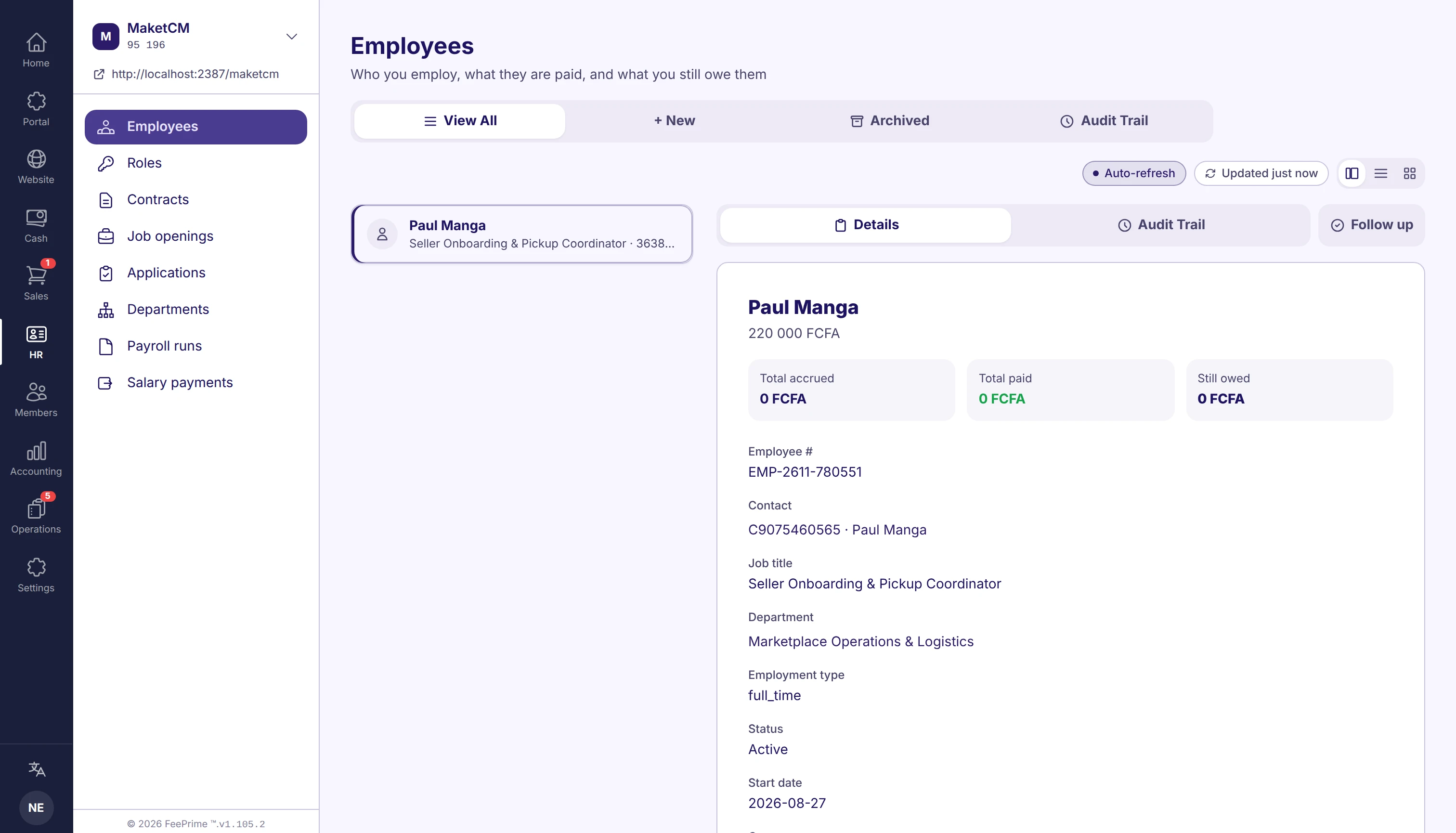 Managing MaketCM operations staff and payroll setup under HR / Employees.
2. Register staff as Employees
Open HR / Employees to keep one clean register of everyone who works for the marketplace.
Every employee record links directly to a person in Sales / Customers / Contacts. That means a person’s phone number, email, and address live in one place rather than being typed twice.
Search Sales / Customers / Contacts before you add an employee, and never rename an old employee record for a new hire. If a pickup coordinator leaves MaketCM and a new person takes the desk, archive the former employee and create a fresh contact and employee record for the replacement.
When creating an employee, fill in:
- Employee Number — a unique ID for that person (for example,
MK-001for Nadine,MK-002for the Douala hub lead). - Contact — pick the person’s existing contact record.
- Job Title — optional plain-language title such as
Portal Operations LeadorListing Moderator. - Department — select one of the real departments you created in HR / Departments.
Because Department is a structured link rather than a free-text box, you never end up with typos like Logistcs and Logistics splitting your reports.
3. Accrue salaries cleanly with Payroll Runs
At the end of every pay period, open HR / Payroll Runs to calculate and post what MaketCM owes its team for the work they completed.
Think of a Payroll Run the same way you think of a supplier bill: it records the expense in the period the work happened, and creates a payable balance owed to each employee until the money is actually sent. If MaketCM’s staff worked all of March and Nadine pays them on 2 April, posting the March payroll run still books the March salary expense into March—not April.
To keep your accounting clean, every payroll run enforces three strict rules:
- One run, one currency. Pick the Currency (for example,
XAF). Journal entries post per currency, so if MaketCM also pays a remote technical advisor inEUR, that advisor gets a separateEURpayroll run. - One run, one pay frequency. Choose
monthly,semimonthly,biweekly, orweekly. Never mix weekly and monthly staff in the same payroll run. Mixing frequencies causes wrong totals because a period means something completely different for a weekly worker than for a monthly manager. - Pick the whole period, not two loose dates. Choosing the month, half-month, or week lets FeePrime derive the period dates cleanly so you cannot accidentally run overlapping payrolls like 1–30 September and 1–31 September for the same work.
If MaketCM runs separate hubs in Douala and Yaoundé, Nadine can also pick an optional Business Location (configured under Settings / Business / Business Locations) so she can run payroll per city or leave it blank for a single company-wide run.
Once posted, a Payroll Run cannot be edited. Just like invoices and bills, posted accruals are locked so nobody can silently alter past numbers. If you forgot a new moderator or typed a wrong allowance, archive the wrong payroll run and create a clean replacement for that same period. You can also print payslips or run summaries right from HR / Payroll Runs.
4. Settle what you owe with Salary Payments
Posting a payroll run records what MaketCM owes. Actually sending the cash happens in HR / Salary Payments.
Each salary payment draws money from a cash account—such as MaketCM’s commercial bank account or Mobile Money payout account—and nets down that employee’s payable balance, in the exact same way paying a supplier bill clears a supplier’s payable balance.
Notice one important difference between HR and paying: recording employees and posting payroll runs work on every FeePrime account automatically, but recording a Salary Payment requires cashflow and cash accounts to be turned on (under Settings / Business / Modules and Cash / Money / Cash Accounts). If you try to pay a run before enabling cashflow, FeePrime tells you what to switch on first.
This separation also reflects real SME life in Douala and Yaoundé. If Nadine pays the four full-time staff by bank transfer on the 1st and settles two pickup coordinators via Mobile Money on the 2nd, each Salary Payment clears the right employee’s balance against the right cash account without touching the original March expense date.
Just like payroll runs, an approved Salary Payment cannot be edited. Editing a payment after sign-off would break your audit trail. If you picked the wrong cash account or entered the wrong amount, archive that salary payment and raise a new one.
5. Read Sales Reports alongside your OHADA Income Statement
Now Nadine can answer the question that started this lesson: Is MaketCM actually making money?
Open Sales / Reports / Sales Reports first. This tells you commercial momentum: how much product volume moved, which categories like leather goods or specialty coffee grew fastest, and how marketplace revenue trended month over month. For MaketCM, 4,800,000 XAF of orders from Hervé and other sellers looks great—but remember from Lesson 8 that most of that cash belongs to sellers, not to MaketCM.
Next, open Accounting Reports / Income Statement Reports for the exact same month. Your OHADA Income Statement brings every piece of the marketplace together:
- Top line (Marketplace Revenue): MaketCM’s earned commissions, listing fees, and any direct platform revenue.
- Operating Costs (from Lesson 9): Douala and Yaoundé pickup hub rent, delivery subsidies, packaging, SMS notifications, and payment gateway fees—which you can also inspect by category in Cash / Reports / Expense Reports.
- Personnel Costs (from this lesson): Every posted Payroll Run accrued for that month.
- Bottom line (True Net Margin): What actually remains for MaketCM after every cost is counted.
  MaketCM — Example Monthly Reality Check (XAF)
  -------------------------------------------------------
  Marketplace Order Volume (GMV)            4,800,000 XAF  ◄── Looks huge on Sales Reports
  MaketCM Commission Revenue (12%)            576,000 XAF  ◄── Real top-line income
  - Hub Rent, Delivery & Ops Expenses        -215,000 XAF  ◄── From Cash / Money / Expenses
  - Accrued Staff Payroll                    -290,000 XAF  ◄── From HR / Payroll Runs
  -------------------------------------------------------
  True Net Margin (Income Statement)           71,000 XAF  ◄── What MaketCM actually kept
Never confuse gross order volume on Sales Reports with real profit. If Nadine also wants to verify unpaid salaries still sitting on the books, she checks Accounting Reports / Balance Sheet Reports or drills into Accounting Reports / General Ledger Reports. To see whether cash actually came in and went out smoothly across bank, Mobile Money, and pickup tills, she opens Accounting Reports / Cashflow Reports.
When your HR payroll accruals, hub expenses, seller payouts, and commission revenue all flow into one OHADA Income Statement, scaling MaketCM stops being guesswork. You know immediately when you can afford to hire another onboarding agent—or when commission rates and delivery subsidies need adjustment first.
Try it
Open staging.feeprime.com—a practice copy of FeePrime, kept apart from the real thing—and run MaketCM’s month-end cycle in five minutes:
- Go to HR / Departments and create two departments: Seller Onboarding (
ONB) and Logistics & Pickup (LOG), leaving Manager blank for now. - Open Sales / Customers / Contacts, add a sample staff member, then go to HR / Employees and link that contact with a unique employee number and the Seller Onboarding department.
- Return to HR / Departments, edit Seller Onboarding, and set your new employee as its Manager.
- Go to HR / Payroll Runs, create a monthly payroll run in XAF for the current month, post it, and confirm that it is locked against editing.
- Open HR / Salary Payments to settle the accrued balance from a cash account, then open Accounting Reports / Income Statement Reports to see the payroll cost reflected alongside revenue and expenses.
Once you see a single payroll run flow straight from HR into your Income Statement, you have everything you need to grow MaketCM—and your team—with confidence.