
Recording expenses, bills, spot purchases, and fixed assets paid by a third party
New dedicated modules & full Third-Party Payments course: FeePrime now gives third-party accounting its own dedicated
Cash > Money > Payment requests,Cash > Money > Paid for others, andCash > Money > Expense correctionsmodules (so staff never need direct access to rawTransactions), plus Pay by Wallet auto-settlement that clears the payer, beneficiary bill or fixed asset, and linked supplier invoice in one shot. For a full standalone guide that also covers unlinked personal/associate (OHADA462), sister-company (471), and loan (162) payments, see our dedicated course: Third-Party Payments, Payment Requests & Inter-Company Balances.
Before you start, sign in and open Cash / Money / Transactions (or Purchases / Paying / Bills, Purchases / Spot purchases / Spot purchases, and Purchases / Returns & assets / Fixed assets).
Can’t find it? It may be turned off for your business, or your account may not be allowed to open it. Ask the person who set up your FeePrime. They can fix both.

Photo: Lewis J Goetz on Unsplash
It is the 5th of the month at Sunrise Bakery in Douala. The 350,000 FCFA rent for the Akwa shop is due today, but the bakery’s bank balance is tight while waiting for Hôtel Akwa to settle its monthly invoice. Ibrahim Bello at Bello Group Holdings steps in and pays the landlord straight from the holding company’s bank account.
Later that same week, two more things happen without a single franc leaving Sunrise Bakery’s till: a local financier hands 240,000 FCFA directly to a farmer at the scale for raw ingredients while Sunrise Bakery’s van loads the sacks, and a shareholder pays 1,200,000 FCFA out of pocket for a new commercial deck oven.
This creates a classic bookkeeping trap for Amina Bello and her accountant. If they record those payments from Sunrise Bakery’s cash box, the till looks short all month. If they leave them out of the books because no bakery cash moved, Sunrise Bakery’s profit looks falsely high, the oven disappears from the asset register, and nobody remembers how much the bakery owes back.
FeePrime solves this cleanly with one checkbox: Paid by a third party.
1. Where Paid by a third party works (linked or not)
First, clear up a common myth: the person or business who paid does NOT need to be linked to you on FeePrime. The Paid by a third party checkbox works for any Contact in your directory — whether that is a linked holding company like Bello Group Holdings, a shareholder who does not use FeePrime, or an outside financier.
You will find Paid by a third party in four places across FeePrime:
- Expenses (Cash / Money / Transactions →
+ New, or Cash / Money / Expenses) — rent, generator fuel, repairs, electricity, or transport paid on your behalf. - Bill payments (Purchases / Paying / Bills or a bill payment line inside Cash / Money / Transactions) — when a parent company or partner settles a supplier bill, such as Littoral Flour Mills’s 450,000 FCFA flour bill.
- Spot purchases (Purchases / Spot purchases / Spot purchases) — when an agent or buyer receives goods directly from a farmer or walk-in seller at the scale, and a financier or backer settles the seller on the spot.
- Fixed assets (Purchases / Returns & assets / Fixed assets) — when an associate or sister company buys equipment like a bakery oven or delivery motorbike directly for your shop.
Running a single small shop where the owner occasionally pays a vendor from personal cash? You can use this right away. You do not need linked businesses, multi-company setups, or special approvals for it to work.
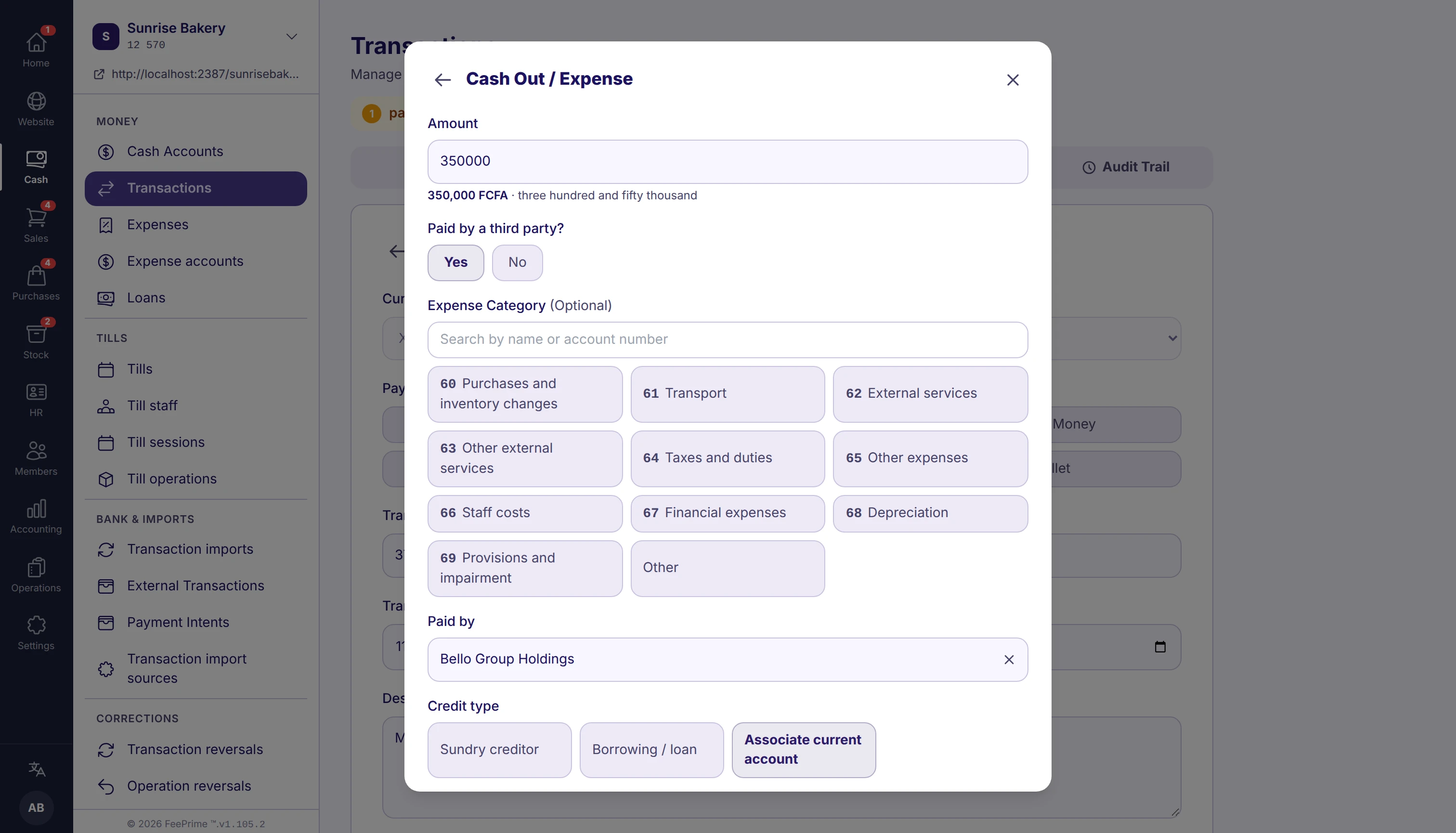 Cash → Transactions: ticking “Paid by a third party” swaps Cash Account for Payer (Bello Group Holdings) and Liability type (OHADA 462 / 471 / 162).
2. What happens when you tick Paid by a third party
In a normal payment, your money leaves your own cash box or bank account. In a third-party payment, your cash does not move at all — instead, you now owe the person who paid.
The moment you tick Paid by a third party, FeePrime updates the form in two ways:
Cash Accountdisappears. Because zero FCFA left your till or bank, FeePrime does not ask you to pick a cash account.PayerandLiability typebecome required. You pick the Contact who paid and tell FeePrime which OHADA liability account should hold what you owe them.
NORMAL PAYMENT (your own money)
  Expense / Bill / Asset ───► Paid from your Cash Account
                                (Your Cash or Bank goes DOWN)

PAID BY A THIRD PARTY (someone else's money)
  Expense / Bill / Asset ───► Tick [x] Paid by a third party
                                • Cash Account hides (your cash is untouched)
                                • Pick Payer (e.g. Bello Group Holdings)
                                • Pick Liability type:
                                    ├── Sundry creditor  ──► OHADA 471
                                    ├── Borrowing        ──► OHADA 162
                                    └── Associate        ──► OHADA 462
                                (What you owe the Payer goes UP)
Never pick your own cash box or bank account when someone else paid. It is tempting to pick a cash account just to get the form saved quickly, but your cash balance will immediately be wrong by that exact amount, and your cashier will waste hours hunting for missing money that never left the drawer.
Never skip recording a cost just because your cash didn’t move. Unrecorded rent makes your Income Statement look artificially profitable, unrecorded spot purchases break your stock valuation, and unrecorded debts cause painful disputes when the payer asks to be repaid.
3. Choosing the right Liability type (471, 162, or 462)
When you tick Paid by a third party, FeePrime asks you to pick a Liability type. Each choice maps to a standard OHADA liability account so your Balance Sheet stays clean and audit-ready:
Sundry creditor(OHADA 471): Your everyday default for third parties. Use this when a holding or sister company like Bello Group Holdings pays Sunrise Bakery’s rent or supplier bills, or when an outside financier settles a farmer spot purchase for you.Borrowing(OHADA 162): Use this for formal loans or longer-term credit facilities — for example, when a lender disburses money directly to an equipment vendor under a loan agreement.Associate(OHADA 462): Use this for company owners, partners, or shareholders paying business expenses or buying fixed assets out of their own pocket — for example, Amina Bello or a co-owner funding Sunrise Bakery’s new deck oven.
Pick ONE Liability type per payer and stick to it every time. This is the single most important habit in this lesson. Suppose Sunrise Bakery books January’s 350,000 FCFA rent paid by Bello Group Holdings under Sundry creditor (471), and then books February’s 185,000 FCFA generator repair paid by Bello Group Holdings under Associate (462). Now the 535,000 FCFA owed to Bello Group Holdings is split across two different ledger accounts. When Ibrahim Bello asks for a statement before repayment, half the balance looks missing.
4. Four everyday walkthroughs at Sunrise Bakery
A. Recording an expense paid by a holding company
- Open Cash / Money / Transactions and click
+ New. - Select your currency (
XAF) and add an Expense line for Akwa shop rent (350,000). - Tick
Paid by a third party. The Cash Account field vanishes. - Select
Bello Group HoldingsasPayerand chooseSundry creditor(471) asLiability type, then save.
Your rent expense hits the Income Statement, Sunrise Bakery’s cash box stays untouched, and account 471 shows 350,000 FCFA owed to Bello Group Holdings.
B. Settling a supplier bill paid by a third party
- Open Purchases / Paying / Bills (or add a bill payment operation in Cash / Money / Transactions) and select Littoral Flour Mills’s unpaid 450,000 FCFA bill.
- Tick
Paid by a third party. - Choose
Bello Group HoldingsasPayerandSundry creditor(471) asLiability type, then save.
Sunrise Bakery’s payable to Littoral Flour Mills clears to zero, and the 450,000 FCFA obligation moves cleanly to Bello Group Holdings in account 471.
C. Recording a spot purchase funded by a financier
- Open Purchases / Spot purchases / Spot purchases and click
+ New. - Fill in the seller, the
business_locationreceiving the goods (your warehouse or mobile buyer van), currency, and items (240,000 FCFA). - Tick
Paid by a third party, pick the financier’s contact asPayer, selectSundry creditor(471), and save.
The stock enters your shelf immediately, the seller is settled at the scale, and the 240,000 FCFA owed to the financier is recorded automatically.
D. Recording a fixed asset bought by a shareholder
- Open Purchases / Returns & assets / Fixed assets and click
+ New. - Enter the commercial deck oven details and its 1,200,000 FCFA cost.
- Tick
Paid by a third party, pick the shareholder’s contact asPayer, chooseAssociate(462), and save.
The oven enters your asset register ready for depreciation, and account 462 tracks the 1,200,000 FCFA owed back to the shareholder.
Double-check the Payer and Liability type before you save. Posted transactions, bills, and spot purchases cannot be edited after approval so your financial trail stays honest. Fixing a mistake later means posting a correction or reversal under Cash / Corrections (for transactions), raising a debit note under Purchases / Paying / Debit notes (for bills), or archiving and re-entering the record (for spot purchases).
5. What happens automatically when the payer IS linked
Everything above works even if the payer has never heard of FeePrime. But when the payer is a mutually linked FeePrime business, you get an extra time-saver automatically:
- When Sunrise Bakery records the 350,000 FCFA rent naming linked Bello Group Holdings, FeePrime sends a report straight to Bello Group Holdings in Payments between linked businesses: “Sunrise Bakery says you paid 350,000 XAF for them.” Ibrahim’s finance team simply clicks
Record what we paidand picks the exact bank or cash account they used (covered in Lesson 6). - When Sunrise Bakery marks linked Littoral Flour Mills’s 450,000 FCFA bill as paid by Bello Group Holdings, FeePrime also alerts Samuel Nkeng at Littoral Flour Mills so he can record the invoice payment on his side (covered in Lesson 7).
If the payer is not linked, nothing leaves your system — your books and your balance owed are still 100% complete on your own side.
Try it
Open staging.feeprime.com — a practice copy of FeePrime, kept apart from the real thing — and run through this in five minutes:
- Sign in to staging.feeprime.com and open Cash / Money / Transactions.
- Click
+ New, select your currency, and add an Expense line for350,000(such as monthly shop rent). - Tick
Paid by a third partyand confirm that the Cash Account field disappears. - Pick a third-party contact as
Payer, selectSundry creditor(471) asLiability type, and save. - Open Purchases / Returns & assets / Fixed assets, start a new equipment entry, tick
Paid by a third party, and chooseAssociate(462) so you see how the exact same pattern works for assets.
Once you have ticked that box twice on staging, you will never again wonder how to book a bill paid out of someone else’s pocket.