
Paying on behalf of a linked business
New dedicated modules & full Third-Party Payments course: FeePrime now gives third-party accounting its own dedicated
Cash > Money > Payment requests,Cash > Money > Paid for others, andCash > Money > Expense correctionsmodules (so staff never need direct access to rawTransactions), plus Pay by Wallet auto-settlement that clears the payer, beneficiary bill or fixed asset, and linked supplier invoice in one shot. For a full standalone guide that also covers unlinked personal/associate (OHADA462), sister-company (471), and loan (162) payments, see our dedicated course: Third-Party Payments, Payment Requests & Inter-Company Balances.
Before you start, sign in to the paying business and open Cash / Money / Transactions.
Can’t find it? It may be turned off for your business, or your account may not be allowed to open it. Ask the person who set up your FeePrime. They can fix both.

Photo: Vitaly Gariev on Unsplash
It is Saturday morning in Akwa and ENEO cuts power right as 400 croissants for Hôtel Akwa are going into the ovens at Sunrise Bakery. The backup generator refuses to start. The technician fixes it on the spot and asks for 185,000 FCFA right now. Sunrise Bakery’s till is short, so Amina Bello calls her brother Ibrahim at Bello Group Holdings. Ibrahim transfers the 185,000 FCFA straight from Bello Group’s bank account so the ovens keep running.
In most family groups and multi-company businesses, that 185,000 FCFA quietly breaks both sets of books. Bello Group’s accountant records it as a “Generator repair” expense on Bello Group—even though Bello Group does not own that generator. Meanwhile, Sunrise Bakery’s profit looks artificially high, and six months later nobody remembers that Sunrise Bakery still owes Bello Group 185,000 FCFA.
FeePrime solves the payer’s side with a dedicated operation type: Paid on behalf of another business. In Lesson 4, you saw how Sunrise Bakery records a cost paid by someone else. Here, you walk through Ibrahim’s side inside Bello Group Holdings—recording the cash leaving Bello Group, tracking what Sunrise Bakery owes back, and alerting Sunrise Bakery cleanly in one move.
1. Why this is not your expense (and what moves in your books)
When Bello Group Holdings pays Sunrise Bakery’s generator technician, Bello Group did not buy a repair. Bello Group gave up 185,000 FCFA of bank cash and gained a 185,000 FCFA claim against Sunrise Bakery. Your income statement should not move by a single franc.
Here is how the payment flows across both businesses:
BELLO GROUP HOLDINGS (Payer)                      SUNRISE BAKERY (Beneficiary)
----------------------------                      ----------------------------
Cash / Money / Transactions -> + New
  Op: Paid on behalf of another business
  Cash account: Bello Group Bank (XAF)
  Paid on behalf of: Sunrise Bakery
  Subtype: Associate (462)
  Amount: 185,000 FCFA
              |
        [ Approve ]
              |
              +--> Journal inside Bello Group:
              |      Dr  Receivable: Sunrise Bakery (462)   185,000
              |      Cr  Bello Group Bank Account           185,000
              |
              +--> Sends "Paid for you" report --------> Home / Incoming
                   (shown in Bello Group's Sent tab)     "Bello Group Holdings paid
                                                          185,000 XAF for you"
                                                                  |
                                                         Amina reviews & picks:
                                                          - Record as an expense
                                                          - Record as a bill payment
                                                          - Record as a fixed asset
                                                          - or Decline (with reason)
Notice the boundary between the two companies. Approving on Bello Group’s side posts Bello Group’s own journal entry and notifies Sunrise Bakery—it never writes directly into Sunrise Bakery’s books. Amina stays in control of how her accountant classifies the repair.
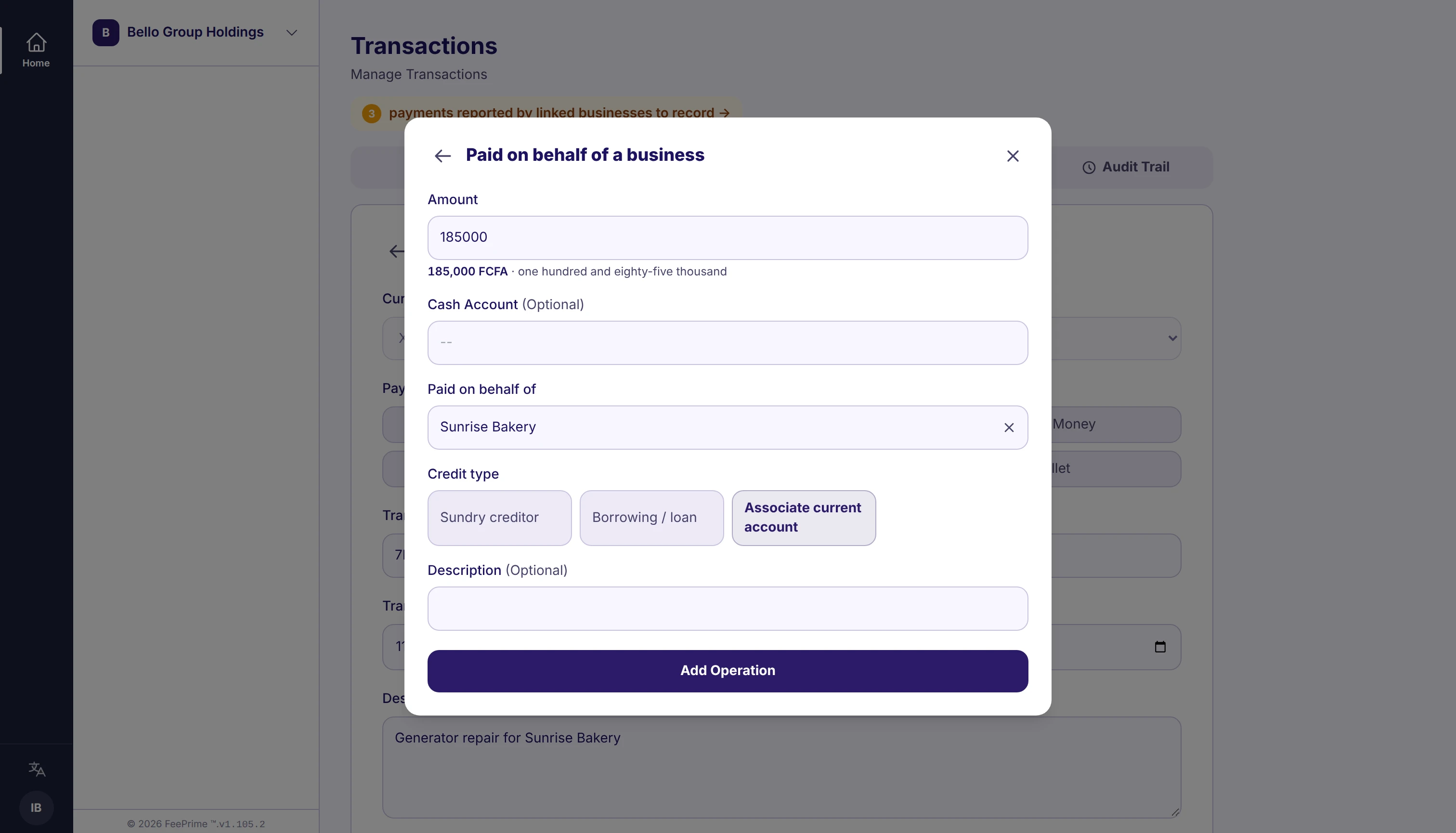 Bello Group Holdings records a “Paid on behalf of another business” transaction: credits its own bank account and notifies Sunrise Bakery automatically.
2. Recording Paid on behalf of another business step by step
Sign in to Bello Group Holdings and check that your paying account (bank account, cash register, mobile money account, wallet, or treasurer) already exists under Cash / Money / Cash accounts. Then follow these steps:
- Open Cash / Money / Transactions and click + New.
- Pick the Currency (
XAF). Only cash accounts in that currency appear for selection. - Add an operation line and choose Paid on behalf of another business.
- Pick the Cash account that actually sent the money—for Ibrahim, Bello Group’s commercial bank account. Because each operation line carries its own cash account, a single transaction can even pay two items from two different accounts if needed.
- Under Paid on behalf of, select Sunrise Bakery from your contacts.
- Choose the Account subtype (see Section 3 below). For a parent company paying for a sister or subsidiary company, pick Associate.
- Enter the amount (185,000) and add a clear description—for example, “Emergency generator repair at Akwa bakery — Saturday ENEO outage”—so Amina recognizes it immediately.
- Save and submit for approval (or approve it if your role has approval rights).
Once saved, you can view all payments you have made for other businesses either inside Cash / Money / Transactions or in the dedicated list under Cash / Money / Paid for others.
3. Picking the right OHADA subtype (and sticking to it)
FeePrime asks for a subtype so your accounting ledger places the balance in the right OHADA account instead of dumping every third-party transfer into one messy bucket:
| Subtype in FeePrime | OHADA Account | When to use it |
|---|---|---|
| Associate | 462 | Parent companies, holding companies, sister companies, shareholders, or directors in the same group (like Bello Group Holdings and Sunrise Bakery). |
| Sundry creditor | 471 | One-off third-party payments for an outside partner, neighbour, or unlinked contact who is not an owner or group entity. |
| Borrowing | 162 | Formal financing or medium-to-long-term lending arrangements tracked separately from routine inter-company accounts. |
Use one subtype consistently for the same business. If Bello Group records January’s generator repair for Sunrise Bakery under Associate (462) and March’s flour payment under Sundry creditor (471), Sunrise Bakery’s balance splits across two ledger accounts. Your trial balance will still add up, but checking “How much does Sunrise Bakery owe Bello Group right now?” becomes a headache.
Running a small family setup with one holding bank account paying for one shop? Keep it simple: pick Associate (462) every time and skip extra accounts. Running a larger group with several finance clerks, mobile money wallets, and maker-checker sign-off? Each clerk can draft the transaction on the right paying account, and nothing reaches the subsidiary until the finance manager approves.
4. What happens when you approve (and what if they are not linked yet)
The moment Ibrahim approves the 185,000 FCFA transaction, three things happen automatically:
- Bello Group’s books update immediately: Your class-4 receivable from Sunrise Bakery increases by 185,000 FCFA, and Bello Group’s bank balance drops by 185,000 FCFA.
- Sunrise Bakery’s
Home / Incominglights up:Incomingsits right underDashboardin the Home menu and adds a live badge count onHome. Amina opens it (or opens Payments between linked businesses → Received) and sees: “Bello Group Holdings paid 185,000 XAF for you.” Bello Group sees the same report in its Sent tab so Ibrahim can check whether Amina has recorded it yet. - No double-entry, no echo: When Amina clicks Record as an expense (or Record as a bill payment or Record as a fixed asset), FeePrime opens Sunrise Bakery’s own prefilled form linked to that report. Two clerks cannot claim the same report twice, and when Sunrise Bakery approves its side, FeePrime does not echo a duplicate notice back to Bello Group.
What if Sunrise Bakery has a module switched off? The report is never lost. It waits safely inside Sunrise Bakery’s Home / Incoming marked as waiting for them to switch the module on, and Amina can switch it on in one tap right from that screen.
What if you pay for a business that is not linked yet? Paid on behalf of another business still works. Bello Group’s receivable and bank entry post normally, and FeePrime shows a blue nudge letting you invite them to link in one tap (or copy a WhatsApp invitation). Remember also that if one business sends more than 20 linked deliveries in a single day, FeePrime pauses the link automatically as a flood safeguard until the receiver clicks Resume.
(Note: If Bello Group is paying an open invoice from a linked third-party supplier like Littoral Flour Mills on Sunrise Bakery’s behalf, that triggers a three-way flow you will master in Lesson 7.)
5. When the other business records first (never enter it twice)
In real life, Sunrise Bakery’s bookkeeper often records the generator repair before Ibrahim even reaches his laptop. If Amina already saved the 185,000 FCFA expense using Paid by a third party and named Bello Group Holdings, Bello Group receives a Paid by you report: “Sunrise Bakery says you paid 185,000 XAF for them.”
Never create a brand-new manual transaction when a Paid by you report is already waiting. If you do, you will leave the report dangling or record the bank outflow twice.
Instead, open Home / Incoming (or the waiting banner on Cash / Money / Transactions), open the report, and click Record what we paid. FeePrime prefills Paid on behalf of another business with Sunrise Bakery and 185,000 FCFA already filled in. All you choose is which cash or bank account paid. When you approve, the report closes cleanly without sending a duplicate alert back to Sunrise Bakery.
6. Common mistakes that break inter-company balances
- Never book a sister company’s bill as your own expense. If Bello Group records Sunrise Bakery’s generator repair under Repairs & Maintenance, Bello Group’s profit is understated, Sunrise Bakery’s cost disappears, and the 185,000 FCFA receivable vanishes.
- Never try to edit an approved transaction to fix a wrong account or amount. Transactions in FeePrime are immutable once posted so your audit trail stays trustworthy. If a clerk picked the Akwa Cash Register instead of the Commercial Bank Account, reverse it under Cash / Corrections / Transaction reversals and post the right entry.
- Never switch subtypes mid-year for the same business. Pick Associate (462) for group companies and stick with it on every transaction so settlement in Lesson 8 takes minutes instead of an afternoon.
- Never ignore a
Declinereason. If Amina declines aPaid for youreport—for instance, because she sees 185,000 FCFA when the technician’s receipt says 158,000 FCFA—check her visible decline reason in your Sent tab, verify the bank slip, and correct your side cleanly.
Try it
Practice this workflow on staging.feeprime.com—a practice copy of FeePrime, kept apart from the real thing—so you can test without touching live books.
- Sign in to your practice paying business (such as a holding company) and verify you have a bank or cash account under Cash / Money / Cash accounts.
- Open Cash / Money / Transactions and click + New.
- Pick currency XAF, add an operation of type Paid on behalf of another business, and choose your bank account on the operation line.
- Select a linked sister business under Paid on behalf of, pick subtype Associate, enter 185,000, and add the description “Generator repair — Akwa bakery”.
- Approve the transaction, then check Cash / Money / Paid for others and your Sent linked payments list to confirm the
Paid for youreport went out cleanly.
Once you see how a single approved entry updates your receivable, deducts your bank, and alerts the sister business without double-entry, inter-company payments stop being a month-end nightmare.