
Reviewing and recording reported linked payments
New dedicated modules & full Third-Party Payments course: FeePrime now gives third-party accounting its own dedicated
Cash > Money > Payment requests,Cash > Money > Paid for others, andCash > Money > Expense correctionsmodules (so staff never need direct access to rawTransactions), plus Pay by Wallet auto-settlement that clears the payer, beneficiary bill or fixed asset, and linked supplier invoice in one shot. For a full standalone guide that also covers unlinked personal/associate (OHADA462), sister-company (471), and loan (162) payments, see our dedicated course: Third-Party Payments, Payment Requests & Inter-Company Balances.
Before you start, sign in and open Cash / Money / Transactions (and watch for the waiting banner at the top, or open Home / Incoming).
Can’t find it? It may be turned off for your business, or your account may not be allowed to open it. Ask the person who set up your FeePrime. They can fix both.

Photo: AllGo - An App For Plus Size People on Unsplash
On Tuesday morning in Douala, Ibrahim Bello at Bello Group Holdings pays 185,000 XAF to repair the backup generator at Sunrise Bakery. He records the payment on his side before lunch. Normally, this is where small groups lose track of money: a blurry receipt photo lands on WhatsApp, Amina Bello’s accountant forgets to book it—or books it twice—and two weeks later both companies argue over the inter-company balance.
When two FeePrime businesses are mutually linked, whichever side records a payment first automatically sends a clean payment notice to the other side. Nothing is forced into your ledger behind your back. Instead, the report waits on your Payments between linked businesses screen until your team reviews it, clicks one button, and saves it through your own prefilled form.
This lesson shows accountants and cashiers on both sides how to work through waiting payment reports cleanly—without double-booking, without endless back-and-forth notices, and without letting a wrong figure slip into your books.
1. Where waiting payments show up: Received vs Sent
You never have to hunt through menus to discover that a linked business reported a payment. FeePrime puts waiting reports in three obvious places:
- The waiting banner at the top of Cash / Money / Transactions, which takes you straight to Payments between linked businesses.
- Action cards on your Task Board (and in your morning task email).
- Home / Incoming, which always sits right under Dashboard and lights up Home with a live count of every waiting document and payment.
Inside Payments between linked businesses, you work across two tabs:
- Received: Payments reported to your business by linked partners. Anything still waiting sits here with its Record buttons and a Decline button. Once recorded or declined, its status stays visible for audit.
- Sent: Every payment notice your own saved transactions triggered to linked partners. Use this tab to check whether Ibrahim or Samuel Nkeng at Littoral Flour Mills has recorded your payment, whether it is still waiting, whether it is held because a module is turned off on their side, or whether they declined it with a note.
Bello Group Holdings saves payment
              │
              ▼
Sunrise Bakery: Payments between linked businesses (Received tab)
              │
     ┌────────┴────────────────────────┐
     ▼                                 ▼
Click Record button               Click Decline + write reason
     │                                 │
     ▼                                 ▼
Opens YOUR prefilled form         Reason shows on Bello Group's
(pick category / account)         Sent tab so they can fix it
     │
     ▼
Save once ──► Report locked (no double-book) & NO echo sent back
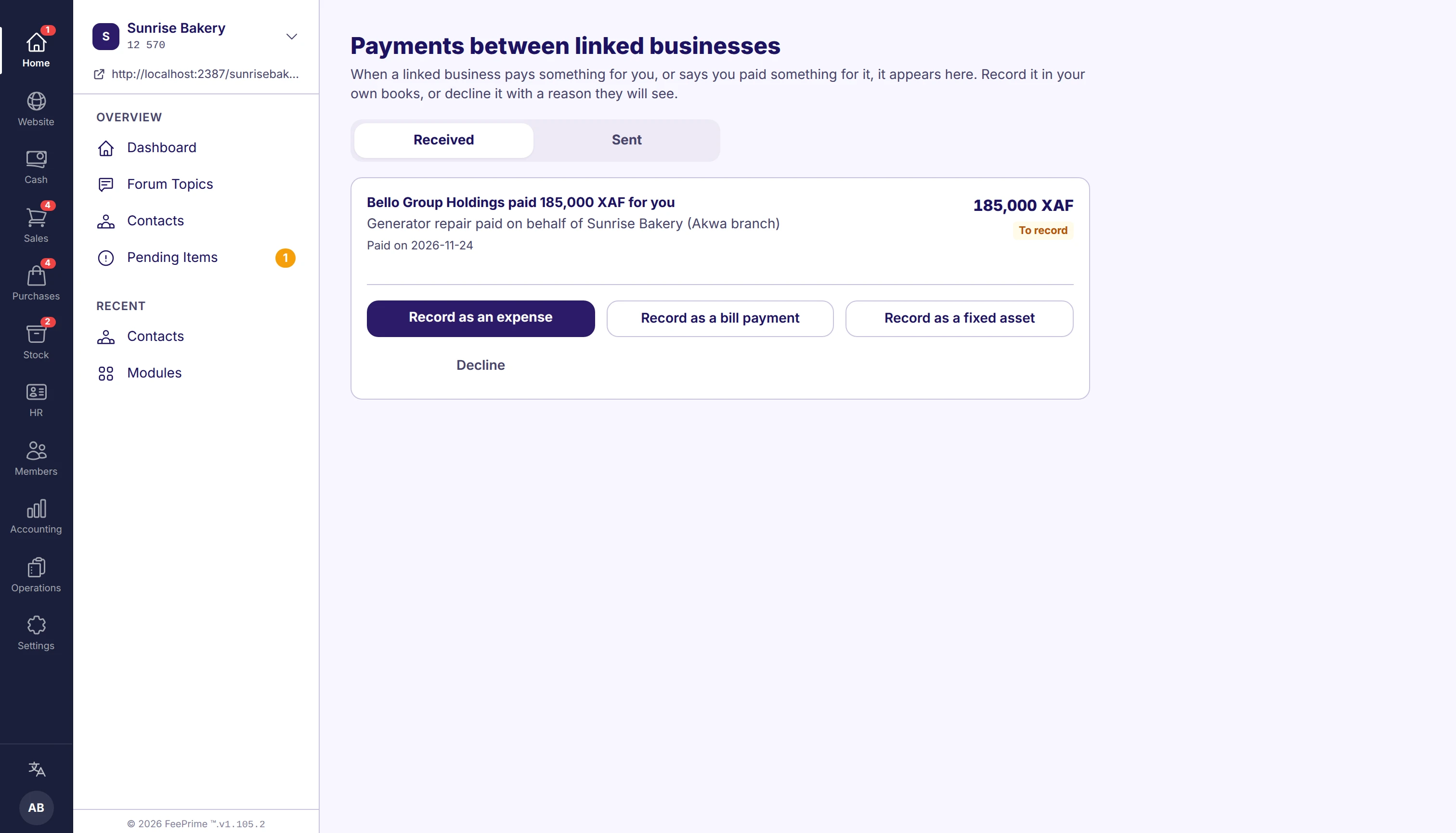 Payments between linked businesses (Received): Sunrise Bakery sees Bello Group Holdings’ 185,000 XAF payment with one-click prefilled Expense, Bill, Fixed Asset, or Decline actions.
2. The five payment notices you will see
Every notice names the real linked business—never a cryptic account ID—and tells you in plain words what happened. Depending on who recorded first and what was paid, you will see one of five notice types:
- A partner paid for you (“Bello Group Holdings paid 185,000 XAF for you”) Ibrahim recorded a payment on behalf of Sunrise Bakery. Because only Sunrise Bakery knows what that money bought, Amina gets three buttons: Record as an expense, Record as a bill payment, or Record as a fixed asset.
- A partner says you paid for them (“Sunrise Bakery says you paid 350,000 XAF for them”) Amina recorded an expense, bill payment, spot purchase, or fixed asset first and ticked Paid by a third party naming Bello Group Holdings. Ibrahim clicks Record what we paid, which opens his own prefilled “paid on behalf of” transaction so he can pick the exact bank or cash account that paid.
- A third party paid your customer’s invoice (“Bello Group Holdings paid 450,000 XAF of Sunrise Bakery’s invoice”) This is the three-way notice. Amina settled Littoral Flour Mills’ bill and ticked Paid by a third party naming Bello Group Holdings. Samuel Nkeng’s cashier at Littoral Flour Mills sees both business names and clicks Record the invoice payment—opening a payment form already pointed at that exact invoice.
- A partner repaid you (“Sunrise Bakery paid you 200,000 XAF”) Amina recorded a repayment toward what Sunrise Bakery owes Bello Group Holdings. Ibrahim clicks Record the money received to log the incoming cash or bank deposit.
- A partner says you repaid them (“Bello Group Holdings says you paid them 200,000 XAF”) Ibrahim logged the money received first, before Amina’s cashier recorded the outgoing repayment. Sunrise Bakery clicks Record what we paid to log the outgoing repayment from its cash or bank account.
3. Why you always finish on your own prefilled form
New users often ask: “If Bello Group Holdings already entered 185,000 XAF, why doesn’t FeePrime just post it straight into Sunrise Bakery’s ledger?”
Because Ibrahim knows the amount and date, not your chart of accounts or your bank accounts. Only Amina’s team knows whether 185,000 XAF belongs in Generator Maintenance (an expense), settles an existing supplier bill under Procurements / Paying / Bills, or buys a 950,000 XAF spiral dough mixer that must be booked under Procurements / Returns & Assets / Fixed Assets with the right SYSCOHADA Class 2 category.
When you click a Record button, FeePrime opens your own standard form with the partner, amount, and reference already filled in:
- When someone paid for you: No cash account is needed because zero of your cash moved. You pick your expense category, bill, or Class 2 fixed asset category, and confirm the liability type: Sundry creditor (OHADA 471), Borrowing (OHADA 162), or Associate (OHADA 462).
- When you paid or received money: You pick the exact cash, mobile money, or bank account on your side where the funds actually left or landed.
Never type a brand-new transaction from scratch when a payment notice is waiting. If a cashier ignores the notice and manually keys in a third-party expense under Cash / Money / Transactions, two things go wrong: the original notice stays open for someone else to record later, and the manual entry fires a fresh duplicate notice back to the other business.
Never switch liability types mid-year for the same linked partner. If Sunrise Bakery records Bello Group Holdings under Associate (462), keep every notice from Bello Group Holdings on Associate (462). Mixing 462 and 471 splits one partner’s balance across two ledger accounts.
Small shop with one owner doing the books? Check the waiting banner on Cash / Money / Transactions (or Home / Incoming) once a day and click Record. Larger group with cashiers and a controller? Every prefilled form still passes through your normal maker-checker approval rules, so a junior cashier cannot push an unapproved entry straight into the final ledger.
4. Built-in safety: no double-booking, no echo loop, and clean declines
Linked payment reports are designed for busy offices where more than one person handles the books:
- One-time claim lock (no double-booking): Suppose two clerks at Sunrise Bakery open the same 185,000 XAF generator notice at 10:05 AM and both click Record as an expense. The first clerk to save claims and closes the report. When the second clerk clicks Save three seconds later, FeePrime blocks the duplicate automatically.
- No ping-pong echo: When Amina saves her prefilled expense from Ibrahim’s notice, FeePrime knows her entry answers his report. It closes the loop quietly and never sends a new “Sunrise Bakery says you paid for them” notice back to Bello Group Holdings.
- Declining with a visible reason: Mistakes still happen. Maybe Ibrahim typed 185,000 XAF when the mechanic’s receipt was 158,000 XAF, or billed a repair that belonged to a different subsidiary. Never record a wrong figure and promise to fix it at month-end. Click Decline and type a short, clear reason—for example: “Generator receipt #412 is 158,000 XAF, not 185,000 XAF.” That exact note appears immediately on Bello Group Holdings’ Sent tab so Ibrahim can reverse and re-enter the right amount.
5. What if the receiving business has Accounting switched off?
Sometimes you link with a smaller sister shop or supplier that uses FeePrime for quotes and orders, but has not turned on Cash/Accounting (or Bills / Fixed Assets) yet.
Their payment notice is never lost and does not break your save:
- On your Sent tab, FeePrime clearly shows the report is waiting for them to switch that module on.
- On their side, the held payment still shows up inside Home / Incoming (right under Dashboard). An owner can switch the needed module on in one tap straight from Incoming, and the waiting payment delivers automatically into their queue.
Try it
Practice this workflow safely on staging.feeprime.com—a practice copy of FeePrime, kept apart from the real thing—in five minutes:
- Sign in to a linked practice business and open Cash / Money / Transactions (click the waiting linked-payments banner) or open Home / Incoming under Dashboard.
- Switch between the Received and Sent tabs to see incoming reports waiting for action alongside notices your own business triggered.
- Open a waiting “paid for you” notice and click Record as an expense. Notice that the partner and amount are prefilled while you choose your own expense category and keep one consistent OHADA liability type (471, 162, or 462).
- Save the form, then return to Payments between linked businesses and confirm the notice is closed on Received—and did not trigger an echo back on Sent.
- On a second test notice with a deliberate wrong amount, click Decline, enter a clear one-line reason, and verify how that reason shows up for the sender.
Once you have recorded and declined one notice each, your team will be able to clear inter-company payments in seconds every morning.