
Paying salaries via Mobile Money, bank, wallet or cash
Before you start, sign in and open HR / Salary payments.
Can’t find it? It may be turned off for your business, or your account may not be allowed to open it. Ask the person who set up your FeePrime. They can fix both.

Photo: Miguel Davis on Unsplash
Payday at a growing business rarely goes through one channel. At Sunrise Bakery in Douala, Amina Bello pays Head Baker Paul Kamga by bank transfer, sends Bonapriso Counter Cashier Grace Ewane her wages via MTN Mobile Money, hands newly hired rider Brice Mballa cash from the office till, and pays staff who have FeePrime wallets straight from the business wallet.
When those payouts live in notebooks, MoMo SMS histories, and bank statements, trouble starts fast. Someone gets paid twice, a mid-month cash advance is forgotten, or the accountant enters salaries again as an office expense and doubles payroll cost on the Income Statement.
FeePrime keeps every payout under HR / Salary payments. Each payment lowers what you owe that employee, deducts money from the exact Cash Account you paid from, and links an automatic accounting entry so your HR records and your cash balances always agree.
1. Running payroll vs paying salaries
In FeePrime, calculating salaries and moving money are two separate steps. In the previous lesson, Mireille Nkom ran the monthly Payroll run under HR / Payroll runs. Approving that run booked Sunrise Bakery’s personnel expense and created a salary payable on each employee’s record — even before a single franc left the bank.
Recording a Salary payment is step two. It clears that payable and moves real money out of your chosen Cash Account:
HR / Payroll runs (Approved)
  ├── Books personnel expense in OHADA accounts
  └── Raises each employee's "Still owed" balance
                │
                ▼
HR / Salary payments (Bank, Mobile Money, Wallet, Cheque, or Cash)
  ├── Deducts money from the chosen Cash Account
  ├── Links a Posted Transaction automatically
  └── Drops the employee's "Still owed" balance toward 0 FCFA
Never enter a salary payout under Cash / Money / Expenses. If you do, FeePrime counts the wages once when the Payroll Run is approved and a second time as an expense. Always pay salaries from HR / Salary payments.
To record a payment here, your business needs at least one active Cash Account under Cash / Money / Cash Accounts (such as your Afriland bank account, MTN MoMo float, Orange Money float, or Akwa office till). Without a Cash Account, HR can still calculate payroll runs, but there is no account to pay from.
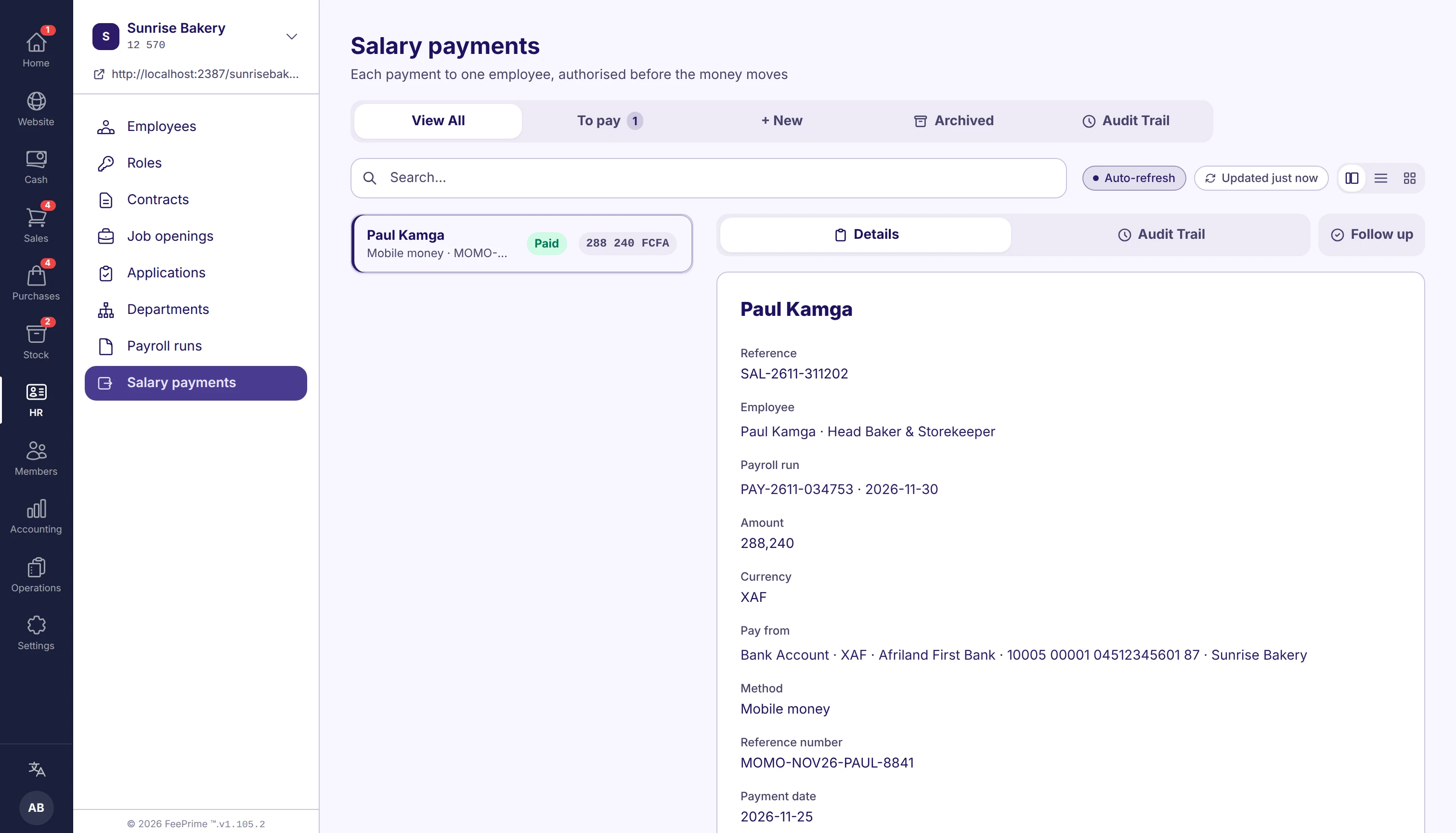 HR / Salary payments recording Paul Kamga’s net salary payout via MTN Mobile Money with payment reference and linked transaction.
2. Recording a salary payment step by step
Open HR / Salary payments and click New. Fill in the fields from top to bottom:
- Salary payment number — Generated uniquely to identify this payout voucher.
- Employee — Pick the staff member you are paying (for example,
Paul Kamga). - Payroll run (optional) — Pick the specific run you are settling (such as October’s run), or leave it blank to clear the employee’s oldest unpaid wages first. More on how this works in Section 4.
- Amount and Currency — Enter the exact figure leaving your account (for example,
280,000 FCFA). - Cash account — Pick the exact source of funds: Afriland First Bank, MTN MoMo Float, Orange Money Float, or Akwa Office Till.
- Payment method — Choose
bank_transfer,mobile_money,cash,wallet,cheque, orother. - Payment reference — Paste the MTN MoMo transaction ID, bank transfer reference, cheque number, or paper voucher number. Always fill in Payment reference for Mobile Money and bank payouts. Six months later, that reference is your proof when a bank statement or staff member questions a payout.
- Payment date — The date the money actually left your business.
Once saved, FeePrime attaches a Posted transaction automatically so the Cash Account balance updates right away.
Paying cash from the till? Click Print on the saved salary payment to print the Payment Voucher. Have Brice Mballa sign it as he counts his notes, and file it in your payday folder. That signed slip protects both the cashier and the rider.
One small shop paying everyone in cash? Pick your single office till as the Cash Account, choose cash, and print the voucher. Leave bank and wallet setups off until you actually use them — nothing breaks.
3. Paying straight from your business wallet
If Sunrise Bakery holds funds in its FeePrime business wallet (Digital Wallets / Our Wallet / Business Wallet Balances), you do not have to copy numbers into a phone app one by one.
- Pay via Wallet (single or batch): Use Pay via Wallet to disburse straight from your business wallet to employees who have a FeePrime wallet linked to their contact. You can pay every employee who has a wallet in one press.
- Invite staff who do not have a wallet yet: When an employee’s contact has no FeePrime wallet number yet, FeePrime raises an HR card on your dashboard Task Board. Sending them an invite lands them straight on the wallet portal so they can open one.
- No silent failures: Before a wallet salary is approved or sent, FeePrime checks both your business wallet limits and the employee’s wallet tier limit, as well as whether their wallet accepts your business’s currency (displayed in real currency such as
FCFAwith the issuer’s name). If a tier limit or currency mismatch would block the payout, FeePrime refuses it on screen and tells you why right away — it never gets approved and silently dropped.
4. Handling salary advances, partial payments, and arrears
Real paydays are not always one neat lump sum. Paul Kamga may take a 100,000 FCFA cash advance on the 15th and collect the remaining 180,000 FCFA by bank transfer on the 30th. Or Sunrise Bakery may owe Brice Mballa 45,000 FCFA from September plus 120,000 FCFA for October.
FeePrime handles both cleanly through the optional Payroll run field:
- When you select a specific Payroll run: FeePrime credits that exact period first. If you pay more than that period’s remaining net pay (for example, paying
150,000 FCFAagainst October’s120,000 FCFA), FeePrime caps October at120,000 FCFAand automatically flows the extra30,000 FCFAto the employee’s oldest unpaid period (September). - When you leave Payroll run blank: The full payment joins the employee’s general pool and settles their oldest unpaid period first before touching newer months.
- Partial or split payments: Simply record two separate salary payments —
100,000 FCFAfrom Akwa Office Till (cash) on the 15th, and180,000 FCFAfrom Afriland First Bank (bank_transfer) on the 30th. Both reduce the sameStill owedbalance.
Do not edit an approved Payroll Run to deduct a mid-month payment you already recorded here. If you paid cash via HR / Salary payments and also typed it as a deduction on the Payroll Run, you will short-pay the employee by that amount.
5. Fixing mistakes and reconciling statements
Because salary payments represent money that already moved and vouchers people signed, you cannot edit a saved salary payment.
If Grace Ewane paid Brice 80,000 FCFA in cash from the till but accidentally selected the MTN MoMo float as the Cash Account:
- Open the mistaken record in HR / Salary payments.
- Click Archive to cancel it and reverse its effect.
- Create a fresh salary payment with the right Cash Account (
Akwa Office Till) and print the updated voucher.
Reconciling bank and wallet statements: When you import your bank or wallet statement into Cash / Bank / Reconciliation Queue, outgoing payroll lines can be reconciled directly as a salary payment (and CNPS or tax transfers can be reconciled as a payroll tax remittance). That keeps your bank reconciliation and your HR ledger matched to the franc.
6. Checking that every employee reaches 0 FCFA owed
Before Amina closes payday, Mireille checks two places:
- Open HR / Employees and click into Paul Kamga, Grace Ewane, and Brice Mballa. At the top of each employee’s detail page, FeePrime displays three live summary cards: Total accrued, Total paid, and Still owed. Every fully paid employee should read
0 FCFAStill owed. - Check the Task Board at the top of the dashboard. FeePrime raises automatic HR cards for unpaid salaries, staff who cannot be paid, and employees missing a wallet number. When every salary is settled cleanly, the unpaid-salaries reminders clear.
Try it
Open staging.feeprime.com — a practice copy of FeePrime, kept apart from the real thing — and run a quick payday drill in five minutes:
- Open HR / Employees, pick an active employee with an approved payroll run, and note their current Still owed balance.
- Go to HR / Salary payments and create a partial cash payment for half that amount from an office cash account, leaving a short voucher note in Payment reference.
- Click Print on the saved payment to preview the signed cash Payment Voucher.
- Create a second salary payment for the remaining half using
mobile_moneyorbank_transfer, linking it to the employee’s current Payroll run and adding a transfer reference. - Return to HR / Employees, reopen that employee, and confirm Total paid matches Total accrued and Still owed is now
0 FCFA.
You just paid an employee across two channels without a single spreadsheet or double-entered expense.