
RFQs and supplier quotes
Before you start, sign in and open Purchases / Sourcing / Requests for quotes and Purchases / Sourcing / Supplier quotes.
Can’t find them? They may be turned off for your business, or your account may not be allowed to open them. Ask the person who set up your FeePrime. They can fix both.

Picture a busy Tuesday at Sunrise Bakery. Amina needs 40 bags of Flour 50kg before Monday morning. She calls one mill, sends a WhatsApp voice note to a second, and asks a third supplier for a price when he drops off yeast. By Thursday, one quote is buried in chat history, another is scribbled on a receipt near Paul’s till, and nobody is sure whether the cheapest price included delivery to the Bonapriso shop or pick-up at the mill gate.
Before you commit to buying, you ask. Requests for quotes and Supplier quotes turn that asking into a clean record inside FeePrime, instead of scattered phone calls nobody can reconstruct a week later.
1. How sourcing flows before you place an order
Sourcing sits right before ordering in your sidebar under Purchases / Sourcing. You send out the exact same question to the suppliers you want to test, record each reply as it comes in, compare them side by side, and only then commit to a purchase order.
What you need (40 bags Flour 50kg delivered to Bonapriso)
      │
      ▼
Purchases / Sourcing / Requests for quotes   ← Send the same question to 2–3 suppliers
      │
      ▼
Purchases / Sourcing / Supplier quotes       ← Record each reply, terms & valid-until date
      │
      ▼
Compare like with like                       ← Delivery location + Currency + Quantity + Terms
      │
      ▼
Purchases / Ordering / Purchase orders       ← Commit to the winning supplier
Running a small shop with routine daily buys? Don’t slow yourself down. If Paul buys two trays of eggs for cash at Marché Central every morning, you do not need an RFQ — record it under Purchases / Spot purchases / Spot purchases. If you always reorder yeast from the same trusted supplier at a standing price, go straight to Purchases / Ordering / Purchase orders.
Use RFQs and supplier quotes when the spend matters, when commodity prices shift week to week, or when you want to keep regular suppliers honest by checking alternatives.
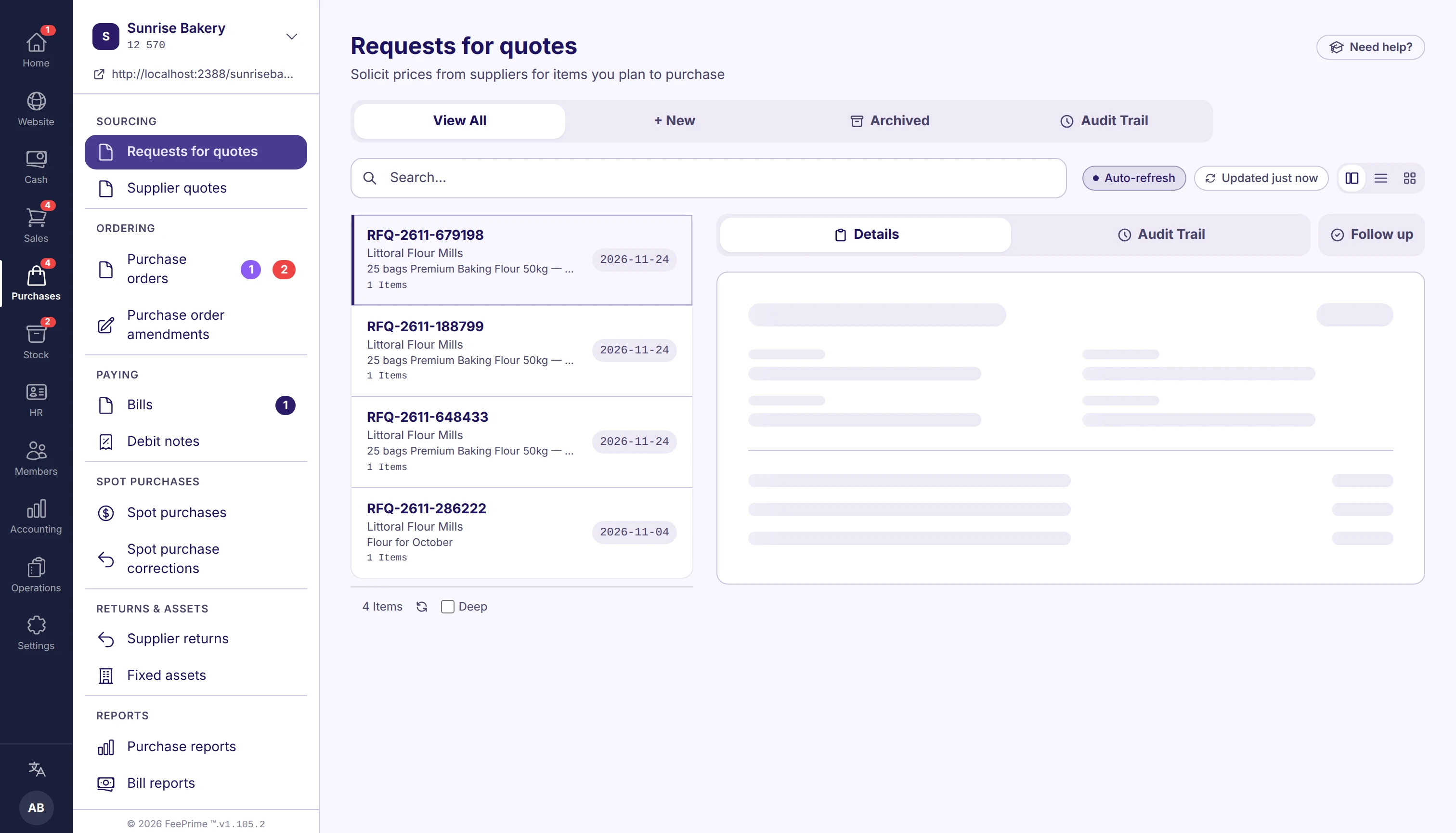 request for quotes screen in FeePrime (Sunrise Bakery).
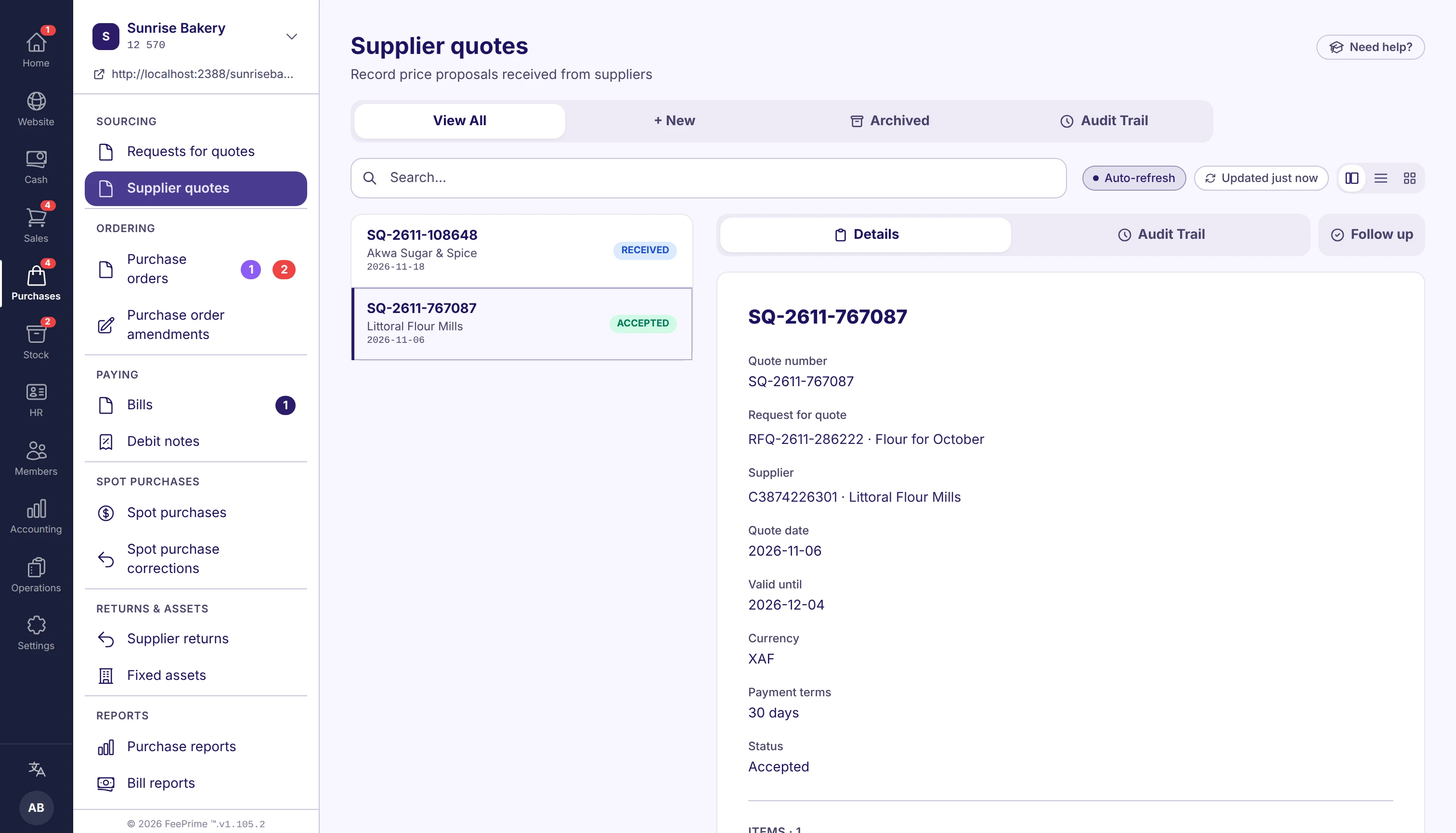 supplier quotes screen in FeePrime (Sunrise Bakery).
2. Creating a request for quotes (RFQ)
Open Purchases / Sourcing / Requests for quotes and create a new request. Each RFQ holds the exact details a supplier needs to give you a serious price:
- RFQ number, Request date, and Subject — give it a clear subject your whole team recognizes, such as Monthly flour restock — 40 bags 50kg.
- Supplier — the supplier you are asking.
- Currency — the currency you want them to quote in (for example, XAF).
- Delivery location — where the goods actually need to land.
- Lines — the items and quantities you are asking them to price.
- Notes — any conditions that affect cost, such as bag weight, offloading help, minimum shelf life, or delivery hours.
Notice that an RFQ also carries two dates, and they ask two completely different questions:
- Expected response date — when you need their price back (say, Thursday by 4:00 PM so you can decide before the weekend).
- Expected delivery date — when you need the stock at your door (say, Monday morning before baking starts).
Mixing those two up creates confusion fast. A supplier who replies on Monday morning is no use if Monday morning was when you needed the flour in the oven.
Asking three suppliers? Ask the exact same question. Keep the quantities, currency, delivery location, and notes identical across every request. If one supplier prices 40 bags delivered and another prices 25 bags at the gate, you have not really compared them.
3. Never skip the delivery location
This field is easy to skip, and expensive to skip.
A price delivered to Sunrise Bakery’s main Akwa bakery is one number. A price delivered to a branch in Yaoundé or Bafoussam — 250 to 300 kilometres up the road — is a completely different number. Transport, loading, and road fees change the real cost of every bag.
Never leave delivery location blank on an RFQ. A supplier who is not told where the goods are going will quote you for the easiest option, usually pick-up at their own depot or delivery down the street. You only discover the extra transport charge after you have already said yes.
Put the real delivery location in the request, and the quote you compare is the quote you can actually accept.
4. Recording every reply as a supplier quote
When a supplier sends back their offer — by PDF, email, WhatsApp, or on paper — open Purchases / Sourcing / Supplier quotes and record it cleanly.
A supplier quote captures:
- Quote number — the supplier’s own reference number, so you can cite it when you call them back.
- Request — the RFQ this reply answers, keeping all competing bids linked together.
- Supplier and Quote date — who quoted and when.
- Valid until — the expiry date of their offer.
- Currency, Delivery location, Expected delivery date, and Payment terms — the real commercial conditions behind the price.
- Lines, Notes, and Status — what they priced, any caveats they added, and where the quote stands.
Never treat an expired quote as a live price. Supplier quotes run out, just like the quotes you send to your own customers. Prices for flour, cooking oil, sugar, and packaging move fast. A quote from six weeks ago is a memory, not an offer you can hold someone to. Filling in Valid until tells anyone on your team whether an offer is still real today.
Never leave quotes buried in WhatsApp or email. If Amina is out visiting Hôtel Akwa and Nadège needs to place the flour order, every figure, condition, and expiry date is already sitting in FeePrime under the same request — no calling around or scrolling through someone else’s phone.
5. Compare like with like — and count payment terms as part of the price
Three quotes can only be compared fairly if they answer the same question. Before picking a winner, check four things side by side:
- Delivery location — are all suppliers pricing delivery to the same shop or warehouse?
- Currency — are all offers in XAF, or is one quoted in another currency with exchange risk?
- Quantity — did everyone quote the full 40 bags, or is one supplier offering a smaller lot?
- Payment terms — cash on delivery, 15 days, or 30 days?
Look at what happens at Sunrise Bakery when two mills quote 40 bags of Flour 50kg delivered to Bonapriso:
- Mill A: 22,500 XAF per bag (900,000 XAF total), paid cash on delivery, valid for 5 days.
- Mill B: 23,000 XAF per bag (920,000 XAF total), 30 days to pay, valid for 14 days.
On unit price alone, Mill A looks 20,000 XAF (about 2.2%) cheaper. Never compare prices without checking payment terms. When cash is tight before staff salaries and rent, having 30 days to bake and sell those 40 bags before paying the supplier is worth far more than 20,000 XAF. Thirty days to pay is real money — and you can only see that trade-off when someone wrote the terms down right next to the number.
One small shop vs a growing team: - Buying solo? You do not need heavy paperwork. Just run a quick 2-quote check on your biggest monthly staples so you know when a supplier’s price has crept up. - Managing buyers across branches? Set a clear house rule — for example, any purchase over 500,000 XAF needs an RFQ and at least two recorded supplier quotes before a purchase order is approved. Approvals take two minutes instead of an argument, because the proof is already on screen.
Try it
Practice this workflow on staging.feeprime.com — a practice copy of FeePrime, kept apart from the real thing — in five minutes:
- Open Purchases / Sourcing / Requests for quotes and create a new RFQ for 40 bags of Flour 50kg (or any staple you buy). Fill in the Supplier, Currency, Delivery location, Expected response date, and Expected delivery date.
- Create a second RFQ for a different supplier using the exact same item, quantity, currency, and delivery location.
- Open Purchases / Sourcing / Supplier quotes and record a reply from Supplier A linked to the first RFQ: set a slightly lower price, cash on delivery payment terms, and a short Valid until date.
- Record a second supplier quote from Supplier B linked to the second RFQ: set a price 2% higher, 30 days payment terms, and a longer Valid until date.
- Put both quotes side by side and check all four pillars: delivery location, currency, quantity, and payment terms.
- Decide which offer you would accept if rent and payroll are due next week — doing it once makes the lesson stick faster than reading about it.
You now have a repeatable habit that protects both your margins and your cash flow before a single franc leaves the till.