
Purchase orders
Before you start, sign in and open Purchases / Ordering / Purchase Orders.
Can’t find it? It may be turned off for your business, or your account may not be allowed to open it. Ask the person who set up your FeePrime. They can fix both.

Photo: Annie Spratt on Unsplash
On Tuesday morning, Amina at Sunrise Bakery calls her flour wholesaler and asks for 40 sacks of 50kg flour for the Akwa bakery. On Wednesday, her assistant sees the store room running low and calls the same wholesaler to order 40 sacks again. On Friday, 80 sacks arrive at the gate, the price per sack is 1,500 XAF higher than agreed, and nobody has a written record of what was actually ordered.
A purchase order stops all three headaches before they happen. It is your formal promise to buy: what you asked for, how much you agreed to pay, where it should be delivered, and when it is due.
It is the document your supplier works from—and the exact reference your storekeeper checks when the truck arrives and your accountant checks when the supplier’s bill lands on the desk.
1. When to use a purchase order (and when not to)
Use a purchase order whenever you are placing a planned order with a supplier and waiting for goods or services to arrive.
- Ordering 40 sacks of 50kg flour from your regular wholesaler for delivery in three days? Raise a purchase order.
- Buying 20 cartons of butter on agreed terms with a written supplier quote? Raise a purchase order.
- Ordering specialty chocolate from a distributor to cover a big order for Hôtel Akwa? Raise a purchase order.
Do not slow your team down with purchase orders for tiny walk-in buys. If Junior runs to the corner shop to buy two emergency rolls of baking paper for 4,000 XAF cash and hands them straight to the kitchen, there is no waiting period and nothing to track on its way. Record quick walk-in buys under Purchases / Spot Purchases / Spot Purchases instead.
One small shop buying mostly for cash? Use Purchase Orders only for your main restocks and credit suppliers, and leave optional links like Sales Orders blank. Nothing breaks.
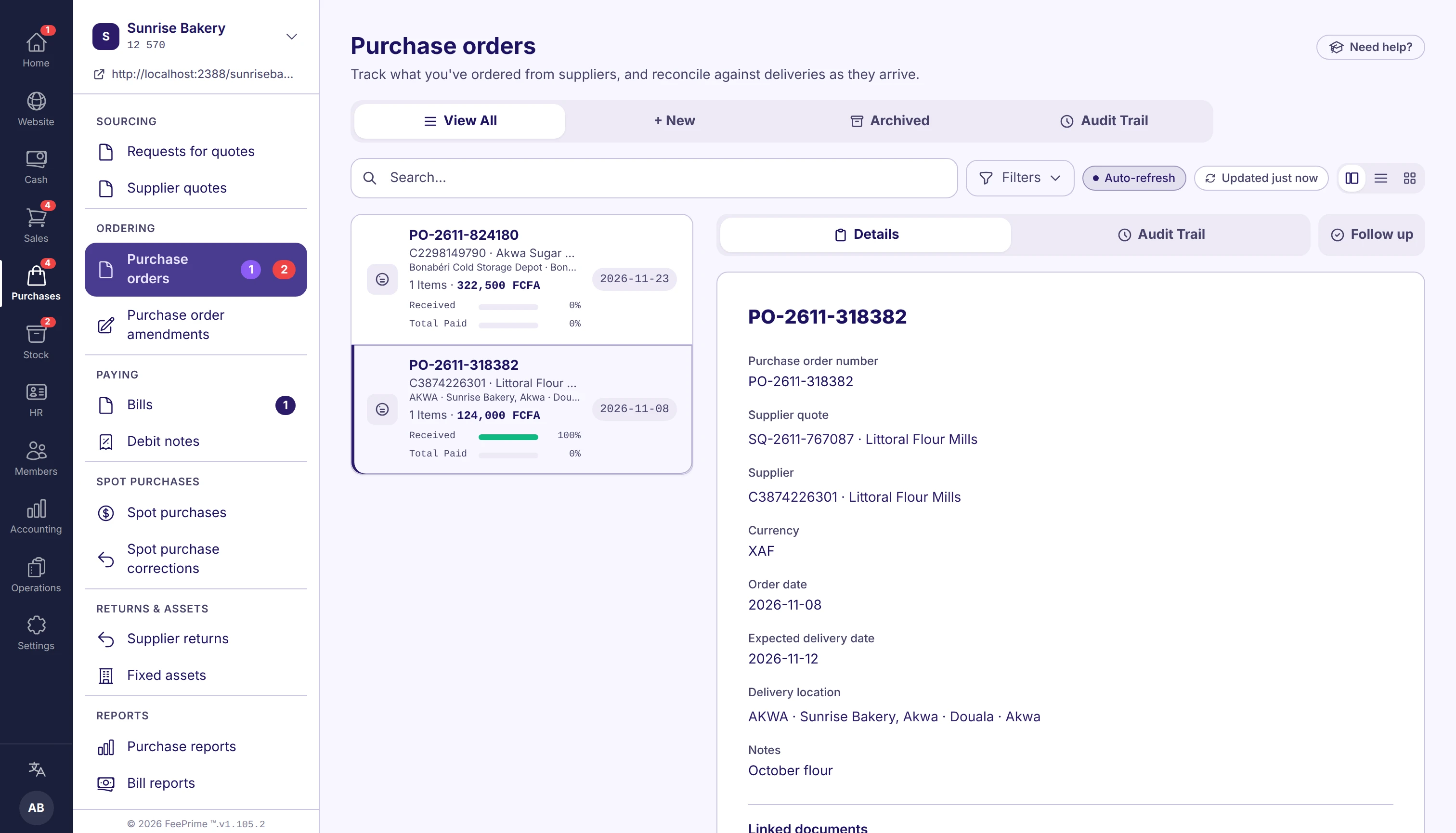 purchase orders screen in FeePrime (Sunrise Bakery).
2. What a purchase order holds—and where it sits in the flow
Every purchase order sits right in the middle of your buying chain. Before it comes the price you agreed; after it come the physical goods and the bill you pay.
[Supplier Quote] (optional)
       |
       v
[Purchase Order]  <--- optional link to [Sales Order] (for a waiting customer)
  • Marks stock as "on its way" at the chosen Business Location
  • Locks in lines, prices, currency, and Expected Delivery Date
       |
       +---------------------------+
       v                           v
[Goods Receipt]                 [Bill]
(Stock / Movements)       (Purchases / Paying)
• Stock arrives on-hand   • Checked against PO
• "On its way" drops      • What you owe supplier
When you open a purchase order under Purchases / Ordering / Purchase Orders, here is what it holds:
- Purchase order number: The unique reference you and the supplier both quote on phone calls, delivery notes, and bills.
- Supplier and optional Supplier quote: Who you are buying from, and the exact quote you accepted.
- Currency, order date, and expected delivery date: What you are paying in, when you placed the order, and when the supplier promised delivery.
- Business location: The exact shop, bakery, or warehouse receiving the goods.
- Lines, description, and documents: Every item, quantity, and agreed unit price, plus room for notes and attached files (like a signed proforma or delivery instructions).
- Sales order link (optional): Connects this purchase directly to a customer order waiting on these goods.
3. Order from the supplier quote you accepted
If you collected quotes under Purchases / Sourcing / Supplier Quotes, always raise the purchase order from the accepted quote—never type a fresh order from scratch.
When you create the purchase order from the quote:
- Every item line and agreed unit price carries straight across with zero re-typing.
- The link back to the original supplier quote stays attached.
- If the supplier later bills you 24,500 XAF per sack instead of the 23,000 XAF they quoted, you have the entire chain in one click.
Common mistake: Typing a brand-new purchase order by hand even though you already have a quote. You break the paper trail, and the price you meant to hold the supplier to becomes just a number somebody typed in.
4. It marks stock as “on its way”—not on your shelf
The moment you save a purchase order for 40 sacks of flour heading to the Akwa bakery, FeePrime updates your planning numbers under Stock / Stock / Inventory Items:
- On its way (incoming) at Akwa goes up by 40 sacks.
- On hand at Akwa stays exactly where it was.
Think of “on its way” as a planning signal, not stock you can scoop into a mixing bowl. It means a supplier has promised those sacks—not that they are sitting in your store room.
- It IS enough to stop your colleague from ordering another 40 sacks on Wednesday afternoon.
- It is NOT enough to promise Hôtel Akwa 400 croissants for Friday morning if you have zero flour on hand today.
The “on its way” number comes back down automatically when the truck actually arrives and your storekeeper records the arrival under Stock / Movements / Goods Receipts. At that point, those 40 sacks move out of “on its way” and into real on-hand stock.
5. Two fields people rush and regret: Expected delivery date & Business location
Most purchase order trouble comes from treating two working fields like paperwork.
Keep the expected delivery date honest
The expected delivery date is not decoration, and it is not the supplier’s best-case sales pitch. It is the field that makes “What is late today?” a question FeePrime can answer in two seconds.
- Enter the real date the supplier committed to.
- Update the date as soon as it slips. If the wholesaler calls on Monday to say the flour truck broke down and delivery moves from Tuesday to Thursday, open the purchase order and change the expected delivery date to Thursday.
Common mistake: Leaving old, optimistic dates untouched on every purchase order. Within a month, half your open orders look overdue, nobody trusts the list, and you only find out a delivery is late when a customer asks where their order is.
Double-check the business location
In FeePrime, stock numbers always belong to a place. The business location on your purchase order decides where the “on its way” count appears and where the goods are expected to land.
Sunrise Bakery runs both the Akwa bakery and the Bonapriso shop. If Amina accidentally picks Bonapriso on a flour purchase order meant for Akwa:
- Bonapriso shows 40 sacks on their way that they never asked for.
- Akwa sees zero sacks on their way and may place a duplicate order.
- When the delivery reaches Akwa, the storekeeper looks for an incoming order that is sitting under the wrong site.
Always pause for two seconds and confirm the destination location before saving.
6. Buying for a specific customer—and handling changes cleanly
Link a sales order when buying to order
Sometimes you are not restocking general shelves—you are buying specifically because a customer already ordered from you. Suppose Hôtel Akwa places a sales order under Sales / Selling / Sales Orders for specialty imported chocolate you do not normally keep in stock.
Attach that sales order directly on the purchase order. Now anyone looking at the purchase knows which customer is waiting on that truck, and if the supplier delays delivery, your sales team knows immediately who needs a phone call.
Running a simple retail counter where you only restock standard shelf items? Leave the sales order link empty.
When an already-agreed order changes
Real life happens: a supplier can only send 30 sacks instead of 40, or a price changes after the order was already issued. Rather than silently erasing your paper trail, use Purchases / Ordering / Purchase Order Adjustments to record changes cleanly while keeping the original order history intact.
Try it
Practice on staging.feeprime.com—a practice copy of FeePrime kept apart from your real business data.
- Open Purchases / Sourcing / Supplier Quotes, pick an accepted quote, and raise a Purchase Order from it so the lines and prices carry across.
- Confirm the Business Location matches the site that should receive the goods, then save the order.
- Open Stock / Stock / Inventory Items, pick one item from your new purchase order, and check that its on its way number went up at that location while on hand stayed unchanged.
- Go back to Purchases / Ordering / Purchase Orders, open your order, and move the Expected Delivery Date forward by three days—notice it is a live working document, not a locked file.
- If you have an open order under Sales / Selling / Sales Orders, try linking it to a new purchase order to see how buying and selling stay connected.
Five minutes on staging now will save you from duplicate orders and missing deliveries on a busy Monday morning.