
Bills and paying suppliers
Before you start, sign in and open Purchases / Paying / Bills (you will also use Cash / Money / Cash Accounts and Cash / Money / Transactions).
Can’t find it? It may be turned off for your business, or your account may not be allowed to open it. Ask the person who set up your FeePrime. They can fix both.
Photo: Eye for Ebony on Unsplash
Friday afternoon at Sunrise Bakery in Akwa, the flour supplier’s accountant calls. They say you owe 1,225,000 XAF on invoice INV-88412, overdue since Tuesday, and they are holding Monday’s delivery until you pay. Nobody at the counter remembers seeing INV-88412. Your storekeeper thinks three bags arrived torn and went back on the truck. Without a clean record of what was billed, what arrived, and what was paid, you either pay for flour you never got or lose your 30-day credit terms.
A bill is what a supplier says you owe. It is their document, recorded inside your FeePrime — the exact opposite of a sales invoice, which is what a customer owes you. Holding that distinction clearly keeps your payables, your stock, and your cash accounts honest.
1. What a bill holds (and why their number matters)
When you open Purchases / Paying / Bills and create a new bill, FeePrime asks for the facts you will need next week when a statement lands on your desk:
- Bill number (yours, generated in sequence) and supplier invoice number (theirs, printed on their paper or PDF).
- Supplier and the purchase order it relates to, if you ordered formally.
- Business location (for example, Akwa Bakery or Bonapriso Shop) and currency (such as XAF).
- Bill date and due date, plus lines (items, quantities, unit prices, taxes like 19.25% TVA) and notes.
- A collection run link (from Operations / Field / Collection Runs), used for field-buying workflows covered in the next lesson.
Always record the supplier invoice number. When a supplier chases payment or sends a monthly statement, they never quote your internal bill number — they quote theirs. Typing INV-88412 into the supplier invoice field takes five seconds today and turns a 30-minute argument next month into a 30-second search.
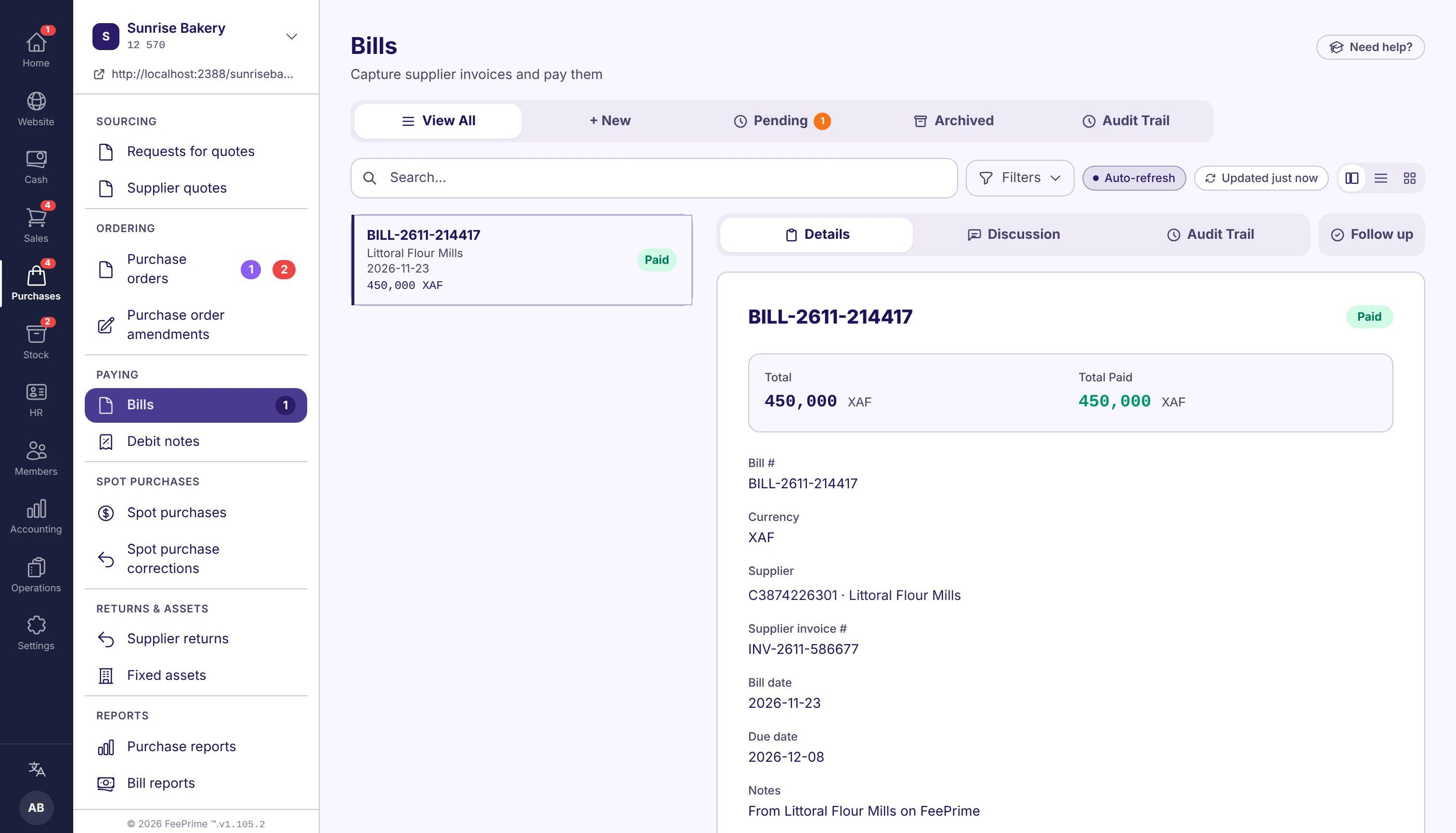 bills screen in FeePrime (Sunrise Bakery).
2. The three-way match: verify before you approve
A supplier bill is the third leg of the three-way match. Before Amina the manager approves a bill for payment, she does not ask “does this look roughly right?” She checks two exact things:
- Do the quantities on the bill match the Goods Receipt (Stock / Movements / Goods Receipts)?
- Do the unit prices on the bill match the Purchase Order (Purchases / Ordering / Purchase Orders)?
Purchase Order (agreed price & qty)
       +
Goods Receipt  (what actually arrived at your gate)
       =
Supplier Bill  (what the supplier asks you to pay)
       |
       +-- Qty & prices match? ---------> Approve & schedule payment
       +-- Short delivery or price jump? -> Hold payment & query first
Picture Sunrise Bakery’s weekly flour order. Amina ordered 50 bags of Flour 50kg at 24,500 XAF per bag (1,225,000 XAF). At the Akwa gate, the storekeeper counted 47 good bags and sent 3 burst bags back on the truck, logging 47 on the Goods Receipt. Five days later, the mill’s bill arrives for 50 bags at 25,200 XAF.
The three-way match catches both mistakes immediately: 3 bags you never kept, and a 700 XAF price jump nobody agreed to.
- Never edit a goods receipt to make a supplier bill match. Changing 47 to 50 destroys the proof of what arrived and makes you pay for missing stock.
- Never pay a disputed bill hoping to sort it out later. Hold payment, call the supplier with their invoice number and your receipt count, and ask for a corrected bill.
- If the supplier agrees to reduce what you owe after a bill is already on the books (for instance, a 40,000 XAF allowance for damp bags), record a debit note under Purchases / Paying / Debit Notes instead of silently deleting history.
This check only protects you if the Goods Receipt was counted honestly at the gate — which is why the previous lesson matters so much.
3. PO-linked bills vs standalone bills (and stock movement)
One rule trips up new teams more than any other: does saving a bill add items to stock? The answer depends on whether a Purchase Order sits behind it.
- A bill linked to a Purchase Order does NOT move stock. The Goods Receipt already brought those 47 bags into your warehouse. If the bill moved stock too, FeePrime would double-count your flour.
- A standalone bill (no Purchase Order) DOES move stock, because nothing else has recorded those goods arriving.
Standalone bills are a legitimate shortcut for small, routine purchases where a full order-and-receipt cycle is overkill. If Paul runs to a wholesaler near Marché Central for 2 boxes of baking paper and a pack of yeast on 14-day credit, entering a standalone bill puts the items into stock and records what you owe in one step.
Know what you give up when you skip the Purchase Order: you skip the three-way match. The standalone bill is now the only record of quantity and price, with nobody independently checking the delivery first. Keep standalone bills for small, low-risk buys — never for major consignments of flour, sugar, or packaging.
Paying cash on the spot at the market with no credit owed? Use Purchases / Spot Purchases / Spot Purchases instead of creating a bill you immediately close.
4. Due dates: protect your terms and cash flow
A payment term typed into a note — “Net 30” or “pay end of month” — is just text. A due date is real data. Once every bill carries an accurate due date, you can open Purchases / Reports / Bill Reports and see every franc falling due this week and next week without opening twenty separate documents.
Paying suppliers late by accident carries a hidden cost that never shows up as a fee line on a report: you quietly lose priority when stock is tight, you lose flexible credit terms, and you spend mornings firefighting phone calls instead of running the shop.
5. Paying suppliers from the right cash account
When money actually leaves your business, record the payment directly against the bill. FeePrime creates a matching outflow in Cash / Money / Transactions from a named Cash Account (Cash / Money / Cash Accounts) — such as Afriland Bank Account, MTN MoMo Business, or Akwa Cash Safe.
Partial payments are normal — record them as they happen. Suppose Sunrise Bakery’s corrected flour bill totals 1,151,500 XAF. Amina transfers 600,000 XAF from Afriland Bank Account today and sends the remaining 551,500 XAF via MTN MoMo Business next Friday. Recording the 600,000 XAF payment today immediately shows 551,500 XAF remaining, so nobody pays twice or forgets the second half.
- Never log a payment from the wrong cash account. If you paid by Mobile Money, do not record it from the Akwa Safe — your cash reconciliation will break on both accounts.
- Never wait to bundle two different payment dates into one fake entry. Record each outflow on the real day and from the real account so bank and MoMo statements match line for line.
Running one small shop with one till and one Mobile Money wallet? Keep those two cash accounts tidy, enter every supplier invoice number, and check due dates once a week. Running multiple locations or a larger team? Fill in the business location on every bill, require a Goods Receipt on all major stock orders, and review Purchases / Reports / Bill Reports every Monday morning before releasing transfers.
Try it
Open staging.feeprime.com (a practice copy of FeePrime, kept apart from the real thing) and run through these five steps in five minutes:
- Go to Purchases / Paying / Bills and create a bill linked to an existing Purchase Order where fewer units were received than ordered. Fill in a supplier invoice number and a due date 14 days from today.
- Compare the Purchase Order, the Goods Receipt, and your new bill side by side so you can spot the quantity gap before approving.
- Create a small standalone bill (no Purchase Order) for a few units of an everyday supply, save it, and verify that warehouse stock increases automatically.
- Record a partial payment (for example, half the bill amount) from a named Cash Account, and check that the bill now displays the exact remaining balance.
- Open Cash / Money / Transactions and Purchases / Reports / Bill Reports to confirm both the cash outflow and your remaining unpaid balance.
Do that once on staging and you will never scramble when a supplier’s statement hits your desk again.